


Desertcart purchases this item on your behalf and handles shipping, customs, and support to KSA.
🔗 Connect More, Charge Faster, Work Smarter!
The Atolla 8-Port Powered USB 3.0 Hub instantly expands your connectivity with seven super-speed data ports and one dedicated smart charging port delivering up to 2.4A. Featuring individual on/off switches, plug-and-play compatibility across major OS platforms, and a powerful 5V/4A adapter, it’s designed for seamless integration with MacBook, Mac Pro, and other devices—perfect for professionals demanding speed, control, and efficiency.
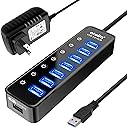


| Additional Features | Indicator Light, Individual Switches, Plug and Play, Powered |
| Asin | B07G8CMR18 |
| Best Sellers Rank | #34 in USB Hubs |
| Brand | atolla |
| Cable Length | 100 centimeters |
| Color | black |
| Compatible Devices | Keyboards, Laptops, Mouse, Printers, Smartphones, Tablets |
| Customer Reviews | 4.6 4.6 out of 5 stars (21,153) 4.6 out of 5 stars |
| Data Transfer Rate | 5 gigabits_per_second |
| Enclosure Material | Plastic |
| Hardware Interface | USB |
| Item Dimensions L X W X H | 6.2"L x 1.69"W x 0.9"H |
| Item Weight | 256 g |
| Manufacturer | bauihr |
| Mfr Part Number | DE-TZW-ZS19 |
| Minimum Required Operating System Version | Mac OS X 10.0 Cheetah |
| Model Number | CH-207U3 |
| Number Of Items | 1 |
| Number Of Packs | 1 |
| Number Of Ports | 8 |
| Operating System | Mac |
| Total Usb Ports | 8 |
| Upc | 659103669722 659103593164 |
User
Exactly What I Needed for a Desk Full of USB Devices
Between my keyboard, mouse, external drives, cables, and other USB accessories, it doesn't take long to run out of ports on a computer. This Atolla powered USB hub gave me a much cleaner way to keep everything connected.Having seven USB 3.0 data ports plus a dedicated smart charging port gives me plenty of room without constantly unplugging one device to make room for another. The included 5V/4A power adapter is also a big reason I chose a powered hub instead of a basic passive splitter.My favorite feature, though, is the individual on/off switch for each data port. I can leave devices physically connected and simply turn off the ports I'm not using. That's much more convenient than reaching behind the computer and pulling cables every time.USB 3.0 also gives me the data speeds I need for everyday peripherals and file transfers, although actual performance will obviously depend on the connected devices and computer.It has been especially useful for cleaning up my workstation because everything can come back to one central hub instead of having USB cables running to every available port.Once you have this many USB devices, a powered hub stops feeling like an accessory and starts feeling like part of the computer. The individual switches are what really make this one useful for me.
User
A Great USB Solution
I had so many peripherals connected to my PC Tower/Server that it would freeze on boot-up. I also had a USB line connected to a large safe for the data storage drives located inside the safe. After some research, I ordered two of these highly rated, Atolla, powered hubs. I removed all of the USB connections from the PC Tower/Server and connected everything directly to this self powered USB hub. I then connected the input of this self powered USB hub, to the USB connection on the PC Tower/Server. I placed the second of these Atolla, powered hubs inside our safe. There, it presently powers three data storage drives and allows for future expansion. This solved all of my USB problems with virtually no power drain on the system’s internal USB ports. This hub will work without plugging in the included wall-wart, power supply. However the added power boost of the AC connection makes everything work better. The individual power switches on each USB port is a great feature. One can turn off the unused ports. I can only see 2 negatives in the design. I wish that it had an in-line power supply with a regular electric cord. The included wall-wart, power supply is large and difficult to plug in to a power strip with other items. I also wish that the hub would automatically shut off when the computer is turned off and/or when there is no USB signal feeding the hub. In self powered mode, it stays on 24/7, which translates in to your USB peripherals being continually powered. Over all, this a great product. It is a major upgrade to any computer. Update: After using these self-powered hubs for a while, I would offer a tip. They do a great job but when using more than one hub connected directly to the same computer, I had a little glitch on boot-up. The problem was eliminated by feeding the second, self powered hub, from one of the USB ports on the first self powered hub. (daisy-chained) This worked much better than having both hubs connected directly to the same computer.
User
Great Quality and is Cheap!
Plug & Play ready, no software or anything to install. Works great, long enough power cord & USB-C cable, strong and fast connection. Only issue, and this is on me for not paying attention, is that my PC is setup to put the external drives (what I use the Hub for) to sleep when not active, and to power them off when the PC powers down. The Hub having it's own power source doesn't power them down with the PC and I have to manually turn it off. Maybe there is a way to configure it, but I've only had it a few days so I haven't messed with it yet.
User
Lasted over 5 years.
Bought this in 2020 and just this week it stopped working altogether. I guess that's good? Not every port was still working, but most were. Some of the lights stopped working over the years too. This thing isn't high quality by any means, but the price is right. It served me well.
User
This one works properlly
I now know you shouldnt buy cheap hubs. $6 for a 7 usb powered hub was too cheap. I had weird disconnection issues so I wasnt sure if it was the hub or power and it would go away and come back. The last straw was when i unplugged my pc completely but the system fans were stilll going on. I was so confused and then finally it was the usb hub. Cheap hubs backfeed power back into the system because they usually skimp out. Asked AI and this came up as a cheaper option than the Anker and Sabrent. Read the reviews and the first thing that someone said was the build quality and how hefty it is. Well its not. It is as light as the cheap one I replaced it with (the one infront) and the whole thing is glossy plastic. Its easy to use, press once to turn a port on and hold down to turn off. The main thing is it actually works. I've had zero connection issues especially when my computer comes out of sleep. It was annoying because my sound and mouse wouldnt work alot of the times because the cheap hub would malfunction or something. I will report back in any issues.
User
USB Hub That Actually Makes Life Easier
USB Hub That Actually Makes Life EasierI’ve used plenty of USB hubs over the years, but this Atolla 7-Port USB 3.0 hub has been one of the most practical and user-friendly additions to my desk setup. Right out of the box, it feels sturdily built and not like the flimsy plastic hubs I’ve tossed in drawers before. The included 5V/4A power adapter is a big plus—it means I don’t have to worry about underpowered devices disconnecting when everything is plugged in.The seven USB 3.0 ports handle high-speed data transfer reliably, which makes moving large files from external drives painless. One standout feature is the smart charging port. I can quickly charge my phone or tablet without sacrificing one of the data ports, and it charges at a noticeably faster rate than standard hub ports.Another feature I really appreciate is the individual on/off switches for each port. If I want to leave a portable hard drive or USB light plugged in but don’t want them drawing power all the time, I can just toggle them off. The indicator lights are subtle, not blinding, so I can see what’s active without being distracted.A couple of things to keep in mind: the hub is a bit larger than a minimalist USB splitter, so it takes up some desk space. Also, because it’s powered, it works best as a semi-permanent desktop accessory rather than something to throw in a laptop bag.Bottom line: A well-designed and dependable powered USB hub with thoughtful extras like port switches and a dedicated charging port. If you’re looking for something to organize and expand your connections without fuss, this one is easy to recommend.
User
Really cool and convenient product.
Before I get started into fully talking about this, know that there are two types of these devices from various brands, unpowered and powered, the latter being used or included with an AC adapter to ensure you are getting enough power to the devices connected like you would if your device was connected directly to your PC USB port, except it has to split one into multiple ports, and only so much energy can be drawn from a single port, so you most definitely want something which is powered with an AC adapter like this.Build: I'll start out by saying that the build quality is fairly nice, it isn't made out of metal or anything, but the ports and buttons are very tactile and responsive, the whole device seems fairly sturdily made, and it's got a nice thick gauge USB cable. The device could maybe be a tiny bit less lightweight for stationary reasons, since it does slide back and forth a little when you move or pull your cords in different directions, or the thick wire just drags it, however, the overall build of everything including the unit, ports, buttons, and necessary wires are satisfactory.Function: The buttons mentioned are on/off switches for the each USB port, giving you the option to cut off certain ports, each have an LED directly under them indicating whether they are on or off, sometimes the LEDs of the other ports shine through the ports that are not turned on but you can still tell whether they are on or off just by the brightness and location of the LED for each corresponding port, which all of them are located just under each port in the second picture showing three at the top inactive, yet the inactive topmost having a lot of light shine through from the active topmost port, and the bottom three showing bright active LEDs just below the ports inside the translucent plastic surrounding each port when they are turned on. The blue LEDs themselves are very nice to see not only for the individual ports and their on/off status, but makes the device really stand out on whatever you have it placed on. That being said, the LEDs are too good that they can be a bit distracting, blinding and make it difficult to see which direction you are plugging the cords in; I suppose turning the individual port off first helps. Overall, I really enjoy the LEDs. To shut off an individual port, the button corresponding to the port needs to be held down for a second or so, and to turn on, just simply press it.Functionality: Straightforward, you plug the device into one USB 3.0 on your motherboard with its thick gauge USB cable, and it splits into a 7 port brick, giving you more ports to plug more devices into when there's not enough, or you just want or need more. On the front of the device there is a separate USB charging port shown in the third picture, only reserved for charging devices and no data transfer, so I do not recommend plugging anything other than a phone, tablet, or any portable device that you need to just charge and nothing else. Charging my phone is fairly satisfactory for USB, it's just a bit less than a wall adapter but not as slow as plugging straight into a standard USB port, I'm assuming because of the included adapter, and possibly separate circuitry from the other ports reserved for just charging.Looks: I really like it, a little bulky for just the thought of having a few extra ports, maybe limiting how you want it placed exactly, but it really does work nicely when put into perspective. The bright blue LEDs, the brick design that just sits there telling you "this is THE hub where you plug everything you need in" on a desk makes it a nice USB station to have with the convenience of not having to reach around for ports or worry about not having enough, however, the fact that the USB ports have to be on top means that big cables have to bend while standing upward, while they are making it a bit awkward not only because of how they are placed but the positioning of wires/devices being affected.Portability: I would say to skip this, since it's pretty obvious why this is by no means meant for portability, but you could probably use this maybe on the go if you have a laptop, a bunch of devices, and a place to stay for a little bit with an extra wall socket, but other than that, laptops probably have enough ports for the amount of devices with short enough cable lengths you are likely to take with you wherever. This is not meant for portability but a hub/station for desktop users, plain and simple, however, by no means is there a rule you cannot use it with a laptop.Conclusion: It is a great concept, convenient, well-made, and extremely useful if you have extra USB, especially v3.0 devices that need more ports and be properly powered with the included 5V/4A AC adapter.Thank you.
User
Efficient, Reliable, and Feature-Rich — A Must-Have USB Hub
After several months of daily use, the Atolla 7-Port Powered USB 3.0 Hub has more than earned its spot on my desk. If you’ve ever struggled with too few USB ports or constantly swapping cables around, this hub is an absolute game-changer.Let’s start with the obvious strength—seven high-speed USB 3.0 ports for data transfer, plus an eighth port on the front specifically for charging. That’s a generous setup, perfect for anyone juggling multiple devices. Just keep in mind: the front port is for charging only, not data transfer—but honestly, it’s a convenient way to juice up a phone or wireless earbuds without eating into your data ports.One of the standout features is the individual power buttons for each port. You can turn off any plug you’re not using, which is a nice touch for saving energy and keeping unused devices from drawing power unnecessarily. The small LED indicators are clear without being too bright, and it’s satisfying to have that level of control.Design-wise, it’s got a sleek and slim profile that doesn’t take up much space. It fits nicely behind a monitor or desk setup if you want to keep it out of sight, but it’s also clean enough in appearance to leave on display.As for performance, I’ve had zero issues adding or removing devices—external hard drives, flash drives, peripherals—everything connects smoothly and maintains fast transfer speeds. No weird disconnections, lag, or power issues even with multiple devices plugged in.Pros:✅ 7 USB 3.0 ports for data + 1 dedicated charging port✅ Individual on/off switches for each port✅ Slim, low-profile design✅ Stable performance even with multiple devices✅ No issues after months of daily useCons:❌ Honestly, none that I can think ofFinal Verdict:The Atolla 7-Port USB 3.0 Hub is a reliable, well-designed solution for anyone looking to expand their USB capacity without sacrificing performance. With smart features like individual power control and a dedicated charging port, it offers excellent value and seamless functionality. Highly recommended.
User
muy util
muy util compre una laptop y solo tiene 2 puertos usb con este articulo puedo conectar cualquier accesorio hasta disco duro
User
Great accessory
Working very well.
User
Good one
I have two ,all are working good . No problem.
User
Perfectly allows for extra components to synchronize with my laptop
Perfectly allows for extra components to synchronize with my laptop like my printer, second monitor, phone charger etc. great buy
User
Good
Useable
Trustpilot
5 days ago
1 month ago