Buy anything from 5,000+ international stores. One checkout price. No surprise fees. Join 2M+ shoppers on Desertcart.
Desertcart purchases this item on your behalf and handles shipping, customs, and support to KSA.
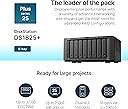
💼 Elevate your data game with Synology DS1825+ — where power meets precision.
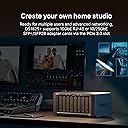
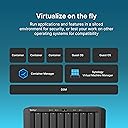
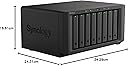
The Synology 8-Bay DiskStation DS1825+ is a high-capacity, versatile NAS designed for professional environments. Featuring 8 drive bays, multi-site synchronization, and comprehensive backup and security solutions, it supports seamless data access and smart surveillance. Compatible with major platforms and backed by a 3-year warranty, it’s the ultimate private cloud for managing and protecting your digital assets.


| ASIN | B0C8SBXSTJ |
| Assembly Required | Yes |
| Best Sellers Rank | #72,983 in Computers & Accessories ( See Top 100 in Computers & Accessories ) #18 in Network Attached Storage (NAS) Devices |
| Brand | Synology |
| Brand Name | Synology |
| Colour | Black |
| Compatible Devices | Android, Desktop, Laptop, Server, iPhone |
| Customer Reviews | 3.8 out of 5 stars 25 Reviews |
| Enclosure Material | Metal Plastic |
| Importer Contact Information | Synology Inc., 9F., No.1, Yuandong Rd., Banqiao Dist., New Taipei City 220632, Taiwan |
| Item Dimensions D x W x H | 24.3D x 34.3W x 16.6H Centimeters |
| Item Type Name | NAS Main Unit |
| Item Weight | 6000 Grams |
| Manufacturer | Synology, Synology Inc., 9F., No.1, Yuandong Rd., Banqiao Dist., New Taipei City 220632, Taiwan |
| Manufacturer Contact Information | Synology Inc., 9F., No.1, Yuandong Rd., Banqiao Dist., New Taipei City 220632, Taiwan |
| Manufacturer Part Number | DS1825+ |
| Material | Metal Plastic |
| Model Number | DS1825+ |
| Mounting Type | Tabletop |
| Packer Contact Information | Synology Inc., 9F., No.1, Yuandong Rd., Banqiao Dist., New Taipei City 220632, Taiwan |
| Product Dimensions | 24.3D x 34.3W x 16.6H Centimeters |
| Size | 166 mm x 343 mm x 243 mm |
| UPC | 846504006021 |
| Unit Count | 1 Count |
| Warranty Description | 3-year hardware warranty |
S**N
So far so good
I’ve owned a synology DS nas for over a decade with no problems. Decided to get a new one because I didn’t want to have to start upgrading all the existing 8tb drives as I would have to buy 3 20tb drives just to start getting more storage. Some people stated that this only accepts Synology drives. I don’t doubt that they would do that because of greed. But I was able to use WD Red Pro drives. They are far from cheap but they were properly detected and setup. It does say that they are not on the compatibility list and they won’t guarantee compatibility but everything works up front. Obviously it updated the OS before I did anything so perhaps they loosened the restrictions on drive compatibility I know in my old DS I was able to use Green drives but mostly use the Red drives now days. I will not be able to talk about longevity on this model as I wouldn’t expect any issues for years. As my old unit just turned 13 years old and is still running just fine. The only problem it has is not compatible with future OS upgrades as my old unit is now to old.
M**L
منتج مميز
يسهل عليك حياتك حسابات سحابية لجوالات العائلة ومكتبة افلام ومسلسلات وسهولة مشاركة الملفات بين الاجهزة وتوصل بياناتك من كل مكان
R**Y
Great after v7.3+
Synology appears to have listened to critical feedback around drive compatibility and reversed course. That’s significant. When you’re buying a NAS at this level, flexibility and long-term trust are a huge part of the value, and that decision made me feel much better about staying in the Synology ecosystem. DSM is still one of the biggest reasons to buy Synology. The operating system is clean, mature, polished, and very approachable. Even someone who is not especially technical could probably get comfortable with the basics pretty quick. The DS1825+ feels like a strong, sensible upgrade if you want more bays, and a reliable file-serving platform. It is not the cheapest option, and I do think Synology hardware can feel a bit overpriced for the specs on paper. That said, some of that may simply be the current market climate. For file serving, backups, media storage, and general NAS use, it does exactly what I wanted. It’s not the best value if you only compare raw hardware specs, but as a complete NAS experience, it is still absolutely worth it for me.
Q**D
OK so far.
Starting to work out quite well. Some confusion caused in guides where actual process time or progress is not mentioned. Minor failing of icons not transferring onto desktop display as professed.
福**9
NASはやっぱり信頼性
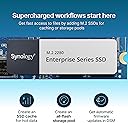
取り敢えず ネットワーク機器に疎く「刺したら使える」物をお求めなら、Synology NASキットとかでは無く USBの接続のドライブとかをお勧めします。 以下、不心得者の顛末 444488+8(ホットスペア)の7本をSHR-1の構成で HDDは、補償付きのIronwolfPro、DS918+とDX517で使用していましたが 突然、DS918+の電源ランプ点滅で起動できなくななり 仕事でファイルのやり取りに使用していたため、否応なく買い替えを検討。 ※コンセントが98~99Vしか出て無かったから 微妙な過負荷でアダプターのコンデンサーが駄目に成って電源入らなかったのかも。 当初、DS918+だけを新しい物に替えようと思ったら 増設ベイの接続が、シリアルからUSB-Cに変更に成っていて 後継機のDS925+では、DX517と物理的につながらない為 色々検討の末DS1825+を購入。 DS925+とDX525も考えたけど、金額的に殆ど変わらないので 1ベイ少ないけどスペースも考慮してDS1825+に決定。 まず、来なかった。物が… 発注して次の日には最寄り迄来ていたのに、配送に成らず・・・ 復旧の為に現場休んで待ってたのに・・・ 届いたのは、到着予定日に22時ちょい前。しかも箱の角がちょっとクシャって・・・ 時間も惜しいし、メーカーの梱包は衝撃にもほどほどに強そうだったので、取り敢えずそのまま受領。 髙いけどSynology にしたのは、今まで使ってて非常に良かったのと ネットで見る限り、引っ越しはHDDの差し替えだけで、ほぼ丸っと移行できるから。 出来るから・・・・だったのに・・・ 起動できない・・・ 青ランプ点滅で起動せず、ネットに繋がらず、 待てど暮らせど立ち上がらず・・・どうも、ドライブを刺す順番が違っていたらしく システムが読み込めなかったらしい。 ホットスペアにしていた1台を起動用に刺してDMSを入れてみたり 電源を入れては待ち、起動できずにHDD入れ替え、電源を入れ、入れ替え電源を・・入れ替え・・・ m2SSDを刺しては抜き、刺しては抜き・・・繰り返す事かれこれ1昼夜。 一先ず、m2無しで起動はできたけど m2刺して無い状態だと、起動は出来ても致命的なストレージの不足とか、HDDの書換を迫られ・・ ここでボリューム作り替えたら、データ飛ぶ!! と思って、Synology アカウントからユーザーサイトに繋いで 既存のデバイスを確認したら、SSDのシリアルとm2スロット番号の組み合わせがっ!! m2スロットにSSDを戻して、やっと再起動に成功!! その後、コントロールパネルからDMSを復元したら、じわじわと元の状態に復旧!!! 散々こねくり回して、HDDを抜き差しして、もうだめかと思ったけど データも無事に復旧!!!ほぼ元通り。 LANが2.5Gに成ってCPUも変わって、諸々レスポンスも良くなった!! HDD指定の件で不評を買って大分叩かれた様ですが DMSのバージョンが上がってからは、サードパーティーのドライブも使える様になったし 今回、ぬるい考えからひどい体験して、NASに重要な信頼度は抜群に高いと感じたので とても良い品だと思います。 マジで、もうだめかと思った・・・データ
Trustpilot
2 weeks ago
3 days ago