Buy anything from 5,000+ international stores. One checkout price. No surprise fees. Join 2M+ shoppers on Desertcart.
Desertcart purchases this item on your behalf and handles shipping, customs, and support to KSA.
💼 Your ultra-compact, always-ready Windows PC—because productivity waits for no one.
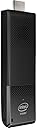
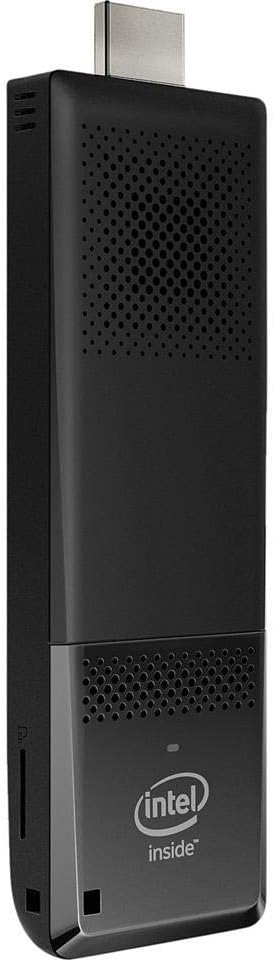
The Intel Compute Stick is a compact Windows 10 PC powered by a quad-core Intel Atom x5-Z8300 processor clocked at 1.44 GHz, featuring 2GB DDR3L RAM and 32GB eMMC storage. It supports Full HD 1080p output via HDMI 1.4 and offers wireless connectivity with 802.11ac Wi-Fi and Bluetooth 4.2. Designed for portability and convenience, it includes USB 2.0 and Micro SD expansion, making it ideal for professionals needing a versatile, travel-friendly computing solution.


| ASIN | B01AZC4NHS |
| Amazon Bestseller | #135,490 in Computers ( See Top 100 in Computers ) #16 in Stick PCs |
| Aspect Ratio | Unknown |
| Brand | Intel |
| Cache Memory Installed Size | 2 |
| Color | Black |
| Connectivity Technology | HDMI, USB |
| Customer Reviews | 4.0 4.0 out of 5 stars (972) |
| Display Resolution Maximum | 1920x1080 ピクセル |
| Global Trade Identification Number | 00735858307505, 05032037080842, 05032037080859 |
| Graphics Card Interface | Integrated |
| Graphics Coprocessor | Intel HD Graphics |
| Hard Disk Description | Emmc |
| Hardware Interface | USB |
| Human-Interface Input | Touchscreen |
| Item Dimensions | 11.3 x 3.8 x 1.2 cm |
| Item Weight | 0.06 Kilograms |
| Manufacturer | インテル(Intel) |
| Memory Clock Speed | 1600 MHz |
| Memory Speed | 1600 MHz |
| Memory Storage Capacity | 32 GB |
| Model Name | Compute Stick |
| Model Number | BOXSTK1AW32SC |
| Model Year | 2015 |
| Number of Component Outputs | 2 |
| Operating System | Home (32bit), Windows 10 |
| Optical Storage Device | No CD-ROM |
| Personal Computer Design Type | Stick PC |
| Processor Brand | Intel |
| Processor Count | 4 |
| Processor Series | Intel Atom |
| Processor Speed | 1440 MHz |
| RAM Memory Installed | 2 GB |
| RAM Type | DDR3L-1600 SDRAM |
| Specific Uses For Product | Everyday Use |
| Style Name | Windows10 |
| Total Number of HDMI Ports | 2 |
| Total Usb Ports | 2 |
| UPC | 796594792031 735858309738 735858307505 |
| Wireless Compability | 801.11ac |
| Wireless Network Technology | Wi-Fi |
| Wireless Technology | Bluetooth |
た**か
ネットサーフィンするだけならコスパ良いです。何回か起動しないトラブルありましたが、それでも十分すぎる値段です。
S**N
しょうがないのかな? 7年くらいで壊れました
S**A
Perfect as backup and to use on TV
It took some time to get Windows 10 up to date, but once done all works since then perfectly. Noise is minimal, with the placement behind the TV (HDMI) and sound on, you hear nothing of it. Can also be used as a backup PC, a bit slow but better than having nothing at all. All great, works nicely, recommended!
K**O
問題なくwindows10起動中。 windows初心者なので、これからいろいろと試していきたい。 ひとつ要望を言えば、HDMI延長ケーブルが短いため、 スティックが宙ぶらりん状態になってしまう。
S**K
既にCompute Stick STK1AW32SCを一台購入して仕事用に使っていましたが、非常に安定して動いていたので自宅用にも購入しました。自宅では動画配信サービスの視聴用に使用しています。 これまではAmazon Fire TVを使用していましたが、対応していない(専用アプリが提供されていない)動画配信サービスを視聴したくなったので、併用してみました。 最初の起動確認後すぐ、最新のBIOSにアップデートしています。また、Windowsアップデートも実施しました。 併用している機器は以下です。 ・ORION DNX23-3BP (23型TV) ・Logitec LAN-GTJU3H3 (USB3.0ハブ兼Gigabit Ethernet Adapter) ・Logicool K270とM545 (マウスとキーボード) ・Anker 40W 5ポート USB急速充電器(電源) ・HDMI延長ケーブル 1m 動画視聴に使用しているブラウザは、主にGoogle Chromeです。また、自宅ネットワークには有線接続しています。 設置については1mのHDMI延長ケーブルを使い、通気口が上に向きつつ物で塞がないように、畳の上に無造作に置いています。 また、電源は専用のACアダプタではなく、汎用のUSB充電器から供給しています。 モニタとしては普通の液晶TVを使用しました。TVに接続した際、デフォルトでFull-HD出力に設定されており、文字を読むのがつらい状態でした。 出力をHD解像度に設定し、TV(DNX23-3BP)側を「スーパーフル」表示にしたところ、にじみ無くきれいに表示されるようになりました。 (この辺の設定はTVの機種次第です) ○動画再生の操作感について これまではAmazon Fire TVで動画を視聴していましたが、さすがにそう言う目的で作られているだけあってリモコンを使った操作が便利でした。 一方で、Compute Stickで動画を見る場合は、基本的にマウスとキーボードが必須です。動画再生用としては操作が煩雑と言わざるを得ないですが、正体は汎用OSを搭載したPCなので仕方がないでしょう。 しかし悪いことばかりではありません、純粋なPCだけに自由度が極めて高い。Windowsのデスクトップアプリケーションが動くので、ローカルのファイル再生には便利です。 また、Fire TVのような専用のインターフェースを備えた製品では「どうしてこんなに不便なんだ、PCだったら…」と思う場面もありますが、Compute Stickなら解決できます。 (逆に「全ての操作がリモコンで完結すれば…」と思っても現状ではどうにもなりません) ○動画再生の状況について 動画配信サービスは、無料のもの1つ、無料会員とプレミアム会員があるものを1つ(プレミアム会員で)、有料のもの2つ試しました。 結果として、ほとんどのサイトは動画再生に問題はありませんでした。コメントが打てる某サイトでは、動画再生はスムーズなものの、コメントの流れが5秒ごとに1秒間程度止まる感じでした。 唯一動画再生自体に問題があったのが有料サービスの一つで、480p/2Mbps設定だと数秒に一度引っかかる状態でした。設定を480p/1.5Mbpsにしたら問題なくなりました。 ビットレートを下げたら問題なく再生できるようになったので最初はCPU/GPUのパワー不足を疑いましたが、手元のH.264コーデック/16Mbps/30fps/1080pの動画の再生では問題ないので関係なさそうです。 次に疑ったのが通信速度ですが、動画サイト側の表示では通信速度が80Mbps前後出ていたのに対して必要帯域は2Mbps程度と表示されていたので、通信速度の問題ではなさそうです。 CPU/GPUパワーの問題、通信速度の問題でないとなると、あとは視聴に使用しているソフトウエア…ブラウザなどでしょうけれど、使い慣れたブラウザを動画視聴のためだけに替えたくはないので、しばらくは画質を480p/1.5Mbps設定で様子を見ます。 ○CPUの温度について CPU温度ですが、室温25℃の部屋に畳の上に転がすように置いていたときは、CPU使用率100%の状態で負荷をかけ続けた状態で69~72℃(4つのコアで温度が違う)、動画再生時65~68℃、アイドル状態で52℃程度でした。温度が高いときでも、特に動作が不安定になると言うことはありませんでした。これから気温が高くなる時期ですが、空調が効いた室内なら問題無さそうです。 それでも多少でも温度が下げられないかと考え、試しにガラス製のTVモニタ台の上に置いてみました。置いただけでは浮いてしまうので、通気口を塞がないようおもりを載せて軽くガラスにしつけています。Compute Stickの背面もそれにありに暖かくなるので多少の効果は期待できるでしょう。実際、アイドル時の温度は4℃程度下がりましたので、気休めにはなりそうです。 ○USB3.0と無線機能の同時使用について 私のもとに届いたものは、現時点では特に問題ありません。 動画視聴中にBluetooth接続のマウスで操作しながら、USB3.0接続のUSBメモリに保存したファイルWiFi経由でサーバにアップロードしても(あるいはサーバからUSBメモリにダウンロードしても)、30分程度では問題は生じませんでした。私の使い方ではこれ以上の負荷を掛けることは無さそうなので、ここで試験を打ち切っています。 但し、経験上USB3.0機器で発熱が大きいものを本体に直接接続すると、USB機器の熱が伝わって本体が異常に加熱し熱暴走することがあります。こういうUSB機器を使うときはハブを介して接続するようにしています。また、私としては常時通信が安定して欲しいので、前述の機器を使って有線LAN接続にしました。無線LANでも十分な速度が出ますが、念のため。 また、(無線関係のトラブルではないですが)USBハブ兼有線LANアダプタのLAN-GTJU3H3に多数の機器をつなぐと、LAN-GTJU3H3に接続したUSB機器の動作が不安定になりました。 おそらく電力不足だろうと思います。接続機器の合計消費電力次第では、セルフパワーのハブを使う必要があるでしょう。 ○そのほか気になった点 現在はTVの手前側にCompute Stickを置いていますが、その状態で気になる点を強いて挙げるなら、冷却ファンの音が気になりました。 普段アイドリング状態ではファンは回っていませんが、この状態でブラウザでサイト巡回をしていると、ブラウザをマウスホイールでスクロールする度に負荷が掛かってファンが回り、スクロールを止めるとファンも止まります。なので、あたかもマウスホイールの操作と連動してファンが回る状態になるのがちょっと気になりました。ファン自体の音は小さいので、TVの裏にでも置けば問題無さそうです。 ファンの音以外では、常駐するアプリケーションとしてIntelのRemote Keyboard Host Appが気になりました。 タスクマネージャで見ると、通常時でCPU使用率が3~5%あるようです。私自身はスマートフォンから操作することはないので無効化しました。 最後に私の感想を。 私は既に1台所有しており性能を把握していたので、性能については全く不満はありません。やりたいこともほぼ100%出来ました。 この価格でこの性能のPCが、しかもOS込みで手に入るなら大満足です。TVをモニタ代わりにする事で省スペース化も達成できました。 なので、現時点では星5つとしておきます。
権**衛
実家の母(後期高齢者)はいまだガラケーで、メールは受信するのみで発信はできず、同居する弟はスマホのみ、ただ回線は別途用意してあり、家ではWi-Fiで使っているようです。 ここでネットやらちょっとしたものを見せたい場合、何もなければスマホ、用意してあれば10インチのタブレットを使っていましたが、タブでも画面は小さく、次にミラキャストを買ってスマホ画面をテレビに映すようになり、いったんの解決を見ました。 が、私はWi-Fiのパスワードなど知らないので自分のスマホの通信容量を使う上、キャストしている最中もスマホ画面は表示されっ放しで、長尺の動画など観せていると、容量とバッテリーの二重の意味で消費が激しいなと思うようになりました。 また弟は普段スマホでYouTubeなど観ているようですが、当然それは母とは全く共有されておらず、少しはそのあたりの共有(=親の面倒を見る一環。この分野を私だけがやるのではなく、自律的にやるようになってくれれば、と)、そしてスマホだけでなくPCに慣れさせるという意味でも、小さいデスクトップPCをテレビにつないだらいいのではないかと思い付きました。 その意味では、以前ECSの「LIVA Q2」という超小型のウィンドウズデスクトップ機を買ってありましたが、さらにコンパクトなスティックPCというものがあると知っていて関心があったので、安いしこの機会に買ってみることにしました。 使ったことがないリナックスも面白そうでしたが、自分だけが使うわけではないと想定すると、ここは順当にウィンドウズ版です。 到着してちょっと使ってみた結果、動作はやはりもっさりしているものの特に問題はなさそうですが、やはりウィンドウズというOS特有の(と思われる)アップデートの多さと長さ(重さ)、これは私はこんなものと思ってはいますが、PC未体験の人がこれを見たら早々に使わなくなってしまうのではないかと危惧しました。 よって、いったん保留にして他の方法を探ることにし、その結果この後もいくつか買うことになった「ウィンドウズのスティックPC」というものは、実家用としてではなく、見ているうちに愛着が湧いてきて自分のコレクターズアイテムのような位置付けになりました。 様子見だったのでCPUはAtomでメモリ2GBのを選んだのですが、他の同型機にもこのへんのスペックはよく見受けられ、ハードウェア的にはエントリークラスのスマホレベルなので、CPUがCoreのものにすればメモリ4GBでUSBも2から3にアップされているようでLIVA Q2と同等になり、私のようなライトユーザーにはメイン機としても使えるのではないかという気もします。 新型コロナによる生活の変化により、自宅や職場問わず、いかに自分のPC関連の「フル環境」とでも言うべきものを、例えデスクトップと言えども一つの場所への据え置きではなく身軽に持ち運べるかを強く意識するようになったため、本機のような「モバイル的なテスクトップ機」に関心が向くようになりました。 一方ではスマホのように入出力機構を備えたモバイル機、他方では本機のように入出力機構を省いた処理系のみで究極までコンパクトにした機器には将来性を感じますが、ジャンルとしては下火なようですね。
H**O
Atom CPUは使い慣れていて最初からLinuxサーバー用途として購入しました。流石のIntel製だけあって安定性は抜群です。あまり長期連続稼働しない方が良いとは思いますが半月は全く問題なく動き続けます。ただカーネルなどコアな部分をアップデートを行う関係で月一は必ず再起動しているのでそれ以上の連続稼働はしていません。ちなみにスティックPCということで(?)電源を挿せば即起動します。もちろん電源ボタンもあります。一応ファンが内蔵されていますが、動いている姿を見たことがありません。(分解した時に壊してしまった可能性はありますが。)でなくとも昨今の殺人的な夏の暑さに加えて設置している部屋にエアコンがないことからRasPi用のファンを取り付けました。ちゃんと冷やすなら5cmファンくらいで大きめのヒートシンクを使った方がいいですね。 ※稼働中のOSはRedHat 8.4です。 このスペックでWindows 10はかなり厳しいと思います。潔くLinuxサーバーとして使うか、デスクトップPCとして使うのであれば軽量LinuxのLubuntuもしくはDietPiなどならいけるかもしれません。
出**羽
パソコンのデスプレイと接続したが映像が出なかった。
F**E
Lo stavamo tutti aspettando. Voglio dire due cose senza essere troppo tecnico. Un HDMI dongle con architettura x86, sufficientemente potente da non farti sentire la mancanza di un PC. Per chi non lo sapesse ciò significa che L'Intel Compute Stick contiene sostanzialmente lo stesso hardware che trovereste in un netbook. In passato ho comprato una decina di prodotti simili con architettura ARM (per capirci, quella del 99% di smartphone e tablets) per esempio il Rikomagic RKM802IV che pur avendo una buona potenza non erano e non sono considerabili dei PC quanto piuttosto dei grossi tablet senza touchscreen, se collegati alla tv. Con questo piccolo gioiello invece la vostra esperienza d'uso sarà identica a quella che avreste collegando un netbook (tipo Acer Aspire One) alla vostra TV con alcuni vantaggi innegabili: Comodità, portabilità, consumi. Nella scatola troverete, otre allo stick e all'alimentatore (piccolo e ben costruito - l'ho aperto per vedere com'era fatto :-) anche una piccola prolunga HDMI utile a connetterlo laddove la vostra TV o il vostro monitor avesse l'ingresso HDMI difficile da raggiungere o fossero appesi al muro. ALCUNE TECH SPECS: Potete espandere la memoria con schede micro sd fino a 128 GB, ha due porte USB sul fianco. Una USB 2.0 e addirittura una USB 3.0 L'alimentazione gli perviene tramite micro USB 3.0 (quella degli smartphone per capirci), ma attenzione, ho riscontrato un piccolo problema relativo alla sua alimentazione: se viene collegato ad una USB integrata nella TV come fonte di alimentazione o ad un alimentatore con basso Amperaggio, si accende normalmente, ma una volta posto sotto stress (anche solo avviando applicazioni impegnative come chrome + Netflix) si spegne. Utilizzate sempre il suo alimentatore. Importante la presenza del tasto di accensione/spegnimento. Ha una ventolina silenziosissima per raffreddare la CPU che scarica il calore attraverso una griglia esteticamente ben riuscita sul top dello stick. Out of the box è equipaggiato con Windows 10, il che è un grandissimo vantaggio per molti: tutte le tue applicazioni, il sistema a cui sei abituato, i tuoi account senza compromessi... Ma non fatemi parlare di Windows se no sbrocco. Linuxiani! Parliamo di cose belle invece: è facile da paura installare la vostra distribuzione preferita. Vi consiglio però la build ubuntu di Morrison per avere anche l'audio funzionante, oppure patchatelo da voi. Io ho installato Ubuntu 16.04 poi ho ranzato via unity e messo openbox. eh.. lo so... a me piace così. :-) Conclusione: PRO - piccolissimo - silenzioso - potente - versatile - compatibile con linux - due porte USB di cui una 3.0 CONTRO - costa il doppio rispetto alla miglior HDMI dongle ARM based (ma sono prodotti decisamente diversi) - assenza di interfaccia audio oltre l'HDMI (date le dimensioni) - nessuna batteria (mi rendo conto che sarebbe stato un suicidio) Compratelo se state cercando un thin-client economico oppure un PC senza grandi pretese, ma con capacità multimediali di buon livello.
G**A
Super ordinateur, compacte et performant, il est pratique et fait tout comme un vrai, à part qu'il n'y a pas de lecteur dvd
S**Y
Can be used as a tv box if u get kodi on it. Works as a mini pc so don't run it too hard with programs, but other than that it works great. Same product as described. Made by intel so no worries.
S**E
I bought one of these off eBay which I had to return, no such problems here. After setting it up, which took considerably less time than I expected (given other reviews on the internet), I updated the latest Windows 10 updates (which again went relatively quickly compared to 2 laptops I had just set up at work). I connected the Bluetooth mouse and keyboard (again no issues here despite some bad internet experiences) and had a working computer in my TV. I watch Game of Thrones through Sky Go on it, and it played fine. The quality of the playback was not the same as if it watched through the sky box, but perfectly acceptable and I assume this is more down to the quality of the Sky Go system rather than the unit itself. All in all, if you want a computer to watch videos over the internet, on your TV, that you can control from your sofa (with a Bluetooth keyboard and Mouse) then this will do the job nicely. If you want to edit Photos / Videos / run Large Spreadsheets then best to think of something else.
D**R
This thing is amazing! Out of the box I had no problem at all. First before I powered it up I plugged in a GOOD Logitech USB/Keyboard combination dongle into one of the USB ports on the side... Not sure if it was the 2.0 port or 3.0 port but I don't actually care it's just a keyboard and I'm not planning on plugging anything else in. I used the little HDMI dongle to plug it into my projector mounted on my ceiling. I had to use the included dongle extension because I already had an HDMI cable plugged into HDMI1 plug on my projector and there was not enough clearance to plug this in also... if I didn't have the other HDMI in there it probably would fit and not need the extender. Once every thing was plugged in I made sure the projector was selected for HDMI2 and then plugged in the power supply. The picture came right up and listed a couple of function keys I could press to get into the bios or whatever. I just let it go and didn't press anything... after a few seconds it began to boot windows 10 with what looked like the first install screen you get with a fresh boot of windows.... "Welcome, getting things ready, etc.. whats your wifi and password, etc.." In no time at all it connected to my wifi fine and then went through the standard "we need to apply some fresh updates blah blah" I just let it go. A few minutes went by and I think an auto reboot after the updates and after a few more "first time booting your new windows question" the familiar windows 10 desktop on a PC came up. That was it... by default it uses "Edge" which I don't like but it was easy enough to turn that off and get things set back to internet explorer like I like. A few more tweaks and this was shared on my home network, had my wifi printer up and working, adode reader installed and changed over so pdf's open with it instead of the default "Edge" Played a couple videos, streamed a few tv shows from xfinity live tv viewer, Netflix, amazon prime video and everything worked perfectly and no lag. Picture looks amazing on my optoma 1080p projector. I'm sitting here writing this review using this device right now. All of this is in my living room including my wifi router which is probably about 20' from the device and my keyboard/mouse combination is maybe 15' from the device and I have NO issues with range, connectivity, signal strength from either wifi or keyboard/mouse. I have 5 bars, the max, indicated on my wifi signal strength. Why on earth I just bought a $1500 dell laptop now is beyond me. This has everything I need and want to be able to do with a PC connected to my projector and none of the bulk or wiring needed to do that with a desktop or laptop. I know there are similar micro desktops out there probably a little faster but phooey on those at double/triple/quadruple the price! For the sound right now it is coming our of my projector which has a speaker in it and works pretty good. I certainly can turn up the volume so I can clearly hear anything just as good as any tv speaker could. the sound is coming into the projector via the HDMI plug so no wires or anything just plug and play to the projector via the HDMI. Ultimately I want the sound to come out of my surround sound speaker system that all my other components plugged into my projector do. To accomplish this my projector has an "audio out" jack on it which is the 1/8 plug type. I have an extra audio wiring schema run from my stereo to the projector I am not currently using should be easy enough to use that and get the sound from the audio out on the projector back to the stereo. I just need to get a really short 1/8 stereo wire so I don't have wires hanging all over the place from my ceiling as everything is hidden with wires I already ran from the stereo to the projector. As far as overfilling the screen goes a good tv/projector like mine allow me to adjust the image size to fit just like xbox games when you first play them sometimes have you adjust the screen size to fill the screen. Also out of the box my stick computer/windows 10 text/app size was set to 150% and was "recommended" I set that to 100% percent to take full advantage of the full screen size but that displays everything to small and so I set it back to 150%. There is no reason you should have to scale this back to a smaller resolution it's all in the settings. Update: Ran the audio out of my projector to my stereo via some wires that were already in my ceiling that were not being used and now I have complete setup to stream video, etc.. it worked perfeclty. Also I've read some others said "not good for gaming" I installed STEAM on this last night and it worked and looked fantastic on my projector.
Trustpilot
3 weeks ago
2 months ago