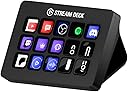
![Elgato Stream Deck MK.2 Elgato Stream Deck MK.2 [15-Key Layout] Controller for Live Content Creation, Streamer Device Compatible with OBS/Twitch/YouTube, Works with Mac/PC](https://m.media-amazon.com/images/I/51Rj+5OLFeL._AC_SL3840_.jpg)






Buy anything from 5,000+ international stores. One checkout price. No surprise fees. Join 2M+ shoppers on Desertcart.
Desertcart purchases this item on your behalf and handles shipping, customs, and support to KSA.
🎥 Elevate your stream game—command your content with a tap!
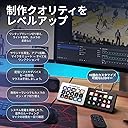
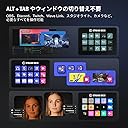
The Elgato Stream Deck MK.2 is a sleek, 15-key customizable controller designed for live content creators. Compatible with Mac and PC, it offers seamless USB-C connectivity and integrates with popular platforms like OBS, Twitch, and YouTube. Its vibrant LCD keys provide instant access to complex commands, making it an essential tool for professional streamers and digital creators seeking efficiency and style.


| ASIN | B09738CV2G |
| Additional Features | Customizable |
| Amazon Bestseller | #15,919 in Video Games ( See Top 100 in Video Games ) #2,411 in PC Accessories #5,366 in Computer Keyboards, Mice & Accessories |
| Antenna Location | Content Production, Live Production, Streaming |
| Brand | Elgato |
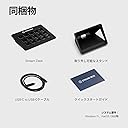
| Built-In Media | Stream Deck MK.2 Unit, Desktop Stand, USB-C Cable, Quick Start Guide |
| Color | Black |
| Compatible Devices | Mac/PC |
| Connectivity Technology | USB |
| Customer Reviews | 4.6 4.6 out of 5 stars (9,878) |
| Enclosure Material | Plastic |
| External Testing Certification | Não Aplicável |
| Global Trade Identification Number | 00840006640554 |
| Item Dimensions L x W x H | 11.8L x 8.4W x 2.5H cm |
| Item Weight | 0.15 Kilograms |
| Keyboard Description | Standard Keyboard |
| Language | English |
| Manufacturer | CORSAIR |
| Mfr Part Number | 10GBA9901 |
| Model Name | Stream Deck MK 2 |
| Model Number | 10GBA9901 |
| Number of Keys | 15 |
| Power Source | USB Powered |
| Style Name | Stream Deck MK.2 |
| Switch Type | Mechanical |
| UPC | 840006640554 |
| Unit Count | 1.0 Count |
| Warranty Description | [Warranty] 2 years from the date of purchase from the end user (receipt / receipt required) |
め**ん
15ボタンというのがちょうどよく使いやすい デスクトップがスッキリするし、あらゆるショートカットを設定できて非常に快適 質感もよく良い買い物だった
高**梨
使いやすい。設定すればワンボタンで色々とすぐに出来るのでめっちゃ便利 ただmp3などの音声を30個くらい割り当てて順番に押して再生したところ20個くらいのところで音がガビガビになり砂嵐状態になった。 何事もほどほどに。
く**パ
パソコンで配信するようになって便利です❤️ 必要なアプリをボタン一つで立ち上げられる🎵
ア**ー
しがないVtuberですが、ゲームや雑談配信等をする時に使用しています。 今や必需品過ぎて無いと不便に感じる程です。 素晴らしい商品をありがとうございます。
購**者
使い方は無限大 YoutubeやWebを見るだけで上手く使えばキーボード不要になる XLの32キーと迷ったが15キーでもOK
よ**パ
これ、配信しない人にもマジでおすすめ。普段ブログ書いてるんだけど、よく使う機能をボタンにしとくだけで爆速になるし、FF14を起動したら今度はそっち用のボタンに自動で変わるのがヤバい。 アイコンも自作できて、デスクがお洒落になってテンション上がる(笑)
ま**ん
定番のガジェットです。 類似品購入も考えたのですが、やはり本家本物の方が良いと思い購入しました。 私の用途の場合、ボタン類は15個タイプが一番使いやすいと思います。
い**気
この製品で、ゲームをする人間や配信者をどれだけ快適にさせたのかってくらい使い勝手が良いです。ボタンの追加は、専用ソフトを使用して編集します。機能の追加などもできるのですが数が多いので、僕が利用しているボタンを4つ紹介します。 1.音声デバイス切り替え このカスタムボタンではイヤホンからヘッドセットに。ヘッドセットマイクからオーディオインターフェイスのマイクに切り替えるなどのことがワンボタンでできます。 そのため一々差し替えるやWindowsの設定から切り替えを行うなどの必要がなくなります。僕は、利便性と音重視の関係でValoとLolで切り替えてます。 2.ブラウザのリンク 上記でLolをプレイしていると発言したのですが、Lolをやる上で必須のサイトがあるため、それを登録したり、配信を行う際にOBSでよく使用するウェブソフトなどあると思うのですが、それらを登録すると準備をギリギリ開始しても間に合います。 僕は上記に加えてアイコンはTwitch。リンク先はFanzaにして偽装を図っています。 3.GeForce Experience のワンボタン録画 これは一般ゲーマー向けです。 FPSをしているとエッグいエイムでて奇声あげるときありませんか?誰かに共有したいですよね。そんな時、このマクロボタンがあればWindowsキープラス…とかする前に録画できます。Valo中にあれするとカーソル遅いわ、音なるわで面倒くさいんですよ。 他にもOBSの録画などにも対応してます。有名どころは大体提供してくれています。 4.SE(サウンドエフェクト) これはエンターテイメント用です。何言ってるのかわからないと思うので説明します。 サウンドエフェクトというと、配信者や動画投稿者の後付けの為のものと思われがちですが、なんと日常的に使用できるのです。 僕は2種類使用していて、SEを専用ソフトから登録して流す方法。もう一つは、ゲーマーは必ず使用しているDiscord のサウンドボードです。 一つ目は一般的なSEの流し方で、仮想マイクを登録してSEを流します。ただ、この方法はそれこそ配信者向けのもので、一般ゲーマーは、わざわざエンタメのために利用しません。 しかし、みんな大好きDiscordのサウンドボードであればこれらの登録は容易です。 Discord のサウンドボード追加は他のサイトを見てください。 この製品はDiscordのサウンドボードもマクロボタンに登録できます。そのため、簡単にエンタメすることができます。オチがつかない時、友人がクッソ寒いことを言った時。SEを使って気まずい空気から逃れましょう。 僕はValorant でボム設置後、解除音をSEで流し、場の空気を乱して遊んでいます。 他にも様々なサイトで紹介されているので見てみてください。必須デバイスではないですが、確実にQOL上がります。 是非。
A**E
I'm genuinely surprised at how many options there are for these buttons, and even more with how many free plugins you can download on their marketplace. I can control way more than I initially thought, as I was going in thinking I'd only use it for my VTuber expressions and soundboard stuff, but now I feel like I could make use of this on my regular day-to-day. The stream deck itself is the perfect size to not get in the way or take up too much space on your desk and at the same time you can still program folders upon folders, and pages of commands and buttons, so you don't necessarily need to buy a bigger stream deck with more buttons. The software is really smooth and easy to use, and works perfectly on Windows 10 even though it says it requires Windows 11 on the download page. All the settings you can choose for the text and icons are straight-forward and feel intuitive, you can even use any of your own PNG images or GIF files for the icons. It's as close to plug and play as possible and everything just... WORKS I highly recommend getting this, even if you're not a streamer cause you'll still find a plethora of ways to utilize it. Whether it's opening URLs from just a button, opening any of your applications, placing any world clock you want, joining a Discord voice channel with a press of a button, muting, deafening, making presets for where your windows open and align, etc. There's so much more to it than just typical streamer usage, but with such, there's a crazy amount of things that'll increase your quality of life and ease while streaming. Everything about this product screams high quality, including a very well-thought-out program. It'll be a massive timesaver for you.
A**R
In description it's MK.2 version. But I got first version. Not big deal for me - it's still usable. But it's wrong in description. Be carefully if you need exactly MK.2 version. Otherwise - no problem at all. Device works perfectly.
K**K
This product is useful, even for normal use or gaming. It has plenty of plugins and frequently updated software. If you need more buttons, you can add virtual buttons (visible on the monitor).
A**R
منتج معروف ولا يحتاج للتقييم
K**T
I LOVE IT SO MUCH! I’ve wished for one for years so I decided to cave and try the smallest one first.. now I have zero regrets buying this one! I use it constantly not just for my streaming but to capture clips in games, for video editing and even checking my temps! I love it so much! ❤️
Trustpilot
1 week ago
2 months ago