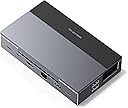
UGREEN SteamDeck/Switch/RogAllyなど用 4K60Hz出力 100W充電 USB3.2 1GbpsLAN カード読み取り
Product ID: 725824414
Details
- HDMIポート総数1
- USBポートの総数4
- ハードウェアインターフェイスHDMI MicroSD
- ブランドUGREEN
- ポート数9
- ワット数100 W
⚡100W PD急速充電
🔗10Gbps USB3.2高速転送
🖥️4K@60Hz HDMI出力
Desertcart purchases this item on your behalf and handles shipping, customs, and support to KSA.
🎮 これ一台でゲームも仕事も最速&最高の体験を!
UGREENの9-in-1ドッキングステーションは、Steam DeckやSwitch、ROG Allyなどのゲーム機に対応し、4K@60HzのHDMI出力、100Wの急速PD充電、USB3.2 Gen2による10Gbpsの高速データ転送を実現。角度調整可能なスタンドで放熱効率を高め、多彩なUSBポートとカードリーダーを備え、幅広いデバイスとの互換性を誇る。24ヶ月保証付きで安心の高性能ゲーミング&作業環境を提供。


| ASIN | B0CR6JND4M |
| Amazon 売れ筋ランキング | ゲーム - 1,027位 ( ゲームの売れ筋ランキングを見る ) Nintendo Switch周辺機器・アクセサリ - 130位 |
| HDMIポート数 | 1 |
| USBポート数 | 4 |
| おすすめ度 | 4.2 5つ星のうち4.2 (2,714) var |
| カラー | スカイグレー |
| ハードウェアインタフェース | HDMI, MicroSD, USB, USB-C, イーサネット |
| パック数 | 1 |
| ポート数 | 9 |
| メーカー名 | Ugreen Group Limited |
| メーカー型番 | 25869 |
| ワット数 | 100 W |
| 互換デバイス | Steam Switch Rog Ally Legion Go |
| 付属品総数 | 1 |
| 保証内容 | 二年間のメーカー保証 |
| 原産国 | 中国 |
| 品目寸法(L x W x H) | 16長さ x 11.5幅 x 4.2高さ cm |
| 商品のハイライト | 9-in-1 USB-Cハブ|ドッキングステーション| LegionGなどゲーム機用ドック HDMI 2.1|USb-A3.2*USB-C 3.2ポート |急速PD充電、イーサネットポート付き|SD/TFカード読み取り|角度調整可能スタンド |
| 型番 | 25869 |
�**⬛
おすすめです
1年半くらい使ってますが、不具合も起きず安定して使えています! キーボードやマウスも繋げるし、コントローラーやモニターも繋いで使えるので本当に助かってます。
し**す
接続ケーブルが外せる(Type-C)の中では安価で高性能 PC用に流用
1万円以下の多機能ドック、ハブは大概接続用ケーブルが直結で根本が断線して故障するのが経験上ほとんどなので 比較的安価でしかもちょっと安心なUGREEN製でUSB-TypeC-Cケーブルでの接続ドックとしてかなり優秀です。 PCに流用しているので、付属ケーブルがちょっと使いにくい、会議等に使用するとマイクにノイズが乗るなど癖はありますが それ以外は相性等も出ておらずおすすめできるドックかと思います。
A**E
Great Dock with Replaceable Cable
Finding a dock with a replaceable cable was a challenge but thankfully I found this one. My only complaint about it is that it doesn't work with the Switch 2 because they changed the specs from the original Switch. But it works great for Handheld PCs and the original Switch if you dock it upside down.
倒**!
純正品よりいいじゃない
スチームデックに購入。 純正は品切れで値段が倍以上するのですが、こちらは問題なく機能してます。 未使用の際、スタンド代わりにもなるので早く買えばよかったな。
不**生
ROGally ターボモードは非推奨
ハブとホストPCの接続ケーブルを変えられる点に惹かれて購入した。 100Wケーブルに100W対応アダプタでROG allyのターボモードで稼働させたが、充電が減る。同梱のケーブルも使用してみたがやはり減る。この製品とallyを直接つないだ時は減らなかった。 バッテリーレポートを吐き出させたが、充電が途切れ途切れになっているような表示はなく、ただただ、充電が間に合っていない。 出力が表示されるアダプタで確認したがほぼ30Wきっかりの出力で、所謂ハブ分の電力分が出ていない。そもそもTypeCの規格的に「そういうもの」なのかもしれないが。 充電以外の点はとても良かっただけに、残念。
N**R
良い商品です。
機能性に満足、拡張機能はありがたい。
B**E
ケーブルすっきり。ノートPCをデスクトップPCのモニターと共有するのにおすすめ
ノートPCと外部モニターをつなぐ際、USBハブを使ってHDMI、PD給電、データのやりとりなどを一本のケーブルさえつなげば可能になるように運用したい人は多いと思います。しかし、普通のUSBハブは左右からケーブルが伸びるため不格好になります。本機はフロントにゲーム機やタブレットを設置する前提で設計されているため、全てのケーブルが後ろに伸び、デスクトップ周りが非常にスッキリします。書類の下にケーブルが伸びてきて邪魔くさいことも無くなります。 同じことをするのに普通のドッキングステーションだと数万円してしまったりしますが、本機で十二分です。 なお、注意点としてPCと本機をつなぐケーブルが非常に短いので(20cmくらいしかない)、ノートPCとの接続に使うのであれば別で購入する必要があります。
O**A
多様性がある。
スチームデックの台として購入。 差込口はまだ全部使えてませんが、多様性があって結構便利。
M**H
Great Dock, works great for Steam Deck
The dock works great, it works with other devices too if you need a dock. When using for the steam deck it was easy to get positioned well and land a permanent spot on my desk. The dock is light if you need to take it places and has enough ports for whatever you need. All of the ports also work out of the box if you install Windows on the steam deck without needing any drivers for the Ethernet which was super helpful for the setup. The HDMI works too however I haven't used it to its full potential yet.
P**K
Simply a great product
Really great performance. I have connected my Asus ROG Ally X to this Dock. Performance wise really great. I could connect Wired LAN to get full speed of my internet connection (500MBPS), connection to my 4K TV was seamless & no frame rate issues. By the way, I have used Ugreen LAN cable, HDMI cable too. Overall it was very satisfactory purchase.
T**I
UGREEN is best in the market
I have been buying UGREEN products since almost 3 years. Every single product i bought from them is just fascinating in terms of quality/price ratio. UGREEN has simply overrun Anker because of much cheaper price for same quality and as well as the variety of super practical and innovative products which no other brand produces. I have been searching all over Amazon as well as internet for a docking station for my android tablet under 150 euros and every single docking station had controversial reviews in terms of quality, compatibility or connectivity. Even those docks above 200 euros had similar reviews. Now i came across this brand new product and of course the only brand that makes such top quality and still super cheap and minimalistic docking station is UGREEN. The docking station is thunderbolt compatible and plug and play. It works with android, windows as well as iPhone and steam deck. For Mac i don't know because i dont have one. Tips for power users: 1- make sure to buy a real USB-IF certified uplink cable from a reputable brand ( i recommend Cable Matters). I recommend at least 20gbps/100w usb-c cable but 40gbps/240W thunderbolt compatible is better. 2. Buy a good quality HDMI cable with the latest version. If you want to use HDMI for longer distances (more than 3 meters) you have to buy expensive Fibre-optic HDMI cable so you don't have latency during display porting. 3. Buy a top quality power cable as well as a reputable real charger with at least 65W but 100W is recommended. Buying a top quality charger is very important. Make sure to buy from a famous certified brand and no cheap no-name generic charger with fake wattage. Electricity is the life in all of your devices and you should never spare money on cables and chargers. 4- Peripherals are just simply plug and play. I recommend 2.4G mouse and keyboard wireless peripherals. 5. Buy a good shielded ethernet cable for lowest latency if you game or work online. Double-shielded is minimum but 4 shielded is recommended. 6. If you use ethernet cable for internet in your dock and use android, you have to activate developers options and enable USB debugging and set the debugging mode to Data Transfer/Charging (NOT charging only) otherwise you don't get internet on your android device but if you do this you have low latency internet with charging alll from the uplink cable. I have an amazing OnePlus Pad 3 tablet with 144hz display refresh rate and now because of this amazing docking station i can play games on GeforceNOW ultimate tier with the latency of 12, which is unbelievable coming from a docking station. The price of this docking station is under 50 euros but has the worth of at least 250 euros. Definitely a big recommendation for ANY gadget/gaming enthusiast.
A**.
Solid Dock for Asus Ally X
I use thing for my Asus Ally X. It has worked very well! Honestly you could use this for any laptop with a USB-C port. It charges my device while I play and basically turns it into a console like experience. I do have the DBrand Killswitch case on my Ally X and it doesn't fit perfectly into the allowed spot, but i can't really DOCK it for that (soon what I did there) because it is mainly for the steam deck. I just put the kickstand behind the part that moves up so it can get airflow and it works great (shown in photos). It also can pack down kinda flat to fit in my bags for traveling! It comes with a USB-C cable to plug into your device as well. Ive traveled many times with it and it's still my main and only dock so it's proven durable enough for someone who tosses things in the bag and rushes out the door. It's made from lightweight aluminum as well. Overall I love it, it's easy to use, plug and play and offers plenty of IO for the typical gamer or even a laptop user as it has micro SD and SD card slots!
M**O
Good Docking Station
I highly recommend this docking station for users who want to enhance their gaming experience on handheld devices, offering reliable performance and seamless connectivity.
Trustpilot
5 days ago
2 weeks ago