






LinkStation 710
Product ID: 693880166
Details
- BrandBuffalo
- ColourBlack
- MaterialMetal
- Product dimensions205D x 45W x
- Size8 TB
⚡2.5GbE double transfer speed
💾8TB HDD included, massive storage
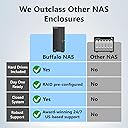
🔒SSL encryption & closed system security
🚀 Unlock lightning-fast, secure storage that keeps your digital life effortlessly connected.
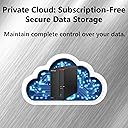
The BUFFALO LinkStation 710 is a 1-bay NAS device featuring an 8TB hard drive, designed for home or small office use. It offers 2.5GbE network speeds for rapid file transfers, robust SSL encryption for data security, and seamless compatibility with Windows and macOS. With subscription-free personal cloud access, automated backups, and hybrid cloud sync options, it centralizes your data storage while providing 24/7 US-based support and a 2-year warranty.


| ASIN | B08V5F9VJT |
| Best Sellers Rank | 20,413 in Computers & Accessories ( See Top 100 in Computers & Accessories ) 8 in Network Attached Storage (NAS) Devices |
| Box Contents | AC Adapter, Ethernet Cable (Cat 6A), LinkStation 710D, Quick Setup Guide, Warranty Statement |
| Brand Name | Buffalo |
| Colour | Black |
| Compatible Devices | hard drive |
| Customer Reviews | 3.5 3.5 out of 5 stars (177) |
| EU Spare Part Availability Duration | 2 Years |
| Enclosure Material | Metal |
| Is Assembly Required | No |
| Item Dimensions D x W x H | 205D x 45W x 128H millimetres |
| Item Weight | 1.5 Kilograms |
| Manufacturer | BUFFALO |
| Manufacturer Part Number | LS710D0801 |
| Model Number | LS710D0801 |
| Mounting Type | Rack Mount |
| Product Warranty | 2 year manufacturer |
| Size | 8 TB |
| UPC | 747464134598 |
M**H
Works great for the Time Machine backups on Mac Tahoe 26.2. Easy to setup by following their quick start guide and downloading the software. I had to do two firmware updates before using it; took about 30 minutes. Downloaded the owners manual and it easily walked me through setting up the Time Machine backup. First backup takes a few hours. Accessing the drive via Finder is easy and drive is very fast. I've got it plugged into my Xfinity cable modem with the supplied cable. The drive offers more than I need. I'm not doing the web access or iPhone connection. Noisy when doing the backup. Fits nicely on the desk. Hope it will have a long life like my Mac AirPorts. Going to run both the Buffalo and AirPorts for a bit to make sure all is well and until Mac stops supporting the AirPorts.
S**N
غبي جدا كسحابة تخزين ومعقد لابعد درجات التعقيد ، ويحتاج لشخص متخصص ومتعمق في الشبكات وانواعها ع شان يعرف يتعامل معه ، لي ثلاث شهور شارية ولحد الحين ماعرفت له وما اقدر اوصل للبيانات من خارج نطاق الشبكة 😡😑
J**Y
The BUFFALO LinkStation 710 8TB 1-Bay NAS Network Attached Storage is a reliable and efficient solution for individuals and small businesses seeking centralized storage and easy access to their digital content. As someone who values simplicity, reliability, and versatility in data management solutions, I find this NAS to be an excellent choice for streamlining storage and enhancing productivity. First and foremost, the storage capacity of the LinkStation 710 is impressive, offering 8TB of storage space for housing large volumes of files, documents, media, and more. Whether used for personal use or small business applications, this NAS provides ample room for storing and organizing digital content, making it easy to access and share files across multiple devices and platforms. Additionally, the performance of the LinkStation 710 is commendable, thanks to its powerful hardware and efficient software management. The dual-core processor ensures smooth and responsive operation, while the built-in DDR3 memory enhances data transfer speeds and multitasking capabilities. Whether streaming multimedia content, backing up files, or accessing data remotely, this NAS delivers consistent performance with minimal latency. One of the standout features of the LinkStation 710 is its user-friendly interface and intuitive setup process. The web-based administration interface allows for easy configuration and management of the NAS, making it accessible to users of all skill levels. With features like automatic data backup, RAID support, and remote access via mobile apps, BUFFALO has designed a NAS that meets the needs of both novice and experienced users alike. Furthermore, I appreciate the versatility and connectivity options offered by the LinkStation 710. With multiple USB ports and a built-in Gigabit Ethernet port, users can easily expand storage capacity, connect peripherals, and share data with other devices on the network. The ability to integrate with cloud storage services further enhances flexibility and accessibility, allowing users to seamlessly sync and backup data across multiple platforms. In terms of reliability, the LinkStation 710 excels with its robust build quality and data protection features. The durable chassis and fan-less design ensure quiet operation and long-term reliability, while features like RAID support and automatic backup provide peace of mind against data loss. With BUFFALO's reputation for quality and durability, users can trust the LinkStation 710 to safeguard their valuable digital assets. Overall, I am highly satisfied with the BUFFALO LinkStation 710 8TB NAS Network Attached Storage. Its ample storage capacity, performance, user-friendly interface, versatility, and reliability make it an excellent choice for individuals and small businesses seeking a streamlined and efficient solution for data management. Pros: Ample 8TB storage capacity for housing large volumes of digital content Powerful hardware and efficient software management for consistent performance User-friendly interface and intuitive setup process for easy configuration and management Versatile connectivity options including USB ports and Gigabit Ethernet Robust build quality and data protection features for long-term reliability Cons: May require some initial setup and configuration for optimal performance Higher price point compared to basic external hard drives, but worth the investment for the features and capabilities offered
M**E
I am another victim of Buffalo's outdated technology and I WANT MY MONEY BACK!!!! It would be the least thing they could do since I have to pay for my own data recovery thanks to deceptive marketing. I am extremely disappointed with my LinkStation 710 8TB. I purchased it on June 12th, 2021. I called customer service the day I received the drive. I knew something was not right with it since the device made clicking sounds every so often, but I was reassured that there was NOTHING wrong with the drive. The customer service guys kept saying "It was the new hard drive spinning up and it will settle in the case after a while" or "it is just the fan keeping the drive cool. You have nothing to worry about. The S.M.A.R.T. technology will notify you if there is a problem with the drive." I purchased this LinkStation because I was worried about the life of my current backup system and I was running out of space. I have a GoFlex drive that is more than 10 years old and I thought I would upgrade the system for a better piece of mind. Boy was I wrong. My LinkStation just completely stopped working one night in the middle of a transfer. THE DRIVE WAS LESS THAN 6 MONTHS OLD. On Dec 6th, 2021, I had to ship the broken product to a data recovery company. I thought I had nothing to worry about since my product had a 3 year warranty. I should have checked the fine print. The warranty only covers the drive itself. I was fooled by the FREE DATA RECOVERY evaluation sticker on the product. Deceptive advertising on the product. What really ticks me off the most is the fact that Buffalo did not cover the recovery cost since it was directly due to the failure of their product. They handed me off to an independent data recovery center and I have not heard from them since. How is that for customer service? I feel they have misled me from day one and I want my money back. It is the least they can do to offset the cost of me trusting them with my precious memories and important personal data. The LinkStation was equipped with S.M.A.R.T. (Self-Monitoring, Analysis, and Reporting Technology) to monitor the internal drives and detect and report various indicators of reliability and to anticipate drive failure. I guess that never worked. How can I continue to place my trust in a device that cannot perform as expected? It has been one thing or another leading up to the device shutting down completely. The technology was old and outdated. Buffalo did not even respect their customers enough to update the user manuals for their devices. It is a shame that my GoFlex home (purchased in 2010) has OUTPERFORMED and OUTLASTED the LinkStation purchased on June 12th. I have uploaded a picture of them side by side. The item with the green light is the drive that is still running (hint: IT is NOT the BUFFALO LinkStation). DO NOT RECOMMEND THIS PRODUCT. DO NOT THROW GOOD MONEY AT AN INFERIOR PRODUCT.
E**R
LS 710. I should have read reviews, even those back to 2023 where I see another reviewer also experienced dreadfully slow write speeds to the NAS as I am now (my first day operating the 710). First the good/Pros. I ordered the machine and then realized it may not work between two OS’s, Mac OS 15 /26 considering the product description stated differences between OS 15 & older vs. OS 26. I called pre-sales and was relieved to learn the difference is related solely to Time Machine which wasn’t a factor for me. Next, the NAS startup was decent following the quick set up guide (it was cryptic establishing a new Admin password (no save or apply button to know that took effect, although it did) and how to bypass the proxy server configuration again with no screen button to skip that step). Eventully I got passed those two. Next, navigating around the settings I could understand enough needed for my configuration, just a NAS for wifi file storage to begin with. Eventully I may try to open up operation to remote users i.e. Cloud. I elected DLNA for reading content of photos/videos. The Cons; Wow the write speed is dreadfully slow (as at least one other reviewer advised). Compared to my 5+ year old WdMyCloud NAS, the LS speed is “sludge” meaning its taking 6 hours to transfer 132GB (from Mac to NAS via wifi) as compared to under 2 hours with the WDMyCloud NAS. I have a Mac Pro OS 15 2024 newly purchased machine and wifi transfer speed is archaic to the LS as compared with the WDMyCloud NAS for the same functions accomplished recently. I also tried NAS (WDMyCloud) to NAS (LS) and that was the same slow transfer speed. Both NAS’ are direclty connected to an ASUS 802.11 (ax) router. I called Buffalo again and talked tech support with no revelation as what to change if anything. The rep. verbally told me they were Googling a variety of info. on my inquiry which I could have done myself to seek answers and that was really disappointing service/support. Next I’ll try file copy/paste transfer from NAS to NAS commands via my older Mac Pro OS 11 to see if that improves matters. I have not yet tried read operation of content via DLNA from the LS NAS to a display/TV. Another reviewer who claimed slow write speeds intdicated read speed is sufficient for them. There are enough Amazon reviews with low stars on this product to warrant caution. I unfortunately also concur from the perspective of the equipment and configuration I have along with the purpose/utilization in mind for this product as it relates to wifi file transfer to the NAS. No, I won’t be providing an “update” of this review whether product impressions improve or deteriorate further. This review is limited to a snap shot in time. One generally hopes to find in reviews resolution to issues. In this case, I have not come across those if any exist. Additionally, I tried Direct copy from the LS USB 3.x ports (front and back) using a SD card & reader and separartely with a SSD flash drive. This too was extremely slow and in both cases Direct copy aborted about 13Gb into the 800Gb job. The LS Erase to default process also took 30 hours.
Trustpilot
1 month ago
2 weeks ago