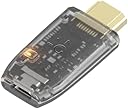
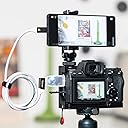
🎥 Elevate your stream game with the world’s smallest powerhouse!
The GENKI ShadowCast 2 is the smallest USB 3.2 external capture card designed for professional-grade 1080P 60Hz recording and streaming. Compatible with a wide range of devices including iPad iOS17, PS5, Xbox Series X, Mac, and Windows, it offers plug-and-play convenience without driver installation. Its compact size and dedicated iPad app make it the ultimate tool for gamers and content creators seeking seamless, high-quality video capture on the go.
| ASIN | B0DP8K5DF6 |
| AV Output | HDMI |
| Best Sellers Rank | #168 in Internal TV Tuner & Video Capture Cards |
| Brand | Human Things |
| Built-In Media | Installation Guide |
| Compatible Devices | Gaming Console, Laptop, Personal Computer |
| Customer Reviews | 4.3 out of 5 stars 207 Reviews |
| Hardware Interface | USB 3.0 |
| Item Weight | 0.1 Kilograms |
| Manufacturer | Human Things |
| Mfr Part Number | ShadowCast 2 |
| Minimum System Requirements | USB 3.0 compatible, Modern Operating System (IOS17 or later), No specific processor speed or RAM mentioned |
| Model Name | GENKI ShadowCast 2 |
| Model Number | GENKI ShadowCast 2 |
| Operating System | MacOS |
| Platform | PlayStation, Steam Deck |
| Video Capture Resolution | 1080p |
| Warranty Description | 1 year |
D**Y
Good balance of price and functionality
I'm a blind gamer, and I like to stream. So having a means of hooking my switch up to my computer is a must. With having issues with being able to do inputs, lag would also be an issue, but I've not really noticed any. If there is, it's not enough for me to notice, even with playing games that would punish for that sort of thing (Mostly Monster Hunter and Dark Souls.) If you don't have a USB C input on your computer, you'll need an adapter to be able to use it, which could be a concern. But beyond that, it works *perfectly*. The only other thing - I don't know if it's my computer or the product itself, but my laptop is convinced it's a camera and microphone and attempts to use it when I have to do zoom meetings until I change things. Minor annoyance after I realized what was happening (As it can be permanently changed in settings), but it's something you'd have to do everywhere (Like with discord too) if you have it plugged in. Otherwise, it's an amazing product. Easy to use, easy to setup. Even for the quadriplegic blind woman ^^ It's effectively just plug and play. I've never used other streaming products (I can't remember the other one that's commonly used for streaming ^^; ) So I can't really comment on how it compares, but in general, it's worked very well for my needs ^^
L**Y
Easy to use. No noticeable lag. Non functional web app, use OBS instead.
I've been using it to play my Switch through my PC and stream it with no issues. The only hitch I had was that it comes with only a USB-C cable, which my PC does not have any USB-C ports. But I swapped in my own USB 3.0 to USB-C and it works perfectly. Other than that it's just plug-and-play. No latency nor any audio issues so far. I couldn't get the web app to work, but it plays through OBS and that's all I really need it for.
E**K
I was wrong and it was user error. Product is great!
Update: Got a second one in and it works perfectly. I feel like I may have been at fault and not the initial product. The light only comes on when you're actively using OBS or some kind of capture software. I thought the power had died on my last one. I feel bad but customer service was great. The product doesn't have pass-through so it's a bit of a niche product but if you know what you're getting, then it's exactly as described. And customer service is amazing! Old: I got this and was super excited because I'll be traveling and wanted to use to for that. I powered it up and made sure it booted up and everything was good then unplugged it and put it away. Just took it out to actually use it and it won't power on. It's dead before I even got to use it for its intended purpose. Didn't last a single use. I'm hoping it was a dud and that customer service will solve the issue but, as of now, I would not recommend. If this is worked out, I will make sure to update the review.
C**A
Gets the job done
Using this with my iPad Air 5 (M1) and it does what it says on the tin. I’m using the Dongled app and can get 1920x1080 @ 60Hz on my 11” Air. Very little lag, the cable and dongle are high quality. Two complaints: 1) can’t get full-screen/full-res on my iPad, 2) no way to do passthrough charging. The first issue is just an inherent limitation of the dongle. Not a deal-breaker, but it would be nice to get the full screen real estate. The second issue can be resolved by either using a Magic Keyboard or a USB-C port splitter like what Belkin makes. I can confirm that this works fine with a Magic Keyboard for power, but there are times I’d like to be able to take just the iPad with a thinner folio case and not worry about running down the battery while using this in display mode. Aside from those two quirks, this is a great little tool and I use it all the time on my work laptop. No need to install software on your host machine (can’t, work laptop locked down by IT). Windows 11 recognizes it as a standard display, no driver issues. Just install the USB Video Capture (UVC) app of choice on your tablet and you’re good to go. The app Dongled for iPadOS works well and is free.
A**X
Amazing capture card but please read…
At this price point, it’s easily the best capture card you can buy. HOWEVER mine has died on me after 2 years of heavy use so this may not be for everyone. I used it for my Nintendo switch and the entire setup was very plug and play with great picture quality and minimal lag that’s only noticeable in fast paced games.
D**N
Unusable amount of lag
Input delay with this device is 2-3 seconds, which make the device completely useless for playing the Nintendo switch on my Windows machine. It also has constant issues such as changing all colors to green or losing audio. Very poor product and is just flat out worthless and unusable.
C**S
Simple, small and portable.
I've only used it with OBS Studio and the only issue I've found is that it has to be connected to the PC before running OBS to avoid reconfiguration. If I connect it AFTER opening OBS, it has to be set up as a new device to be recognized again. Maybe it's a "Me" issue, but it doesn't hurt to get used to having it connected prior to start using it. So far, it's been compatible with VGA to HDMI and DP to HDMI adapters with no issues and no loss in image quality.
B**O
works flawlessly
Being able to play any console on my pc makes my setup feel so much better. perfect gift for anyone that has more than one device
A**R
Switch2でも問題なく使えています。
E**N
Gut um Laptop oder Tablet als Monitor zu nutzen
Ich habe den Stick gekauft, um meinen Laptop als Monitor zu nutzen. Im Internet ist der Stick auch als eine günstige Alternative dafür bekannt. Dafür eignet er sich gut. Ich bin selbst eine Person die bei der Eingabelatenz sehr kleinlich ist, aber die Latenz hält sich gut in Grenzen. Zum richtigen und profesionellem aufnehmen von Videos würde ich jedoch andere Geräte bevorzugen.
S**F
It's okay for what is for
You can use your laptop to display your console or you could stream. It is okay.
M**.
Excelente calidad-precio
Me gustó la app Genki Arcade, reconoce a la perfección el dispositivo y, en Mac, va genial porque lo intenté con el sitio web de Genki pero no funcionó correctamente, con OBS igual tuve problemas en audio y video. La mejor forma fue descargar la app desde la App Store (no del sitio web) y me ofrece diversos formatos para grabar (hasta 4k 30 fps). En cuanto al desfase es imperceptible en juegos como Mario Bros, a mi no me ha molestado. El problema de la pantalla negra me ha pasado en dos ocasiones cuando lo he desconectado (no cada vez) y lo soluciono abriendo el sitio web de Genki Arcade, una vez que me aparece en el sitio web ya abro la app y reconoce mi nintendo, no es necesario recolectarlo. Sin duda, recomiendo mucho este dispositivo.
C**N
Doesn't work
I bought this to use with my Nintendo switch using my iPad Pro and MacBook as my screen when traveling, however the shadow cast 2 just doesn't work, just displays a black screen on both my iPad and MacBook, I have tried using the Genki Arcade app and 3rd party apps and still the same issue, It has worked after unplugging cables and plugging back in for 30 mins, then next time you come to use its a black screen with no sound, Using the same setup with another video card works flawlessly bar the input lag hence why purchasing the shadow cast 2. I personally wouldn't recommend this item and I am now stuck with it has passed my return window.
Trustpilot
1 month ago
3 weeks ago