


Desertcart purchases this item on your behalf and handles shipping, customs, and support to KSA.
🖱️ Elevate your workflow—comfort meets cutting-edge control!
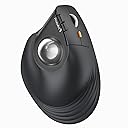
The ProtoArc Vertical Wireless Trackball Mouse combines ergonomic innovation with versatile connectivity, featuring a 62° vertical tilt for natural hand positioning, triple wireless modes to manage up to 3 devices seamlessly, and a thumb-operated trackball that reduces wrist fatigue. Rechargeable via USB-C and compatible with major OS platforms, it offers 5 adjustable DPI levels for precision tracking, making it the ultimate productivity tool for professionals seeking comfort and efficiency.


| ASIN | B0D7PWHTHK |
| Antenna Location | Office |
| Battery Average Life | 2 months |
| Best Sellers Rank | #102 in Computer Trackballs #3,096 in Computer Mice |
| Brand | ProtoArc |
| Button Quantity | 6 |
| Color | silver |
| Connectivity Technology | Bluetooth, USB |
| Customer Reviews | 4.4 out of 5 stars 65 Reviews |
| Enclosure Material | Plastic |
| Finish | Metallic |
| Hand Orientation | Right |
| Hardware Platform | PC |
| Included Components | Charging Cable, Japanese instruction manual (English language not guaranteed), USB Receiver |
| Item Weight | 160 g |
| Manufacturer | ProtoArc |
| Mfr Part Number | EM05 NL |
| Model Name | EM05 NL |
| Model Number | EM05 NL |
| Mouse Maximum Sensitivity | 1600 dots_per_inch |
| Movement Detection | Trackball |
| Movement Detection Technology | Trackball |
| Number of Batteries | 1 Lithium Ion batteries required. (included) |
| Number of Buttons | 6 |
| Operating System | iOS, macOS, Windows |
| Power Source | Battery Powered |
| Range | 10 meters |
| Style Name | US |
| Theme | Gaming |
| Unit Count | 1 Count |
B**M
Alleviates tennis elbow
If you have tennis elbow and need to relax the arm and wrist motion this is a good solution. Nothing is free and It will However move the mouse activity to your thumb and fingers which alleviates the arm but transfers it to the hand. It’s a great mouse and I’m getting a second one for the office now we are RTO - return to office
D**.
A standard mouse is better for me
I had a stroke a couple years ago so I lost some dexterity, especially on my right side. In my situation this was difficult to control so I reverted to my trusty old standard mouse which is nice. However I can tell this is well made and was easy to set up.
M**L
Perfecto
Es perfecto para todo tamaño de mano, siendo honesta tenía miedo que se me dificultara el aprenderlo a usar. Pero me adapte rápidamente. Lo único que si me parece es que al ser estático es mejor usarlo con un teclado sin números, ya que para mí que soy pequeña se me hacía incómodo.
R**3
Great
Súper genial muy bien producto
E**9
Not good for fine movements
Got this because my wrist was starting to bother me with other standard trackball model and hoped vertical style would help. This one is decently comfortable for wrist after getting used to using thumb with track ball and wrist pain eased up. The fine movements are terribly frustrating though. I’ve tried cleaning out any fuzz and cleaning the track ball but it doesn’t move very smoothly when needing to be precise such as checking a small box or choosing options. Beyond frustrated with this thing. I can’t recommend based on this.
C**W
Comfortable mouse alternative
I started re-discovering the benefits of trackballs in general from the standpoint of working with laptops while sitting on the couch, and it's difficult to get most standard computer mice to track well on couch arms or cushions. Trackballs eliminate any of that concern, as all of their motion tracking is self-contained, so you can use them anywhere. This ergonomic trackball definitely looks a bit funny, initially. But, over the course of using it for a few weeks, I have found it to be quite comfortable. The grip fits "like a glove," and it's nice not needing to make wrist movements to move the cursor. The only detriment I've found from a comfort level is the scroll wheel. With the shape of this trackball, the natural grip location has the index finger comfortably over the left mouse button. However, the index finger is far enough away from the scroll wheel that it creates an uncomfortable stretch of the index finger to do scrolling, so that I've found myself using the scroll wheel more with my middle finger, as that finger is closer to the wheel, but that definitely feels unnatural, as I've otherwise always done scrolling with my index finger. The unit certainly is as "plug and play" as it gets. It's not specifically advertised as such, but it works flawlessly with Linux, even with the back and forward buttons. I do wish that the manufacturer could have labeled the working channels as "USB" versus the Bluetooth 1 and 2 connections, instead of just "1,2,3" where #1 is the USB dongle. But, once it's working, that's not a thing that really gets thought about much, but it could make it awkward if you're switching devices frequently. I do like this product, and hopefully a newer model will be able to position the scroll wheel closer to where the index finger naturally sits.
B**.
Comfortable, quiet alternative to flailing your arm around all day
I use a gaming mouse on a daily basis for computer work but wanted to try a more ergonomic alternative to see if it would help improve my tennis elbow symptoms. I don't have much experience with a trackball, but I can definitely see how a mouse like this could be more comfortable long-term. Compared to some alternatives out there (like the Logitech ERGO M575), I think the EM05 NL stands its ground. The surface of the mouse is like a lightly-textured "soft touch" matte plastic that feels premium and resists fingerprints. I haven't owned this long enough to see if it develops oil spots from your fingers, but it feels nicer than I expected. The sparkly silver trackball is light, rolls smoothly, and can be popped out for cleaning. The entire mouse is incredibly quiet. The main mouse button clicks are almost completely silent but still have enough of a tactile press to them that they don't feel mushy or overly dampened. The forward and back buttons are a little louder but don't have the same loud microswitch-y sound as other mice. The scroll wheel is metal with distinct steps and feels well-controlled--it's not too tight, not too loose, and doesn't rattle around when spinning quickly. I've used many mice with irritating, sometimes squeaky scroll wheels, so this is a pleasant surprise! There are no left or right tilt clicks on the scroll wheel for horizontal scrubbing which may disappoint some people. You can engage the middle mouse click by either pressing inward like normal or by pressing downward (which would normally be the right tilt click)--I actually think this is for the best with a vertical configuration because pressing inward physically nudges the mouse to your left if you're not bracing it on the other side with your thumb. This seems like it could suit any range of hand sizes as long as your thumb can manipulate the trackball without too much trouble. My hands are on the smaller side for a male, but I don't find myself having difficulties reaching what I need or experiencing any major comfort drawbacks. My thumb is NOT used to a trackball, however, so you should probably expect some soreness during an initial adjustment period. Bluetooth and 2.4ghz have been fine with no dropouts that I've noticed on my PC. There is a button to toggle between three "channels" underneath the mouse: 1 is 2.4ghz, while 2 and 3 are two different Bluetooth connections. I would like to point out that the polling rate is probably not suitable for gaming. On Bluetooth, the polling rate appears to be 125hz, and the 2.4ghz connection via the included dongle seems to max out at 250hz. I find the Bluetooth connection to be perfectly adequate for productivity. Considering that this is a stationary device, my primary disappointment is that there's no dedicated wired mode. The USB-C port is strictly for charging, so if you're experiencing any connection troubles and can't find a solution, there will be no wired option as a last resort. Additionally, the battery here is an internal rechargeable battery which could be a pro or a con, so it's up to you to decide if that's a dealbreaker. As far as the trackball experience goes, I think it's something you should try if you're curious! It does feel a little alien, and I still find myself needing an extra moment to make precise adjustments due to overshooting my target, but I'm also left-handed and think my right thumb probably isn't as dexterous as my left. Not everything needs to be perfect for everything, though: I use a pen stylus for drawing, but I wouldn't want to click on files and folders all day with that thing like a mouse. The beauty of a wireless device like this is you can just tuck it away somewhere and pull it out when you feel like it. I'm having fun, and my hand is definitely more relaxed than my usual death grip!
S**W
Nice trackball mouse - thumb takes some time getting used to the movement
The ProtoArc Vertical Wireless Trackball Mouse (EM05 NL) is a fantastic ergonomic solution for anyone spending long hours at their computer. Its vertical design is specifically crafted to reduce wrist strain, making it an excellent choice if you're looking for a more natural hand position during use. This trackball mouse is not only comfortable but also operates very smoothly. The thumb-controlled trackball moves with precision, which is ideal for tasks that require fine-tuned control, whether it's graphic design, gaming, or everyday browsing. One of the standout features of this mouse is its ability to connect to up to three devices at once via Bluetooth. This is perfect if you need to switch between multiple devices, such as a laptop, iPad, and desktop. The transition between devices is seamless, and it makes multitasking that much easier. It’s compatible with a wide range of systems, including iPads, Macs, Windows PCs, and more, so you’re covered no matter what devices you’re working with. The rechargeable battery is a major plus as well. Not having to rely on disposable batteries saves money in the long run, and the battery life seems to hold up well, even with extended daily use. The mouse itself feels solid, with a sleek silver finish that gives it a modern look. The buttons and scroll wheel are responsive, and the customizable options allow you to adjust the sensitivity and functionality to suit your preferences. The only thing that might take a little getting used to is the vertical layout if you've never used one before, but after a few days, it feels completely natural. Overall, this trackball mouse is a well-thought-out device. It provides comfort, precision, and versatility, all wrapped up in a stylish package. If you’re looking for an ergonomic mouse with trackball functionality that can handle multiple device connections, this one is a solid choice!
G**L
nice vertical trackball mouse. 2 Bluetooth connections and a usb dongle connection.
- This mouse is quite different as it uses a trackball to mouse the mouse cursor, something I have not used for over 2 decades. It brings back some memories when using the trackball. - To move the mouse, you would use your thumb to move the trackball. It may take time to get used to. The advantage of this mouse is that the mouse is stationary, and it’s perfect for places where you have very limited space with your mouse to move around. Also you could literally put this mouse on any surface and still be able to use the mouse as it moves with the trackball and not the optical/laser on the bottom like regular mouse design. - ERGONOMIC: This new mouse from ProtoArc is even better than the original ones that I am currently using. Now the hand feels even more natural when you're using it. If you're a first time user, it may take sometime to get use to, but once you're used to it, it's quite comfortable compare to using regular mouse, especially when you're on the computer for hours each session. - CONNECTION: There are 3 modes on this mouse you can select from. 2 Bluetooth connections and 1 with a usb dongle. The dongle is tugged nicely under the mouse and so if not in use you won’t lose it. Good design. With 2 bluetooth connections, you could connect this mouse to 2 devices that use bluetooth, and just press the Mode button on the bottom to switch to the connection you like. Very convenient and simple to operate. - Overall a very nice built trackball mouse. Holding it is very comfortable and it contours to your right hand. However, if you’re using the mouse a lot in your work like autocad, photoshop, etc, then I would suggest getting an ergonomic mouse with optical or laser on the bottom because you would have to move your thumb a lot and in the long run it’s not beneficial to your thumb at all. But for regular office work, or normal use I’d recommend giving this a try.
A**R
Convenient Trackball Mouse!
After dealing with wrist strain from regular mice, I decided to switch to a vertical mouse and found this ProtoArc vertical trackball mouse. I work long hours on my computer, so an ergonomic option seemed like the right move. Right out of the box, the vertical design felt almost natural in my hand. The trackball was smooth with easy navigation as I didn't need to move my arm much. I was also impressed with the ability to connect it to three different devices by changing the channel which you can do by pressing a button on the bottom of the mouse. I didn't need to however, as I just used the dongle in my KVM switch to use the mouse across 2 devices without switching channels. I also really like the fact that it doesn't need batteries and it can be recharged through a regular USB-C cable which came included, and I can tell you, the cable appears to be of very high quality. One recommendation, if you feel that the mouse moves too fast, you can just go to mouse settings on Windows and adjust the mouse pointer speed, I found a speed of 2 or 3 produces better navigation. On the downside, I found the thumb placement for the trackball a bit awkward at first (it's quite large compared to a regular mouse), and it took me some time to get used to it. It’s not a dealbreaker, but there’s definitely a learning curve. I just wish it was slightly towards the left so that my arm doesn't need to be completely vertical, but I'm not a guru in ergonomics, so I'm not sure if this would impact the benefits of a vertical mouse. Overall, the ProtoArc mouse could potentially be more comfortable, but I still need to use it for a few more days to get used to it and adjust to the trackball position.
M**C
Easy to start with dongle and bluetooth, takes time to learn movement
Been having some wrist pain lately and I'm guessing it's because of too much time on the computer. I decided to try these trackball having little experience with it. The ProtoArc was definitely simple to get started with its bluetooth and dongle option. Just plug and play. It can support up to 3 stations. Battery was full when I received it and I haven't had a need to charge it yet after a week. It sits stable on the table with a nice grip as I try to move it from time to time from muscle memory. The ergonomic design is definitely noticeable since my hand sits sideways which feels more natural. Plenty of buttons to choose from but I'm comfortable with just the basics. Mouse is good design but I do wish the ball was more chrome than "stone" looking. Or they could of just painted it. It just looks out of place. For anyone who hasn't used a trackball before, it is definitely a steep learning curve. I have 2 mouses connected at the moment until I'm comfortable enough to switch over to the trackball. I find that I'm way too slow with it and even with the unlimited movement since it's a ball, I still find it difficult to pinpoint it to where I want it. For any tasks that requires speed, I use my current mouse. But I "rest" my hand with the trackball.
M**.
ProtoArc vertical trackball: Connection issues; sticky trackball can’t do small movements
Comes with a braided 1 m (3.3 ft) USB 2.0 Type C male to Type A male cable having a branded Velcro strap, as well as the user’s manual (EN/DE/FR/IT/ES/ZH). This mouse is very clearly right-handed only. The base, along with its slot for the USB RF receiver it can be used with, has rubberised feet covering about 25% of its area, so I’m not worried about it moving as I click: it stays in place very well. The trackball can be cleaned by pushing it out from the bottom, and there are no rollers to clean along with it (thankfully). Its sparkle pattern helps with tracking, which it does very well. Though I would recommend playing with the pointer acceleration setting to make the most out of it, depending on your fine motor control on your hand. The trackball is made of somewhat “sticky” high-friction material, which means it’s difficult to start rolling, but once it’s started, it goes fast. It’s impossible to make small, precise movements with it unless changing the DPI setting for the precise movement and back, and in my experience even altering the pointer precision setting does not work so well. The DPI button also cannot be used during a drag (while a mouse button is held), but an advantage of a trackball is that you never have to move the whole mouse over if you run out of space while moving or dragging. Ultimately, I do often need to make precise movements to select text, and trying so hard to make them gave me more strain and pain than the strain that could be removed by the mouse being vertical. I thought maybe adding my natural skin oil to the trackball would make it glide a bit more, but it didn’t. BATTERY: From a full charge, it lasts over 9 days. It does not report battery status over Bluetooth, however, so you never know when it may run out. On Bluetooth, for 30 seconds to 1 minute every so often, the mouse stops responding completely while still staying connected, then comes back as if nothing had happened. When you need to click on something, like a join call button, this is extremely frustrating. Of course, you can have a wired mouse or the MouseKeys accessibility feature as a backup, but then what’s the point of having a wireless one?
T**F
Too big for my hand, well made, but not for me
It seems odd to give something 5 stars, but also be disappointed in it. The mouse itself does everything it says it will, and seems well made. This is my first vertical mouse, but I do find it a little large for my hand. As a 5’6”, 165 lbs right handed male with a 7” palm to middle finger reach, it just didn’t fit my hand well. Moving the mouse was simple enough - although I haven’t mastered the same detail as with a conventional mouse. I found the scroll wheel especially difficult for me, seemingly designed to use my middle finger. I do a fair amount of scrolling at work. I also found dragging items more challenging and had trouble holding down the left button while scrolling - or specifically getting to that point. I found I got “micro movements” when I lifted my finger on/off the mousewheel. If it was still on the file I wanted, I’d then press and hold the left button and resume scrolling to its new location. I did appreciate the DPI adjustment function - for when I need to be more precise. I haven’t given up on it, but a month in, I find I reach for my conventional mouse constantly, and it’s only when I’m trying to “train” myself that I’ll use the other one.
Trustpilot
1 month ago
2 weeks ago