
Desertcart purchases this item on your behalf and handles shipping, customs, and support to KSA.
⌨️ Elevate your mobile workspace with power, style, and seamless multitasking!
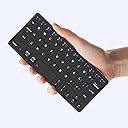
The Kenkor K08 Universal Wireless Mini Keyboard is a sleek, foldable Bluetooth keyboard designed for professionals on the move. Compatible across Android, iOS, and Windows devices, it features a rechargeable battery lasting over 80 hours, dual-device connectivity with instant switching, and an adjustable stand encased in durable PU leather. Compact and lightweight, it’s the ultimate travel companion for seamless productivity anywhere.
| ASIN | B0D2XYLZ7X |
| Additional Features | Foldable, Integrated Stand, Lightweight, Portable, Rechargeable |
| Antenna Location | Connect Bluetooth: Press "Fn" + "1" or "2" for 3 seconds to enter pairing mode, Esc function: Press "Fn" + space bar, Lock/Unlock the keyboard: Press "Fn" + Caps Lock, Shortcut Keys: Press "Fn" + shortcut keys,Apostrophe:FN" + ' |
| Best Sellers Rank | #138 in Computer Keyboards |
| Brand | Kenkor |
| Built-In Media | USB Cable, User Manual |
| Button Quantity | 78 |
| Color | Black |
| Compatible Amazon Tablet Models | Amazon Fire 7 5th Generation, Amazon Fire HD 10 5th Generation, Amazon Fire HD 8 5th Generation |
| Compatible Devices | Android,Windows and iOS,iPad,Phone,Tablet or Laptop, Samsung Galaxy Z Fold 8 Ultra/Z Fold 8 Wide/7/6/5/4 Series |
| Compatible Operating System Family | Android, Windows |
| Compatible Tablet Computer Models | Apple iPad (10th generation) |
| Connectivity Technology | Bluetooth |
| Customer Reviews | 4.3 4.3 out of 5 stars (246) |
| Enclosure Material | Acrylonitrile Butadiene Styrene |
| Hand Orientation | Ambidextrous |
| Item Dimensions L x W x H | 7.68"L x 3.34"W x 0.6"H |
| Item Highlight | Dual-Device Computer Keyboards Rechargeable Travel Bluetooth Keyboard for iPad/iPhone/Tablet/Laptop&Android/Windows/iOS,Black |
| Keyboard Description | Three steps to connect the mini keyboard ①Turn on the power of the keyboard from [OFF-ON] ,Press “FN”+“1”or “2” for three seconds,until the indicator light between flashes frequently ②Then turn on the buletooth of the device you want to connect ③Find the “wireless keyboard” on the device and connect Note: It will automatically connect after connecting once.If it has not been connected for too long… |
| Keyboard Layout | QWERTY |
| Manufacturer | Kenkor |
| Minimum Required Operating System Version | Android 3.0 Honeycomb, Windows 10, iOS 10 |
| Model Name | K08 |
| Model Number | K08 |
| Number of Batteries Required | 1 |
| Number of Items | 1 |
| Number of Keys | 58 |
| Number of Packs | 1 |
| Number of Sections | 1 |
| Power Source | Battery Powered |
| Style Name | Classic |
| Switch Type | Linear |
| Theme | Minimalist |
| Unit Count | 1 Count |
| Warranty Description | 1 Year Warranty |
Trustpilot
2 weeks ago
3 weeks ago