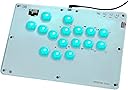




Haute42 T16-Crystal Leverless Arcade Stick, 16 Key Fighting Controller
Product ID: 644180766
Desertcart purchases this item on your behalf and handles shipping, customs, and support to KSA.
desertcart.com: Haute42 T16-Crystal Leverless Arcade Stick, 16 Key Fighting Controller | Custom RGB & Turbo Functions & Hot Swap Supported, Compatible with PC/Ps3/Ps4/Switch/Steam : Video Games Review: Fast - Amazing x the price Review: Haute T16 Review! - After years of playing on an arcade stick—specifically with Sanwa parts—I decided to give the Haute T16 Level Less Controller a try, and the transition has been both challenging and incredibly rewarding. If you're coming from a traditional arcade stick background like I am, be prepared for a learning curve. However, the payoff is well worth it, especially for high-execution games like Marvel vs. Capcom 2 and Street Fighter 6. The T16 design encourages precise inputs, and over time, it’s significantly improved my execution and timing. I found myself hitting combos more reliably, with less fatigue on my hands, thanks to the controller's ergonomic layout. Its unique button design took a few days to adjust to, but once I did, I noticed better control over my movements and faster reactions. For competitive players looking to refine their skills, the Haute T16 is a fantastic investment. It may take time to adapt, but once you do, it’s hard to go back. The benefits to execution and timing make it a standout choice for fighting game enthusiasts who are serious about performance.

J**R
Fast
Amazing x the price
M**P
Haute T16 Review!
After years of playing on an arcade stick—specifically with Sanwa parts—I decided to give the Haute T16 Level Less Controller a try, and the transition has been both challenging and incredibly rewarding. If you're coming from a traditional arcade stick background like I am, be prepared for a learning curve. However, the payoff is well worth it, especially for high-execution games like Marvel vs. Capcom 2 and Street Fighter 6. The T16 design encourages precise inputs, and over time, it’s significantly improved my execution and timing. I found myself hitting combos more reliably, with less fatigue on my hands, thanks to the controller's ergonomic layout. Its unique button design took a few days to adjust to, but once I did, I noticed better control over my movements and faster reactions. For competitive players looking to refine their skills, the Haute T16 is a fantastic investment. It may take time to adapt, but once you do, it’s hard to go back. The benefits to execution and timing make it a standout choice for fighting game enthusiasts who are serious about performance.
V**A
Best Leverless for the price
These haute 42 controllers are amazing for the price that you pay for them. I mostly got mine to try out leverless and to mess around with. It's tricky to get movement down with this controller, but I can definetly seeing it being extremely acurate with movement inputs given enough time. The gp2040ce software was super easy to configure and extremly in depth. The keyswitches felt nice, and are fairly easy to swap with other low profile offerings. Not having ps5 support out of the box does suck, but you can buy a cheap dongle to fix that issue. I also wish that it came with non slip padding on the bottom, but for the price I can't complain too much, and again you can buy some elsewhere if you need it. If you're on the fence about trying a leverless pad, any of the haute 42 boards are the way to go. Special props go to these boards forcing competitors to lower their prices to compete.
K**A
This is the Haute Pro T16 Series Controller
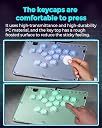
This is my first leverless controller. It took me a little while to get it setup for my PC. I first watched a video on YouTube on how to update the bios and set up the keys. To start, I held in the home button, as I plugged in the USB-C that it came with to my PC. It then booted up to the config mode. Next, I typed 192.168.7.1 into a web browser. That brought me to the web Configurator. The Home Screen showed me that it came with latest firmware v0.7.9 Installed. So there was no need to update it. Next I went to Configuration>Pin Mapping. I then changed the pins as suggested in the video. Then I clicked save on the bottom. Then hit the Reboot button on the top right. Then closed the browser window. The first game I tried with this controller is Street Fighter 6. Now I don't want to ever go back to keyboard. The button layout feels more comfortable than a keyboard. The buttons themselves are very responsive. I can hit these buttons quicker. Especially the double and multi taps. I think this has a clear advantage, just from one gaming session. It feels arcade quality, with the thick plexiglass board, and rounded polished corners. It has some heft and durability to it, that I wasn't expecting, at this price point. I'm a fan of the RGB Lighting. This can be customized to however you want it. The default is just it changing colors. You can also customize the board, with custom skins. You can get templates and all the help you can need on the Haute42 Discord. Overall, my 1st impression is very positive.
P**G
This modern arcade controller is a must try for all gamers
The Sehawei Haute42 is a modern arcade controller that has gained significant popularity among gamers, particularly for fighting games. Its innovative design and customizable features make it a compelling option for enthusiasts seeking a unique and immersive gaming experience. Versatility and Compatibility: The controller offers five distinct modes: X-input, Switch, PS3/D-input, PS4, and Keyboard. This versatility allows for seamless compatibility with a wide range of devices, including Windows 10 or later, Steam Deck, PS3, PS4, PS5 (with configuration), Switch, Raspberry Pi, MiSTer/Android, Linux, iPadOS, and macOS. Mechanical Switches and Customization: Equipped with Kailh MX stemmed low profile linear switches, the Sehawei Haute42 Arcade Stick provides a satisfying tactile experience with responsive keystrokes. The controller's customizable nature allows for easy replacement of keycaps, buttons, and even switches, enabling users to personalize their gaming setup. User Interface and Features: A small screen on the top left corner displays the current mode and offers opportunities for customization with DIY digital art. The top right section features essential buttons, including start, select, back, home, share, PS, and more, ensuring a familiar experience when transitioning between consoles. Performance and Gaming Experience: The Sehawei Haute42 has significantly enhanced my gaming experience, particularly in fighting games and arcade shooters. Its precise controls and responsive switches have elevated my performance and enjoyment. While primarily designed for fighting games, the controller's versatility extends to other genres as well. Additional Features and Accessories: The controller includes a high-quality USB-A to USB-C cable with a right-angled connector, a switch puller, replacement buttons and switches, anti-slip pads, and a user manual. These accessories provide convenience and ensure long-lasting durability. Conclusion: The Sehawei Haute42 is a remarkable arcade controller that delivers exceptional performance, customization options, and compatibility. Its innovative design and high-quality components make it a must-have for gamers seeking a unique and immersive gaming experience.
L**A
Read and watch video.
This stick is cool. You can't press up and down at the same time which sucks. I can press down and charge while pressing up to do a flash kick with my snackbox micro so it's a little better but it's also $300. The good thing about this you get alot for a small amount of money. It's great A 100% buy
P**E
Awesome controller for fighting games (but not only)
The T16 comes in a fairly basic package - just a cardboard box and a padded envelope, along with a few accessories: a USB C to A cable, rubber feet, color replacement caps for the secondary switches, a switch puller, and a spare switch. The assembly itself is also relatively simple, with a PCB sandwiched using acrylic sheets and machine screws. There are 5 secondary small buttons for actions such as Start and Select, a small OLED screen, and the 16 main buttons, which use Kailh MX stemmed low profile linear switches. The board was detected out of the box with no issues on Windows as an xbox compatible controller, with all the buttons working as expected in the games that I tried. All the main buttons are RGB, set to a slow rainbow pattern initially. Switches feel great (though different from traditional arcade ones), and the short travel is well suited to fighting games. The first neat thing that you can do with this type of assembly is that you can disassemble it and insert your own printed art under the first acrylic sheet. There are templates available on the manufacturer's social media, and the process significantly improves the look of the board to your own tastes. The second is of course the customizability and programmability of the firmware. This runs GP2040-CE, an open source firmware designed for such boards. There's plenty of guides and instructions out there, so I won't go too much into it, but essentially it lets you do nearly anything you could ever need as far as programming the firmware and customizing the buttons. For example, you could make it work like a Windows macro pad for functions completely unrelated to fighting games by sending regular keyboard signals. And of course all that is at minimal, sub 1 ms latency. So despite the relatively basic initial impression, this is an excellent highly customizable input device well worth the asking price. The only suggestion that I would have is for the manufacturer to also offer different profiles (flat or concave) of keycaps. Highly recommended.
T**I
Sick Fighting Game Arcade Style Input Controller
This "controller" is sick! Customizable layouts, RGB backlights, extensive compatibility, and feels really nice! Immediately tested this on a few games. A fighting game and a Metroidvania title. Getting it working on Steam was a breeze, especially since it is set to that mode out of the box. PS users may have a few sore spots. The instructions mention needing to perform a few additional steps to keep this controller from disconnecting, so I can see a valid argument for a lower score if I was a PS user. I was able to use any USBC cable to my PC, although it comes with a (not too long) cable. It also has a tool to remove buttons, a spare button switch, and colored caps for the top function and start buttons. The display indicator is also a welcomed feature. Provides clear feedback of what functions you may be setting up as well as a button press indicator. There are pretty clear instructions to quickly change the lighting effects as well as a way to change the UDLR behavior. All this in a stylish form and at a competitive price for the value. Cheaper than many competitors (most likely due to the less than mainstream manufacturer/brand) but with many more features than most!
D**C
Better at fighting games with this leverless.
Great first leverless. Can be customized. Additional software to calibrate easy to navigate. No complaints.
Trustpilot
3 weeks ago
2 months ago