🚀 Elevate your desktop WiFi game with ultra-fast, ultra-reliable 6E connectivity!
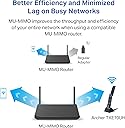
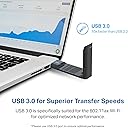
The TP-Link Archer TXE70UH is a cutting-edge tri-band WiFi 6E USB adapter designed for Windows 11/10 desktops, delivering ultra-low latency and speeds up to 2.4 Gbps. Featuring USB 3.0 for rapid data transfer, advanced MU-MIMO and OFDMA technologies for efficient multi-device connectivity, and enhanced WPA3 security, it ensures a seamless, secure, and high-performance wireless experience ideal for gamers, streamers, and professionals demanding the best.


| ASIN | B0CV4M2D36 |
| Best Sellers Rank | #55,584 in Computers ( See Top 100 in Computers ) #373 in USB Computer Network Adapters |
| Brand | TP-Link |
| Built-In Media | AXE5400 Wi-Fi 6E High Gain Wireless USB Adapter Archer TXE70UH, Quick Installation Guide, USB 3. |
| Color | Black |
| Colour | Black |
| Compatible Devices | Desktop, Laptop |
| Compatible Operating System Family | Windows |
| Compatible devices | Desktop, Laptop |
| Customer Reviews | 3.9 out of 5 stars 207 Reviews |
| Data Link Protocol | USB |
| Data Transfer Rate | 5400 Megabits Per Second |
| Data link protocol | USB |
| Hardware Interface | USB |
| Hardware interface | USB |
| Item Dimensions L x W x H | 11.2L x 3W x 1.5H centimeters |
| Item Weight | 0.07 Pounds |
| Manufacturer | TP-Link |
| Mfr Part Number | Archer TXE70UH |
| Minimum Required Operating System Version | Windows 11 |
| Model Number | Archer TXE70UH |
| Number of Items | 1 |
| Number of Packs | 1 |
| Product dimensions | 11.2L x 3W x 1.5H centimeters |
| UPC | 840030706158 |
| Unit Count | 1.0 Count |
P**E
From 12 Mbps to over 800 Mbps
I have the Google Fiber 1 Gig plan, but I don't use their provided router. Instead, I use my own ASUS BT10 Wi-Fi 7 tri-band router and nodes to create a home mesh network. I have a Dell Inspiron desktop computer in the same room as the router. Because the computer is on the other side of the room as the router, the computer is wirelessly connected to the router. However, they are in direct line-of-sight of each other. The Dell came with a built-in Qualcomm Wi-Fi adapter. When I ran a speed test using it, the results were disappointing: 12.0 Mbps download, 11.4 Mbps upload, 3 ms ping, and 6 ms jitter. After installing the TP-Link Archer TXE70UH AXE5400 and connecting it to my 5 GHz network, I saw an immediate jump to a 279.4 Mbps download, 243.3 Mbps upload, 2 ms ping, and 1 ms jitter. I then decided to connect the Archer to my 6 GHz network. At first, it wouldn't connect. The good news is the included instructions advise downloading the latest driver if this happens. The only hiccup is that the required driver depends on your specific hardware version, which the web instructions say will be labeled with a "V:" or "Ver:" number on the unit or packaging. Mine had neither. It turns out the number I needed was labeled "US/". The really good news is that once I updated the driver, rebooted, and connected to my 6 GHz network, my speeds skyrocketed to 824.3 Mbps download, 827.5 Mbps upload, 3 ms ping and 1 ms jitter. I highly recommend this product for anyone with a fast internet plan and a router capable of taking full advantage of these speeds.
G**O
No sirve para Gaming
No sirve para gaming, incluso siguiendo tutoriales en internet para optimizar su uso, hay picos de latencia y perdida de paquetes, por lo cual jugar juegos competetivos se torna imposible, probado en un puerto usb 3.0 cómo es debido en un equipo moderno.
J**Z
Función intermitente
Se desconecta cada 3 segundos
C**N
Works great , better than a generic wifi adapter.
Works great , an improvement on my generic wifi adapter. Wasn't plug in play for me . I had to download a driver. I can finally play online games
K**Y
Not Worth It
I bought the TP Link AXE5400 WiFi 6E USB Adapter for my desktop hoping it would improve my connection, especially for gaming, but my experience was honestly the opposite of what I expected. Installation was simple and it showed up on my Windows 11 PC without any issues. It connected quickly to my network and at first glance everything looked fine. Speeds seemed okay during basic browsing and streaming, so I thought it was going to be a solid upgrade from my previous setup. The problem started when I actually used it for gaming. Instead of improving my connection, it made things less stable. I noticed more lag spikes and inconsistent ping compared to my normal connection. Games that usually ran smoothly started having random stutters and delays that were not there before. I tried moving the adapter to different USB ports and adjusting placement to get a better signal, but it did not really solve the issue. Even when the signal showed full bars, the performance during gameplay still felt worse than expected. For regular internet use like watching videos or browsing, it was acceptable. But for anything that needs a stable low latency connection, it did not perform well in my case. That was the main reason I bought it, so it was disappointing. Build quality seems fine and the device itself is easy to set up, but performance is what matters most for a product like this and that is where it fell short for me. Overall, it did not improve my internet experience and actually made gaming worse compared to my previous setup. It might work better for others depending on their environment, but for my desktop it was not a good upgrade.
Trustpilot
2 weeks ago
2 days ago