Buy anything from 5,000+ international stores. One checkout price. No surprise fees. Join 2M+ shoppers on Desertcart.
Desertcart purchases this item on your behalf and handles shipping, customs, and support to KSA.
🚀 Elevate your desktop game with triple 8K power and seamless control!
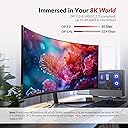
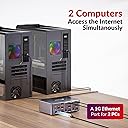
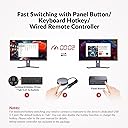
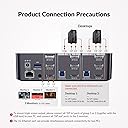
The AV Access iDock D23 KVM Switch is a desktop-only powerhouse enabling 3 DisplayPort monitors to connect 2 computers with blazing-fast 8K@60Hz and 4K@165/144Hz support. Featuring DisplayPort 2.0, 1G Ethernet, and a 12-in-1 docking station, it maximizes productivity and gaming performance with ultra-smooth visuals and instant switching. Designed for professionals craving multi-device mastery and flawless connectivity.


| ASIN | B0CRDQW4GT |
| Best Sellers Rank | #14 in KVM Switches |
| Brand | v AV Access |
| Built-In Media | KVM Dockx1, USB Type-A to Type-B Cablex2, DP 1.4 Cablex6, Power Adapterx1 |
| Color | 8K 3 monitors 2 desktops(iDock D23) |
| Compatible Devices | Desktops with 3 DisplayPort outputs |
| Customer Reviews | 4.0 out of 5 stars 117 Reviews |
| Hardware Interface | USB 3.0 Type C |
| Input Voltage | 12 Volts (DC) |
| Manufacturer | AV Access |
| Mfr Part Number | iDock D23 |
| Model Number | iDock-D23-NA |
| Number of Ports | 7 |
| Total USB Ports | 6 |
| Total Usb Ports | 6 |
| Unit Count | 1.0 Count |
| Wattage | 36 |
L**O
Solid improvement over previous model
I’ve been using this KVM for a a couple of weeks now multiplexing between 2 monitors and my Windows PC and my Macbook Pro, and overall I’m pretty happy with it. Here’s a quick breakdown of my experience so far: Form Factor: - The design is sleek and modern, which I appreciate. It actually looks nice on my desk, unlike a lot of competitor brands out there. At about twice the height of my previous AVAccess KVM (visible on the bottom left in the picture), it’s a little too tall to fit under my desk stand though — I wish it were just a bit shorter. - One minor annoyance is with the supplied cables — unplugging the middle or bottom cables is tricky. You have to press a release lock on top of the cable head, but it’s hard to do that without first unplugging the top cables. Features & Performance: - Switching inputs is fast — faster than my old AVAccess KVM, which is great. There's no flickering so far, which was an issue with some other KVMs I’ve tried - I’m a fan of all the extra ports: headphone jack, SD card slot, USB ports on the back for a webcam or monitor hub. My old KVM didn’t have a rear USB port, so I had to awkwardly route my webcam wire around the unit. This is a small but really nice improvement for wire management. - One feature I miss: a power button. It’d be nice to have the option to turn it off without unplugging it. - I haven't had it for very long yet, so time will tell how reliable it is. If it breaks down before the warranty is over, I will definitely update my review with my experience. Compatibility: - It’s DisplayPort (DP) only if you’re using a laptop, which is a bit of a pain for MacBook users like me. I had to buy some Thunderbolt-to-DP cables. I get why DP was chosen, but it would’ve been nice if 2-3 adapters were included in the box. - My Apple keyboard works fine in every USB slot except the dedicated USB 1.1 keyboard slot. It worked fine in the USB 1.1 port on my older AVAccess KVM. Sometimes I have to play USB port roulette a few times to get it to connect properly. - Occasionally, it seems to interfere with my WiFi. Even though I’m not using the Ethernet port, I’ve had to restart my computer or switch inputs back and forth to get my connection back. - One more downgrade from the previous model: no dedicated mic input port this time. Not a dealbreaker, but something I noticed. Overall, this is a really solid KVM switch with a lot of thoughtful improvements over my previous model.
R**R
Excellent Customer Service
I purchased the AV Access iDock D23 8K KVM Switch Docking Station, which offers impressive specs at a competitive price. While the initial unit had issues, the customer service was outstanding. They quickly sent replacements and even included an extra item as an apology. This KVM switch provides features like DisplayPort 2.0, 1G Ethernet, and support for high refresh rates, making it versatile for both gaming and home office setups. It's a great value compared to other KVMs on the market. The 5-star rating is primarily for the exceptional customer service. If the replacement resolves the initial issues, this product could easily earn 5 stars on its own merits. Overall, I'm satisfied with my purchase and impressed by AV Access's 3 Year Free replacement policy and their commitment to customer satisfaction.
M**E
Great with USB extension for mouse and keyboard receivers
Works great BUT if you are using wireless mouse and keyboard the kvm will either need to be very close to your keyboard and mouse or you will need to get a USB extension to have the wireless receiver close keyboard and mouse. Otherwise you will have random disconnections from your keyboard and mouse.
S**S
8k output to 3 monitors (can be TV via dp to hdmi cables) can take hdmi to dp input.
8k output to 3 monitors (can be TV via dp to hdmi cables) can take hdmi to dp input. Needed a solid performing KVM to manage my 3 monitors as well as sharing a 1. Wacom Tablet/Monitor, and 2. Webcam, and it has an SD card reader, as well as power connection for USB-C; 4 usb connections (a) in front, including the ability to connect to usb based audio output - aka I'm using a X3 SoundBlaster, etc. and it has an easy Speaker/Mic m3.5 jack in front as well, allowing easy sharing of gear. I've had the unit now for over 3 weeks, and it does as advertised - allows 3 channels dp to push 8k video. If you want to have solid 4k performance, 60hz, then this is your tool - I knew it would be trustworthy having used other AV Access gear for over a year. Since I can use HDMI - DP in, as well as DP-HDMI out, it's future proofed and will work with your equipment. Yes, I could use the Nvidia configs through it, as well as Microsoft's multi-display config. The usb-c let's you use it as a port replicator supplying power as well as allowing use of the Ethernet Port in the back of the KVM. In short, it allows you to connect everything you use in common between two PC systems, with 4 usb c ports, and a USB-C for power - I connected a USB-C hub to it, then connected another trackball, and yeap it works. Setup - secrets - setup for 1 PC first. Outbound, Make sure you connect from bottom to top for monitors so they show up in the order you want - Primary, then 2nd, and 3rd. Then connect the 1st PC, and setup monitors on PC as needed, and all the devices are working as desired. After you are happy, then setup 2nd PC. (Trying to setup more than 1 thing at a time ;) might lead to a bit of entirely user generated confusion. ) AV Access makes good stuff, and this unit is a good example of price, features, and ease of use which is why I picked them after many hours of research, and the willingness to try different things, and finding it a great way to physically connect devices (yes, Bluetooth could work for some things, however, sharing a Wacom tablet/HDMI connection makes this the only way) Since storage, etc. any USB device can be shared, you will find a number of things eased. Enjoy! la salida de 8K a 3 monitores (puede ser TV a través de cables dp a hdmi) puede llevar la entrada hdmi a dp. Necesitaba un KVM sólido para administrar mis 3 monitores y compartir un 1. Wacom Tablet/Monitor, y 2. Webcam, y tiene un lector de tarjetas SD, así como conexión de alimentación para USB-C; 4 conexiones usb (a) en la parte delantera, incluida la capacidad de conectarse a la salida de audio basada en usb, también conocido como X3 SoundBlaster, etc., y también tiene un conector Speaker/Mic m3.5 en la parte delantera, lo que permite compartir fácilmente el equipo. He tenido la unidad ahora durante más de 3 semanas, y lo hace como se anuncia: permite que 3 canales dp impulsen el video 8k. Si desea tener un rendimiento sólido de 4k, 60hz, entonces esta es su herramienta: sabía que sería confiable haber usado otro equipo AV Access durante más de un año. Como puedo usar HDMI - DP in, así como DP-HDMI out, está probado en el futuro y funcionará con su equipo. Sí, podría usar las configuraciones de Nvidia a través de él, así como la configuración de pantalla múltiple de Microsoft. El usb-c le permite usarlo como un replicador de puertos que suministra energía y permite el uso del puerto Ethernet en la parte posterior del KVM. En resumen, le permite conectar todo lo que usa en común entre dos sistemas de PC, con 4 puertos usb c y un USB-C para alimentación: le conecté un concentrador USB-C, luego conecté otro trackball y yeap funciona. Configuración - secretos - configuración para 1 PC primero. Saliente, asegúrese de conectarse de abajo hacia arriba para los monitores para que aparezcan en el orden que desee: primario, luego 2o y 3o. Luego conecte la 1a PC y configure los monitores en la PC según sea necesario, y todos los dispositivos funcionarán según lo desee. Después de que esté contento, configure 2nd PC. (Tratar de configurar más de 1 cosa a la vez ;) podría conducir a un poco de confusión generada por el usuario. ) AV Access hace cosas buenas, y esta unidad es un buen ejemplo de precio, características y facilidad de uso, por lo que los elegí después de muchas horas de investigación, y la voluntad de probar cosas diferentes, y encontrar una excelente manera de conectar físicamente dispositivos (sí, Bluetooth podría funcionar para algunas cosas, sin embargo, compartir una tableta/WacomLa conexión HDMI hace que esta sea la única forma) Dado que el almacenamiento, etc., cualquier dispositivo USB se puede compartir, encontrará una serie de cosas facilitadas. ¡Disfruta! 8k输出到3个监视器(可以通过dp到hdmi电缆进行电视)可以将hdmi转换为dp输入。 需要一个性能可靠的KVM来管理我的3台显示器以及共享1台显示器。Wacom平板电脑/显示器,以及2。网络摄像头,它具有SD卡读取器以及USB-C的电源连接;前面有4个USB连接(a),包括连接到基于USB的音频输出的功能-又名,我正在使用X3 SoundBlaster等,并且前面还有一个简单的Speaker / Mic m3。5插孔,可以轻松共享齿轮。我已经拥有该单元超过3周了,并且按照广告宣传的那样-允许3个频道的dp推送8k视频。如果您想获得60hz的4k稳定性能,那么这就是您的工具-我知道使用其他AV Access设备超过一年是值得信赖的。由于我可以使用HDMI-DP和DP-HDMI,因此将来会证明它,并且可以与您的设备一起使用。是的,我可以通过它使用Nvidia配置以及Microsoft的多显示器配置。USB-C允许您将其用作供电的端口复制器,并允许在KVM背面使用以太网端口。简而言之,它使您可以连接两个具有4个USB c端口的PC系统和一个用于电源的USB-C之间的所有常用设备-我将USB-C集线器连接到该集线器,然后连接另一个轨迹球,然后它工作。 设置-秘密-首先为1台PC设置。出站,请确保从下到上连接监视器,以便它们按照所需的顺序显示-主,然后是第二个和第三个。然后连接第一台PC,并根据需要在PC上设置监视器,并且所有设备都可以根据需要工作。高兴之后,请设置第二台PC。(尝试一次设置多个内容;)可能会导致一些完全由用户生成的混乱。)AV Access是很好的东西,该设备是价格,功能和易用性的一个很好的例子,这就是为什么我经过数小时的研究并愿意尝试不同的事情并找到很好的方法后才选择它们的原因物理连接设备(是的,蓝牙在某些方面可以工作,但是共享Wacom平板电脑/HDMI连接使这成为唯一的方法)由于可以共享任何USB设备等,因此您会发现许多轻松的事情。请享用!
S**E
the KVM all us WFH gamers have been looking for
Only a week in but so far so good! I've got the D23 KVM hooked up to my gaming PC and work laptop. Nothing crazy but I do have a NVIDIA Gsync-enabled 1440p/144hz primary monitor and a basic 1080p secondary, it's been tough to find a KVM that will support that. The D23 has been working great with it, Gsync gets picked up normally! Small form factor for what it provides, enough USB connections for the basics (keyboard, mouse, webcam), doesn't get too hot under load. Some very minor complaints that bumped this down to 4 stars: 1. Every 10-15 minutes, the active computer rediscovers some random USB connection. I get the Windows chime that a new device has been plugged in despite all existing USB items still working normally. Haven't been able to figure out what that's about yet... 2. This dock DOES NOT come with its proprietary wired remote for input switching. You can purchase it separately for $12 but have to order directly through the manufacturer website (+$10 shipping minimum!). Would be great if it was either included or at least purchasable through Amazon. 3. It isn't weighted properly in the front so the dock tends to lean backwards a little with all the cables plugged in. Not the end of the world, but surprised it doesn't have some weight inside the case to offset. UPDATE: Dock also leveled itself out after a few days? Untouched but it now sits flat. EDIT: The seller reached out, asked for feedback, and acted on it! Very rare these days. The wired remote is now stocked on their Amazon store and even marked for discount if you buy it in a bundle with this dock. Back to 5 stars simply for being a great partner to work with, will definitely keep an eye on this vendor for any future needs
A**E
Stopped working after 3 months
EDIT: as of 3 months owning this product, it stopped working. Keyboard not responding to key strokes, audio devices are choppy. I do not recommend this product and has request a refund. I've been using this product for a few weeks with 2 of my monitors and it seems to be working fine. My monitors are one Ultrawide 3440x1440p 144Hz OLED with HDR, Gsync and one 2560x1440p 144hz. I used the ultrawide for gaming and work, while the second screen is just for displaying additional contents. The KVM works fine it is able to handle the 3.5K resolution, 144hz and HDR with Gsyncs. At first I have flickering problems so I switched out all of my cables with the provided ones, it got stable and no more flickering. So I would suggest that if anyone got problems, use the supplied cables or buy ones that are at least DP1.4 certified (or DP2.0/2.1 cables). The cable lengths should be short, like 6ft or less. This KVM claims to support UHBR13.5, which is the second highest DP standard (UHBR20 is the highest at the time of this review). So far I haven't use it up to 8K60Hz, but since it is stable at 3440x1440p 144hz with HDR and Gsync, I believe the claims to be true. I would have given this 5* star overall, but only 4* because of a few things. It does not support EDID emulation, which is a useful feature to prevent your windows from shifting when you switch PC inputs. Keyboard hotkeys is kind of limited. I can only use 4 keys: Tab, CapsLock, Shift, Ctrl to switch. If I have hotkeys enabled, and I accidentally double-tap one of those keys, the hotkey function will be assigned to those keys. This is pretty annoying. But overall, I like the product because it has a decent price and supports high resolution and high refresh rate. KVM that can support DP1.4 or higher is either extremely expensive or extremely crappy. This KVM is only one that works as well as it claims, and at an affordable price. I do wish it is EDID capable though.
L**Y
Not As Advertised
I got this KVM with a lot of expectations and hopes for it. I have a Samsung Odyssey ultra-wide monitor and a secondary 2.5k monitor. Since the Odyssey only has 3 inputs and I wanted to be able to freely switch between ultrawide and 2 2.5k monitors with it across 2 computers, I expected this KVM to work perfectly. I wasn't quite sure exactly what refresh rate I would get on the Odyssey, but I expected it to work. The problem is that it does not. Firstly, I can't push 3 2.5k monitors effectively on this KVM - sometimes I can get it to work by constantly unplugging and plugging it back in and repeatedly changing inputs. When I go the 2 monitor route and drop a third, I have constant issues with the detected refresh rates on my monitors. Sometimes I'll turn my PC on and I'll get 240hz on HDMI and 60hz on DP. Then on the next reboot I'll get 165hz on DP, and then randomly 240hz will appear and disappear. No matter which refresh rate I end up sticking with (whether it's at 60, 120, 165, or 240), I end up with constant graphical artifacts flashing on the screen making it unusable. I've tried incredibly short HDMI/DP wires, high end HDMI/DP wires. and probably about 30 other sets of wires I have laying around. In the end, this dock just doesn't push it as advertised and has been a large waste of money. Removing the dock from the equation makes the entire system run flawless, as expected.
A**W
Great dock, and an upgrade from the 8K KVM
I purchased this dock as an upgrade from my AV Access 8K DisplayPort KVM Switch. The old KVM switch is great but LAN and USB-C ports seemed like good things to have. I had the networking running through a USB adapter before. The shared networking on this dock is a big improvement because it seems to stay on even if you're switched to the other computer. So you can access both computers from your local network regardless of which device you've got the KVM switched to. I'm running my Windows gaming PC through this and everything works as expected - HDR, G-Sync, and the full refresh rate of my monitor (240 Hz). I also have a MacBook Pro plugged in using an OWC dual DisplayPort adapter and that's working great to have two extended monitors. The Mac also sees the monitors as HDR and VRR. If you need a KVM switch with DisplayPort for gaming (G-Sync doesn't work over HDMI), this is a solid choice. I've had docks / KVM switches from Anker and OWC before and AV Access does a good job of providing solid hardware for a reasonable price with no additional drivers or software needed.
Trustpilot
1 week ago
1 month ago