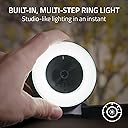
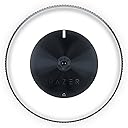
Desertcart purchases this item on your behalf and handles shipping, customs, and support to KSA.
🎥 Elevate your stream game with ultra-crisp 4K brilliance — don’t just broadcast, captivate!
The Razer Kiyo Pro Ultra is a premium 4K webcam featuring a Sony STARVIS 2 sensor with an ultra-large 2.9μm adaptive light sensor for exceptional low-light video quality. It supports 4K at 30FPS and 1080p at 60FPS, offers AI-powered autofocus and advanced live face tracking, and includes a fast f/1.7 aperture lens for natural bokeh effects. Designed for effortless plug-and-play use, it delivers DSLR-level image quality tailored for content creators and streamers seeking professional-grade visuals.
| ASIN | B076QK6489 |
| Antenna Location | Video streaming |
| Are Batteries Included? | No |
| Best Sellers Rank | 9,190 in Computers & Accessories ( See Top 100 in Computers & Accessories ) 77 in Webcams |
| Box Contents | 1 product |
| Brand | Razer |
| Brand Name | Razer |
| Camcorder Type | Webcam |
| Colour | Black |
| Compatible Devices | Personal Computer, Laptop, Tablet |
| Country of Origin | China |
| Customer Reviews | 4.2 out of 5 stars 6,421 Reviews |
| Effective Still Resolution | 4 MP |
| Effective Video Resolution | 720 Pixels |
| Exposure Control Type | Automatic, Manual |
| File Format | YUY2/MJPEG or H.264 |
| Flash Memory Bus Interface Type | SD or eMMC |
| Flash Memory Installed | 128 GB |
| Flash Memory Speed Class | C10 |
| Flash Memory Type | SDHC |
| Flash Memory UHS Speed Class | U1 or higher |
| Flash Memory Video Speed Class | V10 |
| Flash memory type | SDHC |
| Focus Type | Auto Focus |
| Form Factor | Compact |
| Global Trade Identification Number | 08886419377108 |
| Has Image Stabilization | No |
| Image Aspect Ratio | 16:9 |
| Image Capture Speed | 60 fps |
| Image Stabilization Type | Fake |
| Item Dimensions D x W x H | 6.9D x 6.9W x 4.8H centimetres |
| Item Type Name | Razer Kiyo 1080p 30 FPS/720 p 60 FPS Streaming Webcam with Adjustable Brightness Ring Light, Built-in Microphone and Advanced Autofocus, Black |
| Item Weight | 7.05 Ounces |
| Lens Type | Prime |
| Manufacturer | Razer |
| Maximum Aperture | 3.5 Millimetres |
| Maximum Display Resolution | FHD |
| Maximum Focal Length | 60 Millimeters |
| Maximum aperture | 3.5 Millimetres |
| Maximum focal length | 60 Millimeters |
| Minimum Aperture | 22 f |
| Minimum Focal Length | 30 Millimeters |
| Model Name | RZ19-02320100-R3M1 |
| Model Number | RZ19-02320100-R3M1 |
| Network Connectivity Technology | USB |
| Operating System | Windows |
| Optical Zoom | 3 x |
| Photo sensor technology | CMOS |
| Product Features | Face Detection, PC / Mac, Webcam |
| Product Warranty | 1 Year Manufacturer |
| Screen Size | 2.45 Inches |
| Sensor Type | CMOS |
| Shooting Modes | Automatic |
| Style Name | Kiyo |
| Supported Audio Format | PCM |
| Supported Image Format | JPEG |
| UPC | 814855025039 |
| Unit Count | 1.0 count |
| Video Capture Format | MP4 |
| Video Capture Resolution | 720p |
| Video capture resolution | 720p |
| Viewing Angle | 81.6 Degrees |
| Water Resistance Level | Not Water Resistant |
| White Balance Settings | Auto |
| Zoom | Optical |
S**.
High-quality camera with a very bright ringlight
The camera quality is excellent quality, my partner has gotten into streaming and this camera does the job extremely well. Looks like an entire professional setup when you have your video on, the ringlight is very bright and does a great job in conjunction with the camera to give a bright video quality. Surprisingly this also has a mic built in, it's not the highest quality but it also does the job. Overall an excellent investment if you spend alot of time on video.
J**R
Really like the integrated ring light
I've been using the Razer Kiyo for everything from gaming streams to work meetings, and I've got to say, it's been fantastic. The built-in ring lighting is a game-changer, especially in less-than-ideal lighting conditions. It helps keep the video quality sharp and clear, which is crucial whether I'm streaming my gameplay or presenting in a video conference. The HD video quality at 720p and 60 FPS makes a noticeable difference. My streams look smoother, and the feedback from viewers has been overwhelmingly positive. They notice the crisp video quality, which makes the gaming experience more engaging for everyone involved. For work meetings, it ensures I'm seen professionally, which is a huge plus. Compatibility hasn't been an issue either. It plugs in via USB, and I've used it across various platforms without any hiccups. Setting it up was a breeze, and I appreciate not having to fiddle with drivers or complicated software. It's pretty much plug-and-play, which is exactly what I need when I'm switching between gaming and work.
W**I
It's a great camera while it lasts, better to get extended warranty lol
The image quality is great and the built in ring light is a really useful feature. It's easy to set up, the autofocus works well, and it's excellent for streaming, video calls, or recording. When it's working, it's a fantastic webcam. The reason I'm giving it 3 stars is because mine stopped working not long after the warranty period ended. Looking online, I found other people reporting similar experiences, so it doesn't seem like an isolated case. In my experience, the ring light may be the weak point. If I were buying another one, I'd probably avoid using the light unless I really needed it, as that seems to put extra strain on the device.
S**T
Solid camera, decent quality image, fair price
Bought this because the Logitech cameras are all out of stock. Everyone is buying webcams because that's the new normal. The camera is a decent build quality. Sits well on top of my monitor. The ring light works well, though it reflects back if you're wearing glasses, so the camera is best positioned slightly offset if you want to avoid this. The picture quality is pretty good for the price. Certainly acceptable for Zoom calls and podcasts, though it does prefer more light as there can be a fair amount of video noise without. Especially if you have a darker background like a green screen. I use an additional ring light plus 3 cool LEDs rated at 15w each in the main room light. Autofocus isn't perfect, but then I haven't found a camera which is. At £100, it's a reasonable price, but I wouldn't want to pay more. I'm giving the camera 5 stars because it's fair for the price.
D**R
Great at first, but is not built to last...
At first this camera is great (at first), especially as a starter webcam. Easy to use, and the image quality looks great. The ring light is a bit overpowering however, so I would recommend just using an exterior light vs. the one on the camera. MOST IMPORTANTLY HOWEVER- if you're looking for a webcam that lasts- just look elsewhere. Seriously, LOOK ELSEWHERE! You've probably a year or so give or take tops before this camera will completely and utterly die on you. This product is NOT built to last. And especially not built for heavy use via streaming or anything else like that. If you frequently use a webcam everyday for hours on end (for either streaming or business), do yourself a favor and just pay the extra money for either a logitech or elgato, because the Kiyo will most certainly die on you within the span of a year!
M**X
DO NOT BUY - Awful software, unusuable in Teams & Zoom. Loses settings. Features break.
AWFUL, AWFUL SOFTWARE. DO NOT BUY EDIT: And the support is just as bad. A dozen emails to their support team trying to resolve this, and I've had a dozen pointless responses. They cannot or will not submit a bug report / feature request to their software engineering team to even begin the process of resolving this. I'm upgrading this review to add more details. DO NOT BUY THIS CAMERA. The software is awful, the webcam is unusuable in Teams or Zoom meetings. It constantly loses its settings. Two days in and now the Pan/Tilt/Zoom settings have stopped working completely. Awful software and buggy firmware have ruined what should have been a really good webcam. DO NOT BUY. I'm opening a return with Amazon for mine now. ==================================== Original review: First of all, this is a nicely made camera, and first impressions are good software and excellent customer support. The ring light works well, and also makes it very obvious when your camera is on. But. The software is awful. - The camera isn't named in Zoom, I have to select "USB Video Device". My Logitech was named. - In fact, the camera settings are so bad that it's useless for calls in Teams or Zoom - The preview settings in the Synapse software in no way match the camera view in Zoom, so the settings utility can't fix the problem - While Zoom is using the webcam I can't access or change camera profiles in Synapse So basically, THERE'S NO WAY TO ADJUST WEBCAM SETTINGS. You can adjust the settings while in Synapse only. You can't adjust the settings for any actual application, and the preview in Synapse doesn't match what the other applications will get. Worse, the settings are lost every reboot (which I now see is reported online by many previous customers). And two days in I find that the pan, tilt & zoom settings no longer have any effect. This is so much worse than my Logitech it's a joke. Logitech's software allows you to change pan, tilt, zoom, focus WHILE YOU'RE IN A MEETING. Imagine that, a webcam that actually lets you use it as a webcam. With Razer you're locked out of all of that, the softtware is it's useless. The Razor is clearly false advertising - "Full Camera Controls with Razer Synapse 3" is a lie. You have partial controls with Synapse, which may or may not work, and which don't cross to other applications. I purchased this camera as an upgrade from my Logitech because I wanted the ability to quickly switch profiles. I have to use Zoom, Teams and OBS with work, and all three need slightly different zoom, pan, tilt and settings. The promised "Full Control" in Synapse 3 is no such thing, you have basic lighting options, and then Razer have added an "Advanced Settings" button which opens the standard Windows webcam control dialog. The problem is NONE OF THESE "ADVANCED SETTINGS" ARE SAVED, which means profiles do not include: - Saturation - Sharpness - Zoom - Exposure - Pan - Tilt - Low light compensation On top of that, the Razer software has no way to easily switch between profiles. Synapse profiles have no way to add the Kiyo device. Checking online you can add mouse profiles, keyboard profiles, lighting profiles, all of which can be assigned to hotkeys. But Kiyo appears to be in a walled off section of the Synapse software. So the only way to change webcam profiles is to: - Close the application you're using - Open Synapse - Navigate to the Kiyo webcam - Change your webcam profile - Manually change "advanced" settings - pan, tilt, zoom, exposure, etc... - Close Synapse - Relaunch your application AWFUL, AWFUL SOFTWARE. DO NOT BUY
E**N
Has an issue, but does have a temporary annoying workaround
The quality of the camera itself is great, and it would be good value if it wasn't for the fact that it goes dark every time I try to use it and have to mess with the settings, with no real fix being available, its makes it frustrating. The ring light is a good bonus though.
A**M
Great Webcam for home working!
With a shortage we webcams available during lockdown and prices going through the roof, I was lucky to snap one of these up from the warehouse deals for around £76. Not exactly cheap for a webcam I appreciate, but with an RRP new of £100 - it seemed like a reasonable "deal". The camera itself is larger than I expected - not an issue but it's not as sleek as other alternatives (Logitech c920) due to the light ring. Setup was plug and play, literally couldn't be simpler. Detected in all my video applications without any issues and the camera quality is great - very clear and the auto focus generally works very well indeed. I can speak for the microphone though as I have always used headphones for calls. As for the light ring, it seems slightly gimmicky in my opinion as it's very rarely needed - let's be honest, you generally don't sit in a dark room for video calls - perhaps if you're gaming and streaming then it's more applicable. Overall, really impressed with the colours and picture quality, great webcam and happy with the purchase. I don't stream games but it's much better for video calls than many other webcams.
M**S
Super caméra pour débuter le stream
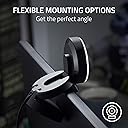
La caméra Razer Kiyo est exactement ce dont j'avais besoin pour commencer mon aventure dans le monde du streaming. Je suis ravi de cette petite caméra qui offre une qualité d'image exceptionnelle, une installation facile et de nombreuses fonctionnalités utiles. La première chose qui m'a impressionné, c'est la qualité de l'image. La Razer Kiyo propose une résolution Full HD (1080p) qui offre des détails nets et des couleurs vives. La fonction d'éclairage annulaire intégré est un énorme avantage, car elle assure un éclairage uniforme et flatteur, ce qui est essentiel pour paraître professionnel à l'écran. L'installation est un jeu d'enfant. Il vous suffit de la brancher, et elle est prête à l'emploi. Elle est compatible avec la plupart des logiciels de streaming populaires, ce qui simplifie encore plus les choses. De plus, le support réglable vous permet de positionner la caméra à l'angle parfait pour votre diffusion. Ce que j'apprécie également, c'est le fait que la Razer Kiyo dispose d'un couvercle de confidentialité intégré. Vous pouvez facilement fermer le cache lorsque vous ne diffusez pas, ce qui est rassurant du point de vue de la sécurité. Enfin, le rapport qualité-prix est excellent. Vous obtenez une caméra de streaming de haute qualité sans avoir à dépenser une petite fortune. Si vous êtes un débutant dans le streaming ou même un créateur de contenu expérimenté à la recherche d'une caméra abordable et efficace, la Razer Kiyo est un excellent choix. Dans l'ensemble, je suis ravi de ma Razer Kiyo. Elle offre tout ce dont j'ai besoin pour diffuser des vidéos de qualité professionnelle sans tracas. C'est un excellent investissement pour tout aspirant streamer !
G**Z
Padła po dwóch latach...
Działała przez trochę ponad 2 lata. Dzisiaj przestała działać - pojawia się krótki błysk na ringu i tyle. Aktualizacja firmware nie pomaga.
M**N
great
as expected
P**K
👍
Really good quality
V**Y
Utilidad
Me encanto empece ha hacer videos con esta cámara y para iniciar va muy bien, recomiendo tanto por utlidad y precio
Trustpilot
3 weeks ago
1 month ago