


Desertcart purchases this item on your behalf and handles shipping, customs, and support to KSA.
🔍 Test smarter, not harder — your cables deserve the VIP treatment!
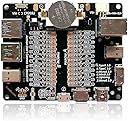
The Treedix TRX5-0476 USB Cable Tester is a compact, battery-powered device designed to test a wide range of USB cables including Type-C, Micro, Lightning, and various USB-B standards. Featuring 24 LED indicators for precise pin-level diagnostics and dual power options (CR2032 battery or 3-12V external supply with reverse polarity protection), it ensures reliable detection of cable faults and shorts with 0.01% accuracy, making it an essential tool for professionals who demand flawless connectivity.


| ASIN | B0BW8ZC7YD |
| Best Sellers Rank | #106,816 in Computers ( See Top 100 in Computers ) #7,028 in USB Cables |
| Brand | Treedix |
| Brand Name | Treedix |
| Color | Black |
| Colour | Black |
| Customer Reviews | 4.6 out of 5 stars 309 Reviews |
| Included Components | USB Cable Tester |
| Item Dimensions | 8.5 x 7 x 0.2 centimeters |
| Item Weight | 0.01 Kilograms |
| Item dimensions L x W x H | 8.5 x 7 x 0.2 centimeters |
| Item weight | 0.01 Kilograms |
| Manufacturer | Treedix |
| Maximum Operating Voltage | 12 Volts |
| Measurement Type | Continuity Tester |
| Minimum Operating Voltage | 3 Volts |
| Model | TRX5-0476 |
| Number of Items | 1 |
| Part Number | TRX5-0476 |
| Power Source | Battery Powered |
| Power source | Battery Powered |
| Style | USB Cable Checker |
| Style Name | USB Cable Checker |
| UPC | 741754911166 |
L**M
Localización de cables USB en mal estado
Muy buen producto pruebas sin error
M**O
One Beefy Little Guy! (Showcase of Device and Manual For Pins Included) :)
Important Warning: DO NOT use this tester to connect to live devices. Doing so could potentially damage both your devices and the tester itself. It is designed solely for testing cables as intended. --------------------------- ★ Section 1 - The Review ★ • This is by far the best design I've encountered for a cheap USB cable tester. It features a straightforward circuit powered by a CR2032 battery or via a Vin pin (cable not included). Each pin of the cable connects to a corresponding light that illuminates when a cable completes the circuit. I really appreciate the broad range of compatible ports, including USB Type-A 2.0 and 3.0, Thunderbolt 3/USB Type-C 3.0 on both sides, Lightning, Micro-B 2.0 and 3.0, and Mini-B 2.0. These standards are fully backward compatible, and the inclusion of both versions ensures that this tester is 100% reliable. • The board has two sides: "Side A" and "Side B," accommodating the reversible nature of Type-C cables. For other types such as Lightning, Micro-B, Mini-B, typically only one side will light up. Generally, you should focus on the side with the most lights illuminated; the other side can usually be disregarded, except for Lightning cables. • One area for improvement.. It would be the documentation of expected pinouts and explanations of the different common combinations. However, this can easily be resolved with a quick Google search. I’ll share my understanding and research below. --------------------------- ★ Section 2 - Here’s a breakdown of what each of those pins means ★ GND (Ground): This is the reference point for electrical signals in the circuit. It serves as the common return path for electric current. • TX+/- (Transmit): These pins are used for data transmission. "TX+" is the positive data line, and "TX-" is the negative data line. They work together to send data signals. • RX+/- (Receive): Similar to TX, these pins are used for receiving data. "RX+" is the positive line for incoming data, and "RX-" is the negative line. They allow the device to receive signals from another device. • VBUS: This pin carries the main power supply voltage. It typically provides +5V to power devices or charge them. • D+ and D-: These are the data lines used in USB connections. "D+" is the positive data line, and "D-" is the negative data line. They enable data transfer between devices. • CC1 and CC2 (Configuration Channel): These pins are used in USB Type-C connections to determine the orientation of the connector and negotiate power delivery. They help devices communicate their capabilities to each other. • SBU1 and SBU2 (Sideband Use): These pins can be used for additional features, such as audio or alternate modes, depending on the type of device connected. They provide extra functionality in certain situations. • ID (Identification): This pin is used to determine the type of device connected. In certain configurations, it helps differentiate between host and peripheral roles. For example, in some USB OTG (On-The-Go) setups, the ID pin can signal whether the device should act as a host or a peripheral. • Shield: This pin is used for grounding the shield of the cable, which helps reduce electromagnetic interference (EMI). It helps protect and improve the signal integrity by grounding any external noise that may affect data transmission. --------------------------- ★ Section 3 - A valuable diagnostic tool for several reasons ★ • Signal Integrity Testing: It helps verify the quality of data transmission through the USB cable, ensuring that signals are not degraded. This is crucial for high-speed data transfer applications. • Pin Configuration Verification: The board can confirm that all the necessary pins in the USB cable are properly connected and functioning. This is important for ensuring compatibility with devices. • Identifying Faults and Damage: By testing various cables, you can quickly identify any faulty ones. This is helpful if you suspect that a cable is defective or if a company is providing subpar products. • Compatibility Checks: It can help determine if a cable is compatible with specific devices, preventing the use of cables that might cause performance issues or failures. • Preventing Scams: If you're considering purchasing cables from a vendor, using the test board can help you confirm that the cables meet advertised specifications. Then you would know to return the product for a full refund, and purchase a different cable from another vendor. This can protect you from scams where companies sell low-quality or counterfeit products. • The Frustration Caused by USB Cables: Want to organize or discard cables, but don't know which ones are functional? You can use the USB Cable Tester Board to easily help you identify the right cables to keep.
T**.
Does its job perfectly, no frills
Great for sorting through my pile of USB cables. - Throw out ones with flaky or broken connections, - Mark ones that are "power only," - Mark C-C and A-C cables that are USB 2 only internally - Mark C-C and A-C cables that are USB 3 with only four wires/two differential pairs (5-10 Gbps) - Mark C-C and A-C cables that are USB 3 with all eight wires/four differential pairs (10-20 Gbps, or USB 3 + alt mode) My only complaint is that sometimes very short cables cannot make it all the way across the board. However, I've mitigated this with USB C-C cables and couplers that I separately tested and verified with this tool as having all their wires connected through to extend the length of the short cables I need to test. In practice, this has only been an issue with very short C-C and very short A-C cables; the mini and micro B ports are positioned such that even very short cables are able to easily reach those plugs. There is some slightly more advanced testing that can be done if you use a multimeter in resistance or continuity mode, along with this tester -- the tester has pads for cable shield, cable ground, and the CC1 and CC2 lines and grounds, located conveniently together to test with probes if a cable is wired with shorts or resistors between those paths. Slightly less convenient, but still very nice to have, are probe pads for each of the individual lines for both sides of the connector: this allows (e.g.) probing explicitly on those "data only" leads to see if they're being naughty and shorting D+/D- together, or have resistors between VBUS -> D+ -> GND and VBUS -> D- -> GND to falsely signal to the device that the USB port the cable is plugged into has a capability that it does not.
R**L
Excelente... si sabes algo de electrónica
Muy bueno, te hace un mapeo de todos los pines, sin embargo creo que la mayor utilidad es cuando sabes como interpretar las lucecitas.
M**X
Mystery USB cable? Find out it's potential with this tester.
Super simple tester works simply to tell you the mysteries of any USB cable. I wish I had bought this thing years ago. The one improvement that I would recommend is the layout and colors used in the manual. I think this could be improved significantly to increase readability.
Trustpilot
2 months ago
1 month ago