


Desertcart purchases this item on your behalf and handles shipping, customs, and support to KSA.
💿 Elevate your digital archive with sleek speed and seamless style!
The NOLYTH USB C SuperDrive is a premium external CD/DVD drive designed for Mac and Windows laptops. Featuring a slot-loading mechanism with no eject button, it offers plug-and-play convenience via USB-C and includes a USB 3.0 adapter for broad compatibility. With blazing 24x CD and 8x DVD read/write speeds, it supports multiple disc formats and operating systems. Its slim, silver aluminum design perfectly complements Apple devices while being portable enough for on-the-go use. Ideal for data backup, media playback, and software installation, this drive revives your optical media with modern speed and style.


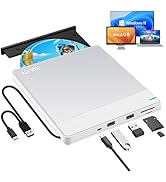


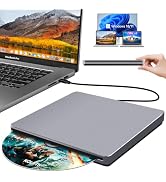


| ASIN | B0BX3S7CZH |
| Additional Features | Backward Compatible/Error Correction, Noise Reduction Technology, Plug & Play/Portable/Slim/Lightweight, Shock Resistant, Slip Resistant/full aluminum alloy/with a free USB 3.0 adapter, Slot-loading/no eject button/USB C data cable |
| Best Sellers Rank | #100 in External CD & DVD Drives |
| Brand | NOLYTH |
| Built-In Media | 1x USB3.0 Adapter, 1x User Manual, 1x external DVD drive |
| Cache Memory Installed Size | 2 MB |
| Color | Silver |
| Compatible Devices | Laptop, Mac |
| Connectivity Technology | USB |
| Customer Package Type | Box |
| Customer Reviews | 3.8 out of 5 stars 1,892 Reviews |
| Data Transfer Rate | 24 gigabits_per_second |
| Enclosure Material | Aluminum |
| Form Factor | External |
| Hardware Interface | USB 3.0, USB 3.0 Type C |
| Hardware Platform | Laptop/PC/Desktop, Mac/MacBoor Pro/MacBook Air/iMac |
| Item Dimensions L x W x H | 5.47"L x 5.47"W x 0.67"H |
| Manufacturer | Confoly Tech |
| Media Speed | 24x CD/8x DVD±R/6x DVD±R DL gigabytes_per_second |
| Model Number | NOLYTH CD ROM External Drive |
| Operating System | Mac OS/macOS/Windows 11/10/8/7/98/XP/2000/Vista/Linux |
| Optical Storage Read Speed | CD 24x / DVD 8x |
| Optical Storage Write Speed | CD 24x / DVD±R 8x / DVD±R DL 6x |
| Read Speed | 24 x |
| Special Feature | Backward Compatible/Error Correction, Noise Reduction Technology, Plug & Play/Portable/Slim/Lightweight, Shock Resistant, Slip Resistant/full aluminum alloy/with a free USB 3.0 adapter, Slot-loading/no eject button/USB C data cable Special Feature Backward Compatible/Error Correction, Noise Reduction Technology, Plug & Play/Portable/Slim/Lightweight, Shock Resistant, Slip Resistant/full aluminum alloy/with a free USB 3.0 adapter, Slot-loading/no eject button/USB C data cable See more |
| UPC | 726133312901 726133312482 |
| Warranty Description | Manufacturer warranty for 2 yr from date of purchase |
A**R
CD-licious
This Nolyth external CD drive works like a charm with our Apple products. Very satisfied.
A**R
Accessible tech, good customer service
The external Superdrive is very user-friendly and has the positive feature of an adaptor that can plug into different kinds of computers. I bought one for my parents initially, and it was so easy to use and reasonably priced that I also bought one for myself. Unfortunately, the one I bought for myself was damaged somehow and didn't work properly. However, when I reached out to the email address included in the drive's pamphlet manual, I received a response within a day. Coco, the customer service rep, walked me through some ways to debug the issue and, when these suggestions did not work, sent me a second drive that works perfectly. I appreciated the speed and ease of the company's service and would order from them again. The drive itself is a simple piece of tech that does what it's supposed to do (play dvds and cds), though I haven't used it to burn anything and can only comment on the playback feature. I have only used it with a Mac, but the dvd player popped up automatically when I inserted a dvd into the drive.
W**D
DVD got stuck, stopped working altogether
I bought this specifically to burn DVDs as that’s what it’s advertised for, but as soon as I put one in and ran it through my burning software there was an error and it stopped working. There’s no eject button and I couldn’t get the disk out, and when I tried to eject it from my laptop I realized it wasn’t being recognized anymore. I thought it was just my computer so I tried it on a different one but the same problem happened. I looked up a tutorial for how to unlodge disks from burners like that, not specifying which one, and one of the top results had a burner that looked exactly like this one down to the name on the back. (He had to dismantle it, breaking it in the process.) I don’t recommend this product at all, it looks cool but please if you’re reading this just spend a little extra on one with an eject button.
T**H
Works with 2019 16" MPB with 1 minor issue
I'm a happy camper with this! I just burned a 1965 oldies hits album to my 2019 16" MBP laptop & I'm listening to it as I type.. Before that, I viewed a 25 yr-old cd with photo files. All uploaded easily. Here's what you get: DVD drive with permanently attached USB-c plug, Optional USB plug (see photo) Well- padded, zippered case Owner's manual in broken English - but all you need to know is there if you have patience to figure out what they are trying to say. I had no issue.. TIPS: 1. When you plug drive in, nothing will show up on your screen until you put a cd/dvd in the drive, so don't despair! 2. EJECTing: there's no manual eject button on the drive; you eject from your computer. On my MBP (running OS Catalina) I eject from Finder, or drag drive's icon to the trash. HUGE CATCH: But in order to eject, I have to FLIP THE DRIVE OVER (black side up). This is in the owner's manual (pg 5 under "Disk was Stuck".) No clue if all of these operate this way, but the fact that it's mentioned means they know of issue...To me, not a deal-breaker. The usb-c plug fits a bit too snug imo into the port (not sure this is harmful to the laptop) Initially, I was thinking of returning the drive due to the "flip over to eject" issue, but having gone went thru hell trying to connect my Apple Super Drive to my laptop to no avail, I decided to get a drive with a usb-c plug. (Apple says the Super Drive is compatible with the newer MBP's..if it is no adapter worked) After hours on the phone with Apple, with them trying to trouble-shoot, I finally gave up & ordered this drive. If you also failed to get your USB Apple Super Drive to connect to your usb-c-only MBP (I tried with the Satechi adapter Apple sold me!!) , then this cheap little drive works, so I don't mind having to flip it over to eject disks at this point. I thought I would never be able to play cd's or watch movies on this new MBP laptop since Apple took away the internal cd/dvd player that older MBP & others had. Some people prefer to play our cd collection amassed over the years, rather than spend more money for the same songs they already own..Young people don't seem to get it. Finally, people should READ MANUALs before posting bad reviews, as most issues are covered!
G**M
Confoly Superdrive is awesome!
I received the Confoly USB-C Superdrive last night. This superdrive is a hub to hub connection on my new MPB thunderbolt 3 port. When I first connected it I saw nothing on the desktop or anywhere else on the Mac computer. When I inserted a CD into it, iTunes popped up with all the information on the CD. When I inserted a DVD into the drive "My DVD Player" (software that comes with the Mac) opened, and started to play the movie. When a disk is inserted you will see a disk on your desktop right click on it to eject the disk. The superdrive is a solid piece with no eject button, and the drive does not open. The drive behaves just like the superdrive Macs used to come installed with. This is an extremely easy device to use, and feels very sturdy. The Confoly comes with a USB adapter in case you do not have the thunderbolt USB-C port on your computer. I would recommend this product to a friend.
M**S
If it's not working, turn that frown (and DVD drive) upside down!
I almost returned my 2017 MacBook Pro when I found out it had no DVD/CD drive but upon researching, I realized Apple phased them out years ago (my last computer was from mid-2012, one of the last to have one). I read that Apple's SuperDrive worked horrendously and a review suggested this NOLYTH external drive as a best bet. When it arrived, I loved the case it came in and that it had a USB 3.1 connection as well as an adapter for a USB-A cord. It utilized plug-and-play and clicked into my computer easily. But when I inserted a blank DVD-R drive to test it, it clicked several times and then ejected. I tried it with an actual DVD and it clicked several times and then ejected. I went here on Amazon and saw some people with a MacBook Pro complained of the same problem. I contacted Coco at Confoly and sent a video of the issue. Coco realized I had the drive upside down -- the NOLYTH logo goes on the bottom and the blank silver side goes on top. This felt counter-intuitive (maybe it's an American thing) but it immediately solved my problem and I've since burned two DVD-Rs seamlessly. What a relief! And it kept me from having to return my computer for its lack of a DVD drive.
V**E
Adequate but not great
This player works alright, but is a little bit clunky to use. It's fine for occasional use, but if you use a DVD player frequently, I wouldn't recommend this one. The eject doesn't work well at all. I finally, after some Googling, discovered that you often have to turn it upside down for the eject to work. There is no manual analog manual eject, such as a small hole that you put a paper clip into, to physically eject a disk. I'll keep it, but if I had to do over, I'd probably go with a different brand.
P**E
Their customer service is top notch!
Bought a new MacBook Air, didn't want to pay the Apple fee for an external drive. After reading several reviews the Nolyth was chosen. To be transparent, the first unit received did not work. The connection directions were followed but the unit would not accept a disc. Customer service was contacted and we collectively tried troubleshooting the unit. After making sure the unit was defective the company accepted the return and immediately shipped a new unit, no questions asked. The new external drive unit was connected according to the instructions and worked immediately. It is a universal unit so a DVD was tested and a few CDs ripped to iTunes. Everything worked perfectly, hence the five star review. Customer service is really there and is a person that communicates with you. It is refreshing to experience great customer service and that's what you get when you buy this unit.
B**N
Excellent, truly EXCELLENT!!
If you have considered purchasing an Apple USB Supedrive don't bother. Buy this one instead. Its form factor is the same, its silent operation is the same, its build quality is the same, except this one comes in two MacBook Pro colors grey or silver, it has an adapter in case you want to use USB A instead of the USB C which is attached to the drive, it even comes with a high quality case which Apple didn't bother to give. This is one heck of a great buy and I am delighted!!! 5/5 stars for this incredible value!!
V**N
Poor Product
After only 2 months of occasional use, this dvd drive no longer works and unable to return it for a refund. My advice would be to spend your money on somewhere else.
A**X
Excellent, High Quality Device at a cheaper price than Apple
Works exactly as described. The overall look and feel of the device is almost identical to the Apple Magic Drive, at almost half the cost.
B**D
NOLYTH Apple USB Superdrive
I've found the NOLYTH Apple USB Superdrive to be a good quality product. My original Apple Superdrive was stating to play up and as Apple has discontinued the manufacture of their product I had to find a replacement.
C**E
Lecteur cd dvd
Fonctionne super bien sur mon MacBook Pro très satisfaite de mon achat, je recommande
Trustpilot
5 days ago
2 weeks ago