Desertcart purchases this item on your behalf and handles shipping, customs, and support to KSA.
🖱️ Elevate your workflow with ergonomic precision and wireless freedom!
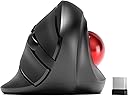
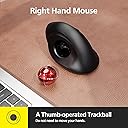
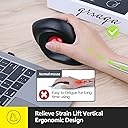
The MicroPack Trackball Wireless Mouse combines a vertical ergonomic design with a smooth trackball for precise cursor control. Featuring 5 adjustable DPI levels (600-2400), 2.4G wireless connectivity with a 10-meter range, and silent clicking, it’s engineered to reduce wrist strain and enhance productivity across PC, Mac, and Linux platforms. Its removable trackball ensures easy maintenance, making it a durable, comfortable choice for professionals seeking both style and function.


| ASIN | B0BRX75KQ1 |
| Additional Features | Ergonomic Design, Soundless, Wireless |
| Antenna Location | Office |
| Battery Average Life | 6 months |
| Best Sellers Rank | #612 in Computer Mice |
| Brand | MICROPACK Digitally Yours |
| Button Quantity | 3 |
| Color | Black With Trackball |
| Compatible Devices | Laptop, Personal Computer |
| Connectivity Technology | 2.4G Wireless |
| Customer Reviews | 3.8 out of 5 stars 588 Reviews |
| Enclosure Material | Plastic |
| Finish | Glossy |
| Hand Orientation | Right |
| Hardware Platform | Linux, Mac, PC |
| Included Components | Mouse, USB receiver, possibly a battery |
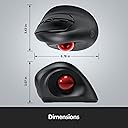
| Item Dimensions L x W | 4.78"L x 3.07"W |
| Manufacturer | MicroPack |
| Mfr Part Number | V02 |
| Minimum Required Operating System Version | Windows 11 |
| Model Name | V02 |
| Model Number | V02 |
| Mouse Maximum Sensitivity | 1600 dots_per_inch |
| Movement Detection | Trackball |
| Movement Detection Technology | Trackball |
| Number of Batteries | 1 AA batteries required. |
| Number of Buttons | 3 |
| Operating System | Chrome OS, DOS, Linux, Mac OS 9, Windows 11 |
| Power Source | Battery Powered |
| Range | 33 feet |
| Special Feature | Ergonomic Design, Soundless, Wireless |
| Style Name | Modern |
| Theme | Ergonomic Wireless Trackball Mouse |
| Unit Count | 1 Count |
| Warranty Description | 1 year manufacturer |
A**R
Just What I've Been Looking For
I've been on the lookout for a trackball mouse with the sideways ergonomic design for a while now. The thumb trackball style has helped my carpal tunnel out a great deal, but laying my hand out flat to use them still takes a toll over long periods of time. So when I found this I had to give it a shot. It was worth it! As with any trackball mouse, I found it effective to take a little small machine oil on a cotton swab, go over the bearings the ball rolls on with the swab, then wipe up the excess with the dry end of the swab. It helps a great deal with ball movement. The dpi settings are a little extreme. Software to customize a sensitivity in between the max and middle settings would be nice, but once you get used to the max setting, it's pretty easy to work with. There's no real bells or whistles when it comes to features on this mouse, lack back keys for websites, but I've found I rarely use those anyway. But it is something to keep in mind. As is the fact that you can adjust cursor speed in Windows settings to make up for lacking more dpi differences using the mouse button. It would just be nice to have more options to switch on the fly. Overall a great mouse. My complaints are incredibly minor and certainly not worth docking points for considering the reasonable price.
A**Y
Great for my carpal tunnel
Clicking works great. The price was reasonable but the base always move when using it. Seems as if the bottom grips are not sticky enough making it uncomfortable after a period of time. I had to brace it to my laptop so that it would not move while using it. (Frustrating) Would have given 5 stars if this was corrected!
C**R
Pick another mouse to hate
Ah, the ergonomic mouse that promised comfort but delivered nothing but frustration. If only I could give it negative stars, I would. This piece of "technology" is a masterclass in disappointment. At first glance, it looks like it could be the ergonomic mouse of your dreams. It fits your hand perfectly, and the sleek design gives the impression that it means business. But don't be fooled by appearances, for this mouse is a wolf in sheep's clothing and I'm definitely not on Team Jacob. The first sign that something is terribly amiss is its complete inability to respond. It's as if it takes pleasure in ignoring your every command. You move the cursor, and it just stares back at you, mocking your futile attempts to get work done. Oh, but don't worry, it's not entirely heartless. It occasionally decides to grace you with a response, but only after a series of desperate beatings on your desk that make you question your sanity and the state of your mouse. Yes, you read that correctly – this ergonomic marvel requires physical abuse to function properly. It's like it's in a toxic relationship with your desk and needs a good thrashing to rekindle its love for work. If I could return it after giving it a few rounds of office-spacing with a baseball bat, I'd send it off in a fiery blaze of glory just to make a point to all the other inferior mice out there. It's a sadistic game of cat and mouse, where you're the mouse and the mouse is the cat, reveling in your suffering. You find yourself questioning every life decision that led you to this point. Why did you think an ergonomic mouse would bring you comfort when it only brings frustration? Why did you trust the sleek exterior when the inner workings are a hot mess of dysfunctionality? In conclusion, this ergonomic mouse is the ultimate betrayal of form over function. It's a tantalizing illusion that lures you in with promises of comfort and style, only to slap you in the face with its incompetence. If you have any self-respect, avoid this mouse like the plague and save yourself from the endless cycle of desk beatings and frustration.
J**O
Update
I absolutely hate touchpads and in most of the places where I use my laptop and even on several of my desktops, the real estate is such that using a traditional mouse is very difficult or impossible. I usually rely on trackballs. They all have had some drawbacks. I have a Logitec and a Microsoft in the standard horizontal configuration. First of all, horizontal is not very ergonomic. The natural position of your arm on the table it is to have the hand vertical. In addition, because of the design, your hand tends to push forward on these devices making them slide. On my large desktop computer, I actually have used double-faced tape to stick it to the desk because the sliding became so annoying with the Microsoft unit. This device is extremely ergonomic and natural feeling to use. There is no tendency to slide or move whatsoever. I have never used the "forward/back" buttons on any of my other trackballs so I don't miss their absence on this device. You can switch the sensitivity but the press of a button behind the thumb wheel. Very convenient. One thing that does take a little getting used to is what to do with your thumb when you're pressing the left mouse button. With a traditional horizontal trackball, you're pressing down toward the table so there is no tendency to move the cursor. With this device, when you press on either the left or right button what you're actually doing is "squeezing" the button towards the ball. The result is there can be a tendency for your thumb to move slightly on the ball and move the cursor. This gets a little easier to control with practice however there's also a very convenient ridge right above the trackball to rest your thumb on when you're pressing the buttons which makes it a little bit easier. Dragging and dropping is the only thing that is really kind of tricky. With a traditional mouse or trackball, since you are pressing down on the button, using the ball itself is an independent motion and easy to do. With this device because of the squeezing action, it's a little tricky to keep the left button pressed while you are manipulating the ball to drag something to a new location. Not that it can't be done. With little practice you can learn to press slightly downward on the button as opposed to the left which takes the pressure off the thumb and allows you to do the dragging motion. What would really be nice is a mechanism to turn the left mouse button into a sticky key but I haven't found any way to do that yet. I have seen reviewers downgrade the device because the ball becomes "sticky". As someone who has used various designs of trackballs for well over a decade, I can tell you this almost always results from either the ball itself or the supports inside the ball cavity becoming dirty. If you are using this in an environment where your hands are likely to be dirty or sticky or there is a lot of dust around, frequent cleaning is definitely going to be necessary as with any trackball. And if you have little ones using your computer, figure on cleaning the ball mechanism pretty much every time they get their hands on it. The price is very reasonable and if you are looking for a more ergonomic alternative to a traditional trackball, it's well giving this a try. I will probably be replacing the cursor control devices on all of my computers with this unit. UPDATE I'm afraid I have to downgrade my rating to 3 stars. I have been using these devices on two of muy laptops for 4 and 6 months respectively. To those reviewers who said the ball became "sticky," I know now what you mean. It is not so much sticky as rough. Originally both were smooth as silk but BOTH have now become extremely rough and jumpy, I have removed the balls and thoroughly cleaned the balls and sockets-no help. There is something with the tiny supports that hold the trackball. the ball itself seems fine but it feels like it is resting on sand. Actually hard to get the cursor in the right place because it is so jumpy. Since it happened on both of my samples and I have never had this happen with other brands, I have to assume there is a defect in the design or materials. I can no longer recommend this device.
D**N
Takes a little getting used to the angle, but great afterwards.
First time using a vertical style trackball / mouse. It takes some getting used to the vertical layout, but it does put your hand in a more comfortable position. I gave it five stars for ergonomics, comfort and accuracy, but four stars overall. There are a couple of detractors. First it goes to sleep too quickly and can't be brought back to life with a simple wiggle of the ball. You have to click a button. Second, it requires it's own USB port which may or may not be a big deal depending how many ports are on your PC. Finally, it doesn't feel particularly high grade so time will tell how well it holds up. Not a bad device, but not my favorite, either.
A**R
NOT FOR ME
This is an unusal mouse. I couldn't get use it so I had to send it back. It seems like it was great quality but it was just difficult for me to use. I think a younger person could use it better. Like a teenager.
W**N
Would be perfect if I could run 2 or 3 devices on it.
BUT the ball moves if it's not level. I don't yet have a level surface for my input devices, but since I like this one I'll make it happen. If you let it tilt to the left a little bit the cursor will move when you take your thumb off the ball because the ball will move slightly. This can lead to mis-clicks. All of you using a proper desk or table should never have this issue. I compute from my couch with a big rounded armrest--and is why I had to quit using mice. I did have trouble getting it up to speed on one system to I swapped it to the other one where it works fine. If it weren't for this I'd buy a second one for the other system, but a new release of Mint should fix that, and it's up. I just haven't done the upgrade.
R**C
Trackball Performs Well with Comfortable Ergonomic Design
I read many reviews and decided to give the trackball mouse a try despite the negative feedback and frequent return notice on this item. I’m glad I did try it because the trackball and mouse perform great! Once install was complete, the first thing I did was adjust the setting for the cursor speed for trackball. There’s no lag or going all over the screen. Also found out during use that the button in the center of left / right click buttons will control the cursor speed, click 4 times to cycle through different speeds. I use this mouse with the trackball for 8 hours a day. Very happy with the performance! I don’t generally review products. That’s how pleased I am with this one.
M**Z
More comfortable than Elecom EX-G it replaces.
Had a little wrist discomfort - and after some testing - I decided that I needed a variety of hand positions to reduce the discomfort. I needed a high-resolution track ball and one that turned my hand quite far. Enter this device: It is easy to use. Has variable resolutions and a few buttons - I don't need a dozen programmable buttons. So far so good. It has made using the trackball much more comfortable. I would like the option to tilt the tackball still further - and its ok for small medium hands - but I would like it slightly larger. Or expandable! The Elecom served me well. This is the evolution of it. Top tip: I installed Mac Mouse - a programme for adapting any mouse. Cheap and effective, it added some customisable features that make this cheap trackball as flexible as many much more expensive options.
K**E
Track ball pops out, and bulky
It's pretty bulky and large for me, so it might be for larger hands. But the track ball keeps getting stuck to my thumb when I let go to type or something, moving the cursor. The ball is also very light and offers very little resistance, making it hard to select at times. There was also a tab to pull out the USB that bend the cover out of shape at the clasp.
A**R
Ok
Feels cheaper than a Logitech and calibration seemed off. Kept. It but went back to using my old ergo.
M**N
Product build quality very poor
Very poor build quality. Lasted less than three months of regular use. Mouse ball now slipping and movement not being picked up. Never owned a trackball that failed so quickly. Avoid.
D**A
Practically unusable
The ball binds and it is very hard to position the mouse precisely
Trustpilot
2 weeks ago
3 weeks ago