Desertcart purchases this item on your behalf and handles shipping, customs, and support to KSA.
🚀 Elevate your Pi projects with a touchscreen that’s as smart as you are!
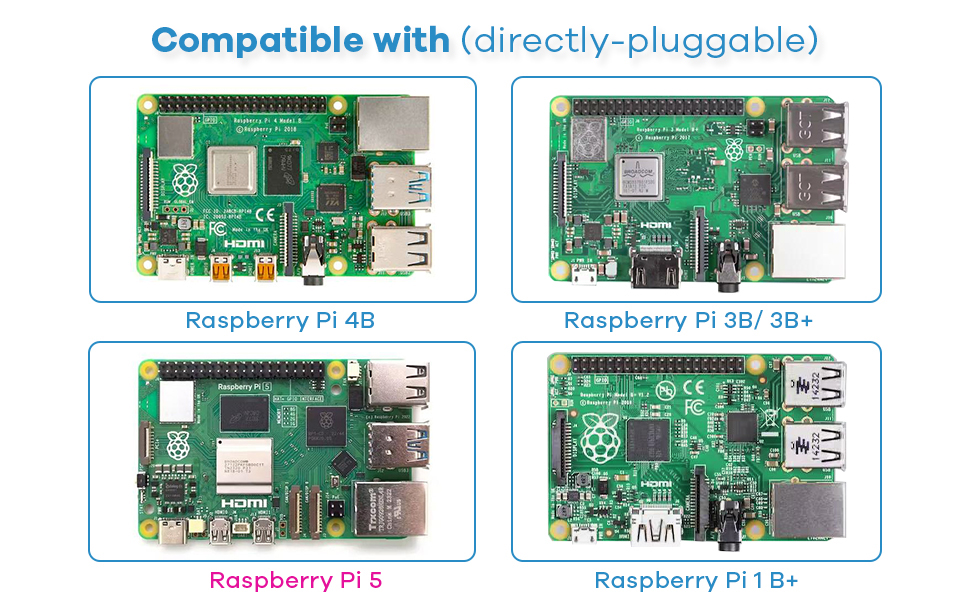
The Hosyond 3.5 Inch 480x320 Touch Screen TFT LCD SPI Display Panel is a plug-and-play, high-contrast touchscreen designed specifically for Raspberry Pi models B through 5. Featuring a crisp 480x320 resolution, 165° viewing angle, and powered directly via SPI without external power, it offers a compact, developer-friendly display solution complete with tutorials and technical support.


| ASIN | B0BJDTL9J3 |
| Additional Features | Touchscreen |
| Aspect Ratio | 16:9 |
| Best Sellers Rank | #8,720 in Electronics ( See Top 100 in Electronics ) #5 in LCD Touch Panels #296 in Computer Monitors |
| Brand | Hosyond |
| Color | Default |
| Compatible Devices | Raspberry Pi A, B, A+, B+, 2B, 3B, 3B+, 4B |
| Connectivity Technology | SPI |
| Contrast Ratio | 1000:1 |
| Customer Reviews | 3.7 out of 5 stars 350 Reviews |
| Display Resolution Maximum | 320 x 480 |
| Display Technology | LCD |
| Display Type | LCD |
| Image Contrast Ratio | 1000:1 |
| Included Components | 1 x 3.5" raspberry pi touchscreen, 1 x touch pen |
| Item Dimensions D x W x H | 0.77"D x 3.36"W x 2.19"H |
| Manufacturer | Hosyond |
| Model Number | Hosyond-3.5-480x320 |
| Mounting Type | Panel Mount |
| Native Resolution | 320 x 480 |
| Number of Component Outputs | 1 |
| Picture Quality Enhancement Technology | TFT |
| Pixel Pitch | 0.00163 |
| Power Consumption | 0.65 watts |
| Processor Count | 1 |
| Refresh Rate | 60 hertz |
| Resolution | 480 x 320 pixels |
| Response Time | 32 milliseconds |
| Screen Finish | Glossy |
| Screen Size | 3.5 inches |
| Screen Surface Description | Glossy |
| Shape | Rectangular prism |
| Specific Uses For Product | Learning |
| UPC | 782917535652 |
| Unit Count | 1 Count |
| Viewing Angle | 165 degrees |
| Voltage | 5 volts_of_direct_current |
| Warranty Description | No |
| Warranty Type | Manufacturer Warranty |
D**H
This is a very nice little screen, I was amazed at the picture quality.
This is a very nice little screen, I was amazed at the picture quality. It's also amazing this comes with a touch screen and speakers for this price. My only complaint is I tried to use it as a virtual stream deck but wasn't able to get it to work easily and repurposed the monitor for a Raspberry Pi display, this wasn't a problem with the monitor but rather my laptop setup.
V**I
Trash
Spent about a week trying to get this to work and the driver overwrites the os config file causing it to fail to book ive watched videos and even tried to write my own code with claud that was the closest ive gotten just so you all know its not worth the headache. Just get an hdmi screen and call it. This is actual trash that is getting returned.
T**R
Such a good addition to a raspberry pi
I had 3d printed a rack for my raspberry pi’s and this worked perfectly as a little health monitor for all 3 devices!
J**N
Uses all GPIO pins, but okay otherwise
Works fine, as long as you can get it installed (apparently, some have more trouble with this than others). Don't get it if you need the GPIO pins, as they're all completely covered, and I haven't seen any documentation as to which are used for what, so connecting to them other ways may be impossible (or at least, a lot of effort).
S**N
Packs a lot of features in a tiny size - worth the chance
I love this little screen. I had to send it back because the raspberry pi 4 purchased at the same time stopped working. We decided to go with a different item so we couldn’t use this. That being said…. The item was as described. Connection was simple if you follow the driver process. Make sure you use the official adapter for the pi to run this item as well. The clarity was nice and the touch feature was excellent. Size is perfect for traveling—if you need reading glasses or have vision concerns…the next size up should work. Setup - if you follow the directions it was as easy as pie (sorry had to put the pun in)….just make sure you have the drivers and is installed properly. Grab a 40 pin cable extension if you want a different setup. Connectivity - no problem. Once the setup is done, you get to see the item working. It’s not like the higher definition items but for field work this is perfect. Picture quality - it works for field work and troubleshooting Viewing Angles - seemed to be good for me. I’m in Washington state so it’s not super bright here…. Size - perfect for on the go set up Quality - shipped securely, brand new and description works well. It includes a stylus as well Overall - I was only disappointed that I needed to return this item due to changing needs for a project.
G**Y
Frustrating software setup, otherwise decent for the price
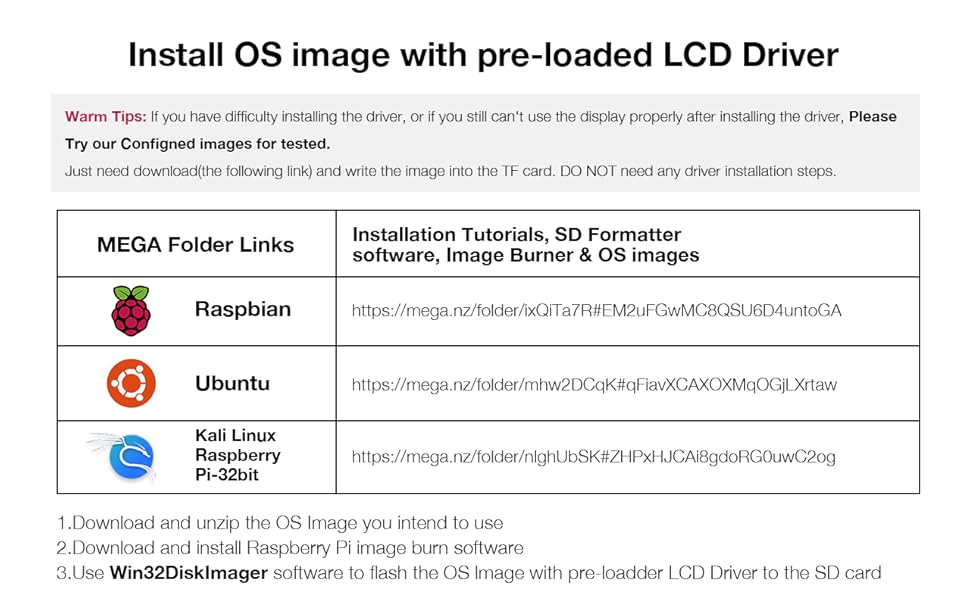
Unfortunately, the official recommended way to install drivers for this display is to use an outdated version of Raspberry Pi OS. (This is because their driver doesn't work with newer versions.) Instead, I managed to get it working (with some caveats) on an up-to-date Raspberry Pi OS Trixie with my Raspberry Pi 2 Model B using an alternate driver from Github. (Search Github for katzenjens/lcd32.) The display itself is okay. It has an ugly sort of grainy effect that reminds me of the original Nintendo DS touch screen. The resolution is too low for Raspberry Pi's desktop to work well---new windows will often open with their edges extending past the edge of the screen. (Remember, you can hold alt while dragging the left mouse button to move windows around.) The screen only looks decent when the it's facing your eyes directly, not when tilted at an angle. The touch works okay with the included stylus. I'm having trouble getting it calibrated to my satisfaction. Using a finger is very imprecise, but it could be fine depending on your application. (If the on-screen buttons are big and chunky it shouldn't be a problem.) It doesn't support multi-touch, so for instance you can't do pinch-to-zoom. I would say it's good enough for the price, but with the driver/setup issues, it's difficult to recommend this product. If you want to use an up-to-date OS (as you should), you can expect to spend at least a few hours getting it working.
X**N
Not user friendly
Mixed review. Used this to create a cyber deck. It attaches to the Pi, NOT via HDMI. I am new to electronics/coding but this WILL NOT WORK with a simple terminal code. I followed several tutorials and I think the code they used was outdated, and the code you need to use is not easily accessible from the merchant selling the screen. After several tries with adding the screen myself, I went to the merchants website and downloaded the Raspian OS plus LCD screen drivers. You have to reimage the OS to your SD so starting from scratch to use this screen (unless your more savvy then me) and unfortunately the OS combo is an older OS. I think this screen is not compatible with newer Raspian OS. For me, this is fine, but for a lot of people this will not work for them. Screen works well once you get it up and running though. Read the reviews, watch tt’s for how to’s. And prepare for a battle 🤣.
B**W
Works with Raspberry Pi 5
I read through the reviews and saw multiple statements that this screen didn’t work with a Raspberry Pi 5. That is incorrect. I installed standard 64 bit Pi OS, then followed the instructions to install the driver once the OS was loaded. No issues following this method. I will say that I was unable to get the device working with the standard Kali load, but I have not yet tried the load from the screen manufacturer.
E**Z
Excelente producto
Excelente producto, cumple con todo lo descrito
D**N
Works with Raspberry 3
Works well but a little tricky to get working with Raspberry
A**R
Great Quality
great quality
A**R
Unusable drivers
As other reviews have mentioned, you need to install third party drivers for this display to work properly. However, when used on a Rasperry Pi 0, installation of the drivers causes some sort of issue where it can no longer connect to the network, and thus you can't use SSH to complete the setup. Might be fine for other devices that have inbuilt wifi, but I was not able to make it work over USB LAN, so it accurately is near impossible with a headless setup.
P**.
Bien correct.
Bien correct pour le prix.
Trustpilot
1 month ago
5 days ago