


Desertcart purchases this item on your behalf and handles shipping, customs, and support to KSA.
🚀 Elevate your DIY electronics with precision IR power!
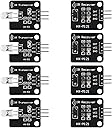
The Dorhea 8-piece IR sensor kit includes 4 digital 38kHz IR transmitter modules and 4 high-sensitivity receiver modules, designed for 5V operation with a 1.3-meter effective range. Compatible with Arduino, Raspberry Pi, AVR, ARM, and 51 platforms, it features built-in LED indicators and mounting holes for easy installation, making it ideal for remote control and infrared communication projects.


| ASIN | B08X2MFS6S |
| Additional Features | Ergonomic |
| Brand | DORHEA |
| Button Quantity | 3 |
| Color | 8PCS |
| Colour | 8PCS |
| Compatible Devices | Raspberry pi, 51, AVR, ARM |
| Compatible devices | Raspberry pi, 51, AVR, ARM |
| Connectivity Technology | Infrared |
| Connectivity technology | Infrared |
| Controller Type | Button Control |
| Customer Reviews | 4.3 out of 5 stars 92 Reviews |
| Manufacturer | DORHEA |
| Max number of supported devices | 8 |
| Maximum Number of Supported Devices | 8 |
| Maximum Range | 1.3 Meters |
| Model Name | 13658-1 |
| Model Number | 13658-1 |
| Special features | Ergonomic |
| UPC | 701715461482 |
| Unit Count | 8.0 Count |
T**R
Works great as long as you have the right expectations
These are good, cheap IR boards. As other reviewers have noted, the VCC lead on the transmitter isn't actually connected to anything; it's just part of the pin header. The transmitter is just an IR LED and a resistor; the DATA pin is really the + line, so if you send it current there, it turns on. You simply bit-bang on that pin to send pulses. If you're using something like a Raspberry Pi, you won't get great range, because all of the GPIO pins are 3.3 volts. I'm using it to control an A/V receiver and have the LED right next to the panel, so it works great. If you need more range, though, you'll want to hook it up to the 5v rail via a transistor and probably also surround it with an IR reflector (as-packaged, it's an omnidirectional LED). The IR receiver works just like you'd expect, and obviously it _does_ need power, so all three pins are needed: data, vcc (5 volt, although might work with 3.3; I didn't test that), and ground. I believe data is pulled high and drops to ground when a signal is received. If you're using a Raspberry Pi with a reasonably current OS, you don't need to download any drivers; much of what you see online is old. Add the appropriate lines ("dtoverlay=gpio-ir,gpio_pin=" and "dtoverlay=gpio-ir-tx,gpio_pin=") to /boot/config.txt (or /boot/firmware/config.txt if running Debian 12). Note that, if you are going to both send AND receive (i.e. you have both lines in the config file and you've hooked up both boards), you'll need to specify which device to use (--device=) in the ir-ctl command: one will be /dev/lirc0 and the other will be /dev/lirc1; this is why some of the reviewers couldn't do both at the same time. Simply use the 'ir-ctl' command to send and receive pulses. ir-ctl can read to and write from a file, so to train it, just set it to write to a file, and then you can play those exact commands back by reading from the same.
K**J
Receiver works great; transmitter is terrible
Receiver is fine since you can shove a remote right up to it to get it payload from. However, the 220Ohm resistor on the transmitter module makes them nearly useless; you can replace with 91Ohm resistor (just note how tiny these are; 1206 is about my limit, and these resistors are even smaller; this was a frustrating experience) for better range. You could also solder bridge if you're only going to be dealing with short pulses. Note if you solder bridge, you are likely to burn out the LED eventually. Even with a solder bridge, though, the transmitter's range is quite poor. It does at least become usable without taping the board with the transmitter to the device you want to control, though; now you can be nearly 2 feet away! Given the price, I won't be *too* harsh on it, but this is definitely a "you get what you pay for" situation. If you're looking to build a universal remote for your devices, keep looking or build your own.
A**N
Transmitter and receiver work fine on Raspberry Pi Zero W
I use these on a Raspberry Pi Zero W for a very specific purpose: to monitor if kodi is playing and when it stops playing, turns the TV off (because I have a tendency to fall asleep). My TV doesn't support the power off signal via HDMI, so I had to make something work the old IR way. I did struggle a bit getting it setup, but in the end, I got it. I hooked up the transmitter to 5v and receiver to 3v and used GPIO pins for signal. I couldn't use both receiver and transmitter at the same time, the pi only wants one or the other enabled in /boot/config.txt, but for my purposes that was fine. I loaded the receiver to record the IR signal, then once I had it, I disabled it and enabled the transmitter to send that signal. Good thing to know here: the pin #s it wants are the GPIO numbers, NOT the pin numbers. Once I got that sorted I was good. I can't speak to how well it does with distance, since I have the pi stashed behind the TV and the transmitter sticking out just far enough for the TV to be able to pick it up. Overall I'm happy, the price was good and it works for my need.
A**X
Works great, would buy again!
Works great! Helps me control a space heater from my computer and does so well!
R**O
Small package and easy to use!
Great product!
Trustpilot
2 months ago
4 days ago