🛡️ Elevate your network game with pro-level security and speed — don’t get left behind!
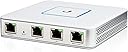
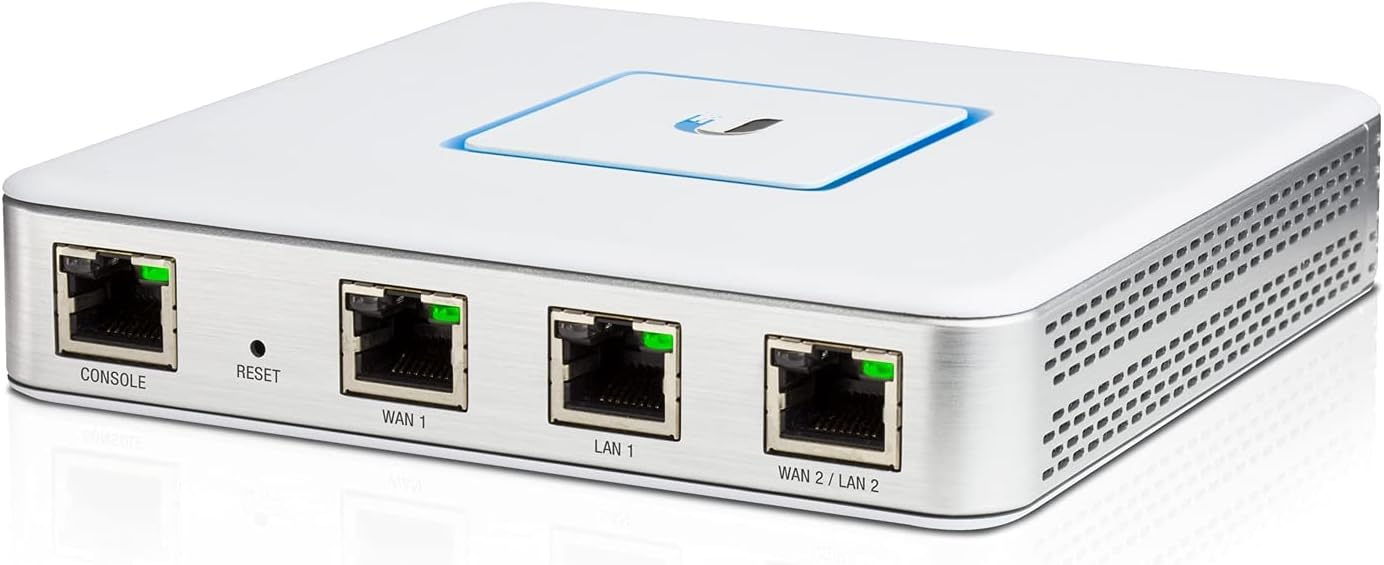
The Ubiquiti UniFi Security Gateway (USG) is a compact, high-performance router designed for professional and advanced home networks. It delivers enterprise-grade security features combined with the ability to route up to 1 million packets per second. Seamlessly managed through the UniFi Controller software, the USG integrates perfectly with other UniFi devices to create a scalable, modular network environment. Ideal for users who demand reliability, visibility, and future-proof networking, it requires some technical know-how but rewards with superior control and performance.


| ASIN | B00LV8YZLK |
| Antenna Location | Home |
| Antenna Type | Internal |
| Best Sellers Rank | 212,020 in Computers & Accessories ( See Top 100 in Computers & Accessories ) 1,575 in Routers |
| Box Contents | Router |
| Brand | Ubiquiti |
| Brand Name | Ubiquiti |
| Colour | White |
| Compatible Devices | Personal computer, laptop, tablet, smartphone, game console |
| Compatible devices | Personal computer, laptop, tablet, smartphone, game console |
| Connectivity Protocol | Other |
| Connectivity Technology | Ethernet |
| Control Method | Voice |
| Controller Type | App Control |
| Coverage | Network Security |
| Customer Reviews | 4.3 out of 5 stars 5,354 Reviews |
| Data Transfer Rate | 3 Gigabits Per Second |
| EU Spare Part Availability Duration | 2 Years |
| Frequency | 5 GHz |
| Frequency Band Class | Dual-Band |
| Frequency band class | Dual-Band |
| Global Trade Identification Number | 00810354020803, 00810354022807 |
| Is Modem Compatible | No |
| Item Dimensions L x W x H | 13.5L x 13.5W x 2.8H centimetres |
| Item Weight | 12.3 Ounces |
| LAN Port Bandwidth | 1000 Mbps |
| Manufacturer | UbiQuiti |
| Manufacturer Part Number | USG |
| Maximum Upstream Data Transfer Rate | 1000 Megabits Per Second |
| Model Name | USG |
| Model Number | USG |
| Model name | USG |
| Number of Ports | 4 |
| Operating System | Unifi OS |
| Other Special Features of the Product | WPS |
| Product Warranty | 12 Months from date of purchase |
| RAM Memory Installed | 16 GB |
| Security Protocol | WPS |
| Special feature | WPS |
| UPC | 817882022996 884201858543 796594801498 810354020803 |
| Unit Count | 1.0 Count |
| Voltage | 240 Volts |
| Wireless Compability | 802.11b |
| Wireless communication standard | 802.11b |
L**N
Solid, expensive, addictive...
This is a home-based installation after a purchase in October 2017. A way of thinking about this is to consider the usual modem/router/switch combo your ISP gave you as being the same as an all-in-one Hi-Fi. This is the separates version, and darn good separates too. This bit is just a router. It connects two networks, as routers do, being the internet (WAN) and all the stuff in your house/business (LAN). It only has one LAN output by default, and no WiFi, so, you'll need a modem of some form with an ethernet output on the WAN side to connect to the outside world, and assuming you have more than one device a switch of some form to allow them to connect to the internet on the LAN side, and then a wifi access point if you want to connect wirelessly. That means cost. But, you get what you pay for. This is a big step up from the consumer kit you'd normally see to business quality hardware and associated software. We're lucky and have fibre to the home, so the OpenReach GPON (sort of fibre modem) unit dumps 300Mb goodness into this, and it handles it effortlessly. Ours is matched to a Ubiquity switch, which in turn is matched to a controller (runs the software) and several PoE driven access points, so our house has seamless WiFi just like a properly setup office. It's been subject to roughly monthly firmware and software updates, all of which happened without drama, and added useful features to it all, including easy IPv6 support. Other than rebooting following those updates it's been on the whole time. A couple of warnings: Read a bit and watch some videos before diving in, it's not for the technically faint of heart as it won't 'just work'. It's not hard to set up, but will be more trouble than a BT/Sky/ISP preconfigured one. If you deal with this sort of thing for a living, it's a walk in the park. It can get hot, mounting vertically is recommended to use the vents effectively. (Ethernet ports go down) Just mind the dust, and don't cover it. The similar looking 3 Edge Router is pretty much identical to this, cheaper, and easier to use without the controller software. The main difference is that in the controller software with this you get more green circles, and access to it from that control panel. Oh and it glows a cool blue when it's working. If that does not interest you, save a few quid and get the 3 Edge Router. Just like Hi-Fi separates, once you start your wallet will weep as you feed your new addiction, but you'll love the improved everything.
X**O
Excelent piece of kit. Easy to setup and very Cheap compared to other solutions
Excelent piece of kit. Cheap compared to other solutions. We were tired of having problems with Virgin Media. I dug out our old dd-wrt which made things better but we still had packetloss to and from the internet. Took a chance on this one and it paid off. No more packetloss all services are working 100% and I have visibility of what is going through the network and how much capacity is in use at any given time. I've set if up via a VM on my esx host, so no need for an additional cloudkey. We are using our existing WiFi kit from TP-link which doesn't integrate with this, but it was expensive and we got it 5 months ago. I would recommend to use the unifi aps and switches as it's a wonderful ecosystem and it can give you a lot of insight and information of your network. It has IPS as well.
R**R
Nice addition for UNIFI set-up but not for the fainthearted and software needs some work
I bought this product as the rest of my home office set-up is UNIFI equipment (4xAPs, Gen 1 unifi cloud key & 8 port PoE switch). I was specifically looking for a new dual wan router and using a UNIFI Gateway would give me this function plus additional reporting and firewall features through the same interface. Positives 1) Good monitoring of internet usage - lots of nice charts 2) Integrated with the other UNIFI equipment well with a single interface to manage the full UNIFI suite 3) Has dual WAN WAN function which allows for either load balancing or fail-over Negatives 1) Use and set-up requires some knowledge of networking, it was a pain to set-up I wanted to use a different IP range to the default. After several hours I ended up changing the IP address range for one of the input WANs and using the Gateway default, it then worked immediately. 2) DUAL WAN failover is very sensitive and seems to produce more false positives than my previous UBIQUITI EDGE Router. Each time a fail is detected there is a short break in the internet, this was happening up to 10 times a day. 3) The dual WAN feature is very basic and lacks some functionality that would be expected e.g. you cannot set the criteria that it uses, you cannot easily see which connection is in use. Overall a nice addition to the UNIFI set-up but I would only recommend if you already have UNIFI equipment and have that geeky desire to see what is happening over your internet. The UNIFI Gateway is easily configured as a cable modem where you put in your username and password for the connection but for a copper connection you will probably need to use the modem/router provided by your supplier. You then set-up the connection in the gateway without login credentials as choose the connection type ' using DHCP0 (it support bridge mode if you want)'. You will also need to make sure that the two routers use different IP ranges. So for DUAL WAN you set-up the two connections and then either choose one as a fail-over only or alternatively set-up a % of traffic to be sent to each connection. IT DOES NOT BALANCE THE CONNECTION for each device, so if you have a 20 Mbps connection and a 5 Mbps connection the max speed for each device will be 20 Mbps not 25 Mbps.
D**L
Solid router for home users
I was having an issue with a Linksys router that was causing horrible ping spikes in games - sometimes up to 1000ms, making games unplayable. I determined the router was at fault, as it was reaching 100% CPU usage (for some unknown reason). I've been using a Ubiquiti UniFi access point for nearly a year now and was very impressed, so I decided to put the extra money in and buy the USG. I have BT Infinity, connecting the USG to the OpenReach modem was a doddle. Installed the UniFi controller, adopted the device and created a WAN network entry - PPPoE for my ISP - username and password entered, I hit apply and everything was done. Have to say I am very impressed so far. I've been using it for 3 months and it hasn't skipped a beat. My ping issues have disappeared overnight, always hovering round 32ms which is perfect. I also love the cloud access provided if you install the UniFi controller, which allows me to adjust pretty much every setting imaginable from an app on my phone. I can add port forwarding rules to my home router when i'm 1000+ miles away - very nice. There's plenty more positive things to say about this router - but to conclude: If you want a -secure- and -fast- home router this is the way to go (bear in mind you'll need an access point to connect to this, and most likely a switch if you want to connect multiple machines).
T**Y
Little tricky for non techies to setup and adopt
Fantastic little security gateway. If your using BT Broadband Fibre (FTTC) and do not have an infinity modem but just a homehub you will need a VDSL router I would suggest the Draytek Vigor 130 or purchase a used infinity modem from eBay for wround £10 - £20 I have installed a lot of these for customers and they are extremely easy to manage from the controller software. Only downside for most will be the initial setup on an existing network. The device ships with a default IP of 192.168.1.1 Easiest to to setup on existing network before removing current router is plug it in Connect a laptop or PC to LAN1 port Open a web browser to 192.168.1.1 Change the IP settings to DHCP Then download and use putty to open an SSH session to 192.168.1.1 and login with ubnt/ubnt Go to ui.com and find the latest firmware for your model Then run the following upgrade https://......... Once it has finished you will be able to adopt it using the UniFi controller. I would purchase this again whenever anyone wants a proper home or business WiFi / Network setup Fantastic bit of kit
F**S
What a great little device
The USG was my next step towards Unifi products. The first was an access point. Couldn't be happier. The USG unlocks so many useful features in the controller. My first task after installing it was to configure a firewall rule to block internet at night (because of the kids). It worked very well. The only point is sometimes you won't find a feature in the UI; then you'll need to configure using SSH, changing configuration files (start and end times are not in the UI yet). You'll need to be a bit brave for that, as I read that you can make a mistake and get in a reboot loop. There is no comparison with my Sky Q Hub; you can do a lot more with USG. To make things perfect, I'd need to get rid of the SKY Q Hub entirely and thus avoid my current double NAT.
M**L
Underwhelming
I bought one of these as part of a home network upgrade alongside a Unifi AC Pro and a Cloud Key. The hardware is very nice and comes neatly packaged, almost Apple-like. Annoyingly it ships without a UK plug so you will have to source one separately. It does get a little warm and the LEDs are quite bright, but nothing too obnoxious. With a maximum power draw of 7w I’m very happy with its low power consumption. You configure the USG through the Unifi controller software, in my case on the Cloud Key, and it does give you some good statistics. Perhaps my biggest bug bear is the DHCP service. For starters, DHCP is tagged as ‘beta’. Seriously? DHCP is as old as the hills, and very basic functionality for a device like this. The way you manage leases and reservations is also not very intuitive. I also struggled to adopt the USG out of the box, forcing me to do 2 factory resets. I also find the lack of documentation on the USG functionality frustrating. This stuff should be built-in, or at least readily available on the website. Take the IDS/IPS functionality (also ‘beta’). It’s literally a toggle on/off with hardly any description and no detail in the documentation. If you’re wondering it appears to be using snort and suricata rules, amongst others. It just seems a bit half-baked to me. Once you get used to the UI it’s a decent enough box, but for £100+ I was expecting a little bit more polish and a lot less beta.
J**S
Strange beast!
In some ways, this is an odd animal. It has 1 LAN port (which can have a DHCP server on it), a WAN port for connection to either a modem or router, but also has a VoIP port, which few people seem to have ever made any sensible use of - not least Ubiquiti themselves. Reading through the Ubiquiti forums, the only method of programming this feature seems to be with a console cable and command-line. The rest of the device is very well-managed by the Cloud Controller, the whole system seems to work very well, with a single management interface for all the Ubiquiti devices on the network. This approach differs from "normal" network device management, where there are separate management pages for each device, which makes for far better integration in larger home wifi installations (where there may be more than one access point for coverage reasons).
Trustpilot
1 month ago
1 day ago