


Buy anything from 5,000+ international stores. One checkout price. No surprise fees. Join 2M+ shoppers on Desertcart.
Desertcart purchases this item on your behalf and handles shipping, customs, and support to KSA.
🎛️ Elevate your mix game—where tactile meets tech in perfect harmony!
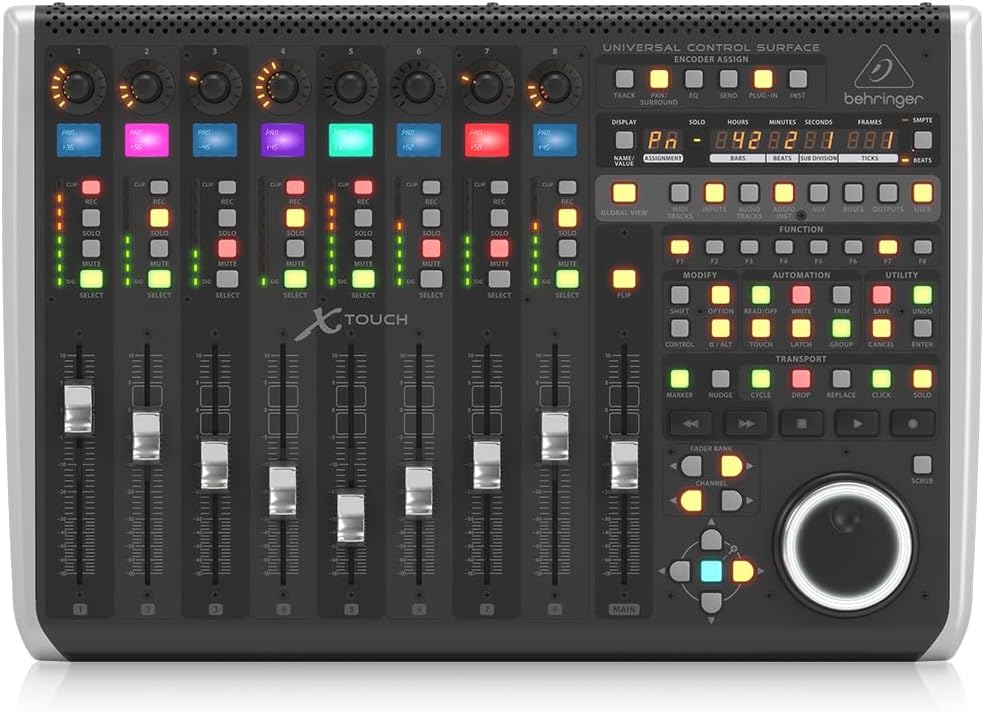
The Behringer X-TOUCH is a professional-grade control surface featuring 9 motorized 100mm faders, 8 dynamic LCD scribble strips, and a comprehensive set of illuminated buttons and rotary encoders. Designed for universal DAW compatibility via HUI and Mackie Control protocols, it offers flexible USB, MIDI, and Ethernet connectivity, making it ideal for both home studios and live performance environments. Its compact footprint and intuitive interface deliver precise, hands-on control that transforms digital mixing into a tactile, immersive experience.


| ASIN | B018W0VWXI |
| Best Sellers Rank | 3,008 in Musical Instruments & DJ ( See Top 100 in Musical Instruments & DJ ) 20 in MIDI Controller |
| Brand | Behringer |
| Brand Name | Behringer |
| Colour | Black |
| Compatible Devices | Computer, Tablet |
| Connectivity Technology | USB |
| Connectivity technology | USB |
| Connector Type | USB |
| Control Method | Touch |
| Control Type | Motor Faders, LCD Scribble Strips, and Rotary Encoders |
| Country of Origin | China |
| Customer Reviews | 4.5 out of 5 stars 307 Reviews |
| Global Trade Identification Number | 04033653130646 |
| Hardware Interface | USB |
| Hardware Platform | PC/Mac |
| Human Interface Input | Touchscreen |
| Included Components | USB Cable, Power Adapter, User Manual, LCD Scribble Strips, Motorized Faders, Rotary Controls with LED-collars, Ethernet Cable (for RTP MIDI and future BEHRINGER X32 remote control) |
| Instrument | digital audio workstation |
| Instrument Key | Any |
| Item Dimensions D x W x H | 38.1D x 56W x 16.8H centimetres |
| Item Type Name | Desktop Controllers |
| Item Weight | 4.27 Kilograms |
| Keyboard Description | Ergonomic |
| Manufacturer | Behringer |
| Manufacturer Part Number | X-TOUCH |
| Material Type | Metal Plastic |
| Mixer Channel Quantity | 9 |
| Model Name | Behringer X-TOUCH |
| Model Number | X-TOUCH |
| Model name | Behringer X-TOUCH |
| Noise Control | None |
| Number of Keys | 9 |
| Number of keys | 9 |
| Outer Material | Plastic or Metal |
| Platform | iOS |
| Product Style | Modern |
| Product Warranty | Community. Musictribe. Com. |
| Product dimensions | 38.1D x 56W x 16.8H centimetres |
| Size | 38.1 cm x 56 cm x 16.8 cm |
| Special Features | Studio Recording, Mute Controls |
| Special feature | Studio Recording, Mute Controls |
| Supported Software | Pro Tools, Logic Pro |
| UPC | 748252139443 |
S**Y
X-Touch & Logic Pro X. Works brilliantly.
I have to admit I was very wary of this initially. I've always thought Behringer audio gear was a bit cheap and toylike - I'm used to professional equipment that's built like a tank. Now I work for myself I can't justify the prices that Avid/Pro Tools want for a control surface. So after a lot of research (a big thanks to the Gearslutz website) I changed to Logic Pro X DAW and bought this control surface. And I'm staggered by what £ 450 buys you. This thing works so smoothly with Logic Pro. And it's more solid than it looks in the pictures. At the price I can live with the niggles some people mention like... 1) You can't see the backlit LCD scribble strips when the desk is flat - an easy solution is to tilt it 2) The faders are a little bit noisy/juddery. At the level I monitor at I don't hear them and they track accurately, which is the big concern. Just some of the things I love.. 1) Solidly built and a small footprint. Just right for a small studio. 2) When you touch a fader, Logic jumps to that channel. 3) Works reliably all day without locking up. 4) When nudging a piece of audio, each encoder has a different step value. So handy for moving cues around quickly. 5) Although Behringer don't publish a user's manual, there's a series of brilliant tutorials on Youtube. 6) Intuitive - you get up and running very quickly. Edit: Just bought a footswitch and am finding it very useful . For the sockets at the rear of the surface, Footswitch 1 operates the transport start/stop. Footswitch 2 toggles the record punch in and out - great for working on your own. Both pedals need to be a momentary footswitch with NO (Normally open contacts) terminated in 1/4" mono jack.
M**2
Works as Mackie Control Unit not Midi controller
This controller has to be set to USB mode and then works as a Mackie contgroller. I am using it with Sonar and there are a number of downloads available which impove the functionality. There is also an SDK available form Cakewalk which allows the casual programmer to make their own device handler for Sonar - I am currently working on that. Sadly Sonat has been killed off by Gibson guitars so they will not be doing any updates themselves. The motorised faders can be a bit noisy and clicky but they work ok. It may work better with a DAW such as Logic since that seems to be the one all the tutorial videos refer to. It is rather expensive, but it does mean that most things can be done without resorting to a keyboard (although I use both). Beware though that this cannot be used in Midi learn mode to control features in a DAW as the functionality is entirely through the Mackie interface.
G**E
Nice to have but not essential
I assume someone somewhere knows how to use this to control every aspect of their DAW, but I've yet to figure out the basics and I've been persevering for some months now. On the surface of it, it's fairly straightforward. But once you start doing anything more complicated than simple fader moves and panning, behaviour is unpredictable and buggy. I have a Mac Mini M1 with the latest version of Logic and I've yet to work out how to get it to behave with any predictably. Some times the Plug in shortcut opens the plug in assigned to the currently selected fader, and sometimes it doesn't. Sometimes it works as expected, sometimes it crashes for no fathomable reason. Sometimes it let's you adjust the parameters of the currently in focus plug in window, sometimes it doesn't. Terrible documentation. Terrible support. No support for colour assignable scribble strips. The Expression controller appears to have SysEx disabled but documentation makes no mention of how to enable it. Apart from that, fader automation works brilliantly and the ability to quickly mix drums and control sends is genuinely something I couldn't go back to doing with just a mouse. But for the money it should be more intuitive to use and configure and the lack of proper easy to follow set up documentation is shocking for such a well established brand. Build quality is excellent. Fader caps feel a little plasticy. Jog shuttle wheel is a great time saver. 6 out of 10.
J**S
Fantastic control surface.
Just like a proper hands on mixing desk. This contol surface feels very responsive with a sturdy metal design and coloured strips which is a bonus. Will buy the extender too. Seamlessdly integrates with my Daw. Proper controls which feels productive rather than scratching around the screen with the mouse. Proper faders for a professional touch. Great delivery too.
S**N
Delighted to pick this up on a Black Friday deal
This is brilliant, even better than I thought it would be, I am using more features than I was expecting to. Seamless integration with Logic and very easy to set up and get going. The only grip is the jog shuttle wheel had fallen off when I opened the box, however it pushed on and has been working fine.
J**P
A flagship product
A huge advancement of the previous BCR/BCF2000 range and like those early models this too occupies a place in the market that is really untouchable for features and price. The X-Touch also appears/feels to have an increase in quality over those early models and certainly a huge jump in features. Considering the excellent original products like this that Behringer can and does produce, its a shame they feel it necessary to undertake the rather dodgy approaches and practices they are with regards to some (not all) of the "reproduction" and "clone" products they are releasing.
M**N
Working well with an XR18
I’m using this to provide a control surface for an XR18 via a ethernet. Worked out of the box as expected. Scribble strips are difficult to read from a sitting position with the device flat in a desk - angling the unit up on a small wedge or laptop stand helps visibility a lot. I also have it attached simultaneously via USB MIDI to a Mac. I’m using some 3rd party software (osculator, midipipe, and midishortcuts) to take the MIDI data and map to shortcuts in non-DAW software - works as well as the effort you out in to set up the controls you want.
A**Y
Worth every penny - you’ll want an extender soon after buying this...
This is probably the single most important investment I’ve made into my studio over the last few years - I adore this thing!! The manual says barely anything about how to use it, the multi-coloured LED screen feature is basically false-advertising as Mackie Control doesn’t support it, but in terms of work-flow this is a real game-changer. I managed to order the extender unit from Thomann in Germany since it’s not on Amazon which (with 16 faders) suddenly makes you feel like you’re back in the analog mixing desk days again.
J**S
Toestel is geweldig, verpakking voor opsturen minder!
Toestel doet wat het moet doen en daar ben ik heel tevreden over! Echter de manier dat het verpakt was, vond ik niet zo professioneel. Het toestel zat gewoon in zijn eigen doos, niet eens beveiligd met een plakband of zo. Iedereen kon de doos openen en er weet ik wat uithalen. Gelukkig is dit niet gebeurd, maar toch vond ik het vernoemen even waard!
S**L
La surface de contrôle universelle par excellence
Pour un budget relativement correct, j'ai enfin une surface de contrôle digne de ce nom pour piloter Logic Pro X. La prise en main est rapide sur les fonctions basiques, mais le mode d'emploi très succinct vous oblige à chercher ailleurs. Fort heureusement, Behringer a publié de nombreuses vidéos sur Youtube pour présenter les fonctionnalités en détails et elles sont très claires (en anglais mais sous-titrées). C'est un fait, cette X-Touch fait très bien le boulot au point que je ne touche presque plus la souris pour des tâches courantes dans LCPX. Un petite amélioration toute de même : des faders moins bruyants la rendrait parfaite. Quelques instabilité quand vous testez toutes les fonctionnalité, mais globalement, je suis ultra satisfait de mon acquisition et je regrette seulement de ne pas l'avoir acheter plus tôt.
M**O
Ne vale assolutamente la pena.
Nel bene e nel male, a differenza di altri dispositivi molto più costosi questo della behringer devo ammettere che é una scelta da valutare. I materiali di costruzione sono discreti ma molto solidi e funzionali. Per quanto riguarda la compatibilità con le daw devo dire che personalmente ho avuto molte difficoltà. Ma una volta settato correttamente a me non ha dato nessun problema, anzi. Un controller midi per la gestione del software é molto comoda e favorisce davvero tanto il workflow in tutte le fasi. Ma il meglio di sé lo esprime specialmente nel mixaggio, i fader motorizzati sono molto precisi e sensibili. Molto utile che siano divisi in banchi da otto canali. Lo schermo LCD per ogni canale é un tocco di classe per abbandonare definitivamente il caro buon vecchio nastro di carta. Comprendo la bruttissima fama della Behringer ma su questo mixer mi sono ricreduto.
C**T
Fantastic
I'm in love with this product. It feels and works spectacular. Behringer doesn't have the greatest reputation for putting out high quality hardware but the X-Touch line stands out as a MAJOR exception to that rule. If you produce music digitally and are used to using virtual mixing boards in all popular DAW software (Logic, Studio One, etc) then the chances are good you should go for the Behringer X-Touch One. It's cheaper but retains the giant knob functionality that is EXCELLENT.
T**G
Preis/Leistung/Qualität Wirklich Top
Zuerst doch recht skeptisch ob das am Ende nur "Blink Blink" ist oder ob es wirklich Sinn macht, habe ich den X Touch bestellt. Ich möcte nicht lange ausufernd schreiben aber auf das wichtigste zu sprechen kommen. Ich hatte eine gewisse Sorge ob sich das leicht ins System einbinden klässt und JA es lief einfach. Angestöpselt per USB, Logic geöffnet...Zack. X Touch war da. Kein Umprogrammieren in dubiosen Controller und Midi Bänken. Anstöpseln und fertig. Zumindest mit Logic. Am Anfang genießt man die Fader, aber bei der Arbeit damit wird es es sozusagen von Stunde zu Stunde besser/leichter/macht mehr Sinn. Nach zwei Tagen intensiver Beschäftigung damit war die Gewissheit gewachsen das ich den X Touch behalten werde. Ich hatte und habe noch meine Schwierigkeiten im Enoder Assign Modus flink zurecht zu kommen. Aber nimmt man sich die Zeit und schaut sich das genau an, gehts dann mit jeder Bedienung flinker, und ohne Sucherei. Mit Maus und Tastatur ist man auch nicht zu Beginn der flinkeste gewesen. Der größte Vorteil liegt ganz klar bei der Automation. Mit den Motorfadern arbeitet man mit den Händen und Fingern ganz einfach völlig anders als in der Mixersoftware mit der Maus Pegel zu schieben. Man fühlt sich doch wieder mehr in der Musik drin als mit den Augen auf dem PC Bildschirm. Man fühlt die Musik wieder mehr anstatt sie "sehen zu wollen". Hat man als Beispiel ein EQ Parameter und schliesst die Augen beim verdrehen des Wertes über den X Touch - ist das Ergebnis musikalischer und am Ende stimmiger als das in PLUGIN Fenstern abläuft. Das ganze erinnert auch an die gute alte Zeit mit den großen Pulten in den Studios. Ein Teil Nostalgie spielt da auch eine Rolle. Auch die Transport und Automationsmodes, das Jog Rad von dem in vielen VIdeos leicht negativ berichtet wird, ist tadellos und macht mächtig Laune. Mein Fazit und Rat für Euch: Wenn man bereit ist sich einzuarbeiten/umzugewöhnen und beim loslassen der Maus nicht gleich Schnappatmung bekommt, gebt dem Teil eine Chance. Hier bei mir sind nun 3 Tage vergangen. Beim ankommen dachte ich noch, das schickst du wahrscheinlich flink zurück. Jetzt an Tag 3 bin ich sicher das es ein sehr wichtiges Teil in meiner Produktionskette ist und bleiben wird.
Trustpilot
5 days ago
1 month ago