Buy anything from 5,000+ international stores. One checkout price. No surprise fees. Join 2M+ shoppers on Desertcart.
Desertcart purchases this item on your behalf and handles shipping, customs, and support to KSA.
🏷️ Label like a boss—professional, precise, and ready to impress!
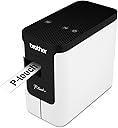
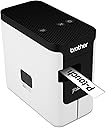
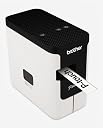
The Brother PT-P700 is a high-resolution (180x360 dpi) thermal desktop label printer designed for professional environments. Compatible with Windows and Mac, it offers plug-and-play USB connectivity with no driver hassle. Print durable laminated labels from 3.5mm up to 24mm wide and lengths up to 1000mm, customizable with fonts, graphics, and cloud templates. Powered by AC or batteries, its sleek design and stable build make it a stylish, versatile asset for organizing IT equipment, files, signage, and more.


| ASIN | B00DSYEB28 |
| Additional Printer Functions | Print Only |
| Best Sellers Rank | #27,705 in Office Products ( See Top 100 in Office Products ) #39 in Label Makers |
| Brand | Brother |
| Built-In Media | 0.94 in x 13.1 ft Black on White laminated inTZe in starter tape, A/C adapter, P-touch® Editor Lite software/printer drivers for PC/Mac, USB cable |
| Color | White |
| Color Depth | Germicidal bactericidal sanitize |
| Compatible Cartridge | Germicidal bactericidal sanitize |
| Compatible Devices | PC |
| Connectivity Technology | USB |
| Control Method | Touch |
| Controller Type | Abode |
| Customer Reviews | 4.4 out of 5 stars 1,054 Reviews |
| Display Type | LCD |
| Dual-sided printing | No |
| Duplex | Automatic |
| Global Trade Identification Number | 00012502635888 |
| Hardware Interface | USB |
| Ink Color | Germicidal bactericidal sanitize |
| Item Dimensions D x W x H | 3.1"D x 6"W x 5.6"H |
| Item Type Name | Brother PT-P700 PC-Connectable Label Printer |
| Item Weight | 1.56 Pounds |
| Manufacturer | Brother Printer |
| Maximum Copy Resolution Black and White | 180 x 360 dpi |
| Maximum Media Size | Paper Roll |
| Maximum Print Resolution Black and White | 180 x 360 |
| Maximum Sheet Capacity | 1 |
| Maximum print Resolution Color | Germicidal bactericidal sanitize |
| Model Name | Touch |
| Model Number | PT-P700 |
| Model Series | PT |
| Number of Trays | 1 |
| Other Special Features of the Product | Portable |
| Output sheet capacity | 1 |
| Paper Size | 24 MM |
| Power Consumption | 31 Watts |
| Print media | Labels |
| Printer Connectivity Type | USB |
| Printer Output Type | Monochrome |
| Printer Type | Thermal |
| Printing Technology | Thermal |
| Processor Count | 1 |
| Resolution | 180 x 360 dpi |
| Scanner Type | Flatbed |
| Series Number | 700 |
| Special Feature | Portable |
| Specific Uses For Product | Office |
| Total USB 2.0 Ports | 1 |
| Total Usb Ports | 1 |
| UPC | 012502635888 800188106477 |
| Unit Count | 1 Count |
| Warranty Description | 2-year limited |
| Warranty Type | Extended |
| Wattage | 31 watts |
A**.
Great printer, easy to use!
There are some reviews here that look at this thing as incredibly complicated or a pain to set up. It is neither of these, and was actually quite easy to set up. Using my Windows 10 machine, I first went to the Brother P-Touch website and downloaded the full software drivers and installation package. When I ran the setup, it instructed me to plug in the printer at the correct time it needed it. The setup went flawlessly. I ran the software updater tool which updated the firmware on my PT-700, including the express software on the included partition. Super easy. The P-Touch Editor 5.2 software is fairly straightforward to use. There's a lot of options available. I would say it is not naturally intuitive. You can pick up any Brother P-Touch standalone label maker and understand how to use it fairly easily. The software here takes a little bit of time to learn. In the Express mode, you click on the paper settings to specify the tape width, length (or auto), margins, and orientation. You then click the large A to enter text mode, and a text box is automatically created on the label. Enter what you want, press Enter for new lines. The software will let you add infinite lines, but your practical limit based on printer resolution is really 7-10 lines at 3.5 pt font each. You can then select the Frame option, pick whatever frames you want (including specialty ones). You might have to go back and adjust label width if a frame doesn't fit. You can also add clip art or images to your label. I took the profile picture of my significant other, made it into a label with hearts on it as a gift. The Layout option lets you change where object boxes line up on the screen. You have to click the frame of that object to get it to accept those commands. The benefit of an object box editor like this is that it makes things easier when you're doing database connections. Brother has a good video detailing how to do this on their Youtube page. Basically, you can connect any database or CSV file and link fields on the form to specific object boxes, and line those up wherever is needed on the label. You could automate mailing address labels this way, or name and ID labels for sign in sheets or something. The possibilities are endless. Also, with this printer sitting on my desk, I have to say this is one of the sexiest office appliances I've owned yet. The white and black contrast looks great. The unit is weighted well so it doesn't fall over. And you can add batteries which stabilize it even more and provide some backup power. The printer does spit out a 1 inch segment before printing to ensure that the tape is properly fed before printing. It's an unavoidable part of the design, and only wastes like 3 cents. Not a big deal. The only problem I have with the printer is putting new cartridges in and out requires opening the side, like an old Walkman cassette player. But that's an unavoidable problem considering the form factor. Overall, this is a great printer, and I have no regrets buying it for $30 used after someone returned it who hated it. Great buy!
D**.
Works great with the Mac. Will only use TZe tapes. Excellent machine.
I have read very little about using this with a Mac. But what I HAVE heard from other reviews, made this a painless experience for me. I have a Macbook Pro running Yosemite, 10.10. And this machine works flawlessly ONCE YOU TURN OFF THE Plite button on the top. That thing defaults to on when first plugged in. Turn it off by holding the button down until the light goes out, and it stays off. This prevents the device from using the onboard software. When you put the DVD in the (external, of course) drive on your Mac, you are basically presented with a link to download the software and drivers. I simply installed everything on offer from the page I was taken to. And... everything works exactly as it should. 1" of waste for each print job: I asked the company about this, and have finally heard an explanation. It is not just to sell more tape as it seems. It is, sadly, an integral part of the lamination/fuse process. The process cannot begin at the very end that was just cut. It isn't a perfect system, but the cost of doing it this way just isn't THAT high. Best way to save tape is to print multiples at a time - assuming you want more than one. IF you want different labels, just create one long label with all the stuff you want, and print that out instead of individual labels for each item. Worst thing you can do is print a bunch of labels that you've screwed up and have to throw away. So use Preview, and be sure all your goodies are inside the little box in the template so you don't have truncated text and graphics... and don't sweat the bit of waste at the beginning of each print job. When it is time to order new tapes (I did immediately, and love the high-strength adhesive stuff) - order them from Amazon after using the handy little guide that comes in the package with the printer. Search on the tape number. The chart that comes with the device makes this very easy. Oh, and one final thing... I have other Brother Label makers that use TZ tapes... and I have a LOT of TZ tapes, I thought they'd work here, but maybe not be auto-size sensing? Wrong. The tapes must be TZe, dang it. NONE of my old tapes will work in this machine. Pretty sad because I'm not sure what the "e" gives me beyond auto size-sensing. And I REALLY don't need it to know I've got a 1/2" tape in there. I can read and click that button myself. But the TZ tapes will not physically fit in the machine due to the additional tab that the "e" adds to these things with little contacts that provides the data. Let me know if you need a great label maker that works with Windows and TZ tapes! :sigh: Bottom line is that because others have suffered to alert me to how it will work with the Mac, my experience has been flawless except for having to buy all new tapes again. I have other Brother Printers, but none of them would work on the Mac, so the entire reason I purchased this was to work with my current computer. And... yay. It does. Perfectly.
G**F
Yes, it is wasteful, but it is still a great label maker
First, like everyone else has said, due to the design of the cartridge tapes, it has to waste some before and after. I don't find this to be a big deal though, and I just deal with it. If I have a lot of labels to print, I just print them all at once on a long strip, and cut them out separately. I like the simplicity of this label maker with the use of batteries and the easy interface. It is easy to print labels wherever I want using a laptop. I only bought genuine brother tape cartridges due to the reviews I kept reading of some that were using 3rd party ones having problems. I haven't had a single issue with any of the brother tape that I've tried. I used to use a handheld label maker, and I much prefer to be able to type and use the computer interface. I know the 750 can do the half-way cut to make multiple labels at once easier, but I didn't want all of the extra wireless connectivity, as I actually prefer to just connect with USB. I think this is a great option for those who want to type and just connect by USB.
D**K
Brother is NOT trying to rip you off.
Brother is not trying to screw you out of tape. Look at the tape cassette. It's a 3-part system: the black "print" material, the laminate, and the adhesive label itself. You'll see there is a feed roller at the exit that pulls them together and laminates them. There is not a time when there is not a laminated label started, otherwise you'd have two pieces getting jammed up. This starter piece is the part that gets cut. The only thing they could have done is move the print "head" closer to the feed wheel, but you can only get so small (without paying 35 bucks a cassette) and you'd save another, what, 1/4" or so. There are 314 inches on a roll. My labels so far have been slightly over one inch, so maybe 300 labels. Some (very) rough math: -10 labels per strip, a 10% loss with that cut off end. 10% of 300 leaves 270 usable labels, at $9 for the 1/2" white cassette, comes to 3.3 cents per label. -6 labels per strip, a 17% loss with that cut off end. 17% of 300 leaves 249 usable labels, at $9/cassette, which comes to 3.6 cents/label. -1 label at a time, a 50% loss with the cut off end. 50% of 300 leaves 150 usable labels, at $9/cassette, comes to 6.0 cents/label. Even though it can get pretty wasteful, you can't buy custom labels for that. Honestly, I don't know how they can make money on this thing. $40-$45 for the printer, and $9-$11 for a complex, 3-part, laminating cassette. Look at that cassette. It's brilliant. Anyone would be hard pressed to go out and manufacture the same thing for the same price, and it would still cut off an inch of tape. I've seen Lego pieces more expensive than this. You're not paying for X amount of tape, you're paying for the engineering that allows this thing to print durable labels quickly, reliably, and jam free. I've been around enough commercial/industrial heat and laser labelers to know waste. All the mis-feeds, jams, alignment problems, carbon tape hang-ups, hours spent fixing it, hours wasted not inventorying/bagging/shipping... you throw away the cost of this printer and tape combined at least weekly, sometimes daily. All that said, I hope this printer lasts a while. I am very impressed with the label quality. I also wish they ditched the battery pack area and made it smaller, but I guess some people would need this in the field. If Brother really wanted to screw you, they'd offer an $80 add-on battery pack like the Chinese tool guys do (Milwaukee, DeWalt).
B**N
This is the label maker that I should have initially bought.
I bought this PC USB connected label printer to replace a handheld brother label maker. The handheld unit worked nicely but I found the small display to be very difficult to read, and the operation to be a bit difficult. This PC version is so much easier to use, has more capability, uses the same excellent TZ style tape and can be battery powered for easy movement between computers. No software install is required, the device appears on the computer as a disk drive that contains the label making editor (lite version) program. Super easy, works really well, and making the labels on screen with a real keyboard is just so much easier than fussing with the handheld unit. If you want to make more complicated labels you have the option of installing the full version of the label editing software on your computer, but so far I have found the light version which requires no install to be perfectly adequate for my needs. This unit has made making labels fast and easy, and I recommend it highly.
S**G
Versatile and handy label maker!
EXCELLENT label maker. You MUST have a pc to connect to to use this label maker. The machine has 2 functions: 1 is "Lite" mode...no software required, just plug it in, and it show up as a drive letter you click on. The 2nd mode is for more serious stuff using the software that comes with it. Easy as using "Word". An editor comes up that allows you to choose fonts, font sizes, and automatically adjusts font for extra line text. You can insert icons, pictures, print bar codes, change orientation on the fly....just about anything you can with Word. Machine also takes several different tape widths, and adjusts to the width automatically, and cuts labels automatically. . The ONLY con I can find is that there is extra unused tape (about an inch) before and after print on each label....I believe this done so the label extends enough from the machine when cut. Either deal with the extra bit of label, or trim them yourself. Not a big issue. This makes the older keyboard label makers look stone aged. Update 2024: Still working like new. 3rd party replacement cartridges can be found on that auction site for pennies on the dollar vs Brother brand.
R**C
Almost Perfect, but for me 1 Major Flaw
Very nice small label printer. If you need to organize your stuff step one put labels on them is so much easier to see whats inside a box seeing the label that taking it out opening and, sort the things inside. The print size is up 24mm wide perfect to put all your info and show ho owns that item (maybe a laptop, tablet you name it) and the best of this is that the label are laminated and are more durable that paper ones It uses no ink, toner or anything else just the label ribbon. The software is very easy to use more if you have use some image design software before (mspaint, ms power point, etc) Cons: You need to use a computer, not a big issue but is good to know that you cant do anything with this without any computer (PC or MAC) Before printing any size label the printer cuts about (or WASTE) 3/4 of an inch of tape before printing your label, the only solution that i have found is that you need to print several labels at once to make continuous jobs (the printer will cut all the labels no problem). Note: was not paid to make this review is any way (no discount, no free stuff, etc)
B**S
Not compatible with labels created with legacy high end model (PT-9800PCN)
Good: 1. cheap 2. easy to use 3. mobility available with battery 4. resolution, or print out quality is better than I expect. Bad: compatibility issue the biggest problem is: it will mess up those labels created with high-end model, in my case, PT-9800PCN. I owned 4 PT-9800PCN printers for about 5 years, now two of them refuse to work. I have many legacy labels created with PT-9800PCN by using brother P-touch Editor Software, and just need a cheap one to print out those not so important labels, that is the reason driving me to buy this model. I am wrong, this PT-P700 new low-end model printer does not do the job, for some labels (especially those with tiny bar code), guaranteed to mess up the lay out, so end up I could not use this printer at all. Summary: for simple usage, or simple label printing, this is a good entry level label printer; however, if you have labels created by high end label printers, and want to reuse these labels, print them out with this printer, even you've lowed your expectation of printing quality, this label printer will mess them up and you will not get the print out result as initially designed/showed in those labels. So I guess I have to buy brother PT-P950NW as a replacement for my dead PT-9800PCN.
E**Z
Super útil.
La empleo en mi negocio, es una forma accesisble y muy buena, con buena presentación de generar etiquetas, todavía tengo la primera pero es tan buena esta serie de etiquetadoras que aprovechando el precio compré una segunda, esta. Muy bien por Brother mi marca preferida para impresión por confiable, productoa que duran, sean estas o laser o inyección.
Z**H
I love it
Excellent label printer, I love the plug-and-play feature. You just plug it in and launch the included software for PC or Mac from it, it shows up as a USB drive. The software could be better but is fine for purpose. Unfortunately you can't disable auto-power-off, so the software will close after a while if you turn off the printer or it turns itself off. Label printer wastes about an inch of label tape each time you print and I can't find the option to print multiple copies without doing that. The image quality overall is great and I love being able to use custom fonts. The label tape it comes with is rather wide, so you'll need to get thinner ones if that's what you want. The plastic labels are smooth on the outside and not sensitive to heat, unlike thermal labels, and it doesn't use BPA/BPS to print which is an added bonus. Great product.
F**Z
Ottima macchina, niente da dire sulla stampante, driver problematico
Nulla da dire sulla stampante, ottima macchina. Purtroppo pero il software e il driver per Mac lasciano molto a desiderare, funzionano a singhiozzo, e alcune volte devo rinunciare a stampare perche è impossibile fa vedere la stampante al Mac con Osx 10.10. Da migliorare sia il software che il driver
C**R
Average product! Labels are expensive.
Very expensive Labels. Hard to procure and as stated by the seller, this product is only good if your usage is limited. Too much wastage between label to label. Not worthy to loose so much label when its so expensive.
A**L
Four Stars
Good product
Trustpilot
1 month ago
4 days ago