


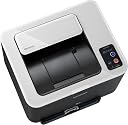

Samsung CLP-325W Colour Laser Printer (Wireless)
Product ID: 362811574
Box Contains 1 x 140 CD/DVD Media Storage Box, Blue;70 x antistatic CD/DVD sleeves Review: Great printer but with flawed wireless abilities - I have been using the printer for about three weeks now and am so far very impressed. It's been a while since I have owned a laser printer and they've certainly come a long way since the LaserJet III! It appears well built and is heavier than I'd expected, given the trend with modern printers. The documentation leads you through configuring the wireless network settings via installation program, which appears to be the only way to do it manually. Each time I tried this the installation program stopped responding and needed to be killed. This was on Windows 7. I eventually resorted to the WPS setup, which worked as advertised and I was able to print a test sheet from my PC. However, this appeared to be the last time that the PC was able to communicate with the printer wirelessly, as although my router stated that it was connected, it was not responding and the printer status application showed it as being offline. Having read the other reviews which said pretty much the same thing, I was expecting trouble, so I connected it up to a switch with a cable and now all is well. As I was aware of this potential issue when I bought it, so I haven't marked it down. Otherwise, the print quality is very good. I haven't printed any photos at best quality yet, but the test print was very impressive. My main reason for buying was to replace an inkjet printer whose cartridge kept drying up in the weeks between uses. I don't print a lot! The price of the replacement toner cartridges seems reasonable, although they're not as large as some rivals, they're likely to last a while for me. I could have saved £40 and gone for the CLP-320N, but maybe one day Samsung will fix the wireless issues in firmware or an updated driver and the printer can be set free. It hasn't suffered any paper jams so far and can take thicker paper, labels and envelopes via the manual input tray. Review: Samsung Dependability - The Samsung CLP-325W printer is easy to set-up and use. The wireless functionality, which so often seems to cause problems, was straightforward enough to install and worked first time round. However, I no longer get feedback from the printer that it has actually printed a job. This is merely annoying when printing from a PC not next the machine; it does not affect its use. It could be that the system is designed for a more up-to-date OS than XP, which I use, but I can live with it "as is". The machine is competitively priced. I bought a laser because we do little printing, so I don't believe that the consumables cost will be a particular issue. My inkjet became expensive to run and unreliable due to print-heads becoming clogged through lack of use. It has a fairly small footprint and does not need a separate transformer to power it - straight to the mains, but you will probably need an extension because the lead is short. The print quality is excellent for this level of machine and is fine for all but glossy photo prints - which it does do reasonably, and to be fair I am yet to buy some glossy paper specifically for lasers. So far the colour is a bit flat. Be sure to set the print quality to "best". I am a fan of Samsung products - all have been reliable and good value. Apart from the printer activity feedback problem I have and after only a couple of months, this is not an exception. This machine is worth considering if: - You don't print a lot or you have large intervals between print jobs. - You are worried about setting-up a wireless device - it's easy. - You need to share your printer with others in the house or to print from more than one PC. - You are not fussed about duplex printing. The software helps you do this, and more, by reinserting paper to print on the reverse, but so far I have not needed it. - You don't like additional hot transformer boxes hanging around your power outlets. - You get your photo printing done professionally, which is probably the most cost effective option.
| ASIN | B003LVGLXA |
| Additional Printer Functions | Print Only |
| B&W Pages per Minute | 16 ppm |
| Brand | Samsung |
| Brand Name | Samsung |
| Color Pages per Minute | 4 ppm |
| Compatible Devices | PC |
| Connectivity technology | Wi-Fi |
| Control Method | Touch |
| Customer Reviews | 3.8 out of 5 stars 233 Reviews |
| Dual-sided printing | Yes |
| Duplex | Automatic |
| Hardware Interface | Ethernet |
| Item Weight | 24.25 Pounds |
| Manufacturer | Samsung |
| Maximum Sheet Capacity | 150 |
| Model Name | CLP 325W |
| Model Number | CLP-325W/SEE |
| Model name | CLP 325W |
| Network Connectivity Technology | Wi-Fi |
| Other Special Features of the Product | Wireless,Compact |
| Output sheet capacity | 100 |
| Paper Size | A4 |
| Print media | Paper (plain) |
| Printer Output Type | Colour |
| Printer Type | Laser |
| Printer output | Colour |
| Printing technology | Laser |
| Processor Count | 1 |
| Series Number | 3 |
| Special feature | Wireless,Compact |
| Wattage | 350 watts |
C**R
Great printer but with flawed wireless abilities
I have been using the printer for about three weeks now and am so far very impressed. It's been a while since I have owned a laser printer and they've certainly come a long way since the LaserJet III! It appears well built and is heavier than I'd expected, given the trend with modern printers. The documentation leads you through configuring the wireless network settings via installation program, which appears to be the only way to do it manually. Each time I tried this the installation program stopped responding and needed to be killed. This was on Windows 7. I eventually resorted to the WPS setup, which worked as advertised and I was able to print a test sheet from my PC. However, this appeared to be the last time that the PC was able to communicate with the printer wirelessly, as although my router stated that it was connected, it was not responding and the printer status application showed it as being offline. Having read the other reviews which said pretty much the same thing, I was expecting trouble, so I connected it up to a switch with a cable and now all is well. As I was aware of this potential issue when I bought it, so I haven't marked it down. Otherwise, the print quality is very good. I haven't printed any photos at best quality yet, but the test print was very impressive. My main reason for buying was to replace an inkjet printer whose cartridge kept drying up in the weeks between uses. I don't print a lot! The price of the replacement toner cartridges seems reasonable, although they're not as large as some rivals, they're likely to last a while for me. I could have saved £40 and gone for the CLP-320N, but maybe one day Samsung will fix the wireless issues in firmware or an updated driver and the printer can be set free. It hasn't suffered any paper jams so far and can take thicker paper, labels and envelopes via the manual input tray.
D**H
Samsung Dependability
The Samsung CLP-325W printer is easy to set-up and use. The wireless functionality, which so often seems to cause problems, was straightforward enough to install and worked first time round. However, I no longer get feedback from the printer that it has actually printed a job. This is merely annoying when printing from a PC not next the machine; it does not affect its use. It could be that the system is designed for a more up-to-date OS than XP, which I use, but I can live with it "as is". The machine is competitively priced. I bought a laser because we do little printing, so I don't believe that the consumables cost will be a particular issue. My inkjet became expensive to run and unreliable due to print-heads becoming clogged through lack of use. It has a fairly small footprint and does not need a separate transformer to power it - straight to the mains, but you will probably need an extension because the lead is short. The print quality is excellent for this level of machine and is fine for all but glossy photo prints - which it does do reasonably, and to be fair I am yet to buy some glossy paper specifically for lasers. So far the colour is a bit flat. Be sure to set the print quality to "best". I am a fan of Samsung products - all have been reliable and good value. Apart from the printer activity feedback problem I have and after only a couple of months, this is not an exception. This machine is worth considering if: - You don't print a lot or you have large intervals between print jobs. - You are worried about setting-up a wireless device - it's easy. - You need to share your printer with others in the house or to print from more than one PC. - You are not fussed about duplex printing. The software helps you do this, and more, by reinserting paper to print on the reverse, but so far I have not needed it. - You don't like additional hot transformer boxes hanging around your power outlets. - You get your photo printing done professionally, which is probably the most cost effective option.
M**S
Does not do what is advertised
I am no computer expert but have built and worked with computers and printers for over 30 years so I'm no novice. Mr Average maybe with a Tosh laptop and Mac with the minimum of software and no other external devices. Nice and simple which how I prefer life.. I hoped the Samsung CLP-325W would fit into my preferred simple life. Firstly, the wireless ad hoc connection does not work as claimed. The manual is appalling and one wonders how we have evolved, after 30years of mainstream computing, to arrive at such misleading nonsense. The Samsung Web Site is awful, with NO information, on anything. Unbelievable. After several days (using all my spare time) of trying various settings reinstallations etc I succumbed to the helpline. After an age on the Samsung helpline I eventually connected my PC adhoc (directly to printer). I would not have been able to do this on my own as it is quite in depth. As for the Mac, well the first Samsung technical adviser, when eventually after 5 minutes, he got round to asking what computer / operating system I had (normally the first question) he hung up when I mentioned the word Mac. I did say it in a very polite way.. I realised after that it was not me but apparently they are having nightmares getting Macs connected to these printers. The following 2 mornings hours were spent on the Samsung helpline trying to get the Mac connected wirelessly. None of the Samsung advisers could ultimately help with connection. One even said Mac's would not work with the printer, even though it comes with Mac software and right in front of me I had a print out from the Mac via USB. Most of the Samsung advisers have no idea what they are talking about, consistently confusing PC with Mac and getting Windows operating systems mixed up. After each adviser talked me through all they could think of (pointless tinkering with settings) they would give up saying someone would call back. Of course after giving these strangers my phone number no one ever called back.. It does not inspire confidence, especially as these people are orchestrating changes to individuals operating systems and settings.. I know, I maybe able to trawl the forums to find a fix but I've got better things to do with my life and why should I, products should do what they say on the box. Its not difficult and it's the Law. A major reason to buy this printer was because it's supposed to be fully wireless and not just via a network but from computer directly to printer which is what my circumstances dictate. I had however resigned myself to living with a cable connection for the Mac. That was until I started to use the printer. The quality is ok buy nothing special. However it continually fails to take paper from the paper tray to print. When this happens the printer must be opened and closed to reset it as it registers as a paper jam. Apparently this is a common fault and makes printing wirelessly irrelevant as you must be next to the printer, unless of course you pay someone else to sit there permanently to get frustrated to the point of distraction. Could be classified as torture! I just spent over 20 frustrating minutes trying to print 3 sheets of A4 and then gave up, returning to my old HP. There are a couple of other issues but I have better things to waste my time on thanks, like retuning the printer and looking for a replacement. Samsung, is this progression? I think not. It's not rocket science but old technology and know how. Pathetic and unacceptable. More of an insult to certain individuals and the environment. Maybe it's ok for some and they can justify this limited product but I find this printer unworthy and many others feel the same. I've been using printers for over 30 years and can say with confidence, do not buy the printer, especially if you want to use adhoc wireless, it is a waste of time and energy and most importantly, NOT FIT FOR PURPOSE regardless of the discounts Amazon and Samsung may give.
J**2
Not impressed, and returned in less than a week
Being new to laser printers I wasn't 100% certain of what to expect, quality-wise, from this budget-level model. Having tried it I was disappointed and must warn anyone else to look elsewhere. As far as ease of installation goes, I had absolutely no trouble in linking it to my small home network, by wireless or by wired connection, and driver installation on both a desktop and laptop went very smoothly. But after printing the first demo page (on normal plain A4 paper), things went downhill. The initial print showed patchy, faded colours in some areas with other sections having a more consistent finish. It didn't seem to be specific to any one colour. Trying again, the page printed with better quality, and all coloured areas seemed to have a consistent finish. In my inexperience I guessed that it perhaps just hadn't warmed up fully. The next day I tried the printer more thoroughly and found that there was no rhyme or reason to when colour prints would come out at an acceptable level of quality. Almost everything else I tried to print in colour had a flaw, faded patch, faint lines, or patches somewhere - and each time in a different part of the image. Eventually, after trying a few different things (such as gently shaking the toner cartridges to equalise the toner), I gave up trying to understand what was going on and returned it. To sum up: Easy installation, "okay" mono printing and inconsistent colour printing. Credit to Amazon for the fast delivery through prime and no-quibbles refund.
E**S
Great printer, abysmal set-up if you use a Mac, but here is how
I already had a Samsung B&W printer and also the non-wireless version of this printer, which I had had connected wirelessly via a Mac airport. That printer would print only six pages when set up with airport, so I decided to buy the wireless version of the printer to fix the problem. I now have my lovely new Samsung wireless printer set up and it is superb. Great print quality, a cheap printer, and running wirelessly to my Mac. But setting it up was a long struggle, taking 11 hours, and the main purpose of this review is to save others time. The key is finding the MAC address of the printer, which is what took me 10 of the 11 hours. You should be able to setup in 10 minutes. The documentation that comes with this machine is fine for PCs, judging by other reviews and a search of the Internet. But the documentation for the Mac is abysmal, because critical information is missing. Chiefly what is missing is how to find the MAC address of the printer. To do this connect your printer to the wireless router with an Ethernet cable, power up the printer, and then depress the red button that is etched with a triangle in a circle. If you do this without connecting bu a cable to the router you get a print out but it is not the network configuration report, which is what you need. You also need to know what the right codes are for the subnet mask and the default gateway. Again, the manual is silent on these points. The codes that worked for me were 255.255.255.0 for the subnet mask, and then for the default gateway the first three sections of the printer's IP address with the final (fourth) section being 96. The manual is effective in telling you how to set an IP address for the printer, which is to take the IP address of your laptop but put a different number in the last section - 150 worked for me. Another irritation is that the hardcopy manual supplied with the machine does not cover installation with Mac computers, you have to use the softcopy manual on the CD for that. Once you have the MAC address and the codes to enter for the subnet mask and the default gateway then setup is simple. My printer now prints long documents perfectly and I am very happy. I have given this machine 3 stars, which is an average of 5 for the printer itself and zero for the setup on Apple Macintosh machines. PS - don't bother calling the Samsung helpdesk. The number given in the manual for the UK no longer works, and the so called specialist on the US number has no idea how to help solve this problem.
A**S
Yes, I ask it too! Are we reviewing the same printer here?
Guys I never owned a laser printer in my life, let alone a coloured laser printer but i've seen many, I printed with many in work and outside work but this printer is just awesome. Black draft prints with maximum ink savings is sharp and very very clear, colour draft prints with maximum ink saving look equally as good crisp and sharp very very nice indeed. I am telling you I am glad that I did not listen to the other reviews claiming all sorts of hair raising problems because I faced NONE. But I admit wireless settings are not documented very well and the printer does not come with a USB cable that is required for setting up the printer wireless settings, luckly i had a spare one at home I used it for the setup and after several minutes I was instructed to remove the USB cable and every thing went very smoothly from there. I've done a test print and was amazed by the quality! Coming from an inkjet printer land it will usually take years to print and can never match the normal laser print on a normal paper. I had to give the printer a static ip on my router so that when I switch it on or if I reset the router while the printer is off then it will always be the same on the network hence can be found very easily by other devices including my iPhone without casing any. Issues of ip address changing. I was even able to print directly from my iPhone using an app called magicprint, and the prints come out superfast just like printing from the PC or Mac. I really love this printer and recommend it to all. The first stage of the setup is the hardest because you will need a USB cable then you need to connect the printer, insert the disc and follow on screen instructions, but after that's done you can put the printer and hide it any where in the house and let the magic happen. Samsung CLP-325W
I**N
Good colour laser for the price despite wireless installation issues
I was not sure about ordering The CLP-325W based on some negative reviews about the wireless setup. For me wireless printing was essential so I was not sure about buying it until the price was about £100. There were no other compact colour wireless laser printers anywhere near that price so I thought it was worth a shot, especially with how easy it is to return Amazon orders... It is very compact for a colour laser which helps place it in the limited shelf space I have. Putting all the bits together was very quick. Wireless setup is indeed annoying as others commented. There is no display on the printer itself like you find on even £40 wireless printers (I ordered an HP AirPrint from Amazon recently which had a nice display) so you need to connect a USB cable and run some software to configure the wireless setup. This is far from elegant or intuitive compared with the much cheaper HPs I configured recently. Once the setup was complete I had no problem setting up wireless printing on my Macs. Unlike other reviews, I had no issues with wireless connection once initially configured. I set it for fixed IP rather than DHCP and reserved that IP on my wireless router to ensure there is no IP conflict. Some novices could find setup intimidating - I can sympathise with those negative reviews. Print quality is good and the speed is decent for my needs. If you print a lot you may want a quicker printer. I imagine the cost of replacing the toners would be significant but again with my printing needs it will take a while. The printer is also completely silent on standby and quite quiet when printing. As commented by others - the paper tray is quite delicate. I rated it 4 stars because of the excellent value for money and good print quality. It would have received 5 stars with better setup.
T**S
Are we al reviewing the SAMSUNG CLP325W?
Having read some of the other reviews on this printer I wonder if we are reviewing the same machine!!! Mine is a Samsung CLP325W and it arrived just before lunch today. It was unpacked, set up and working before I sat down to the mid-day meal. Admittedly it was using a USB connection but everything was fine. The print quality was good, and at this stage I hadn't even inserted the CD. I use Windows 7 64bit and it selected the driver without any problem at all. After lunch I inserted the CD and followed the instructions. The WiFi connection found half a dozen wireless connections (the top one was mine) and three of my neighbours were showing a full array of green and "excellent". My own hub is the BT Homehub2 which one reveiwer says cannot be connected. I inserted the WPA number on the rear of the hub and it was connected without problems. I find this a great colour laser printer for the small outlay. My previous model (Canon iSensys 5100) was a good machine, and I am a Canon man normally. On this occasion the cost of replacing my Canon toners was considerably more than the cost of this Samsung. It's criminal but the Canon had to go although it was still in good condition. I couldn't even offer it to a friend for nothing because he could buy this Samsung for less than the cost putting the Canon into use. On the subject of toner costs for the Samsung. It only ships with 1000 page Black and 500 page colour cartridges against the replacement 1500 and 750 ones. To the majority of home users these should provide a reasnable start, and when they do need renewing all four can be replaced relatively cheaply. It's a good buy. I know I've only had it a few hours but it is already my favourite and it only takes up half the space of the Canon. Just one further point I do not use a laser printer for photographic work as, although they print exceptionaly well on a good quality paper, you need laser gloss or laser matte paper for photographs. I have a dedicated Canon printer for that.
I**R
W-LAN funktioniert sehr gut und ist den Mehrpreis wert.
Ich bin mit diesem Drucker voll zufrieden. Vor allem mit der Drahtlosnetzwerkverbindung bin ich sehr glücklich. Die Erstinstallation erfolgt menügesteuert. Dazu schliesst man den Drucker erstmal über das mitgelieferte USB Kabel an den Rechner an (darauf läuft bei mir Windows XP). Dann schaltet man das Gerät ein. Nch der Geräteerkennung legt man die mitgelieferte CD ein und folgt den Installationshinweisen. Es liegt ein spezielles Handbuch in Taschnbuchform bei, in dem alle Schritte nochmals genau erklärt werden. Ich habe keinen Router der WPS unterstützt, also habe ich die Netzwerksinstallation manuell gemacht. Das war kein Problem. Durch DHCP geht das Zuweisen der IP-Adresse automatisch. Lediglich den Netzwerkschlüßel musste ich von Hand eingeben. Nach der Installation zieht man das USB Kabel ab. Man kann den Drucker dann überall im Haus aufstellen, wichtig ist nur dass er sich innerhalb des eigenen WLAN-Funknetzes befindet. Dann habe ich mein Netbook eingeschaltet. Dieses läuft unter Windows 7. Hier bin ich in das Druckermenü, habe dort die Schaltfläche "Netzwerkdrucker hinzufügen" gedrückt. Das Netbook sucht danach nach WLAN Geräten. Mit einem Klick wurde das gerät bestätigt. Dann verlangte der Computer nach der Treiber-CD. Allerdings habe ich für das Netbook kein CD-ROM Laufwerk verfügbar. Ich aktivierte deshalb die Option: Aus einer Liste unter Windows auswählen. Leider war das Modell nicht aufgeführt, also klickte ich auch "Windows Update". Ein paar wenige Minuten später stand der CLP325W dann zur Verfügung. Die Treiber wurden installiert. Fertig! Das WLAN läuft sehr stabil. Die Funkverbindung steht bei mir zuverlässig. Das Druckergebnis selbst ist sehr gut, ich kann nichts schlechtes finden. Der Drucker stinkt nicht, er ist nicht sehr laut und er sieht schön aus. Im März 2012 betrug der Mehrpreis des Netzwerkfähigen CLP325 W gegenüber dem USB-Drucker CLP325 rund 70 Euro. Dafür bekommt man eine LAN und eine WLAN-Schnittstelle. Gerade wenn man viel oder nur mit Note- und Netbooks arbeitet ist das eine tolle Sache. Aber auch für Drahtnetzwerke ist der Drucker sehr praktisch, da er ohne Printserver auskommt. Von allen Endgeräten aus beliebig farbig oder Schwarz/weiß drucken. Super!
C**E
Bon rapport Qualité prix
Je remplace une Epson stylus color 760 par cette imprimante. Mon usage et avant tout un usage bureautique. Durée d'utilisation depuis l'achat 1 mois Mon utilisation usage privé, finalement assez faible. Les plus : Excellente qualité d'impression, en qualité document le résultat et meilleur que ma jet d'encre. Wifi rien à dire trouve même des voisins que ma livebox ne détecte pas. Installation, il faut juste suivre la procédure, c'est à dire connecter un cable usb pour démarrer l'installation. Tableau de bord trés bien fait, pour modifier les paramètres, il faut simplement rentrer vos identifiant et code dans l'onglet ouvrir une session. les moins Rien pour l'instant. Résumé : j'ai acheté cette imprimante car je ne voulais plus être embêté par la consommation élevé d'encre dû a un usage modéré. hormis le coté photos que personnellement j'ai abandonné vu le prix et finalement la médiocre qualité que j'obtenais avec ma jet d'encre, j'ai calculé que la laser couleurs me revient moins cher.
F**H
Top Drucker!
Ich war auf der Suche nach einem WLAN-fähigen Laserdrucker, der zudem auch schick sein sollte, da er zur Integration in ein Bücherregal vorgesehen war. Nach intensiver Internet-Recherche entschied ich mich für den CLP-325W von Samsung, da er bezüglich der Qualität in Technik und Druck fast ausschließlich Top-Wertungen bekommt. Ich wurde nicht enttäuscht: Er sieht wirklich sehr schick aus und ist für einen Farblaser-Drucker auch relativ klein. Auch auf der technischen Seite hat er mich überzeugt. Die Verarbeitung wirkt ansprechend und solide. Die Ansteuerung über WLAN funktioniert tadellos. Die Druckqualität ist wirklich sehenswert. Zwar hatte ich noch keinen Farblaserdrucker zuvor, doch möchte ich die Ausdrucke als hervorragend bezeichnen - sehr sauber und kräftige Farben. Zum Fotodruck ist er zwar nicht konzipiert, aber diese sehen trotzdem sehr gut aus. Ich drucke hauptsächlich Text mit gelegentlichen Grafiken und bunten Diagrammen. In Verbindung mit speziellem Papier für Farblaserdrucker (leicht glänzende Oberfläche) liefert dieses Gerät absolut beeindruckende Ausdrucke. Die Druckgeschwindigkeit dürfte für den Büroeinsatz vielleicht etwas zu gering sein, für den Hausgebrauch ist sie aber vollkommen ausreichend. Als einzigen Minuspunkt würde ich das Papierfach erwähnen. Wenn Papier eingelegt wird, guckt es ca. 10cm vorne raus (nicht zu sehen auf dem Foto bei Amazon). Dies ist wohl ein Kompromiss zur kompakten Bauweise. Aber es stört nicht wirklich. 5 Sterne für einen ausgezeichneten Drucker!
J**4
laser couleur pour pas cher
j'ai acheté une imprimante laser pour économiser sur le prix de l'impression par feuilles et c'est gagné , elle accepte les toners recyclés et produit de belles photos couleures. en wifi c'est super et toute la famille peut se connecter pour imprimer à distance. mais surtout , n'imprimez JAMAIS sur des papiers photo jet d'encre ou autres papiers jet d'encre cela massacre le rouleau chauffant et j'ai détruit ma premiere imprimante de cette façon (elle avait 2 semaine de fonctionnement ) c'est pour moi , un super produit pour moins de 100€
Z**R
Druckergebnisse gut / Energieverbrauch nicht / stinkt.......
Drucker Freitag Bestellt, Montag angekommen! Vorweg: Die Druckergebnisse sind hervorragend! Ich hatte früher einen Canon IP 5000 - leider bietet Canon nur MFP's mit LAN-Schnittstelle an (derzeit), weshalb ich mich dann für den großen Schritt zum Farblaser mit LAN-Modul getraut habe. Hier nun Stichhaltig die Bewertung von mir: Zu meiner Verwendung des Druckers: Druckvolumen: --> ca. 30 Seiten / Monat Benutzung: --> Für's Studium, Privat. Angeschlossene Rechner: --> 2 Warum Laserdrucker: --> Vermeidung von Austrocknungen des Druckkopfes, für Texte bessere Druckergebnisse (aus meiner Sicht), da es auch vorkommen kann, dass mal eine längere Zeit nichts gedruckt wird, hoffe ich auf geringere Druckkosten durch weniger "Durchblaßenmüssen" der Druckköpfe beim Start. NACHTRAG, 16.06.2012: Druckkosten mit dem ClP-325W vergleichweise hoch, aber man kann mit den Druckeinstellungen über die mitgelieferte Software mit weniger Tonerverbrauch drucken. Bei Konzept-Ausdrucken zum Beispiel. Die mitgelieferte Software ist übrigens sehr bedienerfreundlich und übersichtlich. Auch die Installation verlief problemlos. Vor dem Kauf abgewägte Alternativen: --> HP Officejet Pro 8000 Tintenstrahldrucker, HP ColorLaserJet Pro CP1025 Warum nicht für Alternativen entschieden: --> HP Officejet Pro 8000 Tintenstrahldrucker: In den Rezensionen war des Öfteren von "hohem Verbrauch" und von Problemen mit den "Druckköpfen" zu lesen. Trotz der überwiegend positiven Kriterien ließ ich aufgrund dessen von diesem Drucker ab. --> HP ColorLaserJet Pro CP1025: Teurer, ANGEBLICH schlechte Software, keinen Testbericht im Netz aufgefunden, nur 1 Jahr Hersteller-Garantie. --> HP Officejet Pro 8000, HP ColorLaserJet Pro CP1025: ANGEBLICH schlechter und teurer Support von HP. Mit ANGEBLICH meine ich, dass dies in den bereits vorhandenen Rezensionen so angegeben wurde. Bewertungspunkte: (+) Cooles Design! (+) Gute Druckergebnisse (+) Einfache Installation (+) Übersichtliches Einstellungsmenü (+) WLAN abschaltbar (wird bei mir nicht benötigt, das Teil hängt am Kabel über RJ45 an einer Fritz!Box) (+) Leeres, im Fach lagerndes Papier wird gegen Staub geschützt, da eine Plastikabdeckung vorhanden ist. (-) Energieverbrauch: Zugegeben: Mit meinem 15 € Schlecker-Strommesser kann ich keine zuverlässigen Meßergebnisse liefern, trotzden will ich sie nicht vorenthalten: Ausgeschaltet: 9 Watt (Konstant) Standby, WLAN deaktiviert: 18 Watt (Konstant, hier sei angemerkt, dass ich auch bei aktiviertem WLAN keinen Unterschied messen konnte) Drucken: Hier musste ich Ausschwenkungen bis zu knapp unter 1000 Watt feststellen. Wie gesagt muss ich hier nocheinmal darauf hinweisen, dass ich weder Elektroniker bin, noch über ein professionelles Messgerät verfüge. NACHTRAG, 16.06.2012: Gelöst durch ZeroWatt-Zwischenschaltungen. Ebenfalls bei Amazon.de erhältlich, nicht teuer und auch für andere Geräte sehr empfehlenswert. (-) Geruch: Der Drucker STINKT unheimlich!!! Ich habe das glaube ich hier auch schon mal irgendwo gelesen; ich hoffe das ist nur am Anfang so. So einen dermaßen hässlichen Gestank habe ich in meiner ganzen IT-Laufbahn noch nicht einmal bei geschmorener Elektrik gerochen!! Auch sei angemerkt, dass meine Naße nicht gerade die Beste ist; aber dieser Geruch ist wirklich unertragbar!!!! NACHTRAG, 16.06.2012: Nach wie vor vorhanden, allerdings bei weitem nicht mehr so beißend wie am Anfang. Ich schätze mal, es handelt sich um den normalen "Duft" eines Laserdruckers. (-) Kleinere Streifen: Auch wenn ich "Gute Druckergebnisse" aufgeführt habe, musste ich gleich auf der Testseite schon kleinere Streifen unter dem Bild "verteilt" beim Ausdruck feststellen. Ob dies dauerhaft so ist, kann ich noch nicht sagen. Beim Textausdruck ohne Bild trifft dies nicht zu. NACHTRAG, 16.06.2012: Sind nur am Anfang aufgetaucht, dieser Minuspunkt entfällt somit. Persönliches Fazit: SAMSUNG, bezogen auf den Wert im AUSGESCHALTETEN Zustand trägt man mit so einem Drucker bestimmt nicht zum Atomausstieg bei!! Im übertriebenen Sinne glaube ich auch nicht, dass dieser dermaßen beißende Gestank (der hoffentlich bald verschwindet) auch zum Wohle des Ozonloches beiträgt... Trotzdem werde ich den Drucker (erstmal) behalten - die Druckergebnisse sind gut. Wenn dieser abnormale GESTANK aber nicht bald verschwindet, tut es der Drucker!!! NACHTRAG, 16.06.2012: Bewertung wurde von 3 auf 4 Sterne angehoben. Der Drucker ist sehr Zuverlässig und verrichtet treu seinen Dienst. Der eine abgezogene Stern bleibt trotzdem, da das Gerät ohne zusätzliche Vorrichtungen im Stand-By unnötig Strom benötigt und ein Kartuschenset fast soviel kostet wie ein komplett neues Gerät.
Trustpilot
4 days ago
3 days ago