Desertcart purchases this item on your behalf and handles shipping, customs, and support to KSA.
🔋 Power up your workflow with precision and protection!
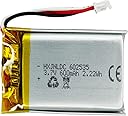
This 3.7V 600mAh rechargeable lithium polymer battery is a tailor-made replacement for Logitech MX Master and MX Anywhere wireless mice series. Featuring a compact form factor, advanced Japanese Seiko IC protection, and a genuine JST 3-pin connector, it delivers reliable, safe, and long-lasting power. Ideal for professionals who demand uninterrupted productivity and seamless compatibility.


| ASIN | B092J98RJD |
| Amperage | 0.6 A |
| Antenna Location | Camera, GPS, Radio, Watch |
| Battery Capacity | 600 milliamp_hours |
| Battery Cell Composition | Lithium Polymer |
| Battery Cell Type | Lithium Polymer |
| Battery Weight | 12.6 g |
| Best Sellers Rank | #604 in Computer Mice |
| Brand | HXJNLDC |
| Compatible Phone Models | for MX Anywhere 2 MX Anywhere 2s MX Anywhere 3 MX Anywhere 3s, for MX ERGO, for MX Master 2 MX Master 2s MX Master 3 MX Master 3s |
| Customer Reviews | 3.9 out of 5 stars 557 Reviews |
| Item Dimensions | 1.42 x 0.98 x 0.24 inches |
| Item Weight | 12.6 g |
| Manufacturer | HXJN |
| Model Name | 602535 |
| Model Number | 602535 |
| Number of Batteries | 1 Lithium Metal batteries required. (included) |
| Recommended Uses For Product | Camera, GPS, Radio, Watch |
| Reusability | Rechargeable |
| UPC | 717664364200 |
| Unit Count | 1 Count |
| Voltage | 3.7 volts_of_direct_current |
M**N
Brought My MX Mouse Back to Life
Saved me $85 and took 5 minutes to install. My Logitech MX Master 3 has served me well for about 5 years, but recently the battery wouldn't hold a charge. This new battery was only $15 and has a larger capacity than the OEM, though we'll see what kind of battery life it actually gets. But so far, so good as my mouse is back to being able to be used wirelessly! UPDATE: Battery lasted about 2 months of daily use, never being turned off. Recharged perfectly.
D**S
A Good Replacement Battery
My Logitech MX Ergo trackball's battery started not providing power even with the trackball plugged in. I have using it like this for 3 months, finally it bite the dust. So I ordered (what I thought) a brand new trackball. It was a renewed item, it is working good. I replaced the old battery in the old trackball, so far it is being charged up, will be using the old trackball with the new battery on my Alienware MX-18 laptop.
R**A
Battery does not last long
I bought this battery for a l.ogitech MX Master 2S. It was easy to replace, however, the battery does not last very long. I charged the battery fully, but only lasted a week before losing charge. I do not use my desktop very much. With the original battery, my mouse would hold a charge for months. Now with this battery, it only seems to last a week. I would buy a better quality from someone else.
T**S
Exact fit for Gen 1 MX Master mouse
Note: this battery was an exact fit and so far is working great in my Gen 1 MX Master mouse. I will update if any issues or if the battery does not last. The original factory battery in the mouse lasted 10+ years... hopefully this one will last quite a while also.
D**Y
Works well in MX Master, meets advertised capacity
Perfect fit for a 2017 MX Master. Mouse runs fine and charges fine with this replacement battery. I also tested the discharge capacity, and it measured 528 mA*h, 1.76 W*hr. See discharge curve. Since I tested 4.1v (open-circuit) to 3.0v (discharge cutoff) which is roughly 90% of capacity, the full capacity is probably meets the advertised 600mA*h. 0.2A (~1/3C) discharge rate. Custom source-measure unit, calibrated against a Fluke 79 III. You'll need some tape to mount the battery in its tray. I used a cut piece of phone-battery peel-tape... if this mouse survives to need another battery replacement in another decade... Fun fact: the original battery it replaced tested at 183 mA*h, 0.59 W*hr.
A**D
Working as intended by supplier.
This battery so far has been performing better than expected. The fit is perfect, the connection is perfect, & the charge/drain cycle outperformed the original battery. Sometimes it really amazes me how a company (Logitech) can make an exceptional product, and with the same stroke of genius, cripple that product by trying to save a few coins. If they used a better grade of battery, (Logitech) they could have avoided a lot of headaches for customers, most people will buy another mouse because it is that good. But once they come across reviews of how cheap it was to replace the battery. I hope they write the company and demand a refund for buying a new mouse. Because the old one now refuses to keep charge. So you buy new, or use the old one as a wired mouse forever. Thank you for providing the battery information as well, Logitech made it very difficult to figure out.
D**E
Fits perfectly, is not lasting
To replace the battery in MX Master, you need to remove the side pads to get to 4 screws, as well as 2 visible small torx screws. Once the screws are removed, it's easy to replace the battery, and this was a perfect fit. I'm 2 years down the road now, and back to very short battery life. I get just a few days before the <10% warnings are popping up, and I have to plug it in frequently. I'm leaning to MX Master 3 instead of replacing the battery again. Not 3S - all my dongles are Logitech Unified - I don't want a mouse that's breaking away from being compatible with my existing investments. Not sure though if the claimed 70 days will hold up so long - the MX Master claimed 40 days, it's nowhere near now. I don't mind a new mouse now and then, but Logitech mice are not cheap. Wish they were less of an ongoing money sink or that the battery was readily replaceable with one that lasts as well as OEM.
C**P
Saved my Logitech MX3 Mouse
I began to have issues with the battery life on my Logitech Anywhere MX3 Mouse about 8 months after I got it. I was very happy with it's performance but I was beyond the time for a return or warranty. Even though the instruction booklet for the mouse says the battery is not replaceable by the consumer, I watched a video tutorial and decided to try it. When I received the battery I carefully made the replacement and the mouse has been working great ever since. I have a separate, unrelated problem with the charging port but I'm still able to charge the battery fully every time.
J**O
Product Worth the Price!.
Great product! works perfectly with the Logitech MX Master 3. Recommend by a set slider for the feet as the screws are below them. Also very quick delivery.
M**.
ok
Questo prodotto è semplicemente fantastico! La qualità è incredibile e la cura nei dettagli è visibile in ogni aspetto. L'utilizzo è semplice e intuitivo, con prestazioni che non deludono mai. La costruzione è solida e resistente, garantendo una lunga durata. Inoltre, il servizio clienti è molto efficiente e disponibile. Lo consiglio vivamente a chiunque desideri un prodotto di alta qualità. Un'esperienza di utilizzo straordinaria!
A**I
Amazing
Very good battery
J**Z
Como la original
Llegó 5 días después a la ciudad de México. Llegó en una bolsita genérica con un accesorio para cortar los cables y cambiar la polaridad. No fue necesario. La batería es nueva, idéntica a la original. Tengo este MX Master 2s de Logitech desde el 2020, ahora en 2024 fallo la carga de la batería pero con este repuesto, sigue funcionando como nuevo.
C**R
Batteir pour souris Logitech MX 3 pour Mac
Très bon produit
Trustpilot
2 days ago
1 month ago