


Desertcart purchases this item on your behalf and handles shipping, customs, and support to KSA.
🚀 Step into your 3D world—because reality is overrated!
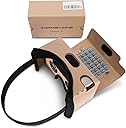
The Topmaxions Google Cardboard VR headset delivers an accessible, sweatproof virtual reality experience with a 100° field of view and HD 1280x720 resolution. Designed for smartphones between 3.5" and 6", it features comfort-enhancing pads, an adjustable headband, and unique suction cups to protect your device. Compatible with both Android and Apple, this lightweight headset offers easy setup and immersive 3D entertainment for gaming and movies.


| ASIN | B01C2PA0KK |
| Additional Features | Sweatproof |
| Age Range Description | Adult |
| Battery Average Life | 4 hours |
| Battery Capacity | 2.6 amp_hours |
| Best Sellers Rank | #19,545 in Cell Phones & Accessories ( See Top 100 in Cell Phones & Accessories ) #22 in Cell Phone Virtual Reality (VR) Headsets |
| Brand | Topmaxions |
| Built-In Media | Strap |
| Color | brown |
| Compatible Devices | Smartphone |
| Connectivity Technology | USB |
| Connector Type | USB |
| Controller Type | Android |
| Customer Reviews | 3.6 out of 5 stars 3,023 Reviews |
| Display Maximum Resolution | 1280 × 720 |
| Display Resolution Maximum | 1280x720 |
| Display Type | Smartphone |
| Field Of View | 100 degrees |
| Global Trade Identification Number | 00733520526704 |
| Included Components | Strap |
| Item Weight | 5.12 ounces |
| Manufacturer | Topmaxions |
| Mfr Part Number | FBA_TT9LK |
| Model Name | FBA_TT9LK |
| Model Number | FBA_TT9LK |
| Number of Batteries Required | 1 |
| Number of Items | 1 |
| Number of Packs | 1 |
| Operating System | Android |
| Platform | Android |
| Resolution | 1280 × 720 |
| Screen Size | 6 inches |
| Sensor Technology | Accelerometer Gyroscope Magnetometer |
| Special Feature | Sweatproof |
| Specific Uses For Product | home entertainment, mobile gaming |
| UPC | 733520526704 |
| Unit Count | 1 Count |
| VR Operating Platform Compatibility | Smartphone VR |
B**N
Amazing for the price
These things are amazing for something that only cost $6. I'm terrible with technology so I wouldn't have bought a VR headset otherwise, in case it was too annoying to figure out how to use. This requires no tech savvy, just find a VR video on youtube or whatever, stick your phone inside the cardboard box, and look into them like you would any other pair of googles. I took the advice of another reviewer and downloaded the "Within" app, and the videos on there worked way better than what I could find on YouTube. So if your having trouble with the quality of the YouTube ones, definitely check that out. Overall, not something I'd use everyday because clearly, it's made out of cardboard so not the most comfortable. But it has shown me how cool VR technology can be, so I'm already considering buying a better headset. Which should really be your purpose for these - just drop the $6 you wouldn't give a second thought about spending on coffee and a donut on these, but instead of getting coffee and a donut, you get to see how it would feel to be in a rocket taking off for the moon, then opening the capsule and going on a space walk. (That was one of my favorite videos, on the Within app.) Or there's jurassic park ones on YouTube that are pretty cool. There's something about it that's super relaxing too (unless you watch the horror vids, which I'm definitely too chicken to do.) But yeah, it blocks out the rest of your vision so you're fully immersed in the video, maybe that's why it's much more relaxing than watching Netflix in your bedroom. You'll still be watching videos in your bedroom, but for $6 you can somewhat convince your body that you're taking a stroll through the rainforest. If I get a more comfortable headset I'll definitely use it to relax before bed. Just get the darn thing man, have I mentioned it's only $6?
J**R
Falls Short of Potential
It's cute and technically functional, but not as good as it good be for its construction. Instead of using a divider, the screen magnification is too strong at its focal length, causing the pixels of a 2400×1080 screen to be CLEARLY visible and the periphery to be out of view. That means you don't see the whole display, and what you CAN see has the rainbow effect of the individual LEDs.
T**J
Used for viewing stereo pairs (photos that were made a long time ago with a Kodak 3D camera).
I wanted some way to view stereo pairs (shot a long time ago with a kodak stereo 3D camera). I set up the cardboard and tried to use it for this purpose. No instructions came with the google cardboard but googling found generic instructions for setting it up. The online tutorial referred to a "button" and it took me awhile to figure out what they were talking about . I finally found the button which is really just a flap (see first photo), but the button did not work with my smaller iPhone SE. Once I finally got it to somewhat work by manually squeezing the cardboard to hold my iPhone in the proper position, I tried viewing a stereo pair. I thought the lenses were terrible but I finally figured out that they had a rubbery plastic protective film. After peeling that off, the view improved immensely, duh. I was able to view a 3D stereo pair (photo 5) and it wasn't bad. BUT, the phone kept sliding around the holder. I thought about sending the cardboard back but I think I'll try adapting it for my smaller phone, or making my own viewer to use with my phone (instructions at skylarking 3D viewer). This device will probably work well enough with a normal size phone (i.e. bigger than my iPhone SE). So, for kind-of-working at the low, low price of $9, I gave it 4 stars. To view stereo pairs made from an old 3D camera, you first need to scan the positives and then edit them to create a single side by side (SBS) image using the left and right views. Put those SBS images on your phone (Photos app for iPhone is what I used) or google photos. You can find plenty of samples of SBS images by googling "stereo pairs". It is possible to view the stereo pair transparencies directly by lowering the back of the cardboard and then looking through it while holding the transparency with the light shining through it from the back (4th photo). It's hard to get it aligned that way, but it is possible. Added note: the photos seem to come up in random order. But you can probably figure out which photo I'm referring to in the review by looking at the text I wrote on the photo itself.
D**D
Not a good product
I really wanted to like this VR headset, but unfortunately, it was a frustrating experience from the start. The setup was confusing, and the device felt unintuitive to use. Even after spending a lot of time adjusting the settings, the image quality remained blurry and inconsistent. It’s hard to stay immersed when everything looks out of focus or distorted. The tracking was unreliable, and the motion felt laggy. I ended up feeling dizzy after just a short session. Overall, it feels like this technology still has a long way to go before it's ready for mainstream use. For the price, I expected a much more polished and functional product.
V**L
Google Cardboard for iPhone is An Amazing and Inexpensive Way for People to Test Out the Current Virtual Reality Craze!
I got this for my iPhone 6+ after learning that there are now free apps available for it! It's really cool!!! I'd tried an Oculus Rift once and was blown away...so I have some basis for comparison. What these inexpensive Google Cardboard VR accessories can do is really amazing given the price and the fact that it's essentially just a piece of cardboard with 2 lenses attached! One little aspect I think is really cool is the 'button' that you use to invoke actions on menu items. It's a cutout piece of cardboard that's covered on both the top and bottom with some touch screen activating material. So at the top of it...the end you press with your finger, you can tell that it's the button just by feel alone. On the other end when you press down with your finger a longer piece of cardboard is pushed against the screen and because it has this fabric at the tip of it your desired action is invoked. You control its position by this little arrow that moves around on the screen. It's pretty brilliant! Some quick steps to using it are. First download and tap to open the Google Cardboard VR app. Then place your iPhone into it and close it with the Velcro that's attached. Hold it up to your eyes and move your head around to see different areas. As you move your head up and down different parts of the screen are displayed and at some point, depending upon the app, you'll see some controls or menu items to explore further. Then use the cool little button I described! This is simple enough for adults to use!
H**D
Ingenious, but ineffective
I wanted a taste of the VR world before jumping in and found these cardboard units. It is an ingenious design, but then the magic goes away. The padding is not effective. The strap is a bit small for an adult, so it is tight. The optics are horrible. I thought I might have left the protective film on one of the lenses, but i had not. It has a VERY tiny area of good focus and then it gets really bad as you move out to the edges of the frame. I needed my reading glasses to even have hope of a focused picture, but this unit is not glasses friendly. It does work for simple images, but anything with depth, detail, or movement is not good at all. All that being said, it did give me a taste of VR and clearly there is a lot of room for improvement in content. I am glad I spent a few bucks. I will wait for content to catch up before investing real money...and even then I will want to actually try out the unit before I buy it. BTW - I was using an iPhone 6plus.
M**N
Buy this!!!
Absolutely amazing. Works well and is cheap.
D**Y
It works, I guess.
It's durable, and when you click the button on the side it does register on the phone. I guess it's not bad, it does what it's supposed to do. Uncomfortable for extended periods of time. You need to basically keep both hands to your head while you're using it unless you want it to dig into your nose. If you turn your head too quickly, your phone runs the risk of sliding out. Mounting is kind of a pain. I'm not sure what you would want out of a thing made of cardboard. I don't regret buying it since I basically just wanted to try out VR, and it will let you do that perfectly. But you are basically buying a disposable origami project to slide over your face, so don't think that you're going to be doing anything crazy with it, or that this will become a comfortable go-to gadget or anything.
M**R
Good value, but I wished it came with a set of instructions
I was interested in purchasing something that can view VR videos and found out about Google Cardboard. Decided to order this product. However because I was unfamiliar with this type of technological gadget, I really struggled to put it together and had to look to YouTube videos for guides and instructions. The product didn't come with a QR code either so I had to find the correct one online. After setting up correctly, I'm glad the product actually works. The quality is alright, considering the price compared to other VR headsets. However it is a little bit uncomfortable to wear so I would not recommend this for prolonged use. I think this is an okay start for anyone that is curious about Virtual Reality technology and want to see what it is like without spending too much money. My recommendation is to people that are looking to purchase is to do thorough research on Google Cardboard before buying.
Trustpilot
1 month ago
2 months ago