We remain fully operational. Our teams are working around the clock to ensure your deliveries continue safely.

DOWNLOAD THE APP


Customer Services
Copyright © 2025 Desertcart Holdings Limited
DOWNLOAD THE APP





Buy anything from 5,000+ international stores. One checkout price. No surprise fees. Join 2M+ shoppers on Desertcart.
Desertcart purchases this item on your behalf and handles shipping, customs, and support to KSA.
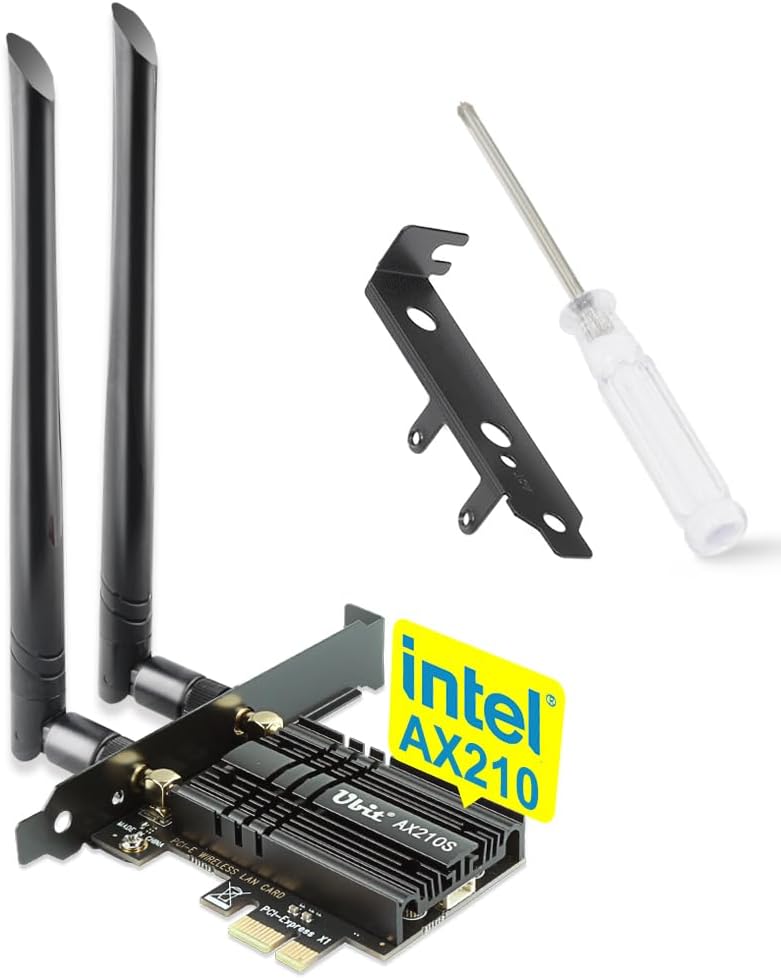
🚀 Elevate your Wi-Fi game with tri-band speed and zero lag!
The Ubit Tri-Band WiFi 6E PCIe Card delivers ultra-fast 5400Mbps speeds across 2.4GHz, 5GHz, and the new 6GHz spectrum, reducing congestion and boosting bandwidth for demanding applications. Featuring Bluetooth 5.2 for enhanced device connectivity and OFDMA technology for ultra-low latency, it’s designed for Windows 10/11 users seeking seamless, high-performance wireless networking.


| ASIN | B08NVR8M8X |
| Best Sellers Rank | #654 in Internal Computer Networking Cards |
| Brand | Ubit |
| Color | WiFi6e 5400Mbps+BT5.2(With heat sink) |
| Compatible Devices | Desktop, Keyboard |
| Customer Reviews | 4.4 out of 5 stars 1,789 Reviews |
| Data Link Protocol | Bluetooth |
| Data Transfer Rate | 5400 Megabytes Per Second |
| Hardware Interface | PCIE x 1, PCIE x 16, PCIE x 4, PCIE x 8 |
| Item Weight | 0.2 Kilograms |
| Manufacturer | Ubit |
| Mfr Part Number | F11W-AX210S-Black |
| Model Number | Intel ax210 |
| UPC | 760627780883 |
A**Z
Super Fast and Easy to Install
This WiFi card was basically plug and play—installation was quick and painless. Once set up, the connection is incredibly fast and stable, even on the 6GHz band. I’ve noticed a big improvement in speed compared to my old setup, and it handles multiple devices without issues. Overall, a solid upgrade for anyone needing reliable, high-speed WiFi.
C**.
AX210 READ BEFORE INSTALLING
This is exactly what I was looking for. Works great as expected. Wish it had a longer USB cable but I had a spare on hand. Some notes below given that some review have problems that caused returns. Ubit could have been more clear, but here’s the info: - The module is a genuine Intel AX210. UBit creates the PCIe adapter and packages it together. This doesn’t change anything - your machine will only recognize it as an AX210. This is exactly as it’s meant to be. - If your driver is not auto-installing, open Device Manager > find the device that is not starting (usually marked with a yellow triangle and an exclamation point) > double click the device > select the “Drivers” tab > Update Driver > choose from a list > Intel (there may be two listings for Intel) > scroll to find the AX210 Wifi 6E driver. - For most cases, and if you don’t otherwise know the difference, use the Microsoft signed driver (if given the option between Microsoft-signed and Intel-signed) which will be the best option for having your wifi card updated through Windows automatically. If you prefer to use Intel-signed drivers, it will work exactly the same but it will likely not auto-update. Make sure you are checking for the latest driver update through Intels official website. 3rd party manager applications are NOT reliable and should not be trusted for day to day use. Snappy Driver is the only trustworthy option - but should only be used in Windows recovery environments. The antennas need to be positioned slightly away from eachother and with the most “free air” possible in order to maximize their ability to keep a stable connection. For my use in a workstation tower, I installed it into the highest PCIe slot so that the antennas would rise up above the top of the tower and have 360 degrees of “view”. Bluetooth drivers should always be installed BEFORE the wifi driver. If you need to, it’s okay to experiment depending on your situation. But if Bluetooth is failing to start, uninstall and check the box to DELETE the wifi and Bluetooth driver via device manager (it’s okay to keep the installers downloaded on your drive, this function just removes the currently installed and problematic drivers from the Drivers files within the windows system. Reboot after deleting and uninstalling, and then install them via the downloaded EXE/MSI in order (Bluetooth, then wifi). This is just a quirk with Windows and Intel cards working together - some issues happen occasionally when you’re first getting started. That’s it, fairly simple.
J**E
surprisingly fast
before anything else, I'm going to fully disclose I did something rather unorthodox with this, and thus will be reviewing the chip, and the actual pcie-wifi connector separately. if you're not looking to pull the card out of the adapter, skip to the end. If you need a wifi6e card, it is worth it to get this. I mostly got it for the updated Bluetooth. my motherboard had a built in wifi card, and i wanted it updated without a pcie slot taken up. so I got this, took out the card, and put it in my motherboard. honestly, it works amazing. the Bluetooth is PERFECT for my headphones. the last card I had was Bluetooth 4.8. the Bluetooth 5.2 actually lets me use my headphones wirelessly with perfectly clear audio. on top of that, I'm almost fully saturating my router bandwidth by getting around 500mbs down and 40mbs up over wifi, which to me is insane. an ethernet cable really isnt needed! now then, since i took the card out of the pcie adaptor, i ended up putting my old card in it and putting it in my older pc which didn't have a wifi chip, in order to give it wifi. the adaptor works amazing, and is extremely easy to install. quite literally plug and play. having Bluetooth and wifi on an older computer that didn't have it before made it much more viable with where i live now and gives me so many more options on where I can have it! Summary: if you're looking for a easy to use and install wifi 6e card, this is definitely for you. its plug and play right to the pcie slot. you don't need to know computers to install it! , and you get the amazing Bluetooth 5.2 speeds as well. I can't recommend this enough.
G**G
Replacing a cheap USB WiFi dongle
The Ubit Tri-Band WiFi 6E PCIe Card is a fantastic upgrade for anyone looking to boost their wireless performance and take full advantage of the latest WiFi 6E technology. Pros: Ultra-Fast Speeds: With support for 6GHz, this card delivers blazing speeds up to 5400Mbps, making it ideal for gaming, streaming in 4K, and heavy downloads without breaking a sweat. If you have a compatible WiFi 6E router, you’ll notice a significant improvement in speed and reliability. Tri-Band Support: It covers 2.4GHz, 5GHz, and the latest 6GHz bands, so you're future-proofed as more devices adopt the 6GHz spectrum. Plus, it’s backward-compatible, so you can still use it with older routers if needed. Easy Installation: Installing the card is straightforward if you’ve got a spare PCIe slot. The included antennas provide strong, stable connections, even at a distance from the router. Bluetooth 5.2: It also comes with built-in Bluetooth 5.2, which is a nice bonus for connecting wireless peripherals like keyboards, mice, and headphones without a separate dongle. Cons: Requires a WiFi 6E Router: To truly take advantage of the 6GHz band and peak speeds, you’ll need a WiFi 6E router. If you're still on older equipment, you might not notice much of a difference compared to other WiFi 6 cards. PCIe Slot Needed: Make sure your PC has an available PCIe slot, as that’s a requirement for installation. Also, if you’ve never installed a PCIe card before, it might take a bit of effort. Conclusion: The Ubit Tri-Band WiFi 6E PCIe Card is an excellent investment for those looking to upgrade their wireless experience. It’s fast, future-proof, and comes with the added benefit of Bluetooth 5.2. If you’ve got a WiFi 6E router or plan to get one soon, this card is a no-brainer for a performance boost.
J**L
Affordable and reliable WIFI 6E wireless adapter card
Got this wireless adapter card to test out my new WIFI 6E router. It uses the same intel AX210 chip as other manufacturers. The only difference between this and other products is how they are constructed and what other features they offer (bigger antenna, Bluetooth Enabled, heatsink, etc. The Ubit WIFI 6E card comes with two fairly long antennas and offers a heat sink, bluetooth version 5.2, and a large heatsink to keep the chip cool. I didn't do any detail testing on this wifi card, I simply installed it to my PC, went to the Intel website to download the chip drivers and windows 11 recognized the new wifi card and I was up, up and away. So far I can tell that the antennas pick up a lot more SSIDs around my home than the previous wifi card I had. Connections have been stabled across the 2.5Ghz and 5Ghz range. I tested the WiFI 6E range and was underwhelmed by the speed, it was similar to my 5Ghz speeds. Watching some WiFi 6E videos online I'm not sure how these people are getting 1800+Mbps on their speed tests.. I might be missing something or doing the tests wrong. Anyways, as far as I know, the Ubit wifi card works, it's stable and hopefully I will find out what I am doing wrong with the Wifi 6E and when I do, I'll update this review.
B**R
Great For Wifi, Bluetooth Commendable with Headphone Connectivity.
I bought two of these since I was impressed with the performance of the first one. I've had nothing but good luck with them to date. The product is very easy to install, just make sure to connect the USB header for BT. (Minor oversite for my first hurried install.) The Wifi range is very strong and exceeds my requirements by a long shot. My basement desktops connect with 100% signal strength to my 2nd floor office router - TP-Link 4524. The adapter connects perfectly with AX600 set to 802.11b/g/n/ax mixed mode. The connection is verified Wifi 6 by a popup (at least in Win 11.) I do question the BT driver backward compatibility on Windows 11 but believe this to be an issue with Windows 11. Rolling back to Win 10 to test made the BT Ver4 microphone speaker function again - I rolled back up to Windows 11 and the same BT device stopped working again. No problems with any of my other BT devices, including other BT 4 devices. In summary. The connection for both Wifi and Bluetooth is strong; however, in the same breath I'll add that I have never had a Bluetooth keyboard connect to any BT adapter with any authority and respectable delay. I have not tried an expensive keyboard but the couple devices I tried with failed the keyboard connectivity test. Overall, this is a VERY SOLID adapter. I would not have two of them if it wasn't.
K**N
Took card out and replaced motherboard wifi
I bought one of the original X570 boards with wifi, but came with the old intel wifi card imbedded (no wifi 6e) on the motherboard. I bought this card to upgrade my wifi and blueooth, but then realized that windows had conflicts because now I see 2 wifi cards and 2 bluetooth cards. After some searching around, I figure out that the imbedded card on the motherboard could be removed by taking the motherboard apart. So I proceeded to remove the motherboard and taking out the old intel wifi module. Then I took apart this wifi card and removed the module. Immediately I noticed that they had a different design but the m.2 slot was the same, so I placed the new card on the mobo. To my surprise, it actually worked AND the bluetooth also worked without an external cable. So now I upgraded the embedded mobo wifi to 6E and BT 5.2 and it works perfectly. Although this is an option, if you do want to do this, I recommend buying a regular AX210 m.2 card because they are exact oem as the ones from the motherboard manufacturers. In any case, I am extremely happy with this card. It worked when I first got it and it works now on my mobo.
A**5
Bluetooth doesn't work
Intel AX210 bluetooth driver package (separate from wifi drivers) is plagued with problems and typically does not ever install correctly with Windows 10 or 11.
Trustpilot
2 months ago
2 weeks ago