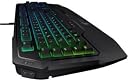
🎮 Elevate your game with precision, power, and style — the keyboard that keeps you ahead.
The ROCCAT Ryos MK FX is a high-performance USB gaming keyboard featuring per-key RGB illumination, Cherry MX mechanical switches, and advanced anti-ghosting technology. Powered by dual 32-bit ARM Cortex processors with 2MB memory, it supports over 500 programmable macros, N-key rollover, and a blazing 1ms response time at 1000Hz polling rate. Designed for Windows 7, 8, and 10, it includes 3 programmable thumbster keys and a durable 1.8m braided USB cable, making it a top-tier choice for gamers and professionals seeking precision and customization.


| ASIN | B01BFZL72I |
| Box Contents | Keyboard |
| Brand | ROCCAT |
| Brand Name | ROCCAT |
| Button Quantity | 104 |
| Colour | Multicolor |
| Compatible Devices | Laptop |
| Connectivity Technology | USB |
| Customer Reviews | 4.1 out of 5 stars 61 Reviews |
| Global Trade Identification Number | 04250288135796 |
| Hand Orientation | Ambidextrous |
| Item Type Name | keyboard |
| Item Weight Unit of Measure | 1.6 kg |
| Keyboard Description | Gaming |
| Keyboard Layout | QWERTY |
| Manufacturer | Roccat |
| Manufacturer Part Number | ROC-12-871-BN-AM |
| Model Number | ROC-12-871-BN-AM |
| Number of Keys | 104 |
| Processor Count | 2 |
| Product Features | mechanical |
| Series Number | 1271 |
| Special Feature | mechanical |
| Style Name | Modern |
| Switch Type | Mechanical |
| Total USB 2.0 Ports | 2 |
V**.
Worth it if you are gonna buy a keyboard this pricey
This keyboard is really amazing. Keys: I got the Cherry MX Brown switches. Transport & Packaging: This keyboard comes in a big box almost as big as a 24" monitor box. Installation Experience: Nothing great comes with 2 USB cables to insert & and audio jacks with headphone and mic (as there is a dock for audio in the keyboard). While installation, I faced issues connecting this Keyboard to Swarm for the first time. Apparently I had to unplug the keyboard after the first driver installation otherwise Swarm never detected it. Apart from that didn't face any issues. Keyboard is mostly covered by matte finishes so doesn't get much fingerprints apart from the logo at the bottom and a lining/stripe of glossy black. Performs well. Easy to make Macros. Lacks Macro Sharing from Swarm i.e. I cannot view community created macros which could have been awesome. This keyboard is definitely not portable, Its heavy and has a non removal wrist rest padding. For the price you are paying this keyboard lives up to the expectations. It would have been awesome if Roccat provided a key cap remover also but they didn't.
R**G
awesome keyboard marred by lack of dedicated multimedia keys!
This is a premium gaming keyboard. EVERY single key can be changed in color, whatever color you wish it to be in! the ROCCAT software is a bit iffy at times, but the keyboard is SOLID and HEAVY and HUGE!!!! The only problem is, at this price, I expect dedicated multimedia keys, especially for a keyboard which is massive in size. The brown keys are excellent, but the lack of ease of use for multimedia is huge issue for me personally
A**R
Great performance and excellent software
I've been a fan of their mice since the Tyon and now the Nyth but hadn't tried ROCCAT keyboards until this one. It's not click like my razor was but otherwise performs on par with a couple extra perks. I like having the headset jacks on the left so the wires don't interfere with my mouse and the software suite is excellent!
P**A
Good feel and functionality
After three months' use, here is why I like this keyboard. CONSTRUCTION: This thing is solid. Heavy as it is, I can lift the whole thing by pinching the corner of the wrist rest and it stays rigid. Doesn't slide around or give under my sometimes-heavy typing. The dotted texture hides fingerprints nicely. KEYS: The Cherry MX Brown switches can be found on other keyboards, and reviewing those isn't reviewing *this keyboard* per se, but you don’t find Amazon reviews for just Cherry MX Brown, so here's one. A Brown switch is, essentially- if you slowly press down on a key, then halfway down the key slides past a “bump”. It's like slowly sliding a key into a lock. The bump is silent (unlike Cherry MX Blue or Razer green, which makes a “tick” sound). If you go all the way down, it hits bottom much more crisply than a membrane keyboard. I much enjoy the feel; however, the bump doesn't give anywhere near the feel of the Blue or Razer Green and doesn't itself provide that much a typing advantage. After breaking this in, I got slightly faster, about 5 wpm (up from ~140 wpm on a membrane), but my accuracy improved a ton. This is louder than a membrane keyboard, but not obnoxiously so. You can quiet it down even more by typing only halfway down. *Update (July 2017)*: Over the last two months this has given me a problem that is almost enough to knock it down a star. That is, the s pace bar activates at random. (yes, it happened just there) I believe I am pressing it and not knowing, but now that the keyboard is broken in after over half a year, it registers phantom spaces because it's too easy to press. Not that much, maybe every two minutes, but it really annoys me. Been a power user for maybe 10 years and have never had this problem, let alone consistently. *Update (August 2017)*: I tried putting a gas duster/compressed air into it. That seems to have completely fixed the problem; the space bar even feels and sounds different. LIGHTING: The lighting is beautiful, but disappointingly dim. It's like those green glowing nightlights; however, I think I’ve read that Cherry MX Brown switches are harder to light than Black or Red. Color resolution is good- you can tell between RGB 0/255/0 and 0/245/0. Dark colors are pretty accurate, but lighter colors are dark- lime green is more like light emerald, cyan is light turquoise, etc. The effects cannot be customized as much as Corsair or Razer (you cannot animate Pac-Man or lightsabers) but is still more than plenty. There are the usual- rainbow, blinking, fading, etc. but also a “heat map” and a working sound bar equalizer. You can set response to events- for instance, every time you hold the J key, E turns orange and R blinks blue. The thumbster keys and toggle (e.g. Num Lock) are a brighter white than the other keys are, and they cannot be color changed. If you think “who needs lighting, I can just read the keys”, understand this: It's way easier to look for a color than a symbol. I don't have the scroll lock location memorized, and if I'm doing an intense Excel formula that needs lots of focus, then the 5 seconds to find scroll lock will break my concentration (yes, Samuel L. Jackson). Instead I can look for bright yellow out the corner of my eye and quickly hit it. LAYOUT: There are five dedicated macro keys, which were much of why I bought this. The three thumbster keys below the space bar don’t work that well with thumbs, they’re stiff like alarm clock buttons. I would have liked media buttons but there are none. The layout's biggest problem is the Esc and F-keys being too far away. I whiffed the Esc a lot at first. F1-F12 are way too far right, making Alt+F4 literally a pain (see picture of my thumb cramping) to type. F4 on this keyboard is where F5 should be. FUNCTIONALITY: The Easy Shift (“ES” I’ll call it) is one of the greatest keyboard-related inventions ever! ES replaces Caps Lock (who uses that anyway) and can be combined with almost any key (A-Z, 0-9, numpad, symbols, specials like Ctrl, Alt, PgUp, and macro keys) to put up a custom function such as a macro of keystrokes or opening or closing a program. Instead of just five macro keys, the ES combo gives you maybe ninety! I set ES+X to close programs instead of that horrible Alt+F4. Macros execute very quickly and without hesitation no matter what the computer's doing, thanks to the keyboard's internal memory. This keyboard takes one (USB 3.0) or two (USB 2.0) ports, and it does not have pass-thru ports. It does have microphone and headphone jacks. It was shipped with a transparent plastic mould covering the keys; you can use it as a keyboard dust cover. Oh, if you *do* want to seem like a moron on the internet, you *can* still put Caps Lock back on the ES key, though you're taking away one of the best features. (or you can put Caps Lock on the thumbster keys instead) SOFTWARE INTERFACE: Needs some work. For instance, if you click a palette color, it won't show its RGB value. You don't select a macro and delete, you must use the check box. To see special animation features for each key, you always have to scroll down. I only really use one profile, so I cannot say with that feature. Overall, it's powerful but very awkward to use. Overall, this is a great keyboard. The Easy Shift function really takes the cake, but I also love the feel of the switches. Macro keys are good, as is lighting though it is a bit dim.
R**N
Great keyboard, a bit overpriced but still worth it
I was replacing an older Roccat Ryos MK Pro that was having some double-entering problems with certain keys. I would have preferred a non-RGB version as I don't see the point of paying more for something unnecessary like fancy colours but, since that's not an option, it is what it is. Keyboard works as it should. LED colours and brightness are both on point. The braided cable is a noticeable upgrade to the MK Pro. The cherry browns seem noticeably louder than the ones in the old keyboard, but not to a point where it's bothersome. My only complaint is that there seems to be a bit of wobble in the keyboard when it is on my desk almost as though the pads on the front left and back right aren't at the same height.
J**U
Sturdy & Reliable
Honestly love the design & feel of this keyboard, been using it for close to 3 years, and is the best keyboard that I have used so far! Sturdy for everyday use even during intense typing or gaming sessions where you are not so gentle with the keyboard, and multiple macro profiles that you can switch to. Added feature that I love about this is the audio and microphone jack on the top left where you can use earbuds instead of a standard headset which I do to avoid headset hair. Cons: Pretty big and will take up a lot of space, especially the jumbo wrist-rest that's not removable Roccat Software is not the greatest and wouldn't really use or rely on, just set up what you need and close it out at the end, shame for this as its main feature is for Macros Some additions that are not there but would be nice: Adding 2 USB Passthrough ports on the top right of the keyboard for USB access either for Flashdrives or a headset/microphone A Dedicated Media scroller for audio or whatnot as Logitech Keyboards have, to control audio & media you have to use the Fn key along with your F Keys on the top by default, you can go to the Roccat Ryos software and bind some of these functions to the M1-M5 keys based on your preference. Overall, this is a good keyboard and worth the money!
N**N
Worth the money in my opinion
I have had some crap keyboards in my time and this is not one of them. i type like an 800 pound gorilla and this thing takes it in stride. the keys have good feedback and the switches are amazing. my only complaint would be that there isn't a single attempt that i have seen to make these switches quieter so if im using a microphone then people can comment on my typing speed without visual aid but that is mostly par for the course with mechanical keyboards work their salt. overall the back lighting on the keyboard is about a 7/10 for versatility of colors. yellows are so washed out they look tan which is unfortunate because im weird and like yellow ,but it does blues reds and greens just fine. the ROCCAT SWARM software crashes like its nobodies business and appears to fight itself when trying to run updates. it also for some reason randomly start sucking up a ton of system resources so i recommend installing and configuring your favorite backlight effect then setting it to not start with windows and be done with it. For the software support i give it a 3/10 the Interface is at least good. the board is sturdy and has some weight to it with big girth rubber traction pads and flip down leg on it so i wouldn't worry about breaking anything like ever in normal use. The cherry MX keycaps are swappable but the stock keys, though loud are more than serviceable. the headphone and mic jacks on the side of the keyboard for me are seldom used since my headset is a USB 3 wireless one but if i still had a twin 3.5mm jack mic and audio this would be an amazing feature. tey dont bleed any static into your audio like some low quality jacks will and like the rest of the board its sturdy. TLDR Build quality 10/10 software support 3/10 LED back lighting 7/10 overall i recommend it but i still have not figured out how the Caps lock works and thats alright.
Trustpilot
4 days ago
1 month ago