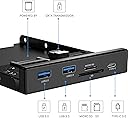
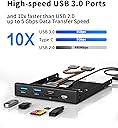
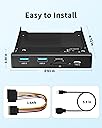
desertcart.com: BYEASY Front Panel USB 3.0 Hub, 5 Ports 3.5 Inches Internal Metal USB Hub with 2 USB 3.0 Ports, SD/TF Internal Card Reader and USB 3.1 Gen 1 Type C Port Fits Any 3.5" Floppy Disk Bay : Electronics Review: Nice product - great price for some added features. - USB 3.0 and USB C w/ added bonus of micro SD and std SD card reader. Power cord they supply is not necessary to use if you have a free SATA power connecter. Mine had enough length so I just plugged it into my spare SATA power connector. As others have discovered, the system does not fully shutdown with this installed. The power light on my case would say light. Discovered a setting in my bios referred to as ErP. This allows USB ports etc to stay powered after shutdown to allow charging of devices. Thus, that was why why power light was still on - it was indicating that the USB ports were powered. I confirmed this by plugging in my phone and observing it was charging from one of the USB ports even with the system powered down. I set ErP to disabled. This tells the BIOS to not power any external ports when powered down. It also disables such features as wake on keyboard and wake on LAN. With ErP set to disabled I no longer have the power light illuminated when the system shuts down and the USB ports are no longer powered after shutdown. Why does this occur? It occurs because when you hook up this board to your USB 3.0 header you are attaching a logic board that was not previously present. This logic board (the BYEASY front panel) supports charging while off and this is why your systems stays slightly powered on. And as an aside. I don't care about the logo. Review: Works as expected even with Quest 2 PC VR streaming - I got this to have a usb c port for my Quest 2 to play PC VR games on, and since it has additional power I thought it might charge or slow the battery drain of the headset. I was a little concerned with a name like "ByEasy" .. but it works as I had hoped, and the headset only slowly discharges while in use with this. About 1% battery loss every 20 minutes, so you could go quite a long time with it plugged in. The card readers and USB 3.0 ports are an added bonus and also work very well. No more external Micro SD card adapter needed! Install could be a pain if your PC doesn't have the correct ports / power plugs so make sure it does before ordering. You also need to have a floppy drive bay to install this to. There are adapters for DVD slots available. Going on about 6 months of use now and working fine. I would recommend.


| ASIN | B08DKDHMGR |
| Additional Features | Play, Plug |
| Brand | BYEASY |
| Color | Black |
| Compatible Devices | Windows 10/8/8.1/7/Vista/XP, Mac OS X, Linux, Chrome OS |
| Customer Reviews | 4.0 out of 5 stars 532 Reviews |
| Data Transfer Rate | 5 gigabits_per_second |
| Hardware Interface | USB 3.0 |
| Item Dimensions L x W x H | 4.72"L x 3.93"W x 0.98"H |
| Item Weight | 3.46 ounces |
| Manufacturer | BYEASY |
| Mfr Part Number | PCI-02 |
| Minimum Required Operating System Version | Windows 7 |
| Model Number | PCI-02 |
| Number of Items | 1 |
| Number of Packs | 1 |
| Number of Ports | 5 |
| Operating System | chrome_os, linux, mac_os_10_12_sierra, windows_7, windows_8, windows_10 |
| Special Feature | Play, Plug |
| Total USB Ports | 5 |
| Total Usb Ports | 5 |
| UPC | 744306847067 |
| Unit Count | 1 Count |
G**W
Nice product - great price for some added features.
USB 3.0 and USB C w/ added bonus of micro SD and std SD card reader. Power cord they supply is not necessary to use if you have a free SATA power connecter. Mine had enough length so I just plugged it into my spare SATA power connector. As others have discovered, the system does not fully shutdown with this installed. The power light on my case would say light. Discovered a setting in my bios referred to as ErP. This allows USB ports etc to stay powered after shutdown to allow charging of devices. Thus, that was why why power light was still on - it was indicating that the USB ports were powered. I confirmed this by plugging in my phone and observing it was charging from one of the USB ports even with the system powered down. I set ErP to disabled. This tells the BIOS to not power any external ports when powered down. It also disables such features as wake on keyboard and wake on LAN. With ErP set to disabled I no longer have the power light illuminated when the system shuts down and the USB ports are no longer powered after shutdown. Why does this occur? It occurs because when you hook up this board to your USB 3.0 header you are attaching a logic board that was not previously present. This logic board (the BYEASY front panel) supports charging while off and this is why your systems stays slightly powered on. And as an aside. I don't care about the logo.
A**R
Works as expected even with Quest 2 PC VR streaming
I got this to have a usb c port for my Quest 2 to play PC VR games on, and since it has additional power I thought it might charge or slow the battery drain of the headset. I was a little concerned with a name like "ByEasy" .. but it works as I had hoped, and the headset only slowly discharges while in use with this. About 1% battery loss every 20 minutes, so you could go quite a long time with it plugged in. The card readers and USB 3.0 ports are an added bonus and also work very well. No more external Micro SD card adapter needed! Install could be a pain if your PC doesn't have the correct ports / power plugs so make sure it does before ordering. You also need to have a floppy drive bay to install this to. There are adapters for DVD slots available. Going on about 6 months of use now and working fine. I would recommend.
J**N
The Best Desktop Card Reader...But That Doesn't Say Much
So you have a Desktop with a 5.25" bay, and you want to use SD cards and newer USB C drives without dongles... The solution is simple: install a card reader The problem is complex: finding a card reader that isn't dog s$&t Everything becomes difficult the moment you need to read SD cards. The only viable option I have found is from StarTech. Everything else is plagued with constant complaints of poor/cheap design, ports stopping working (or never working), or USB 2.0 connections. Enter ByEasy...the sole saving grace. Enough narrative, here are the pros and cons: Pros: 1. SOLID METAL CONSTRUCTION: NO PLASTIC GARBAGE 2. Premium look and feel: board is black to match the bracket, no exposed ketchup/mustard wires, no hot glue 3. One single USB 3.0 Type A connector for the hub: That's it; run a single High Speed USB 3.0 Type A to 19-Pin USB 3.0 Header cable and you are DONE 4. Micro SD card LOCKS IN PLACE: You have no idea how rare this feature is; it is a joy to insert and remove Micro SD Cards 5. Other ports are properly machined: Insert easily, are not loose, and instantly register in Windows Pro-cons (Good and bad lol) 1. No LED to indicate connectivity: people often complain that these are too bright, so maybe a good thing 2. 3.5" (Floppy) Size: While you will likely have to buy a cheap 3.5 to 5.25 adapter, this allows for maximum compatibility across systems CONS: 1. Yes, there is a computer power issue with the SATA splitter; do not connect the hub to power, only USB. Charge your devices somewhere else. 2. Yes, there is a ByEasy logo displayed prominently on the card; I personally think it looks quite modern, but the pictures are deceptive. Can be removed with Rubbing Alcohol 3. Yes, the SD card is inserted upside down...whatever 4. Cannot use Micro SD Card and SD card ports simultaneously (see next point) 5. Reserved Drive Letters: Alright, save for avoidable power issues, this is the only real con. As another review has elaborated, this device chooses what Drive Letters it wants to use (and not Windows for some reason), and will reserve a drive letter for SD Cards (even if they are not inserted). This can cause conflicts in rare scenarios where you have manually selected the same drive letters for Network Drives and in cases like mine where your SD card has 2 volumes on it (it was a pain to troubleshoot). Of course, my unit was not DOA or defective, and I *may* encounter problems in the future with ports dying, but my worries are put to rest as other users have praised their customer support. Yes, this IS the card reader you are looking for (if you have read all of that).
B**R
Updated review - I thought it might be good, but it just isn't
This review is for the "BYEASY Front Panel USB 3.0 Hub 5 Ports, 3.5 Inches Internal Metal USB Hub..." After initially being mostly impressed with this, I rushed a review because I want to make people aware of a potential issue. Other than that I was sure it would be fine. The day after writing the review, I tried to actually use it to transfer files. Didn't work. Within 30 seconds of transferring files, an error message popped up saying that it couldn't transfer a file because the drive didn't exist. So, I removed the drive and reinserted it, and was able to start transferring only to have it happen again. And it happened every single time I tried to use this hub, regardless of what drive I used - and all of those drives worked perfectly fine when I unplugged them and put them into a different USB 3.0 port on the back of the computer, so the drives aren't the problem. I reached out to the seller and they promptly sent a replacement, so I have no complaints about the service. But the second hub does exactly the same thing. Since I've had two faulty pieces of this item and I see other reviews mentioning this issue, I have no faith in getting a good one. So this is being returned and I will seek out other options. Original review: I have only had this for a couple days, and usually I wait for a bit before reviewing a product so I have time to sit with it and see how it holds up over time. Since I don't expect any problems, I wanted to write this quickly to mention an issue that I haven't seen mentioned elsewhere here. Please read on... I'm generally impressed with the quality, especially for the price. It does what it's supposed to do, is easy enough to install, and it's well-built. It doesn't look, feel, or operate like they cheaped out on anything. I do wish the USB-C was faster - as it should be - but with no front-facing USB 3.0 ports on my computer and no USB-C port at all, I'm happy with this. It beats the heck out of USB 2.0. The issue is this: I have several flash drives that do great with any ports I plug them in to, except this hub wasn't recognizing a couple of them. Plugging into USB-C got no response at all, and USB-A (these are dual drives) recognized that something got plugged in, but the computer didn't know what it was and couldn't access it. But it was fine on the USB 3.0 on the back of the computer. As I was getting ready to box this thing back up for returning, I checked something out and found the problem. For some reason I had the drives that didn't work on this formatted as FAT 32, and the ones that did work were exFAT. Not sure why the formatting would make a difference on this and not other ports, but apparently it does because I reformatted them to exFAT and they work perfectly on this hub now. No biggie for me, since FAT 32 is something I rarely if ever need to use, and I don't remember why they were formatted that way to begin with. So it's now a non-issue for me, but it could be an issue for someone else, so it's something to bear in mind when considering this. Other than that, I had the same issues as others with the power cable attached, so I unplugged that and it works fine. No idea how well the SD card reader works yet, so I can't report on that. All in all a good purchase, only losing a star for the issues I mentioned.
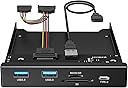
J**.
Works as advertised.
Directions are included and they should answer all installation questions. I connected this unit to a 5.25 inch bay adapter as my case does not have 3.5 inch openings. My case also has a USB-3 on the front panel that would have to be disconnected in order to use the motherboard connector for the BYEASY. Enter good old Newegg. They sell a PCB which converts one USB-3 connector to two USB-3 connectors. Unfortunately, it is not sold on Amazon. Works fine with the BYEASY. So far have had no problems with connectivity on any of the BYEASY ports. I would definitely purchase one again.
K**K
Good Retrofit
I have a specific use case for this USB Hub. I was rebuilding on older PC, which had a mutli-card reader on the front of the case, but limited USB ports on the front. Memory cards have mostly standardized since that original hub came with the case, so I had no need for 6 different card readers, and I wanted to add USB functionality. This was also a form factor I could use. It comes with a cable to plug into the USB 3 slot on the motherboard. Based on other reviews, I decided to try not using the supplied power cable, and that worked fine. In wasn’t needed to have all the USB and memory card slots function, at least for my install. I did have to make s small adjustment for mounting, as once it was flush in the front, it would have a tendency to slide back a little when I inserted something into it. That was easily fixed by drilling through the case mounting rail where there was a single non-slotted hole, and into the mounting frame of the hub, so I could put a screw in that had no play or slot to move in. This was an inexpensive way to get me a card reader and USB 3 functionality on the front of my case, and was pretty easy to install.
T**Y
Ports/slots work well but did not expect tacky logo on front - power issues
The picture on Amazon shows the card reader without a logo. The picture on the box shows the card reader without a logo. The product has a tacky BYEASY logo above the USB Type-C port. I will be painting over it as it is the only thing in my case with a logo. Inexplicably, the SD card reader requires the card to be inserted upside down. I have had several card readers and this is the first that requires the card to be inserted this way. Not a huge deal but it did surprise me. Depending on your case size and placement of reader in the case, the USB 3.0 cable may be a little short. For those putting this in a 3.5 floppy slot, it is probably no big deal as those tend to be lower in the case. If you're using a 5.25" to 3.5" adapter bracket and mounting it higher or have a tall case, you may have issues depending on where on your motherboard the 19/20-pin USB 3.x connector is located. The "manual" is a complete an utterly worthless piece of paper and should not even be included since it is just a list of product features. It tells you absolutely nothing meaningful or helpful for those who may have questions about installation, purpose of cables, etc. The product works great and all ports and slots are functional and work at USB 3.x speeds. It is a good product, just be aware of the above "issues." UPDATE: The power LED stays on constantly even when the PC is powered off if I have any SATA power connector (direct from PSU or with the included SATA power/splitter) attached to the card reader. My power LED is the power button itself and is rather large. If I disconnect the SATA power from the BYEASY unit, the power LED works as it should and goes off with the computer. It's a major annoyance and I may return this unit because of it. My previous USB 3.0 card reader worked without issue on the same motherboard and PSU but it did not have a SATA power connector. I also noticed that motherboard attached fans try to keep spinning even when the computer is off because this thing continues to draw 5 volts even when "shutdown." One fan actually keeps spinning slowly and another just keeps trying to spin but can't quite do it so it just "twitches." These seems like odd problems to intentionally introduce and I see a couple of other reviews also mention this. Why does this unit need to keep drawing 5v power after the computer shuts down? UPDATE 2: I recently changed the motherboard, CPU and RAM in the computer in which this card reader is installed. I thought I would connect the SATA power cable again to see if it continued to have the problem with the power LED remaining on and fans spinning even when the computer is shut down. I am happy to report that neither of those problems are still present. Since others have seen these problems as well, I can only conclude that it has to do with the motherboard to which the device is connected. I swapped out an older Intel-based Z77 motherboard for a new AMD-based X570 motherboard and no longer have these issues. As a result, I have raised the rating from 3 stars to 4. I am still deducting a star for the worthless manual and the logo.
M**T
Metal frame, solid connectors.
Nothing rinky-dink on the stuff here as best as I can tell (You can (and usually DO) get cheezy, chintzy stuff in this particular space of peripherals...) As described, all USB 3.x support, including the readers- which only provides SD/MicroSD slots. (That being said...unless you've got old hardware or...heh...unusual requirements...you're not going to worry with this at this time- everything is SD...it won.) Metal framed, which is a nice touch. Two 3.x A's and one C to go. Doesn't _appear_ to be a PD slot on the C, but that matters less and just lets me use the C slot for peripherals that actually use the connector, which is a welcome touch. All in all, this was a good deal for me, letting me replace the duff predecessor that wasn't worth the money I spent on it ultimately- cheap materials, etc.
N**D
Works a treat
Ticks the boxes, good value. Easy setup.
I**Y
mal producto
super malo, el primer dia conecte un USB y se vino todo el interior del usb. ya no funciono. muy muy mala experiencia
P**Y
A great piece of kit
A nice add in panel to increase USB 3 ports and SD Card reader, for a Desktop Computer. Easy to fit and connect. Great value and good quality.
T**R
Sinnvolle Ergänzung
Eine günstige Ergänzung für PCs die bisher keine integrierten Ports besaßen aber auch ein gutes Upgrade falls zu wenige oder zu langsame Anschlüsse vorhanden sind. Ich persönlich brauchte einfach mehr Anschlüsse und hatte keine Verwendung mehr für meinen alten CD Rom Schacht. Der Umbau war einfach und das Produkt funktioniert einwandfrei. Tipp: Die Usb Anschlüsse sind auch perfekt zum Laden vom Handy geeignet!
M**R
Perfect and really good nice quality USB 3.0 is fast
Perfect and really good nice quality USB 3.0 is fast Finally a good replacement for my broken front panel
Trustpilot
1 week ago
3 weeks ago