Buy anything from 5,000+ international stores. One checkout price. No surprise fees. Join 2M+ shoppers on Desertcart.
Desertcart purchases this item on your behalf and handles shipping, customs, and support to KSA.
🌡️ Take control of your environment—because precision is the new power move.
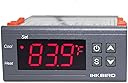
The Inkbird ITC1000 is a dual-stage digital temperature controller designed for professional-grade heating and cooling management. Featuring a clear ℃/℉ LCD display, reliable NTC sensor, and built-in alarms for sensor failure and high temperature, it offers precise, user-friendly control ideal for applications like 3D printing, refrigeration, and incubation. Operating at 110 volts, this compact device delivers consistent performance and easy installation, making it a top choice for millennial professionals seeking dependable climate control solutions.


| ASIN | B0152LYY0I |
| Best Sellers Rank | #26,560 in Industrial & Scientific ( See Top 100 in Industrial & Scientific ) #22 in Temperature Controllers |
| Brand | Inkbird |
| Brand Name | Inkbird |
| Color | Grey |
| Customer Reviews | 4.4 out of 5 stars 533 Reviews |
| Display Type | LCD or LED |
| Included Components | Temp Control Thermostat |
| Item Dimensions L x W x H | 3.93"L x 3.77"W x 1.49"H |
| Item Type Name | Temp Control Thermostat |
| Manufacturer | LERWAY Tech. |
| Material | Plastic |
| Material Type | Plastic |
| Model | ITC1000 |
| Part Number | 43237-2 |
| Product Dimensions | 3.93"L x 3.77"W x 1.49"H |
| UPC | 705701562658 |
| Voltage | 110 Volts |
B**N
Great STC-1000 Type Controller
Full Disclosure - I was offered a discount on this product in exchange for an honest review. I purchased a Inkbird All-Purpose Digital Temperature Controller Fahrenheit &Centigrade Thermostat w Sensor 2 Relays back in April and have been very happy with its performance. I wired it into a small project box and hooked up my chest freezer to make a nice effective fermentation chamber. I have since picked up a second chest freezer so I needed something to control the temperature. This device fits the bill perfectly! You will see my make-shift controller box build for this unit in my pictures. This is almost certainly not to code, please do not think that I am suggesting you build your box like this. For what it's worth, it is working just fine on my chest freezer right now. PROs: Price - Great low-cost controller, especially if you already have the parts to wire this up sitting in your garage. Ease of Use - Adding the Fahrenheit display makes this much more user friendly. Effectiveness - Control heating and cooling with one device. CONs: Not Programmable - This is not the V1.0 A400 model STC-1000, you can't flash STC-1000p on this. Not Pre-Wired - If you are not sure how to read a wiring diagram, or you don't have the parts/tools around your house, then you would be better off buying Inkbird Itc-308 Digital Temperature Controller Outlet Thermostat, 2-stage, 1000w, w/ Sensor which does exactly the same thing, but is already wired for you. Additional Notes: This appears to be functionally identical to the earlier STC-1000 that I purchased. You can set the temperature, display unit, the compressor delay, and the calibration offset. The temperature probe is the same plastic-coated probe. The screw terminals and wiring diagram on the back look the same. In 7 months of continuous use my first STC-1000 has not had a single issue, I would guess that this one will be just as great. Inkbird is a great company to deal with and are very friendly to customers, I would say that alone is enough reason to pick this model.
S**D
Perfect!
I got this several years ago to replace the thermostat in my fridge, and it has been great! The temp is much more consistent than with the original thermostat, and it's been perfectly reliable. Easy to install.
C**.
Fun diy and accurate thermostat
I recently acquired the inkbird Incubator Thermostat Controller for my egg incubation setup, and I must say it has impressed me with its precise temperature control capabilities. One of the standout features of this controller is its remarkable precision in temperature control. With a temperature range of just 1°F and the ability to calibrate in increments of 0.1°F, it allows me to achieve and maintain the exact temperature required for successful incubation. This level of accuracy is crucial for the healthy development of embryos, and I appreciate the fine-tuning options it provides. The quick sample rate of the included temperature probe is another commendable aspect of this controller. It rapidly determines temperature changes, ensuring that the incubator environment remains stable and within the desired range. This fast response time is particularly valuable during critical phases of egg incubation when even minor temperature fluctuations can have a significant impact. It's important to note that while this controller excels in temperature control, it doesn't assist with humidity levels, which may require an additional humidity control system if necessary for your incubation setup. In summary, the inkbird Incubator Thermostat Controller is a fantastic choice for those seeking precise temperature control during egg incubation. Its 1°F temperature range, 0.1°F calibration capability, and quick sample rate make it a reliable tool for maintaining the optimal environment for embryo development. However, keep in mind that it doesn't regulate humidity levels, so you may need to pair it with a separate humidity control system if that's a requirement for your specific incubation needs.
B**N
Perfect fit, easy to wire, working great 2 months in.
Perfect fit. Running an aquarium heater. Cut an old extension cord and had this wired up in minutes to plug in my heater. So for less than half the price, it functions the same as the other pre-wired units. Moreover, I can use it for cooling in the future as needed. It is also easier to custom mount as needed. Of course, the programming is a bit silly, (I keep forgetting what the letters for the modes stand for), but it has a full array of settings including a compressor delay, run buffer, temp correction, etc. Holds settings on loss of power... i Put the temp sensor on a weight and dropped it in my sump (basically a container of water). So it seems submersible, to the extent that I submerged it. I do wish it had a better than 1 degree tolerance though. I had a Celsius version of the same unit before that had a .1 degree tolerance. Of course I know one degree Celsius is not one degree Fahrenheit, but it still comes out to a poor tolerance. This becomes an issue when you're setting the buffer for it to run. Regardless, is been running for a couple months no problem. Will buy again.
R**N
Works great when used as intended. Relays are for 10 amps
Good cheap temp control for when a pid is overbore. If using to control a full size fridge or freezer you will likely need to add an AC SSR and heat sink or the internal relay will stick and your beer fridge will turn into a beer freezer. It took a year for that to happen. The user interface is simple, but no intuitive. Some toss the directions you will need them if you only make adjustments every couple of months. Cools to within 3 degrees in an upright freezer being used as a fridge. I think it would be more accurate in a more efficient application.
M**F
Great value and high reliability for conversion projects
Awesome affordable controller. Used a couple of these over the years. Latest purchase was to convert a high end Marvel wine cooler that was firmware locked to no colder than 55F to a drink cooler capable of 39F or colder. No issues driving the compressor, two circulating fans, and condenser fan direct from the controller's inner relay. Retained the stock controller just for the door temp display and the classy fade effect of the blue internal LED lighting.
W**N
Can't trust this, Not Accurate!!!!
for years I have bought Hovabator incubators with the digital control, heat cntrol and humidity. Like so much stuff I've received from China that is way below par, all of a sudden the Hovabators have gone beserk. I go to bed, temp is set for the eggs at 100, I wake up and find it's 106-108 and I end up getting 3 chicks out of 42 eggs. So I decided to straight wire the heater and fan and use an Inkbird to control the incubator. I set up the first incubator of the season using an Inkbird, worked great. Then I had an old Ronco controller, so used it and both incubators are set for 99 and the vary from 98-100. I was so happy I ordred another inkbird and to test them I put the sensor UNDER my tongue to see how close to 98.6 it comes. This one shot up to 108. I thought OK OK, lemme actually put it in a working incubator that has 2 other temp controls, both showing 9-100 and this Inkbird shot to 118. I cannot afford to have this happen and lose expensive eggs. I thought I could trust these, but guess not. I have the Ronco, AND a kitchen thermometer in the incubator that's showing 98 on one, 99 on the other but the Inkbird is showing 117.
J**D
Used for hydroponics! Here's a quick how-to for all you non-electical engineers out there (like me!)
I live in Florida and decided during quarantine that I wanted to try growing peppers and onions in my office closet. I've spent the last 4 weeks buying every hydroponic solution I could, trying to figure out why my plants were always closer to dead than alive. I have a small setup -- a 5 gallon bucket of nutrients and a RDWC setup I got off Amazon (https://amzn.to/3acGSqG). Little did I know, with the Florida heat and my small closet space, a RDWC can actually cook your plants because of the water that sits in the hydroponic system when the pump is not running. I needed a way to cool my nutrients without investing in a 400$ water chiller meant for (much) bigger grow ops. I read all of the reviews on a small water cooler that would help keep my solution temperatures under control (https://amzn.to/2VcaBMg) and saw a review from the control engineer saying I needed to forget about an expensive controller buy a simple 18$ one -- this one! (review is here for reference https://www.amazon.com/gp/customer-reviews/R3C88YUKT446KA/ref=cm_cr_arp_d_rvw_ttl?ie=UTF8&ASIN=B001JSVLBO). Well that was a stupid idea -- that guy knows way more than I do. If you're reading this now and you need a controller, spend an extra 15$ and buy this (https://amzn.to/34EnDVH). However, if you like to get in over your head like me, keep reading. You'll need a few items from your local hardware store -- 1. A 1-1/4" hole saw (https://amzn.to/2xnu5o7). You'll need this to drill a hole in whatever tank is holding your nutrient solution. 2. A generic wall outlet -- something like this (https://amzn.to/3bcOYkd) 3. A 3 prong extension cord, you know, the usual kind (https://amzn.to/2K4ImbZ) 4. If you have an extra computer power plug laying around, that should be fine. Otherwise you can use a lamp cord. I used something like this (https://amzn.to/2K7GLSH) 5. Finally, a place to put it all, nice and neat. I used something like this, but I took my controller to the hardware store and found one that was a snug fit (https://amzn.to/3bdfw56) 6. (optional) an outlet cover, 'cause we're fancy and like aesthetics. Time to put it together! 1. Cut the tail off the computer power cord (or similar) mentioned in the part list -- #4. The tail being the part that does not plug into the wall (the female end, cut it off). Pull the casing back a bit and strip the black (hot wire) and white (neutral). Leave the green alone, cut it so that its just the two black and white wires exposed. Put some electrical tape over it for good measure. 2. Strip the black and white wires and connect them to the controller by first unscrewing the screws in the terminals. Black (hot) goes into port 1 (closest to the left when looking at the back), the white (neutral) goes into port 2. Screw the screws tight to secure the wires. 3. Connect the controller's sensor wire to ports 3 and 4 -- the order does not matter. 4. Plug in the power cable connected to the controller and make sure it powers on. 5. If all is well, it should startup and show you what the ambient temperature is. Disconnect the power cable afterwards. 6. Take your extension cord (part #3) and cut the tail off (female part). Then cut an additional 6-8 inches from that -- we'll need a bit of copper wire for the next steps. Set it aside. 7. Grab the mutilated extension cord -- the one with the male plug remaining. Strip all 3 wires -- white, green, black back a bit. Connect the white wire to the neutral screw (mine was silver). The green wire goes to the green screw. Connect the black wire (hot, power) to the temperature controller, terminal #7. At this point you should have: the power cord (section with the male end) connected to the electrical outlet via the white and green wires. The power cord's black wire should be connected to the controller port #7. 8. Remember that piece we cut off in step #6? Grab that, pull the black wire out of the casing, and strip both ends. Plug one end into the controller terminal #8, and the other side of that wire goes now to the brass screw on the new outlet (the one that has the green and white wires connected). At this point you should have 3 wires connected to the outlet, green and white directly from the extension cord, and black coming from the controller. 9. Make it look pretty! I'll leave this up to you. Make sure to cover any exposed wires with electrical tape. 10. Finally -- you should have three plugs now -- one from the aquarium chiller, one from the extension cord, and one that power the controller. Plug the aquarium chiller plug into the new outlet. Plug the other two cables into a standard wall outlet that has power. 11. Mount the chiller to your bucket, inserting the probe through the hole and tightly securing it with a wrench. Check for leaks! Congratulations, you're a boss. Go out there and grow!
Trustpilot
1 week ago
2 months ago