


Buy anything from 5,000+ international stores. One checkout price. No surprise fees. Join 2M+ shoppers on Desertcart.
Desertcart purchases this item on your behalf and handles shipping, customs, and support to KSA.
🔍 Unlock microscopic worlds with clarity and style — don’t just see it, capture it!
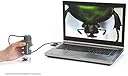
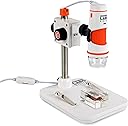
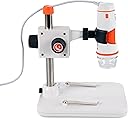
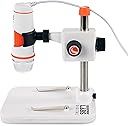
The Celestron Labs 5MP Handheld Digital Microscope combines professional 20x–200x magnification with a true 5MP sensor and advanced optics to deliver crisp, high-resolution images and videos. Featuring an adjustable LED ring light, built-in polarizing filter, and versatile mounting options, it’s designed for educators, hobbyists, and professionals seeking precise, glare-free microscopic exploration. Plug-and-play USB-C connectivity and free imaging software make capturing, measuring, and annotating specimens seamless, backed by Celestron’s trusted warranty and support.




| ASIN | B00CMJ1I08 |
| Best Sellers Rank | #686 in Camera & Photo Products ( See Top 100 in Camera & Photo Products ) #89 in Lab Handheld Digital Microscopes |
| Brand | Celestron |
| Built-In Media | Built in adjustable light polarizing filter, Calibration Ruler, Plastic and metal adjustable stand with 1/4-20 thread clip holder, Quick Setup Guide |
| Color | Gray/White |
| Compatible Devices | Personal Computer |
| Customer Reviews | 4.0 out of 5 stars 978 Reviews |
| Global Trade Identification Number | 00050234443081 |
| Item Dimensions L x W x H | 1.3"L x 1.3"W x 4.44"H |
| Item Weight | 0.65 Kilograms |
| Light Source Type | LED |
| Magnification Maximum | 200 |
| Manufacturer | Celestron |
| Manufacturer Part Number | 44308 |
| Model Name | Celestron Labs Digital 5MP Handheld Microscope |
| Model Number | 44308 |
| Objective Lens Description | Achromatic |
| Power Source | 2.0 USB-C 5V (non-removable cable) |
| Product Dimensions | 1.3"L x 1.3"W x 4.44"H |
| Real Angle Of View | 45 Degrees |
| Real Angle of View | 45 Degrees |
| UPC | 050234443081 |
| Unit Count | 1.0 Count |
| Voltage | 5 Volts |
| Warranty Description | 2 Years |
C**N
Amazing!
UPDATE: I've changed my review to 5 stars. I called the company, and found out that they are sending out an updated version of the scope. The older version is the one with the light adjustment on the cord. The newer version has the light adjustment on the scope. I've seen several comments complaining that they didn't get the one in the picture, but the one in the picture is the prior version. They are actually getting a newer scope. Celestron emailed me the updated driver, and that fixed it. The resolution is AMAZING. This scope is so much better than I had hoped for. It is going to be a very important tool in identifying errors in my coins. If you have a mac, call Celestron and have them email you the updated driver. I'm soooo disappointed. I've tried to connect this to 2 of my apple computers. BOTH are not recognizing the device after installing drivers, restarting, etc. I wish I hadn't spent the $$. Now I have to send it back. Beware if you have an apple.
C**N
You get what you pay for
I ordered this Celestron USB microscope after I ordered a $19 off brand one from Ebay. I take pictures of the stamped bases of Civil War bullets and the resolution of the $19 version was just not satisfactory - plus, the software was all in Chinese, the included disc wouldn't load the software to run it so I had to find it online and felt it was "iffy" (I wasn't sure if it was trustworthy). Got it working, but it just didn't give the images I wanted. Initiated a return and they offered me a $3 refund to just keep it (I don't want it). I immediately ordered the Celestron, it arrive the next day, plug and play - so simple and the results are great. Yes, it was $50 more, but well worth the price. I am a very satisfied customer
B**S
Nice little gadget.
This digital microscope is a cool little gadget. Attached are photos of a micro-SD card and ball point pen at different focuses. I'm quite pleased with the quality of the photos. The microscope isn't perfect, however. The first issue I had was with the software. There's a note and a VERY quick "quick start guide" included in the box. The note tells you to visit celestron.com for software downloads. The quick start guide tells you to install Microcapture Pro. There is a LOT of software on their site so it's a bit of a scavenger hunt. I was unable to get the microscope to work with the version I downloaded so I had to open a support ticket with Celestron. They pointed me to a different version of Microcapture Pro that DID work. Apparently there are different versions depending on when the product was manufactured but you have no way of knowing that. Any time you use Microcapture Pro, it tells you to calibrate the microscope with no further instructions as to how to do that. There are no menu options to calibrate. Other than that error, it turns out that the software offers no microscope functionality, though. It's a simple camera viewer. I've switched over to using the Camera app that comes installed on Windows 10. It's just more convenient and efficient and it doesn't throw an error every time I take a photo. It takes a little fiddling to figure out the microscope if you've never used one before (like me) but once you do, it's fun. In my case, it works best with the LED lights turned way down and sometimes using another light pointed to the side for the best imaging. The focus knobs aren't great - since the stand and mounts aren't that solid, every little touch will move the image a little so a little trial and error is sometimes needed. All in all, the brand new price seems a little steep to me, for what it is... But it's fun especially if you can find it as an Amazon Warehouse deal.
M**L
Software issues and then unit stopped working completely
I do not write bad reviews lightly and only after being sure that I am not the source of the problem. Sorry to say that I am returning this unit for refund. Not interested in a replacement. First issue was that I downloaded what I expected to be the latest version of the software directly from Celestron's web site. My expectation was incorrect. The version of MicroCapture Pro from their web site is 2.3. It would not recognize my Digital Microscope Pro even though my computer sees it fine. I tried three different computers with the same result. For giggles I installed the version on the CD that came with the camera. Turns out it is a newer version than what came from their web site. The newer version is 2.5. Go figure. That was my first major clue that I was not dealing with an outfit on top of their game. I managed to get the 2.5 version working on one of my laptops and obtained some acceptable imagery for a short time. Then while focusing in on a subject item, I noticed that the image on screen was not updating. First step in troubleshooting was to restart software. No help. The software did not complain that it could not find the camera as the 2.3 version constantly did. It just would not display any imagery on screen. I tried rebooting. No good. Tried reloading software. Nada. Tried other USB ports on computer. No go. Rinsed and repeated all the above on another computer to no avail. So the unit became completely worthless to me and thus the return. Congratulations to those of you who have no issues and I hope your product continues to provide value for years to come. I lost this particular lottery and am disinclined to give Celestron another go.
M**L
Great value! High resolution.
I'm a professional Biologist and have many high quality very expensive microscopes. I needed something small and portable that I could transport even in airline luggage. This USB scope met my needs and exceeded my expectation for picture quality. Very easy to use and set up. My only complaint is that the mount that holds the scope to the base is a little loose and tightening the set screws did not help. This makes focusing a bit tricky because when you let go of the focus knob, there is a physical shift of the scope to out of focus. I've learned to focus very gently and work around this small problem. For the price, this USB scope can't be beat and its rated at the top of its price class in reviews for a reason. My CD manual was out of date and did not contain the proper method of calibration. I contacted on-line tech support, no wait time, and received chat instructions how to do the calibration. Now, the calibration is for those measuring the dimensions of the object they are viewing. Some have complained that the calibration needs to be done for each image, and that's pretty standard for almost all of these USB scopes. If you don't need precise measurements on objects, you don't need to bother with calibrating, just enjoy the clear images!
T**N
Awesome for magnificent
Great for seeing details in coins
T**B
Decent Unit - Lame Software
The camera part is great. Pictures can be nice and clear once you adjust the focus. I'll get to focusing in a sec. The mount is rather cheap and not that solid. Adjusting the mount up and down with the knobs twists the camera either to the left or right depending on the direction. Now back to focusing (told you it would only be a second). The focus wheel is a little too stiff. Stiff is good to keep the camera in focus, however, because the mount isn't that stable, you could slightly move the camera while trying to focus on the object. The software? Some very simple quality of life adjustments could be made so easily and I don't understand why they haven't. The resolutions are 4:3 format (aside 1920x1080) which is fine. The problem though comes into play when you use those 4:3 resolutions in the software on a widescreen monitor. The software stretches (yes, stretches) the video to fit the window. Taking pictures and recording video is fine as they still use the resolution you've chosen, but why it doesn't force the aspect ratio in the software's video feed is beyond me. I basically have to manually size the window until the height and width looked correct. In the end, if you are using this for coins, stamps, or anything else where you'll rarely need to adjust the camera, it is a good buy. If you're using this to constantly look at all sorts of things and will be adjusting a lot, you might want to either look for a better mounting unit. Thankfully, I fit in the former scenario.
M**S
DOES NOT WORK on Windows 10 and Windows 11
I bought this about 5 years ago. It worked great and I liked it. But one day it just stopped working on Windows 10, after a Windows update. Celestron never updated the software. The software that comes with it, and the software on their website both no longer work with Windows. So basically, I paid 100 dollars for a paperweight. Don't take my word for it. Do a search online, many people talking about the same thing with this unit.
R**R
Buen producto
Adecuado desempeño
M**.
Ein tolles Gerät für den Einstieg in die digitale Mikroskopie!
Das Gerät und die Teile sind dem Preis entsprechend sehr gut bis gut verarbeitet. Die Software von Celestron ist intuitiv und ich denke der Support wird von dieser Firma (da es sich nicht um eine No-Name Company handelt) auch noch länger sichergestellt sein. Unter Windows 8.1 x64 läuft alles problemlos. Handheld Mikroskope gibt es auch günstiger und ohne Tischständer, dieser erweist sich aber beim Scharfstellen als sehr nützlich. Man kann kaum die exakte Entfernung zu einem zu untersuchenden Objekt gleich halten, während man mit der anderen Hand scharfstellt und dann noch den Auslöser für das Foto (ich mache es in der Software mit der Maus) betätigt. Man darf sich natürlich keine Wunder erwarten was den Schärfebereich angeht, umso höher die Vergrößerung ums geringer wird dieser (gilt für 3D Objekte wie zb Kaffeebohne etc.) Seht dazu auch meine Bilder, die ich hier hochgeladen habe. Ich denke diese geben einen guten ersten Eindruck wie weit man mit dem Gerät gehen kann. Die Vergrößerung hängt natürlich von der Entfernung zum Messobjekt, sowie den Einstellungen an dem Gerät (diese stellen das Bild Scharf und vergrößern teilweise noch) ab. Wer mehr will, muss gemäß dem Gesetz der Wirtschaft (you get what you pay for) auch mehr bezahlen, da ist eigentlich auch klar. Für den Einstieg in die digitale Mikroskopie kann ich es getrost weiter empfehlen! Trotzdem der Hinweis von "dnt" gibt es ein "ähnliches" (vermutlich das gleiche Produkt nur in Schwarz) zu einem günstigeren Preis.
A**N
Sencillo y práctico
Para el que busque un equipo económico para ampliar pequeños objetos es una buena elección. La luz es en general demasiado potente pero la cámara tiene una gran sensibilidad lumínica y 5Mpx de detalle que hacen que una vez efectuada la foto se pueda ampliar considerablemente. Fotografiar es muy sencillo con un pegueño botón del cable El programa tiene una herramienta de medición calibrable que resulta muy práctica. El soporte el algo bajo pero su regulación es buena y fina. Fotografiar es muy sencillo
K**G
Portability, ease of use
I like this as it allows me to do fieldwork using computer screen. For my purpose, suffiently high magnification for me to identify bryophytes --- my latest area of microimage work. Very good, fast, effective technical support. Could not get it to work at first, but quick reply by service person sorted out the issue.
G**B
An excellent digital microscope out of the box
An excellent digital microscope out of the box. At 5MP the resolution is just what I need but don't be fooled by the advertised magnification because magnification depends only on the size you blow up the image. The better figure of merit is resolution. At closest focus, it compares to the resolution of a 30x magnifying glass. The software is pretty basic. Since this is just a simple webcam packaged as a microscope, any third party software will do. Since I am running Windows 7, you have to make sure you install the codex (that comes on the CD) so that the 5MP resolution can be realized. I tried three providers of free 3rd party software and all worked (again, the 5MP codex must be installed for them to run at that resolution). This third party software had more features than Celestron Capture Pro so I will probably use them often. For example, the Celestron software doesn't allow for adjustable exposure - it only auto scales so it can't be trusted for depth of field stacking. It also has no color balance controls. This is necessary since the 8 leds do not provide uniform lighting and I will need other lighting sources in certain circumstances. All third party software I looked at offers adjustable exposure and other features that make depth of field stacking easy. They also offer the full gamut of image control. Speaking of depth of field stacking, I will have to construct my own mount and optical stage for depth of field stacking since the Celestron mount is far too flimsy. The Celestron mount is good for just viewing objects on screen but if you need to make fine adjustments it is finicky. I love the quality of the images - an excellent price point for the optical quality - I will customize it to make it suit my needs.
Trustpilot
3 weeks ago
2 weeks ago