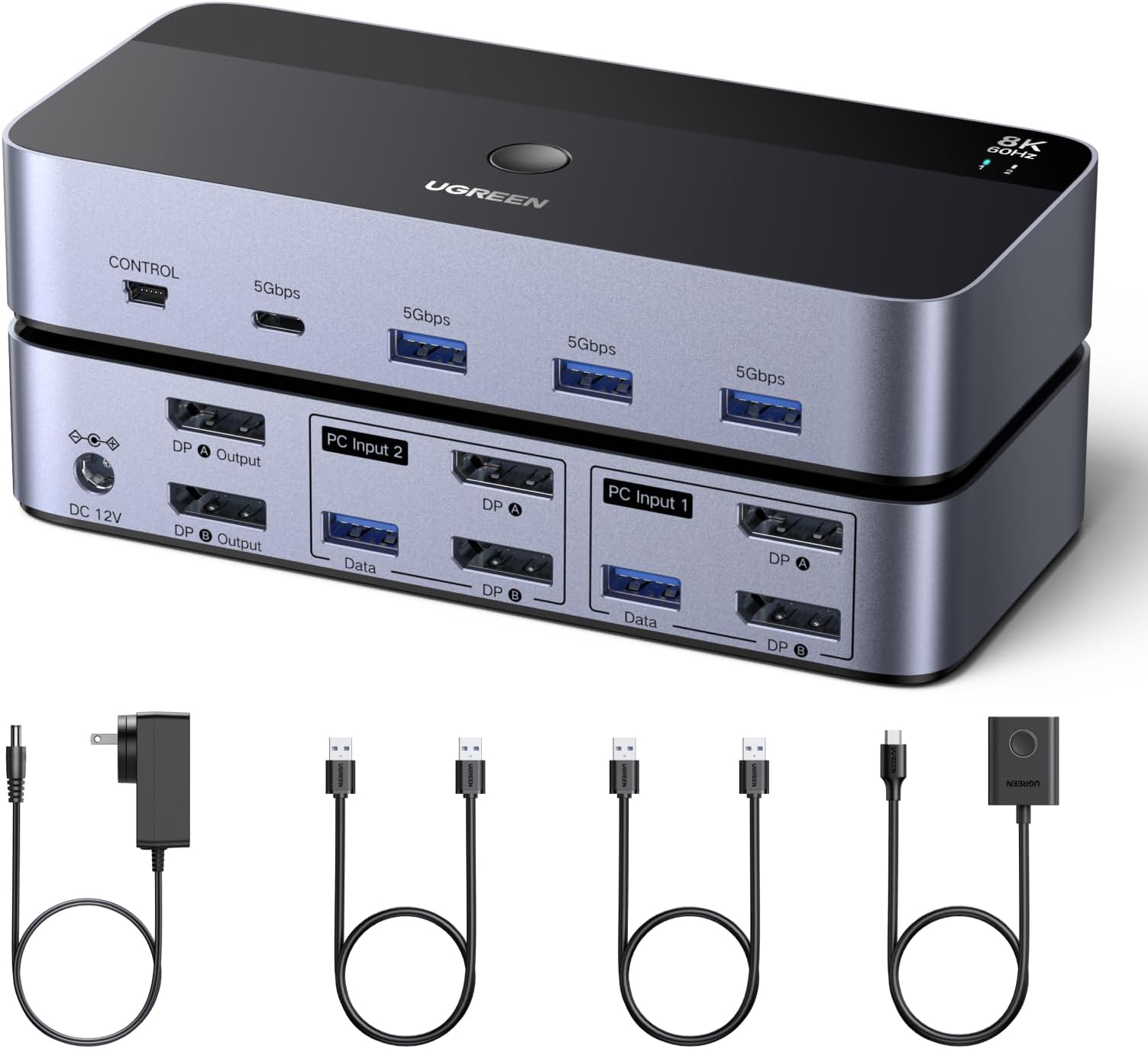
Desertcart purchases this item on your behalf and handles shipping, customs, and support to KSA.
🚀 Elevate Your Dual-Computer Command Center with 8K Precision!
The UGREEN 8K@60Hz DisplayPort KVM Switch empowers professionals to effortlessly manage two computers and dual monitors with ultra HD clarity. Featuring 4 USB 3.0 ports for high-speed peripheral sharing, a durable aluminum chassis, and plug-and-play setup, it’s the ultimate tool for streamlined multitasking in modern workspaces.


| ASIN | B0DXF5Z23S |
| Best Sellers Rank | #35 in KVM Switches |
| Brand | UGREEN |
| Built-In Media | 1*KVM switch, 2*USB A cables, 3 different specifications of power adapters, 1*desktop controller, 1*user guide |
| Cable Type | DisplayPort |
| Color | Multi |
| Compatible Devices | Laptop, Monitor, Personal Computer, Printer, Tablet |
| Connector Type | Plug In |
| Connector Type Used on Cable | Plug In |
| Customer Reviews | 3.8 out of 5 stars 641 Reviews |
| Manufacturer | Ugreen Group Limited |
| Mfr Part Number | AK700 |
| Model Number | 55851 |
| Number of Ports | 6 |
| Power Source | AC adapter |
| Unit Count | 1.0 Count |
P**M
Great KVM switch for dual-computer setup | Easy to Use | Good Design | Reliable
The UGREEN DisplayPort KVM Switch works exactly as advertised and has been a great addition to my setup. I’m using it with a desktop and a laptop, sharing multiple DisplayPort monitors along with one keyboard and mouse. Switching between the two computers is very fast—almost instant. With a simple button press, everything (monitors, keyboard, and mouse) moves from one system to the other without any noticeable delay. This makes it really convenient for daily use. The build quality feels solid and durable. The casing is sturdy, and the ports on the back are spaced well, so plugging in cables is easy and not cramped. There’s also enough room to manage cables neatly with ties or straps. Setup was straightforward. The included instructions are clear and easy to follow. It comes with a power adapter (with a good cable length) and two USB-A cables, so you have everything you need to get started. I’ve tested it with both Windows and Linux systems, and it has worked without any compatibility issues so far. Another plus is the compact size—it doesn’t take up much desk space, which is always a bonus. I chose this product because UGREEN has a strong reputation, and based on my experience so far, it lives up to it. Keep in mind this review is based on less than 30 days of use (as of April 2026), but I’m very happy with the performance so far. Pros: Fast, seamless switching Solid build quality Easy setup Good port spacing for cable management Works with Windows and Linux Cons: None so far (based on short-term use)
P**N
Convenient tool to switch between work Macbook and Gaming PC
I work from my home desk often so I've been looking for a clean way to switch between "work mode" and "personal/game mode". I have 2x 144hz monitors (1080p/1440p) that I feed from either my MacBook Pro USB dock or my gaming PC tower. For the Macbook, I'm currently running a TobenOne Displaylink docking station with Display port cables running from the dock to this KVM. For the PC, it's just Display Port directly from the GPU to the KVM. I have NOT plugged in the provided power cable for the KVM as I have not notice a difference in functionality with it attached vs unplugged. It's possible it may only be needed if your USBs from the PCs do not provide enough power for the dock. I have all of my peripherals plugged into USB hubs that attach to the front USBs of this KVM so it all switches together. (Mouse, Keyboard, Sound Card, etc). I followed other reviewer's advice and only used Display Port to Display Port from the KVM to the monitors. I did test using USB-C to DisplayPort from the PC to KVM and that did work successfully. Only issue I had during setup was that for some reason, I has to swap the inputs into the KVM to get one of the computers working. I think this might have been user error, but just wanted to note it in case anyone else gets stuck. Once it's setup, I have had no issues switching back and forth between the two computers. It takes about 3 seconds for both monitors and all peripherals to switch over and be ready to go. I've tucked away the KVM and all of the cables under my desk and use the external switching remote to switch and it's nice to not have a mess of cables. I would recommend!
S**M
Gave up on this following several months of trying to make it work
My system consists of an Asus/NVIDIA 5060 video card and two Samsung 8K displays on Windows 11. I have used this KVM switcher for several months now, and finally had enough. It keeps switching on and off the monitors, loses the USB connection, and has me constant pressing the switch button on the KVM switch to get my video back. In some cases, I had to power cycle the KVM switch, in other cases I had to reboot my system. It's simply unreliable. I used the highest quality cables I could find, and put up with the intermittent operation for months, but today finally gave up on it, pulled it, and tossed it in the trash - there's simply not enough time to waste fooling around with something that doesn't work reliably.
N**S
It just works!
Plug and play for me. I have an M4 max MacBook Pro on one side and a gaming PC running Arch Linux with an AMD Radeon RX 7900XT on the other. DP cables for the PC, an Anker PowerExpand 11-in-1 USB C PD hub on the Mac side for one DP port, and an Amazon Basics USB C to DP cable for the other. No hiccups, rock steady.
D**N
Good & works as advertised
I got it to use on 2 4k monitors. My monitors are capped at 144hz refresh rate & this works well for the refresh rate. Set up was easy. Switching between machines is an ease with click of a button. Compatible for windows & mac. One of the review pointed out the screen resolution resets every time when switching between machines. I did notice the same too. However, if I think this has to do with the machine & not the switch. My newer windows machine has no such issues & I can see the same resolution I set it up with. However, when I connect a laptop the display resolution for laptop screen gets reset to default. The switch is a little bulky & needs a power source which makes be give it a 4 star. Overall I am happy with the purchase
A**R
Great KVM, but doesn't work with HDMI converters. Straight DP to DP cables only!
Listing is incorrect: DO NOT USE DP TO HDMI CONVERTERS!! Overall, this KVM is great, but it took me a while to figure out why it wasn't working correctly - first one monitor would not work; I switched a DP-HDMI cable out for direct DP, and it worked. Then it had an issue where where everytime the KVM received no video signal, it would not recognize or turn on 2 DP out ports. I had a different brand DP-HDMI converter in there; switching them out for DP cables solved the issue. Now it's working flawless, but they really should not list that you can use converters!
I**R
Amazing KVM, supports high resolution and refresh rate
This is honestly a hidden gem for KVM's. I have gone through several KVM's, even spent a good amount of money on Level1Tech's KVM switch (which is known to be one of the best KVM's) However this one does everything better at fraction of the cost. Though it does not state to have EDID support, when switching between computers, I noticed that the windows that I had up remain in the same spot as they did, this might be due to the monitor's I have, I have not tested on any other hardware. This thing can handle a variety of resolutions and refresh rates. I have this connected to a 5120x1440p monitor and a 3440x1440p both at 144hz runs them no problem The HDCP 2.3 seems to work well, if you don't know what this is, when you have a monitor connected to a kvm switch, the hdcp protocol thinks its a recording device which will cause you screen to go black intermittently when watching something like netflix, amazon prime video, hbo max etc. Even the $400 Level1Tech KVM switch, goes black now and then because of the hdcp protocol. If you are a remote worker looking to switch between your work pc and gaming pc with no issue, this is the one. I hope Ugreen comes out with a triple monitor version.
T**E
Be careful about the bottom cover plate.
works so far, but quality is less than desirable. The bottom cover plate fell off right as I took it out of the packaging. I was able to use a slightly larger screw to stick it in place good enough to use. The screws used were too small to secure the bottom plate properly. If I didnt actually NEED this today, I would have immediately returned for an exchange.
G**O
Bello e funzionale
Ottimo prodotto, elegante, completo (alimentatore e cavi USB, non ci sono i cavi DP), ben confenzionato e soprattutto che ha funzionato al primo colpo. Nel mio caso collega due pc ad un solo monitor, mouse tastiera e accessori USB inclusi i dischi, che vengono switchati da un pc all'altro. Ho avuto un'icertezza all'inizio perché imballaggio e istruzioni dichiarano che la connessione "deve" prevedere per ogni desktop 2 cavi DisplayPort e 1 cavo USB. Nel mio caso avevo bisogno di 1 solo cavo DP e ho temuto non dovesse funzionare. Invece è tutto ok anche con un solo cavo, solo un accesso di enfasi nelle istruzioni...
A**ー
正常
この製品の前の他社製品が酷かったが 当製品は問題ないです 寿命は不明です
D**R
Cambio fácil entre PCs Y dispositivos con el KVM UGreen: práctico y accesible
He probado varios KVM y, como persona con movilidad reducida que utiliza un QuadStick para manejar el ordenador, mi prioridad era la accesibilidad. No puedo usar teclado ni ratón de forma directa, así que necesitaba un sistema que me permitiera cambiar de equipo sin depender de combinaciones de teclas. Después de probar opciones que no reconocían mis comandos, opté por este modelo de UGreen, una marca en la que confío porque todos sus dispositivos me han dado buenos resultados. La experiencia ha sido excelente. Puntos positivos: Fiabilidad y calidad UGreen. Siempre funcionan a la primera. Botón físico con cable largo. Puedo colocarlo cerca y usarlo sin depender de atajos de teclado. Diseño limpio y flexible. Incluye cables USB-A a USB-A, pero se pueden sustituir fácilmente por USB-A a USB-C más finos. Gestión de energía inteligente. Cuando el PC está apagado, el KVM corta la corriente y todos los periféricos (teclado, ratón, micrófono…) quedan desactivados, evitando desgastes innecesarios. Compatibilidad sin problemas. Funciona tanto en Windows como en Mac. Antes como el ordenador se quedaba encendido. Aunque lo apagara siempre se ha quedado una luz y en el QuadStick a partir de ahora ya pueden descansar Y no estropearse! Aspectos a mejorar: El botón tiene una resistencia algo dura. Para personas con fuerza reducida, como es mi caso, cuesta un poco. Para el resto de usuarios puede ser perfecto. Accesibilidad: Este KVM resulta muy útil para personas que, como yo, no pueden usar atajos de teclado. El botón externo facilita muchísimo la vida y da independencia. Es un detalle importante que fabricantes como UGreen tengan este tipo de soluciones. En resumen, un producto fiable, bien diseñado y muy práctico tanto para usuarios convencionales como para quienes necesitamos opciones accesibles.
T**N
Top product, makkelijk van Windows naar Macbook overschakelen!
Werkt precies zoals het moet werken, schakelt snel over en beeldschermen flikkeren heel af en toe eventjes bij het switchen maar dat is geen enkel probleem. Top product!
A**N
Praktisk
Funkar perfekt
Trustpilot
2 days ago
1 month ago