


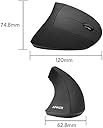

Anker 2.4G ワイヤレスマウス (縦型 無線マウス)
Product ID: 727667929
Details
- ブランドAnker
- 動き検出技術光学
- 接続技術ワイヤレス
- 特徴
- 色ブラック
🎯3 DPI settings (800/1200/1600) for precision
🔋Wireless 2.4G connection with 8m range
🖐️Ergonomic handshake angle reduces wrist strain
Desertcart purchases this item on your behalf and handles shipping, customs, and support to KSA.
🖱️ Elevate your workflow with ergonomic precision — because your wrist deserves the best!
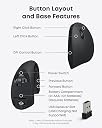
The Anker 2.4G Wireless Vertical Mouse features an ergonomic handshake design to reduce wrist strain, three adjustable DPI settings (800/1200/1600) for precise control, and convenient forward/back buttons to enhance browsing efficiency. Compatible with Windows, MacOS, and Linux, it offers reliable 2.4G wireless connectivity with an 8-meter range. Its matte black finish and five-button layout make it a stylish, productivity-boosting accessory for professionals seeking comfort and accuracy.


| ASIN | B00BIFNTMC |
| Amazon 売れ筋ランキング | パソコン・周辺機器 - 7,010位 ( パソコン・周辺機器の売れ筋ランキングを見る ) マウス - 198位 |
| EUスペアパーツの入手可能期間 | 8 分 |
| GTIN (Global Trade Identification Number) | 08536692579774 |
| OS1 | Windows, Mac OS X, Linux |
| UPC | 848061077438 848061079456 |
| おすすめ度 | 5つ星のうち3.6 52,291 レビュー |
| カラー | ブラック |
| スタイル名 | モダン |
| テーマ | 人。 |
| ハードウェアプラットフォーム | ノートパソコン |
| バッテリー付属の有無 | いいえ |
| バッテリ平均持続時間 | 18 月 |
| ブランド | Anker |
| ブランド名 | Anker |
| ボタンの数 | 5 |
| ボタン数 | 5 |
| マウス最大感度 | 1600 ドットパーインチ |
| ムーブメント検出技術 | 光学 |
| メーカー名 | Anker |
| メーカー型番 | AK-98ANWVM-UBA |
| ユニット数 | 1 個 |
| 互換デバイス | パソコン、ノートパソコン。 |
| 仕上げ | マット |
| 利き手 | 右利き |
| 動き検出技術 | 光学 |
| 商品の寸法 L x W | 12長さ x 6.3幅 cm |
| 商品の推奨用途 | ゲーム |
| 商品の追加説明1 | エルゴノミックデザイン、追加ボタン |
| 商品の重量 | 0.28 ポンド |
| 商品外装素材 | プラスチック |
| 型番 | AK-98ANWVM-UBA |
| 必要電池数 | はい |
| 接続技術 | ワイヤレス |
| 特徴 | エルゴノミックデザイン、追加ボタン |
| 色 | ブラック |
| 装飾機能 | LED、ロゴ。 |
| 通信・接続インターフェース | ワイヤレス |
| 電池の数 | 2 単4形 電池 |
| 電源のタイプ | バッテリー式 |
| 音域 | 8 meters |
A**様
慣れれば問題なし
動画で紹介されていたので買いました 使ってみた感想ですが、最初は違和感ありましたし、ホイールの操作もぎこちなかったのですが、一時間もかからずに慣れて、使いやすくなりました 後は充電式ではなく、電池なので事前に用意しておく事
R**A
エルゴノミクスマウスデビューにおすすめ
マットな質感のさらさらとした触り心地です。手の側面がべったりとデスクについてしまい、小指と手首の骨が痛かったので、リストレスト付きのマウスパッドと合わせて使ったところ、非常に使いやすかったです。手首をひねらないだけで腱鞘炎がかなり楽になりました。クリックするときカーソルが少し左にずれる点は気をつけなければいけません。この形のマウスでは仕方のないことだと割り切っています。指が届かないとかもなくちょうどいいサイズ感でした。お値段も安いのでエルゴノミクスマウスデビューにはおすすめです。
D**J
全体的にボタンの耐久性X、初期不良率高し、不要にひっかけやすい頭頂部に難あり。デザインだけが救い
今まで使ってた縦型マウスと比べてはるかに使いやすい。(この辺は自分の手と合うかどうかが全て。) マウスホイールも割と安定してる。 ただ、ONにしたままほっとくと数時間で電池が切れる。ほんとに節電してるのか? → 不具合だったので交換してこの問題は解消 ただし、耐久性に難あり。クリック連打するようなことをしているとすぐ壊れる。(頻繁誤動作) クリック動作部は耐久性に問題がありそう。 → 保証期間内にサポート連絡したら速攻で交換品を送ってくれたので、その辺の対応は◎。とても良い 普通に使う分には長く使えるんじゃないですかね。 → 結局、普通に使っても2年ぐらいで壊れた(左クリックだけ使えなくなった) あと自分だけかもだけど、右に動かす時にへこみ部分に手が引っかかってマウスがよく横転する → ついでにマウスが落下するため、故障の原因になっている気がする。 サポート対応良好な部分を含めればコスパはいい方か? 結局は自分の手にマウスが合うかどうか。 数年して壊れて買い替えも検討したが、再購入してもう少しこれで頑張ってみようと思う。 決め手は自分の手に合ってるのと、デザイン。他のエルゴノミクスマウスでまともなデザインは見たことがない。他社はもっとデザインにこだわるべきだと思うよ。機能性、合理性伝々言う前に見た目がクソダサかったら買いません。 しかし、とにかく初期不良品が多い。(というか、製品耐久性が低いので配送の途中で壊れるのかもしれない) 今のところ初期不良率50%以上。
マ**ン
腱鞘炎対策の入門にどうぞ
僅かに痛み続ける腱鞘炎の対策にエルゴノミクスマウスの入門として購入しました。 エルゴノミクスマウスは他にも高額な物もあるので 値段相応のやすかろう・わるかろうかと思っていましたが、親指の位置と手首の角度が変わるだけで腱鞘炎のチクチクした感覚が無くなりました。 充電式ではなく電池式なのでバッテリーの経年劣化や不具合を気にせず使える所も良いです。 通常の使用範囲でなら十分なマウスです。仕事・ゲームへの拘りがある方はもっと高いマウスを購入してください。
購**者
ゴミ
操作性は全く問題なし。 が、乾電池がすぐ切れる。最強のアルカリ乾電池、パナソニックのエボルタネオ使ってダメ。 このマウスは単4電池2本も使うので、この状態だとコスパが非常に悪すぎる。 他の無線マウスは2年くらい持つとのことだが、この調子だと無線全部信用ができなくなった。 有線のマウスを買いなおすことにする。これはゴミ、使えない。
さ**し
数年でベトつくようになった。その点がなければ良い製品。
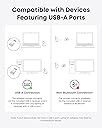
【良かった点】 ・腕を捻らずに手のひらを立てた状態で使え、手首というよりは腕全体で操作するので、腕の痛みがなくなった。 ・通信・レーザーの読み込み・反応は良好だった 【残念な点】 ・2年くらいで表面がベタつくようになりました(おそらく加水分解)。3年をすぎた頃に範囲もべたつき加減も我慢できない程度になりました(私は別製品に買い替え)。 ・私は分かった上で購入したのでマイナス評価ではないですが、BluetoothではなくUSBでの接続なので、人によってはその点が気になるかも。 【総評】 機能や特徴には満足だっただけに、ベタつきが残念です。 他のマウスに比べて高額という訳でもないので、買い替えながら使い続けるのもありかもしれませんが、私はベタつきでまたイライラしたくなかったので他製品に変えました。
ま**う
Ankerだから買う。
Ankerさんはバッテリー作ってる会社ということでその面を信頼していて、エルゴニクスタイプを探していた所見つけて購入。 割と手が滑ります。 滑り止めシールつけたほうが持ちやすい。 男性なら大きさはちょうど良さそうですが、子供やそれに近い手の大人には大きいサイズですね。 bluetoothを使わないので他の機器と干渉しにくいみたいです。 長年ロジクールさんの使ってたのですが、急に持ち方が変になり手の中でマウスがまわりそれに合わせ手も斜めになってしまってその為手を痛めたみたいで、傷めにくいのを探してました。 これサイズ違いがあると嬉しいですね。 手のひらが小さい私には若干クリック部分に届いていないのです。 物は良いと感じます。
K**O
お値打ち品
私の手には少し大きめだけど、触りごこちはさらっとしてて気持ち良く、軽いので気に入っています。 (私の手にジャストな大きさ:Logicoolのlift)
B**S
Perfecto
Funciona bien. Es cómodo aunque hay que acostumbrarse al cambio de posición.
A**D
تجربة مميزه
عملي وتجربة مميزه
M**I
Ergonomico, consigliato!
Dopo più di 6 mesi di utilizzo, ritengo che questo mouse verticale è un’ottima scelta per chi cerca comfort ed ergonomia. Anche dopo ore di utilizzo continuo, la mano e il polso non si affaticano, grazie alla sua forma studiata per una presa naturale. Dal punto di vista dell’alimentazione, il mouse richiede due batterie (non incluse), ma non ho ancora dovuto sostituirle a distanza di oltre 6 mesi. Considerando il rapporto qualità-prezzo, è difficile trovare di meglio in questa fascia di prezzo. Se cercate un mouse ergonomico, preciso e con funzioni aggiuntive utili (grazie ai tasti laterali), questo è sicuramente un acquisto consigliato!
M**X
Did not cause any pain in my arm, which is a good thing.
Initially, I felt like a caveman holding a huge bone, but after a few hours with it, I grew to like it. Unlike using the traditional mouse, where I rotate my wrist for hours, this did not cause any pain in my arm. It's nice; it took me a while to adjust, but it feels good and comfortable. Well, that's my 2 cents
K**S
Souris ergonomique et confortable
Je viens faire un retour après 1 mois et demi d'utilisation de ce produit et je peux dire que j'en suis pleinement satisfait, je l'utilise environ 7h par jour (c'est ma souris de travail) et j'envisage même son intégration à la maison. Tout d'abord j’appréhendais un peu le passage souris standard vers souris verticale, et finalement il ne m'a pas fallu plus de quelques heures pour maîtriser la bête. Concernant les douleurs au poignet je dois admettre que je n'en avais pas réellement à la base. J'avais plutôt pris ce produit dans un but préventif, du coup je n'ai pas senti de changement particulier en utilisant cette souris jusqu'à ce que je retourne sur une souris classique et là on sent tout de suite une sorte de gêne au niveau du poignet et de l'avant bras, comme si cette position n'était pas naturelle. J'ai également remarqué qu'on a tendance a renversé la souris, étant donné que la souris n'est plus "plate" on a tendances à la renverser sur le coté, ce n'est pas grave en soit mais ça peut être un peu énervant au début surtout quand on bouge régulièrement ses mains sur le bureau. Concernant les autres aspects de la souris je trouve que les matériaux utilisé donne un rendu de qualité, je ne suis pas expert dans le domaine pour le confirmer mais les plastiques sont "doux" et c'est agréable à utiliser. La souris dispose bien de 5 boutons, aucun problème pour les clics droit / gauche / précédent / suivant par contre le clic de molette a été compliqué au début, il faut je trouve appuyer plus fort que sur une souris classique (certainement dû à la position de la main) mais ce ressenti c'est dissipé aujourd'hui. J'ajouterais aussi qu'il n'y a pas de débrayage de la molette comme sur certaines souris (notamment Logitech pour celles que j'ai pu avoir) cette fonction est bien pratique mais n'est pas pour autant indispensable (surtout à ce prix). Enfin il est possible de régler le nombre de DPI de la souris (800, 1200 ou 1600) j'aurais toutefois aimé avoir un indicateur, par exemple une échelle graduée avec une petit bouton a déplacer comme au dessous de certains autres modèles. Je précise également que les 2 piles AAA ne sont pas fournies, mais sachez que la souris passe en mode veille si vous ne vous en servez pas pendant quelques minutes (on la reveille d'un simple clic) ce qui permettra d'économiser un peu sur la durée de vie de ces piles. En résumé, Points positifs ; - Réduction de la fatigue au niveau du poignet - Prise en main plutôt rapide si on utilise une souris régulièrement - Matériaux qui semble de bonne facture - Un mode "veille" pour éviter de vider les piles trop vite Points Négatifs ; - Piles non fournies - Tombe facilement (voir détails plus haut) - Pourrait être un peu plus large pour un confort optimal (mais variable selon les utilisateurs) - Pas d'indication sur le nombre de dpi Je recommande donc cette souris notamment à ceux qui serait curieux de la chose mais qui ne voudrait pas franchir le pas et puis pour le prix vous ne prenez pas un gros risque.
Trustpilot
3 weeks ago
3 days ago