Desertcart purchases this item on your behalf and handles shipping, customs, and support to KSA.
🚀 Elevate your office game with speed, smarts, and seamless wireless printing!
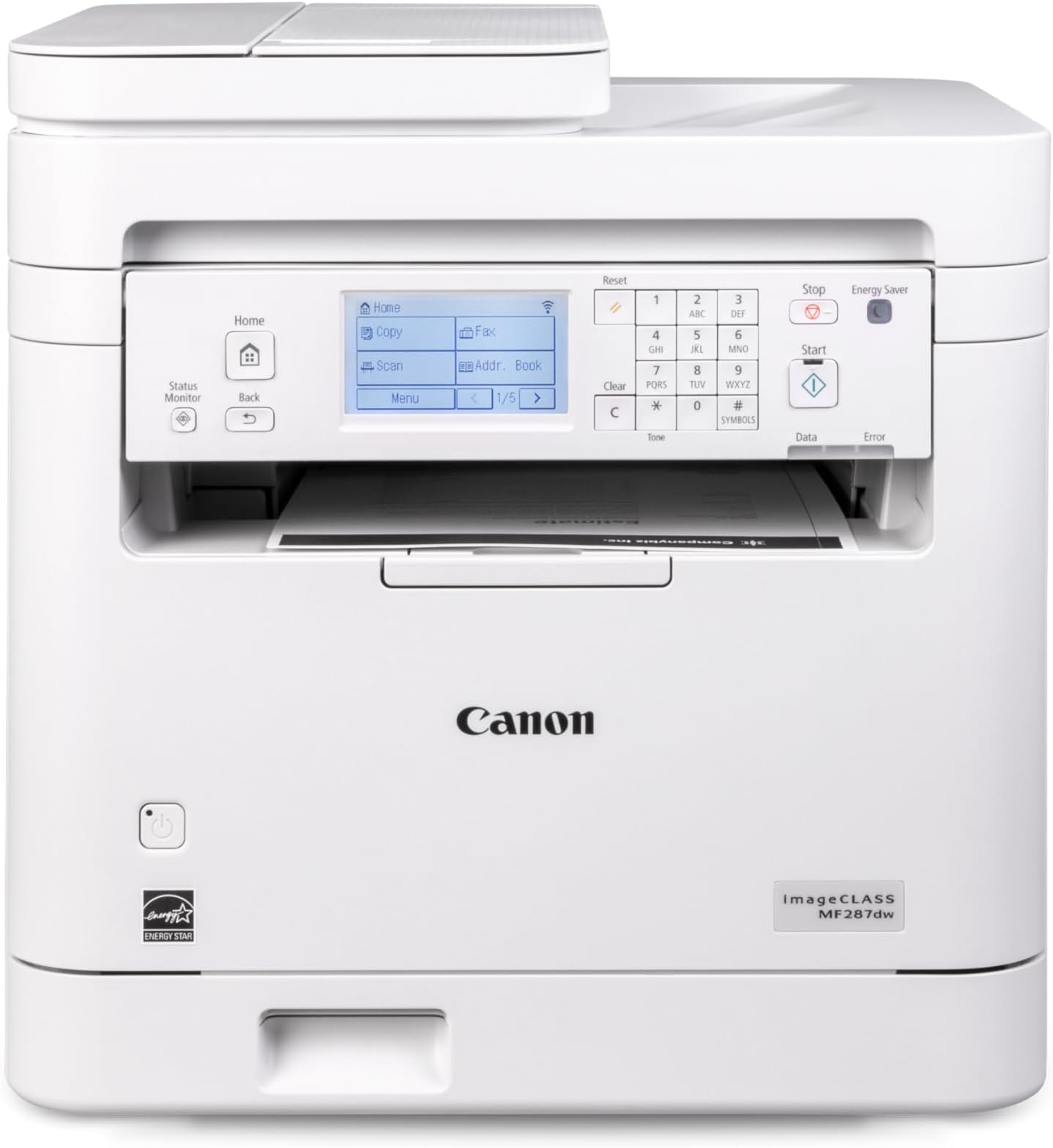
The Canon imageCLASS MF287dw is a monochrome all-in-one laser printer delivering up to 35 pages per minute with crisp 600x600 dpi resolution. Featuring automatic duplex printing, wireless connectivity including Apple AirPrint and Canon Print App, and an auto document feeder, it’s designed for busy professionals seeking efficient, eco-friendly, and versatile office solutions backed by a 1-year limited warranty.


| ASIN | B0DGZ9LMD1 |
| Additional Printer Functions | All In One |
| B&W Pages per Minute | 35 pages_per_minute |
| Best Sellers Rank | #40,669 in Office Products ( See Top 100 in Office Products ) #47 in Laser Computer Printers |
| Brand | Canon |
| Built-In Media | Toner Cartridges |
| Color | White |
| Color Depth | 1 bits_per_pixel |
| Color Pages per Minute | 35 |
| Compatible Cartridge | Canon Genuine Toner 072 Standard, 072 High Capacity |
| Connectivity Technology | Wi-Fi |
| Customer Reviews | 3.8 out of 5 stars 144 Reviews |
| Display Type | LCD |
| Duplex | Automatic |
| EU Spare Part Availability Duration | 1 years |
| Hardware Interface | USB 2.0 |
| Ink Color | Black |
| Item Dimensions D x W x H | 22.5"D x 22.8"W x 22.1"H |
| Item Type Name | Laser Printer |
| Item Weight | 27.6 pounds |
| Manufacturer | Canon |
| Maximum Copy Resolution Black and White | Up to 600 x 600 dpi |
| Maximum Copy Speed Black and White | 35 pages_per_minute |
| Maximum Media Size | 8.5 x 14 inch |
| Maximum Print Resolution Black and White | Up to 600 x 600 dpi |
| Maximum Sheet Capacity | 250 |
| Model Name | imageCLASS MF287dw |
| Model Number | 6354C011 |
| Model Series | imageCLASS |
| Number of Trays | 1 |
| Other Special Features of the Product | Display Screen |
| Paper Size | 3 x 5 Inches to 8.5 x 14 Inches |
| Print media | High-resolution paper, Paper (plain), Unknown |
| Printer Connectivity Type | Wi-Fi |
| Printer Output Type | Monochrome |
| Printer Type | Laser |
| Printing Technology | Laser |
| Resolution | 600 x 600 |
| Scanner Type | Automatic Document Feeder |
| Series Number | 6354011 |
| Special Feature | Display Screen |
| Specific Uses For Product | Office |
| Total Usb Ports | 1 |
| UPC | 013803372267 |
| Warranty Description | 1 Year Manufacturer |
| Warranty Type | limited warranty |
| Wattage | 970 watts |
S**A
Excellent printer
Set up is under an hour. Not too bad. For a windows desktop you can do a quick connect from canon, and that gets the printer on your network. Then, if you are not using the fax you will not be able to do anything until you resolve the fax set up process. Go to your desktop settings and find two programs from canon, delete the one for fax, and you are off to the races. For scanning, search your computer for a canon scan utility and add that to your tool bar. Deleting the fax software was at the direction of canon support. You can find their phone number once you register the product at canon.
E**N
User friendly
Very happy with the printer, user friendly and easy set up.
B**R
I should have sent this back
Ive been setting up printers for years and am well versed in installation of systems and computers.... this is a very difficult printer to set up, and it keeps dropping connection to the computer. I really believe it is a software issue that Cannon does not fix. Ive spent hours on the phone with them and initially they could not even help it connect, they essentially put their hands up and gave up - I ended up getting it to work after many attempts - and now it doesn't connect any longer, so I start from ground zero for the 3rd time. I can't reliably print, or scan. Documentation and instructions are terrible... It seems they got started on documentation.... figured they had spent enough time, and left it 30% completed... So, I have a Canon MF287dw for sale - interested? I should have sent it back.
E**O
Easy to set up and operate
Easy to set up. Connected to my WiFi with no problem. Easy control panel. No paper jams in 3 months of use. Could use a longer cord.
B**H
Great printer, but label ink smears
This printer has a lot going for it (wireless, duplex, all-in-one functions, and it’s quick), but I’m leaving 3 stars because the print results haven’t been consistent for the one thing I needed most: shipping labels. When I print labels, the text/barcodes smear/rub off too easily during normal handling, which is a big problem for packing orders. I also ran a standard test page (photo attached) and you can clearly see what I’m dealing with: random toner speckling/dots across the page, mottled “dirty” looking black patches, and streaking/banding in parts of the gradients/text. For a laser printer, I expected cleaner solids and more smudge-resistant output. If you’re mainly printing basic documents and don’t care about label durability, it may still work for you. But if you’re buying it for shipping labels or clean, crisp output, this has been frustrating.
K**E
Not a great printer.
Not great tbh. Washed out printing. Weird UI. Not a fan.
S**A
Convenient, why did I wait so long for a wireless printer?
So far, I’ve only used this for wireless printing. But it has very easy set up and now I can print from anywhere in my house, which I love. I’m expecting it to give us a lot of value over its life. We don’t do a lot of printing, but it’s nice to be able to print from any of our devices.
K**R
Works well, hasn't jammed
Print and copy quality is excellent. Toner cartridge lasts a good while Only gripe is that the prints come out under the control panel, making it hard to tell if it printed.
R**Y
Awesome printer
Awesome printer! The features on the printer is well worth the price. Fast printing, air print, duplex printing.
S**G
Much needed upgrade
Bought this to replace an old HP Officejet AIO that I'd had for around 8 years that just refused to print unless I restarted it several times. I set it up via ethernet and setup was a breeze for the most part, setting up scan to email gave me a headache, but once I figured out my issue, it was fine. Fast printing - much faster than my old HP one - just a couple of seconds to print, scan to email works great, haven't set up or used scan to folder yet, not yet sure if I will. Scan and print quality are good. Likely won't be using the fax function, so can't really rate that.
S**A
Easy to set up.
Due to where I have it, I had to get a quality signal booster, but it works fine.
S**H
It deserves
Perfect, but some difficulties with setup.
M**B
good solid fast B&W printer
Photocopier like printing speed... not immediate plug and play, but simply FOLLOW THE PROVIDED INSTRUCTIONS and you'll have zero issues. It clearly states do not connect by usb before downloading the app/software....pretty simple. We set up software on one computer, then set up the printer following instructions to connect to wifi, and boom. Then added the second computer, and two android phones. The machine works great, very fast, excellent print quality. FAR faster and immediate startup from power on, than any ink cartridge I've ever had. No grinding, no head cleaning, just boom. I did not sign onto the toner plan you can opt into, probably a bad idea unless you print a lot. Scanner works great with flatbed and feeding (for legal and odd sizing). After a month, I have zero issues other than my mother in law turning the thing off when I try do anything with it. Great buy for home use. No regrets not getting colour, decided that for the amount of colour I've used the last 10 years, if I really need colour I'd usb myself to the copy /photo finish store. You'll save on ink cartridges for sure.
Trustpilot
2 months ago
2 weeks ago