
Desertcart purchases this item on your behalf and handles shipping, customs, and support to KSA.
🚀 Elevate your presence with AI-powered 4K clarity—because your image deserves the spotlight!
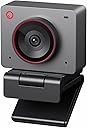
The OBSBOT Meet 2 is a compact 4K webcam featuring a large 1/2" CMOS sensor, AI-driven framing and autofocus, and dynamic gesture controls. Designed for professionals and content creators, it offers plug-and-play USB-C connectivity, dual noise-canceling microphones, and a sleek lightweight form factor, making it ideal for high-quality video calls, streaming, and esports broadcasting.
| ASIN | B0D9W7J9SK |
| Antenna Location | video conferencing, streaming, and content creation |
| Are Batteries Included? | No |
| Best Sellers Rank | 2,893 in Computers & Accessories ( See Top 100 in Computers & Accessories ) 20 in Webcams |
| Box Contents | USB-C cable |
| Brand | OBSBOT |
| Brand Name | OBSBOT |
| Camcorder Type | Webcam |
| Colour | Meet 2 Space Grey |
| Compatible Devices | Personal Computer, Laptop |
| Country of Origin | China |
| Customer Reviews | 4.4 out of 5 stars 1,126 Reviews |
| Digital Zoom | 4 x |
| Effective Still Resolution | 48 MP |
| Effective Video Resolution | 48 MP |
| Exposure Control Type | Automatic |
| File Format | MP4 |
| Flash Memory Speed Class | C10 |
| Flash Memory Type | Not available, rely on your PC/Mac |
| Flash Memory UHS Speed Class | 3 |
| Flash Memory Video Speed Class | V60 |
| Flash memory type | Not available, rely on your PC/Mac |
| Focus Type | Auto Focus |
| Form Factor | Compact |
| Has Image Stabilization | No |
| Image Aspect Ratio | 16:9 |
| Image Capture Speed | 60 fps |
| Image Stabilization Type | Digital |
| Item Weight | 40.5 Grams |
| Lens Type | Prime |
| Manufacturer | OBSBOT |
| Maximum Aperture | 1.8 f |
| Maximum Display Resolution | 3840x2160 (4K) |
| Maximum Focal Length | 26 |
| Maximum aperture | 1.8 f |
| Maximum focal length | 26 |
| Minimum Aperture | 2.8 Millimetres |
| Minimum Focal Length | 10 |
| Model Name | MEET 2 Space Grey |
| Model Number | MEET 2 |
| Network Connectivity Technology | USB |
| Operating System | Recommended PC configuration: CPU: 7th Gen Intel® Core™ i5 Processors or later, RAM: 8GB, Windows® 10 or later, macOS 11 or later |
| Optical Sensor Size | 1/2-inch |
| Photo sensor technology | CMOS |
| Product Features | AI Framing and Auto Focus and Gesture Control, Experience Stunning 4K Clarity, Multiple color options, Plug and Play Simplicity, Sleek and Lightweight |
| Product Warranty | 2 Year Warranty |
| Screen Size | 2 Inches |
| Sensor Type | CMOS |
| Shooting Modes | AI Framing and Autofocus |
| Style Name | Minimalist |
| Supported Audio Format | AAC, MP3, PCM |
| Supported Image Format | MJPEG |
| UPC | 783970236326 |
| Unit Count | 1.0 count |
| Video Capture Format | MP4 |
| Video Capture Resolution | 4K |
| Video capture resolution | 4K |
| Water Resistance Level | Not Water Resistant |
| White Balance Settings | Auto |
| Zoom | Digital |
D**N
All rounder
The quality of the camera is, without question, amazing. The software is easy to use, and the options it has are amazing. I think when this is on sale, it's easily one of the best bang-for-your-buck cameras. It also works well in low light.
R**T
Great little webcam
Crisp image & all the stated features work fine. Works perfect with Nvidia Broadcast utility (which the other webcam I bought from a different brand would not be detected even though worked in other applications). Auto focus is fast compared to cheaper lower resolution cameras. The magnetic lens cover stops any prying eyes should your machine get compromised. Cannot say how good the microphones are as haven’t used them due to using a professional grade XLR microphone.
A**R
Buy for clear picture and no issues.
Great webcam. Fantastic quality. Looks smart. Attaches to the magnet clip and is very sturdy. Good privacy cover also magnetises on. AI hand gestures a bonus
S**N
Mostly Good quality camera and software
It’s seems to be very well built and very small which is great . The quality of the picture is ok for general use. Without good lighting it does suffer a little, and in darker light does struggle but does a fairly good job compensating considering. As with all camera setups you need a lighting setup to get quality image but even without it’s much better than you bog standard webcamera that’s for sure. The software works well too when you are able to use it. On my personal device it’s easy to install and setup and lots of features. It’s a shame that some features are all dependent on the software though as if, like me, you use it for work, the software cannot be installed on my work device due to company policy. So you just have basic controls from within whichever apps you use on work device. The only downside is the stand which has a very weak arm which is not particularly good for sitting sturdily on my pc the monitor. It’s quite flimsy which I would have expected something a bit more robust.
S**S
Amazing quality for the price
The Meet is a handsdown awesome little camera for the price. There's no comparison to anything below £100. I have 2 Nexigo £70 1080p cams, a Ugreen 1080p cam and an Elgato Facecam in my streaming setup and I upgraded one of the Nexigos to this Osbot cam. Picture quality at 1080p is a radical improvement on all my other cams, notably including the Elgato. 4k blows it away. The comparison with the Elgato Facecam is the important one because it's similar-ish price and is frequently talked about as being good in low light. The Osbot picture is clearer and in low light, well, ... you wouldn't know you're in low light. Gesture and Beauty modes, I can happily do without but they work fine. The other things that's important to me are the Autofocus and AI autoframing, which work brilliantly. As far as the camera's build is concerned, it's cute and tiny! You can immediatly tell that the build quality is superior to lower cost webcams and is on a par or better, than the Elgato Facecam. The only downside I have with the Osbot is that I used to use the Snapcam application on my pc to pass the footage through and use some lens on, before consuming that footage in OBS Studio. I noticed that as soon as I told Snapcam to use the Osbot as it's source, it's CPU usage spiked to 33% of my total available. .. I have Overclocked AMD Ryzen 9 5950X 16 Core CPU so this was unnaceptabe and I simply uninstalled Snapcam and forgot about the lens. (Didn't make any difference whether the Osbot gave it 1080p or 4k footage, Snapcam just basically F'd).
T**H
Decent quality for a webcam
Good quality, nice and small. The magnetic stand is a clear weak point though. Because it snaps to "horizontal" it's basically impossible to make it point slightly down, which is what you want if it's on top of your monitor. I'll probably have to wedge something under it or something. Otherwise, pretty good for a webcam. Don't expect *actually good* quality though. This isn't anywhere near e.g. an iPhone or even a cheap Android phone to be honest. But to get that in a webcam you have to spend at least double the price of this.
S**T
Excellent Picture Quality With Slightly Overactive Framing
I use this compact 4K webcam for daily video calls from my home office. Compared with the camera built into my laptop, the image is much sharper, especially around facial detail and text on objects held near the camera. The camera handles changing light well. My desk is near a window, and the picture remains usable when clouds move across the sun instead of constantly becoming too dark or washed out. Colours look natural, and I have not needed to add extra lighting for normal meetings. The automatic framing is helpful when I lean back or shift position, but it can be a little too eager. During longer calls it occasionally adjusted the crop when I had barely moved, which was distracting. I now leave the framing fixed for formal meetings and use the tracking feature only when I am presenting or moving around. The mount feels secure, the camera was recognised immediately by my computer, and the software provides useful control without being essential for basic use. The picture quality is excellent, but the framing behaviour needs a little adjustment to suit personal preference.
A**H
Better than a DLSR camera for streaming. Works with linux Ubuntu 24.04lts and OBS studio.
I brought this webcam camera to use with content creation. Mostly streaming. I originally used a dlsr Sony Zv1 which cost a whopping £400+. This small webcam does a better job for my setup. I use a green screen and low lighting and its just a perfect match. If you are wanting a camera for YouTube to do talking head recordings this is the perfect companion. It works better than an expensive dlsr alternative at a fraction of a cost what is to dislike?. I am using it out the box on Linux using Ubuntu 24.04lts and OBS studio and it works perfect. Very impressed!
M**N
Great and easy Webcam
fantastic quality, plug and play
T**S
camera usb
camera extraordinaire sous environnement linux....
A**ー
小さくて画質が良い
画質が格段に良い サイズも場所を取らず使い勝手が良い おすすめの商品です
L**N
Sleek and smart webcam
This is a very impressive webcam camera. It's very small and very easy to set up. It just basically plugs and plays. I put this webcam on top of my Xiaomi light bar, and it has no problem. I wish the included cable could be a little bit longer. That said, the USB Type-C cable quality is pretty good. The camera handles the low-light situation pretty well and it can get focus on objects very quickly. Also, if you're using an NVIDIA graphics card, there is a very convenient option in the blur that you can turn on the advanced mode, which makes the blur backgrounds look so much better in meetings.
A**S
Doesn't play well with new MacBooks
Mic is rubbish which was a very important consideration. Hibernates even when I don't want it to (now disabled) and doesn't wake on calls so I have to faff with it every time (on a MacBook Pro M4, latest iOS) or leave it on permanently with cap on. WhatsApp video call it doesn't work with the ratio. Incredibly disappointed for the price.
Trustpilot
1 month ago
1 month ago