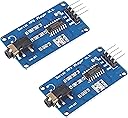
Desertcart purchases this item on your behalf and handles shipping, customs, and support to KSA.
🎵 Elevate your DIY audio game — because your projects deserve to sound as smart as you do!
This dual-pack MP3 Player Module by DIYables offers a compact, versatile audio solution compatible with popular microcontrollers like Arduino, ESP32, ESP8266, and Raspberry Pi. Featuring a mono 3.5mm aux output, micro SD card slot supporting multiple SD formats, and a serial interface with a 9600bps baud rate, it supports MP3 and WAV playback powered by a 3.2-5.2V supply. Backed by extensive tutorials and libraries, it’s the perfect plug-and-play module for professional-grade DIY audio projects.
| ASIN | B0CF593SWY |
| Additional Features | Versatility with multiple platforms and file formats, serial interface with microcontroller |
| Best Sellers Rank | #1,058 in Single Board Computers (Computers & Accessories) |
| Brand | DIYables |
| Built-In Media | 2 Pieces of MP3 Player Module |
| Color | Blue |
| Compatible Devices | Microcontroller, Single-Board Computer |
| Connectivity Technology | Aux |
| Customer Reviews | 4.3 out of 5 stars 33 Reviews |
| Display Technology | no display |
| Item Weight | 0.02 Kilograms |
| Manufacturer | DIYables |
| Mfr Part Number | DIY-MP3-PLAYER |
| Model Name | DIYables MP3 Player Module |
| Model Number | DIY-MP3-PLAYER |
| Special Feature | Versatility with multiple platforms and file formats, serial interface with microcontroller |
| Supported Media Type | ['SD Card', 'Micro SDHC', 'SDHC', 'SDXC', 'Micro SD', 'Micro SDXC'] |
| Supported Standards | MP3, WAV |
D**T
use random nerd tutorial not esp32io
It really ought to be more clearly communicated that this module is mono. This fact is not called out on their website or any easily available documentation and it's really quite hard to find. I spent several hours trying to get the ESP32io tutorial to work, even taking into account the potential ambiguity of the TX RX pins. I also found no documentation for the module there. Things were very different at random nerd tutorials. Not only did their tutorial work right out of the box, the tutorial clearly demonstrated that this chip can play a specific selected track, not just go next previous through a list. Most surprising of all was when I downloaded the source code for the tutorial there was a link to the full documentation for this module, the only link I've ever found anywhere for documentation for this module. The tutorial went into detail describing folder names, file names, what voltage worked best, format and maximum capacity of the SD card, minimum and maximum bit rates, MP3 and wave file formats. Their demo even came with a dozen public domain audio files properly named in proper folders. Random nerd tutorials had everything I could possibly need and it all worked the first try.
J**S
works good, lots of online instruction available
Simple to use. DIYables has good instructions online to use it. The Arduino IDE has the library for "DIYables_MiniMp3" available in library manager. Makes a good portable mp3 player. Works with earbuds or line in to an amp for speakers.
A**R
Bought the first mp3 module i saw without researching.
4 stars because it's my fault I didn't research better, finicky little unit that is not what you want to add audio to your project, but it is a functional mp3 player that can be controlled by your project, it just can't communicate with your project making displays pointless and integration finicky. They work, but there are better options.
T**H
Player is Perfect
This module works as advertised straight out of the packaging. Seems lots of people have issues? Had it working in mere minutes. Just follow the DIYables Tutorial on newbiely website. It's all explained, with fully working sketch. Tutorial is in brief format and I would have liked a bit more explanation of the frame[ ] commands . Don't understand someone's comment about TX-TX and RX-RX. As expected, wiring TX to RX and RX to TX works fine. Also, you can mix and match mp3 and wav files with no problem. I was using 44KHz files.
A**R
DIYables MP3 Player Module
These modules work well. Other reviewers are saying the Rx and Tx pins on the module are labeled wrong. Those reviewers are wrong - don't do what they are saying. If you look at the source code you will see which Arduino pins to connect to the Rx (pin 7 on UNO) and Tx (pin 6 on UNO) pins on the module. If you look closely at the wiring diagram in the online tutorial you will see the correct connections also.
M**E
needs better documentation
Works well when you figure out the protocols! Not intuitive at all. Difficult to get running with a microprocessor controller
S**A
Easy and simple!
Great uart mp3 player! Very easy to setup and get going. The tutorial on their site works great for arduino setup! One thing to note, if using the command CMD_PLAY_W_INDEX, the files are "indexed" in the sd card as they were pasted IN ORDER!! If you want a simple index (1-10 for example on the root of the sd card) make sure you copy the files onto the card in order!! A+
H**K
UPDATE: Got it to work, limited information available
Spent hours trying to get these to work. No Documentation. Even tried simply powering it on with SD card in and nothing. Tried every naming convention for the SD card. Even found an old 2 GB card to try. This was a bust. Edit: I want to walk this review back a little bit. I was using a ESP8266 and could not find anything to help me with this YX5300 version 1.2! I have uploaded a couple pictures and the video is testing FM broadcast for a Halloween "show" we plan to do this year. Two huge issues. First, the Rx and Tx pins are backwards on all of these units. This was infuriating. Second, (this is strictly with ESP8266) do not use software serial. Use GPIO 1(TX) and 3 (RX). This was the only way I could get it to work. Remember to pull these connections prior to uploading a sketch... Also, ignore any information about naming conventions (other than folders). The player plays the songs in their order, regardless of their name. Last thing, snag the Serial MP3 Player library and you should be good to go. Here is the basic "play the first song" snippet. Just remember, since it is backwards, TX to TX and RX to RX (so weird). #include "SerialMP3Player.h" // Use GPIO pin numbers directly for TX and RX #define TX_PIN 1 // GPIO 1 (TX) #define RX_PIN 3 // GPIO 3 (RX) // Create the MP3 player object with the correct pin assignments SerialMP3Player mp3(RX_PIN, TX_PIN); void setup() { Serial.begin(9600); // Start hardware serial communication for debugging mp3.begin(9600); // Start communication with the MP3 player delay(500); // Wait for MP3 player to initialize mp3.sendCommand(CMD_SEL_DEV, 0, 2); // Select the SD card delay(500); // Wait for SD card to initialize } void loop() { mp3.play(); // Play your first mp3 delay(3000); // Wait 3 seconds before repeating }
Trustpilot
1 month ago
1 month ago