Desertcart purchases this item on your behalf and handles shipping, customs, and support to KSA.
🚗 Upgrade your drive with smart, sleek, and safe tech—because your car deserves the future now!
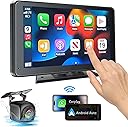
The PASLDA Portable Wireless CarPlay and Android Auto Screen is a versatile 7-inch HD touchscreen car stereo that supports both wireless and wired connections for Apple CarPlay and Android Auto. Compatible with virtually all vehicles, it features Bluetooth 5.2, multiple audio output modes, and a 360° rotatable mount for easy installation. The device includes a waterproof HD backup camera with night vision for enhanced safety, and offers seamless smartphone mirroring for apps like YouTube and TikTok. Backed by lifetime tech support and a 2-year warranty, it’s a premium upgrade for any driver seeking smarter, safer, and more connected journeys.


| ASIN | B0CDKMJDLD |
| Audio Output Mode | Stereo |
| Audio Output Type | Speakers |
| Best Sellers Rank | #1,582 in Electronics ( See Top 100 in Electronics ) #1 in Car Stereo Digital Media Receivers |
| Brand | PASLDA |
| Built-In Media | DVD |
| Color | Black |
| Compatible Devices | Mobile Phone |
| Connectivity Technology | Bluetooth |
| Connector Type | USB, 3.5mm Jack |
| Control Method | Touch |
| Controller Type | iOS, Android |
| Customer Reviews | 3.8 out of 5 stars 3,625 Reviews |
| Format | WAV |
| Item Dimensions D x W x H | 7.36"D x 4.21"W x 0.9"H |
| Item Type Name | Carplay |
| Item Weight | 1.9 pounds |
| Manufacturer | Shenzhen Yuzhongqi Technology Co., Ltd. |
| Mfr Part Number | FX-WCS-803 |
| Model Number | FX-WCS-803 |
| Number of Channels | 4 |
| Number of Items | 1 |
| Number of Packs | 1 |
| Other Special Features of the Product | Wireless Carplay & Android Auto,Mirror Link,Touchscreen, Siri/ Google Voice Control,Rear View Camera Input |
| Special Feature | Wireless Carplay & Android Auto,Mirror Link,Touchscreen, Siri/ Google Voice Control,Rear View Camera Input Special Feature Wireless Carplay & Android Auto,Mirror Link,Touchscreen, Siri/ Google Voice Control,Rear View Camera Input See more |
| Supported Internet Services | Maps, Youtube |
| UPC | 791137577830 |
| Unit Count | 1 Count |
| Video Encoding | AVI/MKV/MOV/VOB/MPEG |
| Warranty Description | 2 Year Warranty and Lifetime Technical Support |
| Wireless Technology | Bluetooth |
L**Z
Excelente producto me a sido muy útil
⭐⭐⭐⭐⭐ I’m very happy with this portable CarPlay screen. The setup was quick and easy, and it connected to my phone without any issues. The touchscreen is responsive, the display is bright and clear, and both Apple CarPlay and Android Auto work smoothly. The Bluetooth connection is stable, and the sound quality through AUX is excellent. The backup camera is also a nice bonus and makes parking much easier. Overall, this is a great value for the price and a perfect upgrade for any car without a built-in infotainment system. Highly recommended!
S**E
highly recommended
Review of PASLDA Portable Wireless Apple CarPlay and Android Auto Screen I recently purchased the PASLDA Portable Wireless Apple CarPlay and Android Auto Screen, and I must say, it has truly transformed my driving experience! This 7-inch HD touch screen car stereo is a game-changer, particularly for anyone looking to upgrade their vehicle's tech without breaking the bank. 1. User-Friendly Setup and Compatibility The installation process was remarkably straightforward. Within minutes, I had it set up and fully functional. The device is compatible with all vehicles, which is a significant advantage for those with older models that lack modern infotainment systems. Its portability means I can easily move it between cars, making it a versatile addition to my driving routine. 2. Exceptional Connectivity and Functionality One of the standout features is its support for both wireless and wired Apple CarPlay and Android Auto. This flexibility allows seamless integration with my smartphone for navigation, music, and communication—all accessible via voice commands. The Bluetooth 5.2 technology ensures quick connections and crystal-clear audio, enhancing my driving experience with high-quality sound. Additionally, the inclusion of a built-in speaker, AUX input, and FM transmitter provides multiple audio output options, allowing me to choose what suits my needs best. 3. Impressive Display Quality The 1024x600 resolution of the touchscreen delivers vibrant visuals, making navigation and media playback a pleasure. The display is responsive and easy to use, even when driving on bumpy roads. The option to customize the boot logo adds a personal touch that I appreciate. 4. Enhanced Safety Features Safety is paramount when driving, and the PASLDA screen excels in this area. The included waterproof HD rearview camera is a fantastic feature that activates automatically when reversing, providing peace of mind during parking. The night vision capability of the camera is particularly impressive, making night parking simpler and safer. 5. Robust Customer Support Another major plus is the professional lifetime tech support provided by the PASLDA team. They offer a 30-day money-back guarantee and a 12-month replacement warranty, which speaks volumes about their confidence in the product. Knowing that support is readily available if needed makes the purchase even more reassuring. Conclusion Overall, I highly recommend the PASLDA Portable Wireless Apple CarPlay and Android Auto Screen to anyone looking to enhance their driving experience. It's packed with features that are both practical and enjoyable, all at a price point that is hard to beat. This product combines functionality, ease of use, and impressive performance, making it a must-have for anyone looking to modernize their car's entertainment system. If you're hesitant about investing in car tech, this is definitely worth considering—it's been a breath of fresh air for my daily commutes!
J**G
Real user review
We have a 2005 Honda CRV and I wanted to add a backup camera, but I was also interested in Android Auto. I usually just mount my phone to the dash and use that for music and maps (I already added bluetooth a few years ago to the car). But with the added screen, I needed something to replace the functionality of the phone that would no longer be on the dash. And Android auto fits the bill for sure (but that's not really what this review is about). Honestly, the price was a factor, but the reviews were more what swayed me. I would have paid double this for a unit that works really well and will last considering how much effort it is to install and run wires. For this review, I'll start with the cons, because I think they're more important and outweigh the pros heavily: CONS - The backup camera is AWFUL. A-W-F-U-L. If any kind of sun hits it, all you get is silhouettes. And despite the listing here, it does not do well at night. It's just a black screen with some things barely lit up by the reverse lights. Also, not sure how this is 170 degrees. The thing has no peripherals. I'm always scared I'm going to hit someone. Also, the guidelines for the camera on the screen CAN be edited, but they do not save and just revert back to the default, which for me make them totally useless. Honestly, I think that this camera makes my car less safe than more, which was kind of the entire point. - The screen quality is kind of awful too. At night it's a little easier to see, but generally, google maps on Android auto is so hard to tell the difference between roads and everything else. In direct sun, forget about it. You will lose your way with directions. I tried night mode and changing all of the display settings and could not get the image to be any clearer. Also the display has this weird blue/green tinge that makes it hard to see certain colors. There's a "hue" setting in the display settings but the slider does not seem to do anything. - Instructions were basically non-existent. They tell you to wire the camera to the positive on your reverse lights and then send you out into the world. PROS - Surprisingly, given the other issues, the touchscreen is pretty responsive and works well. There's maybe a tiny but of lag, but it's not really noticeable. I was expecting something less snappy. - The length on the cable for the backup camera was thankfully long enough - I like that they give you 4 options to get audio to your stereo. Originally buying this, I thought I'd use bluetooth. But I found that the aux out was actually more convenient and had better quality (also bluetooth from phone to unit, then unit to car seemed a little much). Overall, if I could go back and do it again I'd pay more money for something with a better camera (though how you're supposed to know, I have no idea. the reviews I read here said that it was great, but obviously something fishy is going on there).
T**I
Fantastic upgrade for older cars! Easy to use and great screen.
I am incredibly impressed with this portable CarPlay unit. The ease of use is fantastic; it was essentially plug-and-play right out of the box. Its compatibility is seamless, as it connected to my phone wirelessly almost instantly and re-pairs without any hassle every time I get in the car. The display itself looks sleek on the dashboard. I was worried about visibility, but the display brightness is excellent—even in direct sunlight, everything is perfectly readable. The overall screen quality is sharp, and the touch responsiveness is snappy with zero noticeable lag when tapping through maps or switching playlists. Highly recommend!
J**N
A well made system with good customer support but the manual needs work.
First and foremost, this supplier has great customer service! They responded to my e-mails very quickly in response to the questions I had about the system and the back-up camera. That being said, I still had issues with the back-up camera's view being reversed that they claim was normal (see the photo and notice the sign on the wall that's reversed). Not a really big deal but it's still disappointing to say the least. The basic set-up went pretty well and plenty of cable for the various hook-ups was provided. I installed the system in a 2014 Toyota 4Runner that already has a back-up camera. So, I installed the camera on my car's front grill and ran the red trigger wire through a switch that I have mounted just below the dash. So, whenever I want to see the video I just push the button and use the camera for forward parking assistance when needed. I later found that I can turn the camera on within the CarPlay display. Pretty neat! Regarding the manual, I found it to lack details in several areas and I feel it needs a lot of work. But through trial and error I was able to figure things out. As far as the display is concerned, it's very nice and clear and seems to be very well built. Using it to view the Maps app is a big help when driving rather than viewing my iPhone. All-in-all, it's a nice system once you figure things out and the great customer service was a big help.
M**N
CarPlay
Portable Wireless Apple CarPlay Screen Review I bought a portable wireless Apple CarPlay screen to upgrade my car without having to install a whole new system, and it actually works pretty well for what it is. The best part is how easy it is to set up — most of these just plug in and connect to your phone through Bluetooth or WiFi. Once connected, you can use maps, music, calls, and messages right on the screen, which makes driving a lot easier and safer. A lot of them also support voice control, which is really convenient. The screen quality is decent, especially on bigger ones, and it’s nice having a larger display for navigation instead of looking at your phone. It’s a good option if you have an older car and want newer features without spending a lot of money. (Car and Driver) However, it’s not perfect. Sometimes the wireless connection can lag or disconnect, especially on cheaper models. The sound quality can also depend on how you connect it (Bluetooth, AUX, or FM), and the mount doesn’t always stay in place on rough roads. Overall, it’s a good upgrade for convenience and features, but it’s not the same as having a built-in system. ⭐ Rating: 7.5/10
B**L
Great usability and fantastic value!
With the price point of this device, I was unsure if it would work right. Lo and behold, it proved me wrong: this thing works great! Installation and setup weren’t too complicated; just click the screen into the mount, suction it to your dash, plug it in, connect Bluetooth, and CarPlay is already there! (Note: it comes with a backup camera, but I chose not to install it, so I don’t know the installation for it nor how well it works.) I will admit the screen quality isn’t 4K HDR and everything, but for a $50 car kit, it’s perfectly usable! The only time the suction fell off so far was when it was sitting in the 90° sun and high humidity, so the only thing to blame was physics. Sometimes, when it connects to my phone, it switches to Bluetooth audio instead of CarPlay, but in two taps, you’re right where you need to be! Otherwise, this thing is phenomenal for its tiny price! There’s no point of buying the $200+ fancy screens if all you need is your phone’s controls at your reach! Just know that although CarPlay is very straightforward to set up with this device, Android Auto requires extra hoops, so I would mainly recommend this to iPhone users.
M**N
Cheaply made, display is next to useless in normal lighting
Disclaimers: I have a 2015 Toyota Tacoma. This review was done several weeks after owning it and countless minutes trying to get it to work 100% I'm guessing it's only abut 75% working, but the features I wanted most work so I'm not complaining! Also, I have an iPhone. I have no idea how this 7" HD Touch Screen works with Android. I wanted something with Apple Carplay so I could use Apple Maps. The installation went pretty straightforward. I am using an unused FM station as my means of audio output to the car's radio system. This unit does wireless Carplay. That's convenient as you don't have to be physically connected to the 7" HD Touch Screen for it to work. It sets up it's own wifi network and your phone connects to the Carplay screen via wifi. This Carplay screen also has the ability to do Screen Mirroring. I could *never* get it to work! I followed the instructions and did everything they said but the 7" CarPlay device would never show up on my iPhone 17. That brings me to the instructions. Pretty much useless unless you have some tech savy going in (which I do...). I believe it's a Chinese made product and the manual was translated from Chinese to English very poorly. There are some pictures to illustrate their instructions. Overall, they need to be rewritten by someone whose first language is ENGLISH, and expanded as the manual isn't sufficient. Ok now for the good and the bad... The good: This unit is inexpensive. If it did everything mostly right it would be a great deal. Apple Carplay seems to work flawlessly and the touchscreen is responsive enough to more than acceptable. I got this unit so I could have a larger display for Apple Maps then my phone's. The bad: The 7" LCD display is unable to create enough brightness/contrast in any light accept night driving. Apple Maps gets washed out and is difficult to discern moving features in the map. The display simply is unacceptable, even at this price range. I have tried adjusting both brightness/contrast on the 7" Screen but could never get it to where Maps should look like it should. Edit: I finally got screen mirroring to work. You have to do the following to get it to mirror: 1. Turn OFF both WiFi AND Bluetooth on your phone. You should now see the startup screen (not the CarPlay screen) on the 7” CarPlay display. 2. Turn on WiFi only on your phone, NOT Bluetooth. 3. Press the screen mirroring option in the 7” display. You will get another screen that will show CarPlay and Screen Mirroring as an option. Select screen mirroring NOT CarPlay. Now on your iPhone swipe down from the top right corner of your iPhone. Select the screen mirroring icon (2 offset rectangles on top of each other. You should now see “car” as a screen mirroring selection. Select it and you should now be mirroring the screen!
Trustpilot
1 month ago
1 day ago