


Buy anything from 5,000+ international stores. One checkout price. No surprise fees. Join 2M+ shoppers on Desertcart.
Desertcart purchases this item on your behalf and handles shipping, customs, and support to KSA.
🚀 Elevate your workspace: Switch, charge, and display like a pro—no cable drama, just pure productivity.
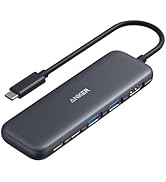
The Anker 554 USB-C Docking Station with KVM switch enables seamless control of two laptops with a single button, supports dual 4K monitors via HDMI and DisplayPort, and delivers up to 100W power delivery for simultaneous charging. Featuring multiple USB ports and audio connectivity, it’s designed for professionals seeking a streamlined, high-performance multi-device setup.





| ASIN | B0C532J5JW |
| Best Sellers Rank | #90,100 in Electronics ( See Top 100 in Electronics ) #978 in Laptop Docking Stations |
| Brand | Anker |
| Color | Gray |
| Compatible Devices | MacBook Pro, iPad |
| Customer Reviews | 3.7 out of 5 stars 250 Reviews |
| Hardware Interface | USB Type C |
| Item Dimensions L x W x H | 6.69"L x 2.83"W x 0.94"H |
| Item Weight | 9.92 ounces |
| Manufacturer | Anker |
| Mfr Part Number | A83K11A1 |
| Minimum Required Operating System Version | Windows 7 |
| Model Number | A83K1 |
| Number of Ports | 9 |
| Product Dimensions | 6.69"L x 2.83"W x 0.94"H |
| Total Number of HDMI Ports | 1 |
| Total USB Ports | 6 |
| Total Usb Ports | 6 |
| UPC | 194644134969 |
| Unit Count | 1.0 Count |
| Wattage | 180 watts |
M**L
⭐⭐⭐⭐⭐ The Ultimate Home‑Office Upgrade — Effortless Switching Between Work & Personal Laptops
The Anker Dual 4K KVM USB‑C Docking Station has completely transformed my home office setup. I run both a work laptop and a personal laptop, and this dock makes switching between them as simple as pressing a single button. No cable swapping, no re‑plugging, no hassle — just instant switching. Perfect for Dual‑Laptop Home Offices This dock handles everything I throw at it: Dual 4K monitors Printer/scanner Conference speaker/microphone/camera External storage and peripherals Full laptop charging for both systems Both laptops connect through USB‑C, and the dock automatically routes displays, USB devices, audio, and power depending on which machine I select. It’s seamless. One‑Button Switching = Game Changer Going from “work mode” to “personal mode” takes literally one second. Tap the button → both monitors switch → peripherals switch → charging switches → done. It’s miles better than any conventional single‑PC docking station. Once you experience true KVM switching with full docking capability, you’ll never go back. Fully Leverages Modern USB‑C Power & Data If your laptops support USB‑C power delivery and high‑speed data, this dock takes full advantage of it. Both machines stay charged, both get full monitor output, and all peripherals stay connected through a single clean setup. Rock‑Solid Stability No flickering monitors, no USB dropouts, no random disconnects. Everything just works — exactly what you want in a professional home office. Bottom Line If you juggle two laptops and want a clean, efficient, professional home office setup, this is the best solution I’ve found. It simplifies everything and makes switching between systems effortless. Pair this with a Rosonway 7‑Port Powered USB 3.2/USB‑C Hub (RSH‑H7C4) for powered USB-C 3.2 10Gps ports for fast data transfer and powered/charging ports for peripherals and you have a future proofed setup. Amazing stuff 5 stars — absolutely worth it.
D**D
Great Docking Station for Multi Computer Setups
This Anker docking station works exactly as I need it too. It has plenty of connections to connect two separate computers and use shared monitors and accessories. It has one input specifically for laptops which features USB-C in at 65W, so it can replace your laptop charger. The second input also has USB-C as well as HDMI and DisplayPort for the monitor. Output wise, there is one HDMI and one DisplayPort, both capable of 4K60hz. And both ports can be used simultaneously for a dual monitor setup. As far as inputs, there are 2 USB-A 3.0, one USB-A 2.0, and one USB-C connections as well as a combo audio/mic port. One glaring omission however, is an ethernet port. I had to add a separate dongle to my setup since I prefer a wired connection for my work from home setup. Setup was actually relatively easy. I just plugged in my keyboard, mouse, and webcam into the input ports, and then one usb-c to my laptop and a usb-c and hdmi to my desktop, and that was it. Once I started up my systems everything worked seamlessly. You can switch between systems easily using the button on the front of the device, or more conveniently, the attached wired remote button. I opted for he latter option that way I could hide the actual device out of sight and better organize all the cords. Then, the only thing I have showing on my desk is the small remote button. I honest spent more time rearranging my desk and computers than I did actually getting the docking station set up and working. I highly recommend this docking station for anyone wanting to use two separate computers but only one set of monitors and peripherals.
A**R
Serious Monitor Signal issues
I jumped at the promise of this product but am now repenting at leisure. The Anker 554 has terrible problems passing along live monitor signals at the moment you switch computers. You click the button to switch to your other machine and the monitor goes black while you sit there moving your mouse and typing on your keyboard to no effect. Doesn't matter if you have a live session or if the login screen is active. The keys I type while the monitor is black are visible once I finally get in -- it isn't that the machine is in sleep mode, the monitor simply does not detect any video signal. This happens on both my M1 mac mini and my 2018 mac mini, my PC seems to work fine but that does not help me for daily operation. I have only found two ways to be productive: 1) to wait until the monitor sends itself into power saving mode and THEN my mouse/keyboard can wake the monitor or 2) to unplug the usbc cable at the mac mini and plug it back in. I have played with every display option on the monitor and machines, tried a million cables, read all the Anker "display problems" articles and Apple "monitor not responding" articles, nothing has yet solved this issue. A previous reviewer talked about lack of EDID support - maybe that's the problem. Whatever it is, this KVM is missing something fundamental and I would not buy it knowing what I know now, or at least I would keep all my packaging until I did serious testing.
A**D
Expensive - but a game changer!
EDIT: it was great until is stopped working on day 3. Suddenly impossible to have a charge or connection to my laptop through USB-C. The cable, laptop work fine on another docking station, just not with the Anker device. I am requesting a new device, I hope it works better this time. INITIAL REVIEW: I have a home + work setup with a personal desktop (Mac Mini), a work laptop, and just one set of peripherals (monitor, keyboard and mouse, soundbar, webcam, etc.). I've used other KVMs for many years, but I had to do two manipulations for switching: 1. Press a button on the KVM 2. Fumble with my monitor to switch video inputs from one computer to the other (using those tiny and annoying buttons on the monitor). With the Anker 553 KVM, I no longer need to do all this. One press on the remote button and I switch seamlessly from work to personal, and vice versa. This is a HUGE improvement! Setup got me to scratch my head somewhat, as I wanted my monitor to act as an additional USB hub, but it was manageable thanks to the ports being clearly labeled on the device. The number of ports of Anker 553 KVM is satisfactory for my use. The device comes with a variety of good quality cables. I wish it were more affordable.
A**R
Perfect Solution For Me
Before purchasing the Anker switch, I had tried a different one that was poor quality and didn’t work for me. The Anker KVM is a much better build quality, and works flawlessly for me. Set up was easy. I have two Lenovo laptops connected to one monitor and one Logitech wireless keyboard and mouse. Switching between the two laptops is super convenient and fast with the wired remote button. The Anker device has enough capacity to keep both laptops charged through their USB-C connections. The Logitech USB unifying receiver connects to a USB port on the front of the KVM device. Thr monitor is connected to the KVM with an HDMI cable. I only have minor complaint. The laptops don’t always wake up when I switch to them if they are idle for a while. I have to tap the actual laptop mouse pad to wake it. The issue may stem from the wireless keyboard and mouse rather than a design flaw with the switch. I have used the Anker KVM switch for about a month, and I am very satisfied with its performance and the convenience it provides.
R**R
Compatibility issues with PC
Purchased this to replace a Pluggable dock with a separate a/b switch, so that I could have both features in one device as well as have the PD rather than use a second cable. This connects to my Mac laptop and works fine, however the PC doesn't recognize it, even when trying the same cable that works with the previous dock. I do not think it's a settings issue because other dock works just fine. Have tried a known-working cable as well as the cable that came with this dock. Searching support forums and reading the included manual hasn't yielded good results. Confirmed with mobo maker that connecting a cable from a PD source wouldn't cause any compatibility issues and should work fine. Wouldn't recommend if using a desktop PC.
L**S
ah!! Anker Docking Station
Overall, this is a well-built and thoughtfully designed docking station with a very useful concept. The ability to connect two laptops to dual 4K monitors through a single KVM-style dock is extremely convenient, especially for anyone working between a work PC and a personal machine. Video output is solid, switching between systems is fast, and Anker’s build quality is what you’d expect—sturdy, clean design, and reliable power delivery. However, the biggest downside for me has been mouse and keyboard behavior, which significantly affects daily usability. The keyboard frequently overtypes or repeats characters, making typing frustrating and unreliable. The mouse connection is flaky, with intermittent lag or missed input. To work around this, I often have to manually switch the mouse and keyboard back and forth between my two PCs, which defeats the purpose of having an integrated KVM solution. To rule out peripheral issues, I tested multiple configurations, including: A wireless mouse using its own USB dongle Wired USB keyboard and wired USB mouse Mixed wired and wireless setups Unfortunately, the behavior was the same across all configurations, which strongly suggests the issue is related to how the dock handles USB input switching rather than the peripherals themselves.
V**E
perfect KVM for 2 laptops, specifically!!
2 usb c enabled laptops. 2 external monitors. 1 set of peripherals (keyboard, mouse, etc). FIGHT!! no but seriously that was the problem i was facing, this KVM was the answer. DEETS: i started 2 new wfh jobs and spent hours scouring goog + reddit for a way to connect both laptops to my personal monitor, and an external monitor being sent by one of the companies. laptop 1 was an older model dell with HDMI and usb 2/3 ports, but laptop 2 is a SurfacePro4 that only has 1 usb 2.0 slot and 1 usbc/thunderbolt port so my solution had to favor that one. there are (as i found out) so many different configurations for KVM switches, so to find one that supported usb c for 2 devices that existed and WASN'T $500+ was perfection. PROS: all hooked up it works exactly as described, with just a few seconds of latency (<5sec) when switching between computers. it's not instant but that's not a downside for me. all peripherals transfer without glitching. i like the sleep look, the streamline design, the change button is magnetic so i can stick it to my desk leg. simple, clean, functional. CONS: since i bought a used version, mine arrived missing 1 of the 2 usb c cables needed to make it work. customer service was easy to reach and sent out a second very quickly, it was the wrong one as well but got that fixed without issue. the only functional problem i did notice was that i had to turn off the rgb lighting on my connected headphones (using for mic and alternate audio when i want to lock in) to prevent issues, as i figured the setting was drawing too much power. once it was turned off, no more glitching. it's not a necessary function for work so it's a small adjustment, and the color comes back on when it's connected to my personal pc. OVERALL: i love it, it's a simple and sleek solution to my very particular not-even-really-a-problem! a little pricy but well worth it if you're buying new
B**L
Great device and very practical
It great, you just need to setup the keyboard/mouse wake up on your device. Charges both my laptops effortlessly, the butto is separate so you can stow away the wires in the back However, It came with a US plug rather than a UK plug, hence the 4 stars. You will need an adapter or alternative cable
Y**T
Good niche product but Amazon is selling used items as new
Edit: Updated to 5 stars after Anker reached out and rectified the situation. Very impressed by their customer service! Received the package and the packaging looks worn out. The plastic wraps around each cables were already torn and visibily have been unpacked by someone prior to this. I paid the price for a new item, but received a used item :( Other than the unpacking experience, the product itself works well. It's an expensive and niche product for people who want to switch between a desktop and laptop setup, but it works great and supports high resolution monitors which is not typical in other KVM switches / USB-C docks.
V**L
Expensive, but worth it!
Anker read my mind when creating this product. I have a personal laptop and a work one, both sharing same peripherals (keyboard, mouse, headset, 2 monitors). I previously had a nonbrand hub which did the job but was crashing a bit. This KVM is awesome, expensive yes, but works great!!! Just make sure both laptops have Thunderbolt support or USB 4/5, one monitor has DisplayPort and another HDMI, then you're set!
A**R
Works great with a MacBook Pro (M2) and a Dell XPS 15 (9570)
I am using it with a Macbook Pro (M2) and a Dell XPS 15 9570 and it has been going okay for my needs. My setup is with a single LG 34" ultrawide monitor connected via HDMI, with two Logitech wireless mice and a keyboard, all connected wireless via a single Logitech Bolt USB dongle. The second USB A port is connected to a webcam, and the remaining USB-A port is connected to a charging pod for my earbuds. I have one USB-C port free. I work with both laptops in clam-shell (lid closed) mode. Switching between the laptops works fine with all accessories getting picked up by both MacOS and Windows 11. I couldn't get the Macbook Pro to work until I allowed the USB dock to be connected via a notification in MacOS. After that things work except for the following issues: * I have to lift the Macbook Pro lid up to get the display to show on my external monitor, this is annoying but better than me having to unplug and plug the display cable from my previous Dell dock * Power delivery is not 100W, unless you have only one laptop connected to the KVM switch. This is actually mentioned in the product description, but I overlooked it. This makes Dell XPS 15 Windows 11 report "Weak charging stage, please check power charger" notification against the battery icon with a warning in the taskbar, and also will make the boot pause before Windows loads with a similar warning. I don't use the XPS for gaming or anything power hungry, and you could always just connect the power supply that came with the XPS. But other than, works great for me.
G**Y
Great piece of hardware.
Easy to set up and easy to use. The magnetic back on the switch is a handy feature - I just stick it to my monitor bezel. KVM ultrawide monitor, $500+. KVM dock, <$300 and I can use it with any monitor I like. I have an actual KVM monitor with a USB-C upstream port, and a USB-A upstream port + HDMI and I had to buy a separate USB-C dock with power and USB and HDMI to get the convenience of a "flick of a switch". This dock does it all easily.
Trustpilot
2 weeks ago
2 weeks ago