Buy anything from 5,000+ international stores. One checkout price. No surprise fees. Join 2M+ shoppers on Desertcart.
Desertcart purchases this item on your behalf and handles shipping, customs, and support to KSA.
🔒 Protect your vision, perfect your workspace.
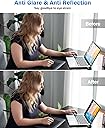
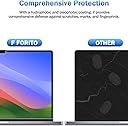
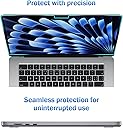
The F FORITO 2-Pack Anti Blue Light Matte Screen Protector is engineered specifically for MacBook Air 15.3-inch models (2023-2025, M2-M4). It features advanced blue light filtering to reduce eye strain, superior anti-glare matte technology for glare-free viewing, and a scratch-resistant surface that minimizes fingerprints and smudges. Designed for professionals and creatives, it maintains high-definition clarity while providing durable, easy-to-install protection that keeps your screen looking flawless.


| ASIN | B0C77XQHD7 |
| Best Sellers Rank | #218 in Computers & Accessories ( See Top 100 in Computers & Accessories ) #4 in Laptop Screen Protectors |
| Brand | F FORITO |
| Brand Name | F FORITO |
| Clarity | 9 |
| Color | Transparent |
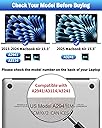
| Compatible Devices | MacBook Air 15.3"(Model: A3448,A3241,A3114,A2941) |
| Compatible Phone Models | MacBook Air 15.3"(2023-2026,M5,M4,M3,M2) |
| Customer Reviews | 4.3 out of 5 stars 3,325 Reviews |
| Finish Type | Matte |
| Item Dimensions L x W | 7"L x 0.1"W |
| Item Hardness | 5H |
| Manufacturer | F FORITO |
| Material | Polyethylene Terephthalate |
| Model Name | MacBook Air 15.3-inch |
| Model Number | A2941 |
| Number of Items | 2 |
| Part Number | A2941 |
| Product Dimensions | 7"L x 0.1"W |
| Screen Size | 15.3 Inches |
| Screen Surface Description | Matte |
| Special Features | Reduce Eye Strain, Anti Reflection, Blue Light Block, Anti Glare, Scratch Resistant, Smudge Resistant, Anti-Fingerprint, Touch Sensitive |
| UPC | 768443133470 |
| Unit Count | 2.0 Count |
| Warranty Description | Lifetime Warranty |
A**A
great cover
I bought the other top selling brand on Amazon in the same price range and was very disappointed so tried this one. Much higher quality product and you get TWO for the same price as the crappier one I'd previously purchased.
K**E
Fits well, Anti- Glare, Blue-light blocking, and worth it
It fits perfectly on my 2022 MacBook Air M2 laptop screen. It came with a whole set to prep and install the screen properly. Had to wipe the laptop screen with cloth, clean with alcohol pad, wipe with cloth again, then remove all dust using the sticker provided. The trick I found best is to use a bright flashlight and shine it towards your laptop screen on different angles and you’ll see and notice all the smudges, grease, and dust. Completely clean the screen of any dust and smudges. Go to a room where there’s no air movement to make sure it’s completely dust-free on your screen. Throughout the whole install, I was shining my flashlight towards the laptop screen and it shows all the dust and air bubbles so easily that you can pull the screen protector back and press it down with squeegee and eliminate all bubbles. If bubbles don’t disappear, pull the screen back and use sticker to pick up dust caught in between. Then slowly reapply the screen as you press the squeegee one area at a time until there are no bubbles. It was a perfect install on my first try. I started from left side to right side peeling the back #1 barrier of the screen protector slowly as I press the squeegee and eliminate bubbles. After peeling off the last #2 screen barrier, the screen protector looked really nice and felt so smooth. No bubbles or anything. But one thing I noticed is that the screen protector itself attracts dust particles but you’d barely notice them especially when the laptop screen is on. I think overall it’s a good purchase. I’m glad I picked this one out of the other screen protectors because my eyes will thank me and I’ll be able to use and stare at my laptop screen with protection from dry eyes and eye-fatigue, which then could cause headaches. And it’ll also protect the laptop screen from scratches.
M**Y
No More Dirt, Oils, and Fingerprints on Your Screen!
After falling in love with the matte screen protectors on my phone and iPad, I decided I had to get one for my computer screen. When I found this product, I was thrilled. The price is more than reasonable (especially for 2), and the fact it is matte, glare/fingerprint resistant, and blue-light limiting? Sign me up! Application was a bit trickier than I anticipated, but I also did not follow the instructions. Despite this, the application was still easy and looks great. No bubbles, and no need to rely on the 2nd protector as a back-up. While I am not sure on if the screen actually limits blue light (I can't tell a difference), I absolutely love the matte texture and the fact my fingerprints, keyboard case, and dog fur no longer cloud up the screen. I used to be so embarrassed going into professional development opportunities with a dirty screen, and no longer need to worry about that. Highly recommend this product!!
C**O
Good matte finish. Tough to put on perfectly, without bubbles.
I work in front of two 27" monitors plus a laptop screen, so I'm getting a pretty (un)healthy dose of blue light every day. This is my attempt to reduce my exposure to the MacBook Pro laptop's blue light. MBPro1: The first time I installed it, I used the directions on the back of the sleeve and promptly got hair and some dust specs that did not come out, but thankfully were not visible in a practical way. I didn't use the alcohol wipe or the dust sticker or even the guide stickers which allowed more time for dust in the air to float under the exposed adhesive as I jockeyed the protector so it would not cover the camera. MBPro2: For the second MacBook Pro I installed it on, I used the inner pouch's directions which I found better but not perfect because the order/quality of the steps was not clear as they should have been. Step 4 (where you attach the Guide stickers) should have been preceded by, "Place the side of the protector with the Tab-1 against the screen (inner adhesive side) with the pull tab on the same side of the screen as the guide stickers." Only then can you follow along with Step 5; and even then, the pull tab did not pull the film off the adhesive--I had to remove the entire screen again to start the Tab-1 removal from the other edge of the screen protector. But, in the end, after this step clarification, the screen protector was bubble-free compared to my first attempt. I really like the matte finish and it feels substantial, does not feel too thin nor blur the screen, as far as I can see. 5/7/24 Update: This is now the 3rd MacBook Pro (a 14" M3 model) I have installed one of these on. And it was after I had tried two other vendor's anti-glare magnetic stick-on versions that failed to address the glare at all. I came back to this version because each time I've tried it, the results are better with practice. I have a cat, and no matter how many times I tried removing the dust and hairs from these screen protectors, a stray hair always manages to find its way beneath the film. It happened with this one, but I was able to remove it and place it back with it being virtually invisible--and there are no other bubbles I had major issues with. This is a new version of their screen protector for the 14" MBP and the only thing is that the camera notch is supposed to be facing up. But the installation screen tabs (1 and 2) are upside down compared what they are supposed to be like in the installation video. So, as long as you face the #2 tab towards you, with the camera notch up top, the installation will work fine. As before, the matte finish on my screen is excellent and it makes a world of difference with my screen facing the windows behind me. So, I lost the fight over getting a magnetic version as good as these but am very happy to virtually all the glare gone AND have the blue-light protection added.
S**L
Pack your patience. Application is painstaking and frustrating, and instructions are zero help.
First of all, in case the words "Made in China" on the back of the packaging left any doubt, the copy on the packaging and in the instructions were obviously written by someone for whom English is a second language at best. For example, one of the selling points listed on the front of the packaging reads: "Water-oil repellcy [sic]." Then there are the directions ... "Step 1. Thoroughly clean the screen area to make it is completely dry." The word "sure" should be between the words "make" and "it." "Step 3. Peel off Tab1 film and align carefully starting from the bottom and work you way to the top." That should be "your," not "you," and there should be a comma after "carefully." "Step 5. Peel off Tab2 film when finish applying." That should be "finished," not "finish." OK, enough bad-grammar ranting. On to the actual product application. The package includes two screen protectors, just in case something goes awry on the first attempt. And for me, go awry it did. On my first attempt, I peeled away the Tab1 film and noticed that the hole near the top of the screen protector (which is there to accommodate your webcam) still had the "donut hole" inside the cutline and had not been "popped out" at the factory. Just as I peeled away the film, the "donut hole" popped out and affixed itself to the sticky side of the screen protector I had just exposed. I tried scraping it off using the application card, but not only did the "donut hole" remain stuck to the screen protector, but I scratched the screen protector in the attempt. AARGH! I threw the now-ruined screen protector in the trash and moved on to my second attempt. I applied the second screen protector to my MacBook screen and tried using the application card to gently squeeze out the bubbles, to no avail. Then I removed the Tab2 film and saw that there were even MORE bubbles than were visible before removing said film. I tried removing THOSE using the application card, to no avail. Fortunately, said bubbles are not visible when I "wake up" my MacBook Air, but they are very visible when it's asleep. And finally, the package includes guide stickers along with the dust-absorber sticker. However, the instructions NEVER mention the guide stickers or explain what they're for or how to use them. So in summary: If you're an old hand at applying screen protectors to phones, tablets, and laptop screens and are able to read between the lines and get the general gist of instructions written in poor English, you'll likely have no problems applying this protector to your screen. But if you're a very literal-minded person like me who struggles with poorly written instructions, then this product is probably not for you.
C**R
Went on very easily and fits perfectly.
I had no problem putting this on, having said that I'm usually pretty good at applying screen protectors. Make sure you are in a well lit area so you can look at the screen sideways after using the alcohol and microfiber cloth, and don't take them out until you are just about to use them. I peel as I go when applying so I tore back about a third of the backing and placed it starting on the left side of the screen (I'm right handed) and slowly let it stick, if there was a bubble I just lifted slightly and used my hand to press and re-stick it. I didn't have any random stuff on the screen but if that had been the case I would have used the sticky tape to grab it off and just keep going. It isn't tempered glass, so it applies like the old school screen protectors but it is thick and stiff so it makes it easier. It fits my 16 inch MacBook Pro perfectly. It is definitely anti-glare and appears more mat. The colors are still vibrant and nothing looks fuzzy, but it isn't the shiny screen I'm used to with tempered glass protectors. Having said that, it is perfect for our office which gets a lot of sun. I hope the blue blocking works (I guess no way to measure it), and my screen is not a touch screen so I cannot speak to that. I am happy that it came with a spare in case this ever lifts. Due to the cost of this laptop I'm glad to have something protecting the screen in case of an accident. Definitely worth piece of mind and works great for using in a sunny spot.
N**X
Easy Install & Nice Matte Finish
Fits my MacBook Air perfectly and was easy to apply. The matte finish reduces glare and fingerprints, and the screen still looks clear. Good value since it comes as a 2-pack.
J**H
Great addition to my laptop
I didn't know what I was missing. The light glare has been reduced and the overall screen is softer. I do turn up the brightness a bit but it all looks better than it did before. I'm not sure if it's the blue light reduction or what. The change is so welcome and drastic that I'm commenting on it. I cleaned the screen with lot's of alcohol and soft cloth. Get everything off it. Then I misplaced the kit with the stickers to align it so I just used regular tape. I made sure the right side was aligned perfect, then pealed off the inside sticky cover. As I began to apply the cover, I had a credit card to smooth it out and I did notice a few bubbles at first. So I changed the angle of the plastic to be a very sharp angle, almost folding the plastic cover back on itself, then smoothing out from top to bottom and repeating as I went. In the end, no bubbles and it's all aligned. There are two in the pack, so if you have two laptops or just a backup I guess. What I didn't expect is that all the screen smudges don't show up anymore when light hits it. I'm going to always have one on my laptops from now on. I don't think it adds any privacy though, so if that is what you are looking for look else where.
A**T
Damaged
Arrived opened, damaged and folded
L**I
Screen cleaning kit missing & instructions confusing
even though you are buying a 2 pack of screens, they only provide one screen cleaning kit, one alcohol wipe, one dust remover etc. it pretty much makes the 2nd one unusable without buying a secondary screen cleaning kit. The instructions are really difficult to understand and the screens don't come the way they are listed in the instructions, so it really adds to the confusion. I think the screen looks good on, I dont know if it actually blocks blue light or not, but it seems to protect the screen well. It was quite difficult to get on without any bubbles.
T**A
Es perfecto 👌🏻
Es perfecto, mucho mejor que los lentes
R**N
Great product!
Great product! Fast delivery and quality is cool! Fits 2019 mac air very well..
S**N
Good quality, watch out for dust.
I needed a quality anti-glare filter for my tablet and this did not disappoint. It wasn't too hard to cut to size, but like with all plastic protectors, you have to take extra care to eliminate all the dust before applying it.
Trustpilot
1 week ago
3 weeks ago