

Buy anything from 5,000+ international stores. One checkout price. No surprise fees. Join 2M+ shoppers on Desertcart.
Desertcart purchases this item on your behalf and handles shipping, customs, and support to KSA.
✈️ Elevate Your Flight Game with Airbus-Grade Precision!
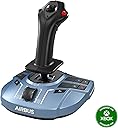
The Thrustmaster TCA Sidestick X Airbus Edition is a high-precision, officially licensed Airbus flight stick featuring advanced H.E.A.R.T magnetic sensor technology with 16-bit resolution. Designed for both comfort and versatility, it offers an ergonomic, ambidextrous layout with multiple customizable controls and integrated throttle. Compatible with Xbox Series X|S, Xbox One, and PC, it delivers an immersive, professional-grade flight simulation experience favored by enthusiasts seeking authentic Airbus control fidelity.


| ASIN | B0B5L1QNMG |
| Best Sellers Rank | 769 in PC & Video Games ( See Top 100 in PC & Video Games ) 4 in Xbox One Joysticks 31 in PC Game Controllers |
| Country of origin | China |
| Customer reviews | 4.5 4.5 out of 5 stars (3,517) |
| Item model number | 4460219 |
| Language | English |
| Product Dimensions | 20.8 x 19.8 x 24 cm; 1.1 g |
| Rated | Not PEGI rated |
| Release date | 2 Nov. 2022 |
T**I
Excellent joystick for the price
This is a really good joystick, it has a smooth and firm action in all 3 axes with a medium strength spring. I am using it with X-Plane 11 with the B737-800 and had no issues installing and configuring it. The only small downside as others have said is that the throttle slider came installed upside down on my unit, it was sticking out below the front of the unit at minimum throttle. Also the detent arm for reverse was not even touching the cut-outs intended for it so it had no feel at all. I fixed both these issues myself with little effort. You can lift off the black plastic throttle button by carefully and slowly rocking it up and down as you lift. Then remove the screw holding the plastic detent arm and lift it off. Cut a couple of thin strips of electrical tape and place directly underneath where the arm sits, as close to the screw as possible. Replace the arm, press it down on the tape and tighten the screw. The arm ends should now sit about 2mm higher than before. Add another layer of tape if needed. There is a very good guide on Reddit to do this, just google "Detent Fix for Thrustmaster Airbus Stick". I'm not going to knock off a star for this problem even though this should have been done correctly at the factory as it was a very easy fix and I otherwise love this joystick. Hope the above is helpful to someone.
C**D
Delighted this is back in stock - more than met my expectations
As PC joysticks seemed to have been sold out everywhere for the last few months, for my daily fix of MS FS2020 I'd been making do with my 10 year old Speedlink Black Widow flight stick. It was clunky, with one of the springs broken and made an already complex simulation more tricky than it should have been. So, when I saw this Thrustmaster TCA joystick was finally back in stock, at a sensible price, I snapped it up straight away. It's simple plug-and-play and MS FS2020 detected it and mapped the controls immediately. There are 16 programmable buttons, which is sufficient for the majority of commonly used FS 2020 controls. The mapped default controls all feel very intuitive and the default degree of sensitivity for the main flight controls and throttle is spot-on and shouldn't require any tweaking. The difference between my old joystick and this was remarkable! Had the Warthog HOTAS been in stock, I would probably have bought that instead. Despite this being of plastic construction, it feels fairly robust and has certainly met my expectations. At a 6th of the price of the Warthog, it has saved me a fair chunk of money too. Excellent product that I can recommend most highly.
J**N
Great controller / Terrible throttle implementation
So what can you say about a joystick??? I was quite excited about trying this stick after my previous Thrustmaster T.Flight broke.....those potentiometers don't last forever. This stick however uses a totally different system for sensing movement which is so much better. As a heavy X-Plane user I was hoping the control of the A319/A321 would improve ever so slightly. Here's my opinion... -- Installation on Windows 10 -- Install the drivers as it makes switching between mode1/2throttle easier. Don't install the SMART software unless you really need it. -- Pitch/roll/yaw axis -- Much better than the potentiometer models There is plenty of travel in all directions Yaw can be locked if you have pedals -- Buttons -- Loads of buttons and all work well although you sometimes need to be very positive and press in the centre of the buttons located on the base. -- Left / Right handed switching -- This is easy to switch. Personally I prefer right handed mode. A small screwdriver is needed to swap the buttons. Remember to switch the button underneath the base to left or right -- Throttle -- Where do I start. Thrustmaster have tried to make this "clever" and failed miserably. There are 2 modes. Mode1 is a standard throttle so the bottom stop is idle and the top stop is full throttle. Mode2 is designed for aircraft with reversers and moves the idle position about 5mm forward of the bottom stop as well as adding an additional button to the bottom position. The idea is that you map "toggle reversers" to this extra button. So you reduce the throttle to idle passing over the threshold, then move the slider to the bottom on touchdown to trigger the reversers, then slide all the way forward for full throttle reverse......then to idle, then to the bottom to turn off the reversers....then back to idle. This seems like such a great idea but it's actually rubbish for one simple reason. Thrustmaster didn't engineer the physical idle detent point correctly so you can't actually feel the stop point. You can see in the picture the recess for the detent, and also the piece of plastic which is supposed to provide resistance at the idle point. It just doesn't work as it needs to be sprung. What ends up happening is you're constantly trying to work out if you're are at idle, or if you've set the reversers off. I went back to mode1 and assigned the reversers to a button and have no issues. The throttle range and sensitivity in mode1 is excellent. In summary, a great controller with a terrible (mode2) throttle implementation.
P**R
Delighted it works for us on Apple Mac Mini M1
Whilst it is only listed as being PC compatible my son really wanted one to use for AeroflyFS 4 with our Apple Mac Mini M1. From researching online I was finding conflicting or what seemed to be outdated information about its compatibility with Apple and I was hesitant about making the purchase but I am so glad I did. As it costs considerably less than some options I wasn't sure what to expect but on unboxing the stick I was pleasantly surprised by the general quality, finish and feel of it. Most importantly for us the Thrustmaster TCA Sidestick actually works on our Mac M1 without an issue. Once it was plugged it into a USB hub that is connected to a Mac Mini M1 running macOS Sonoma 14.4.1 we rebooted the Mac and it has been running fine and been plugged in and out on numerous occasions without any issues. My son informs me that it works seamlessly with AeroflyFS4 and that it works great with no extra adjustments needed. He also said that it works fine on Simple Planes & War Thunder but that it required manual mapping of controls within the games settings. Likewise with some changes to the mapping he says it works well in Farming Simulator 22 when used to control some of the machinery. It doesn't appear to be supported by GeForce Now, there might be a work around to trick GeForce Now into thinking it is a different type of controller and then remapping but we haven't looked into it and probably won't as my son is just delighted that it works without issue on Mac M1.
J**S
Must have if you use airbus aircraft in flight sims
I bought the Thrustmaster TCA Sidestick Airbus Edition specifically for Microsoft Flight Simulator and Xplane 12, and honestly, it has completely changed the experience for me. If you are still using an Xbox controller or an old, jittery joystick, this is a massive step up without breaking the bank. What I love about it: Precision (The H.E.A.R.T. Tech): This is the biggest selling point. The magnetic sensors make the stick incredibly smooth and accurate. There are practically no "dead zones" (simmers will know the pain), making manual landings and small adjustments feel buttery smooth. The Airbus Feel: It’s a 1:1 replica of the A320 sidestick. If you fly the FlyByWire A32NX or the Fenix A320 in the sim, holding this stick adds a layer of immersion that is really cool. It just feels "right" for modern airliners. Ambidextrous Design: It comes with swappable button modules so you can set it up for the Captain (left hand) or First Officer (right hand) side. It takes about 2 minutes to swap them with the included screwdriver. Plug & Play: MSFS recognized it immediately. The default mapping was already set up perfectly for the A320neo, so I was flying 5 minutes after opening the box. Things to keep in mind: The Throttle Slider: There is a tiny throttle slider at the base. It does have a reverse thrust detent (which is a nice touch), but it has a very short travel distance. It works fine for casual flying, but I will probably want to buy the separate TCA Quadrant throttle to go with this. It’s Light: The base has rubber grips that hold well, but the stick is lightweight. If you get too aggressive during a crosswind landing, the base might lift off your desk slightly. I learned to be gentler with my inputs, which actually improved my flying! Twist Rudder: The twist function for the rudder works great and can be locked if you have pedals. However, if you have big hands, you might accidentally twist it while banking hard. Verdict: For the price, this is arguably the best "mid-range" stick on the market. It feels much more precise than the Logitech Extreme 3D Pro I used to have. If you are a flight sim enthusiast—especially if you love Airbus planes—this is a no-brainer.
B**Y
SO GOOD!!!!!!!!
The best joystick for this price range, literally no complaints at all, proper quality
S**L
Good quality and easy to use
The joystick was very easy to set up and configure with Flight Simulator, which recognised it and assigned buttons and axes automatically. The feel of the joystick is great, with just the right amount of resistance for fine control. It fits comfortably in my hand and appears to be well made. The buttons on the base are of better quality than my previous Logitech Wingman joystick, and there's more of them. There are 5 buttons Flight Simulator left unassigned which gives plenty of options for your choice of assignments. It has improved my precision when flying compared to the previous joystick, no question.
T**T
It's Ok
Purchased this product as a bit of an Airbus enthusiast, and to use with the new Microsoft Flight Simulator. Getting hold of one of these, along with all the Thrustmaster Airbus products has been a nightmare. The whole supply and stocking is a shambles, I can only assume that Thrustmaster had grossly underestimated the popularity of their products and/or suffered production issues. The general quality of the product is good. It is plastic, but it feels sturdy and quite weighty. The base is solid and heavy enough so it doesn't tip or move around on the desk when you use the stick. The throttle slider is OK, quite a small range of travel but if like me you intend on using the Airbus quadrant as well that isn't an issue. The problem I have is with the twist (Z) axis. This suffers with random and erratic inputs even when not touching the stick. A quick search of the web found that this isn't uncommon to the Thrustmaster T16000M, on which this product is based. It is caused by some wiring inside the grip mounted too close to the potentiometer, causing electrical noise. I will probably have to take it apart at some point to try and fix this. It's a shame that Thrustmaster didn't rectify this known issue when they designed this stick as a 'successor' to the T16000M.
H**.
Für Airbus Piloten hervorragend geeignet. Top Verarbeitung zum Top Preis !
Für Flugsimulatoren Freunde... (Airbus Piloten) ein toller Flight Stick. Sehr gute Verarbeitung / sehr gutes Handling. Für PC und X-Box. Viele Einstellmöglichkeiten und das leichte Handling machen den Stick zum perfekten Airbus Flight Stick. Umrüstbar für Pilot oder FO Seite. Werkzeug und Tools alles dabei.
F**.
Elevando la experiencia de vuelo
El Thrustmaster TCA Sidestick Airbus Edition es una joya para los entusiastas de la simulación de vuelo. Su diseño inspirado en los controles de Airbus proporciona una experiencia de vuelo auténtica y envolvente. La construcción robusta y los materiales de alta calidad garantizan durabilidad y precisión en cada movimiento. La sensación ergonómica del Sidestick es excepcional, ofreciendo comodidad incluso en sesiones de vuelo prolongadas. Los botones y controles están perfectamente ubicados y son fáciles de alcanzar, lo que permite un acceso rápido a las funciones clave sin sacrificar la inmersión. La compatibilidad con una variedad de simuladores de vuelo y plataformas lo hace versátil y adaptable a las preferencias de cada usuario. Además, su sistema de calibración y configuración permite una personalización completa según las necesidades individuales. En resumen, el Thrustmaster TCA Sidestick Airbus Edition es una elección sobresaliente para los aficionados a la simulación de vuelo que buscan una experiencia auténtica y de alta calidad. Su diseño, precisión y funcionalidad lo convierten en una inversión que vale la pena para llevar la experiencia de vuelo virtual al siguiente nivel.
ا**ي
ممتاز
ممتاز
E**E
ÇOK BAŞARILI
ALMAYI DÜŞÜNEN VARSA DÜŞÜNMEDEN HEMEN ALSIN DÜNYANIN EN İYİ ÜRÜNÜ HAVACILIĞA GİRİŞİN BABASI MFS İÇİN
K**L
Harika
İstanbul içi 13 saat gibi mükemmel bir sürede teslim edildi, kutusundan ithalatçı garantisi ve gamepass hediyesi ile çıkıyor. Buton ve joystick hissiyatı güzel, fiyatına göre tamamen plastik olması biraz üzücü ancak genel olarak sağlam ve kaliteli. Ben xbox’a takıp kullanmak için aldım, msfs2024 için hiçbir ayar yapma gereksinimi olmadan doğrudan çalışıyor. Kesinlikle tavsiye ederim. Throttle lever olarak çalışan kısım yetersiz daha keyfili bir kullanım için gaz kollarınıda almak şart…
Trustpilot
1 month ago
2 weeks ago