

Desertcart purchases this item on your behalf and handles shipping, customs, and support to KSA.
✨ Unlock your MacBook Air’s hidden touchscreen superpower! 🖱️
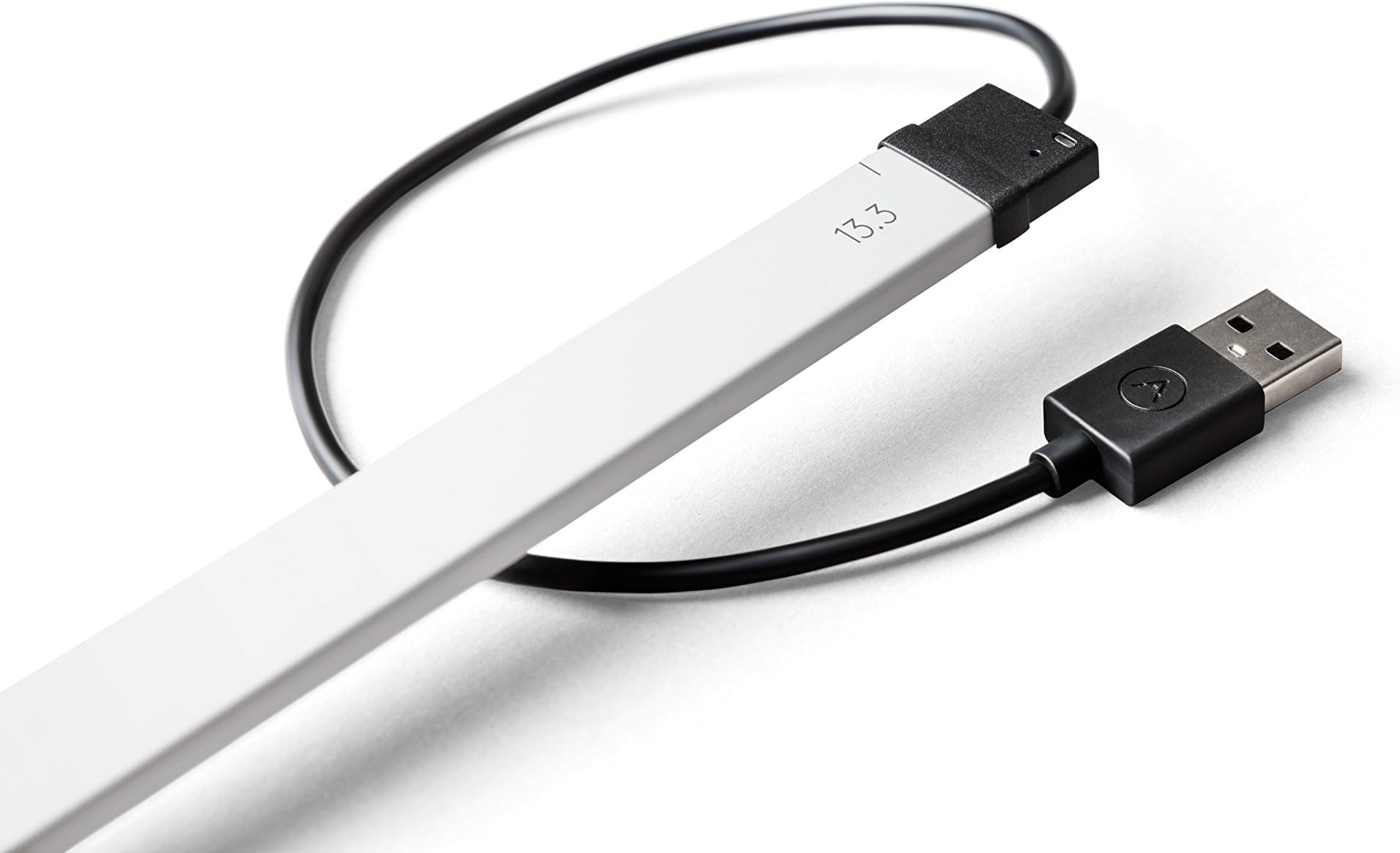
The AirBar by Neonode is a lightweight, USB-powered sensor that magnetically attaches to your 13.3" MacBook Air, instantly enabling touchscreen functionality. It supports multi-finger gestures and allows touch input with any object, including gloves and paintbrushes, making your laptop more versatile and productivity-ready.


| ASIN | B072PCZZJZ |
| Best Sellers Rank | 172,011 in Computers & Accessories ( See Top 100 in Computers & Accessories ) 27,882 in Tablet Accessories |
| Brand | AirBar by Neonode |
| Cable Type | USB |
| Cable type | USB |
| Colour | Silver |
| Compatible Devices | MacBook Air (13.3" display) |
| Compatible Phone Models | No Compatible Phone Models |
| Compatible devices | MacBook Air (13.3" display) |
| Compatible phone models | No Compatible Phone Models |
| Connectivity Technology | USB |
| Connector Gender | Male-to-Female |
| Connector Type | USB Type A |
| Connector type | USB Type A |
| Customer Package Type | FFP |
| Customer Reviews | 3.2 out of 5 stars 97 Reviews |
| Global Trade Identification Number | 00853661007051, 07350000980059 |
| Included Components | AirBar,magnets |
| Indoor Outdoor Usage | Indoor |
| Item Length | 13.3 Inches |
| Item Shape | Round |
| Item Type Name | AirBar by Neonode - For 13.3" MacBook Air Notebook, Silver (NNABC2950XU51) |
| Item Weight | 51 Grams |
| Manufacturer | Neonode |
| Manufacturer Part Number | FBA_NNABC2950XU51 |
| Maximum Voltage | 5 Volts (DC) |
| Model Name | AirBar for 13.3" MacBook Air Notebooks |
| Model Number | NNABC2950XU51 |
| Number of Items | 1 |
| Number of Pins | 4 |
| Other Special Features of the Product | Touch Using Any Object |
| Product Warranty | 3 years |
| Recommended Uses For Product | adding touchscreen functionality to a 13.3" MacBook Air notebook |
| Special feature | Touch Using Any Object |
| Specification Met | USB |
| UPC | 853661007051 |
| Unit Count | 1.0 count |
B**.
Worthy
The accuracy is not good as a touch screen mobile phone
L**S
Came broken
Came in the post and I stupidly threw the box away so can’t return never worked At all tried 3 different laptops.
O**A
Turn your laptop into a touch screen
Great but not that great
N**N
Disappointed with the product.
It’s not working properly with my MacBook Air 13. It does click properly where we want to. So I’m returning this product back. Also for returning the product it’s cost 4 pound.
M**Y
Good
Good
E**5
DON'T ORDER FOR MACBOOK PRO (why isn't this made clear in the main listing?!)
Awful that the main listing/dropdown menu doesn't warn you that it won't be compatible with a MacBook Pro! I see this information has now been added to the FAQs, but that isn't good enough! Refused a refund/return, almost £90 out of pocket. VERY ANGRY.
A**R
Great Gadget.
Great Gadget.
Y**I
Doesn't work on small buttons, magnetic pads impossible to take off.. damage to my macbook
overall works but when wouldn't use it for photoshop/music editing, as it's not precise enough. So while removing it for return, the magnetic pads would not come off because the glue is too strong, and I actually dented the frame of my laptop trying to remove it... :(
M**G
Neuware Top auch der Versandt,
Die Airbar erfüllt voll und ganz die von mir in diese gesetzten Erwartungen. Sie ersetzt wohl nicht ganz einen 10 Punkte Touch da hier aufgrund nur einen einzigen Leiste (also nicht um den ganzen Screen) der Touch nur über zwei Punkte Funktioniert jedoch ist dies für die Anwender welche keine Technischen Zeichnungen oder drgl. machen müssen ein voll adäquater Ersatz. Klasse ist natürlich wenn das Mac Book offen auf dem Schreibtisch stehen bleiben kann denn dann bemerkt man die Airbar gar nicht. Nur wer seinen Mac immer mitnehmen und immer nur kurz zum Einsatz bringt für den ist die Airbar doch sehr umständlich weil diese dann immer abgenommen werden muss (der Screen läßt sich sonst nicht schließen), und auch immer wieder an die Usb Buchse angeschlossen werden muss. Für alle anderen ist es aber ein geiles Gimmik wenn auch nicht Lebensnotwendig aber schick und Einfach zu Bedienen. Also Daumen hoch und 5 Sterne ***** !!!!
R**A
Cable corto
Cable corto
何**る
マウスの方が良い
反応はするがズレるし、画面にタッチしなくても反応するからそれではないアイコンに反応。 作業しながら指の動きに注意しなくてはいけないならマウスで十分だ。
M**E
Non adatto a MC
Purtroppo sul MC non ha funzionato bene (non so su altre marche) ho dovuto renderlo. Per il reso mi sono dovuta fare carico io delle spese, anche se tramite un corriere economico consigliato direttamente dal fornitore.
W**P
Works as described
I bought the MacBook Air version of the AirBar about a month ago. Overall it works as described. As others have said depending on what you are trying to click on it can be hard to determine where the mouse cursor is and get clicks exactly where you want them if the target is too small. Mounting was very easy and no real problem with the magnets. I run a very small dock bar at bottom of screen and it is hard to click the icons accurately with the AirBar not getting in the way. Out of the box the single click with one finger access worked without any driver installs. I do have to plug it in to a USB port before booting for it to be recognized. I did have problems with the multi-touch driver install. I run macOS 10.13 beta and the driver install is not fully compatible. The install says it finished successfully but then the driver fails to load properly, but I was able to move a few files around and get multitouch working. Airbar preference pane does not work though. I'm sure once 10.13 is released they will release a more compatible driver. So overall it is working but will have to use it longer to see how much I use it. It is nice to be able to interact with the screen since I am used to my iPad.
Trustpilot
1 month ago
1 week ago