


Buy anything from 5,000+ international stores. One checkout price. No surprise fees. Join 2M+ shoppers on Desertcart.
Desertcart purchases this item on your behalf and handles shipping, customs, and support to KSA.
⚡ Upgrade Your Lens IQ — Precision Meets Power
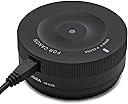
The Sigma USB Dock Canon is a compact, USB-powered device designed for photographers using Sigma’s Global Vision lenses. It enables firmware updates and detailed customization of autofocus parameters, including focus position, AF speed, and focus limiter settings, via the free Sigma Optimization Pro software compatible with Windows and Mac. Ideal for Art, Sport, and Contemporary lenses, this dock ensures your gear stays cutting-edge and perfectly tuned for professional-grade performance.


| ASIN | B00CBQ5YOS |
| Best Sellers Rank | 8,821 in Electronics & Photo ( See Top 100 in Electronics & Photo ) 32 in Camera Lenses |
| Box Contents | Box contents: USB dock |
| Brand Name | Sigma |
| Colour | Black |
| Compatible Devices | Sigma 35mm F1.4 DG HSM, 17-70mm F2.8-4 DC MACRO OS HSM / 120-300mm F2.8 |
| Country of Origin | China |
| Customer Reviews | 4.6 4.6 out of 5 stars (4,868) |
| Global Trade Identification Number | 00085126878542 |
| Hardware Interface | USB |
| Item Dimensions L x W x H | 10.2L x 5.1W x 5.1H centimetres |
| Item Weight | 65 Grams |
| Manufacturer | Sigma |
| Manufacturer Part Number | 878954 |
| Model Number | 878954 |
| Number of Ports | 1 |
| Smart Home Compatibility | Not Smart Home Compatible |
| Total USB Ports | 1 |
| UPC | 085126878542 |
| Unit Count | 1.0 count |
| Wattage | 2.5 watts |
S**M
First Impressions, Great bit of kit and must have for Sigma 150-600!
First day using it I immediately attached the dock to my Sigma 150-600 as I've been a little skeptical about the focus speed and accuracy. I say accuracy, but it depends on the situation and a lot of camera settings can have affect on the final image. So as soon as I attached the dock and loaded up the software it said there was new firmware for the lens, brilliant, exactly why I purchased the dock, bearing in mind I only purchased the lens July 2018. I also set up my C1 and C2 settings. C1 - Priority AF focus for quick wildlife shooting (which is really quick now!) and Moderate view mode for Smooth Optical stabilizer. Then C2 I have set up for filming so, slower auto focus and moderate view again for OS if filming hand held. I haven't used the full focus adjustments yet, but will leave the Easy to use as 4 star as I have heard trying to get the correct focus settings if it's front/back focusing too much can be very tedious as you have to set up a tripod and fine tune each focal length. But for now I do not have Micro AF adjustments in camera so if it takes few hours and it works, then money well spent.
A**E
Works with SIGMA Art, Sport, and Contemporary Lenses
Useful if you own any of the new SIGMA ART (A), SPORT (S), or CONTEMPORARY (C) Lenses. I only own a couple of Prime Art lenses but anticipate buying more from the three ranges as they are so good. The dock allows micro adjustments to be made to focussing as well as firmware upgrades (i.e. as and when new cameras and systems are released from the likes of Canon and Nikon). Not much more to say. When connected to a lens the green light comes on but this is in the base and if you have it on a desk or table you cannot see it unless you pick the whole thing up. You do not need to have one of these but for the tekkie enthusiasts it is probably a must have.
C**R
Useful addition for compatible lenses
Using this on a Sigma 150-600 sport. No software provided - has to be downloaded from Sigma's site (best way in my opinion for any new piece of software or drivers), but easy to download & install. Software for this is basic but usable (automatically checks for firmware updates for both dock & attached lens when lens connected) - hopefully new features will be added over time, software also provides information not provided on lens box or lens (needed the serial number for this lens for my camera insurance - nothing on box or lens, but showed up on the home page of the software). Device itself has a plastic (yet robust) feel to it, provided cable is reasonable length (have been able to use this on my desk without the need for an extension cable or replacing the cable with a longer 1 (unlike some other peripherals I have) and has a solid feel when connecting the lens. Overall a good addition if you have a compatible lens.
H**R
Vital for adjusting Sigma Lens settings
Sigma have upped their game in recent years, their lenses are on a par - if not surpassing - some original manufacturer's offerings. This USB dock is really easy to use and enables the user, through the Sigma app, to update firmware or change settings of their lenses to suit their needs, such as focus distance limiting or focus micro adjusting. For some lenses it's possible to change the focus speed/priority if required also. The app can be downloaded free from Sigma's website and, once the dock is attached to the lens mount and plugged into a usb socket, it will read the lens and enable adjustments to be made. Certainly worth having if you own a number of sigma lenses.
S**Y
This is a worthwhile investment
OK, so you will probably only use this a couple of times and then it will sit in a cupboard somewhere plus calibrating your lens is really tedious... but I've spent an hour and a half calibrating my 150-600 Contemporary and it's gone from a pretty good lens for the money to a real amazing lens for the money! If you are planning on buying a Sigma lens, especially a super telephoto where the Depth of Field is so shallow that focusing is absolutely critical, I would say you should definitely budget for the cost of the USB dock as well. Don't forget that you will also need a Lens Focus Calibration Tool - I bought the Maxsimafoto one as I couldn't see the point paying more than the price of the dock for the DataSpyder - it did the job. You also need two tripods (one for the camera and one for the calibration tool). There are lots of YouTube videos on how to do this but all you really need to know, and which doesn't seem very well documented, is that, for a given focal length at a given distance, if the lens is focusing behind where it should, you give it a negative number and if it is focusing in front of where it should, you give it a positive number. 4 focal lengths, 4 distances so 16 test shots. Adjust and repeat until you get it spot on - took me about 4 repetitions until it was right. My one tip is to do the calibration on a cloudy day (assuming you are doing it outside) as glare makes it harder to read the calibration scale in your shots and under-expose by a stop because that scale is very bright. Buy one (or borrow one).
A**.
This is a very useful tool for Sigma zoom lens, or for any Sigma lens if your DLSR does not have AF microadjustment. I will answer several questions which you probably are asking yourself: 1. Which one to get? "Sigma USB Dock for Canon" means a USB dock for Sigma lenses with Canon mount, i.e, lenses designed to work with Canon cameras. If you own a Canon camera, buy a Sigma USB dock for Canon. If you own a Nikon camera, buy a USB dock for Nikon. Do not forget that this dock only works with Sigma lenses, and only with selected Sigma lenses. 2. Does it work with all Sigma lenses? NO! It only only with most Contemporary, Sport and Art series lenses. Sigma web site has up-to-date list of compatible lenses. Search for for "Sigma USB Dock" on Sigma web site, or go to Sigmaphoto web site and navigate from Home to Accessories -> Lens Accessories -> Category: Miscellaneous -> Sigma USB Dock. There, you will find the list of about 26 lenses supported by the dock, a link to download the free software, and link to tutorials. Scroll all the way down to the bottom of that page, below the table with compatible lenses, to find the link to the manual. 3. Does not work with Nikon or Canon brand lenses? NO WAY! The dock is just the means for the Sigma software to talk to the electronics in the Sigma lenses. It only works with Sigma brand lenses, and only with selected ones, which have this capability. 4. What is lens autofocus (AF) adjustment? Most DSLRs, with the exception of mirrorless ones, have a separate sensor for autofocus. It is possible and happens quite often that due to tolerances in manufacturing of camera bodies (and lenses), the focus which appears to be perfect to the autofocus system turns out to be slightly out of focus on the image sensor. There are two way to adjust for it. High end DLSRs have a so called "AF micro adjustment" (the exact term for it depends on the DSLR brand). This adjustment in the camera itself can even be lens-specific, i.e., you can program your high end camera body with individual AF adjustments for each lens you own. Sigma went one step further, they included AF adjustment into software/firmware of their lenses and provided an option to use different adjustments for different focal lengths. This works great with long range zoom lenses, which may front-focus on low end of the zoom range and back focus on the high end, or the other way around. You get multiple adjustment points instead of a single one on a camera body. 5. What does this USB dock do? It enables you to update lens's firmware and to program autofocus correction factors into the lens. It is just an interface between your lens and your computer. Basically, it is a dummy plug which matches your camera brand's mount with contacts to connect to contacts of the lens and with a USB interface. 6. Is calibration done automatically? How long does it take? Unfortunately, it is a tedious manual work. The dock is just an interface between your computer and lens's firmware. You do all the work and then use the dock to upload updated parameters into the lens. The dock does not measure anything and does not calibrate anything on its own. You buy a focusing target, install the free Sigma software (free download from Sigma web site), connect your lens, write down the focal lengths and distances from the table provided in the software, then grab your camera, set it on tripod, set it to center point AF, single shot AF, center point metering, set up the camera at one of the four distances listed in the Sigma software (you cannot change those, they are given to you), and take picture of the focusing target for each of the zooms listed in the table (if applicable to your lens) and each of the distances. If it is a single focal length zoom, you will only take 4 images from different distances. If it is a zoom lens, you may have to take as many as 16 images, a matrix of four focal lengths and four distances from the target. Then, you download images from the camera and examine them closely on the computer screen. The AF target has a tilted scale (looks like a ruler) which enables you to make a judgement where the best focus is - is it right at the center, where the focusing plate is, or is it behind the area which you focused on, or in front of it, and by how much the center of the area which is in good focus is shifted relatively to "zero". It is fairly easy to see. Once you've done it, the next step is to enter some numbers into the table in Sigma software. The numbers are in focus units, not in cm or inches. They probably are just steps of the stepping motor in the lens. They do not directly correlate with distances and Sigma does not provide any guidance as to how to correlate what you see in the pictures with required changes to focus parameters. All you know that you should increase the focusing parameter in a positive direction, e.g., from 0 to 5 (the total range of adjustment is from -20 to +20) if your camera front-focuses and you want to move the focal plane further away from the camera, and reduce it (e.g., from 0 to -5) if your camera back-focuses and you need to bring the focal point closer to the camera. Basically, you end up doing bracketing through several iterations, first making large steps and then smaller steps to dial the focus in. With my lens (Sigma 18-300), a focus step was roughly matching 1/2 of a centimeter on the inclined ruler of the focusing target with shorter distances between the lens and the target, but this is a very rough guideline. If you see that focus is off center, change the parameter by 5 units in the proper direction and check in the next round of measurements if this was enough. If not, change again and take more pictures. If you went too far, take a smaller step back. Repeat until you are satisfied. In my case, with Sigma 18-30, it took about 5 hours for 6 iterations for my son and I to complete the task to a reasonable level of satisfaction. 7. How do I know that I need to calibrate my Sigma lens? The indications are: soft focus across the whole range, or on the high or low end of the zoom range. Images come with sharp areas not quite where you focused on, i.e., on something a little closer to you or a little further from you than the focal point. Also, if your camera has "live view" (which is focusing using image sensor instead of autofocus sensor), you can compare images taken in live view and in standard mode. If live view images are noticeably sharper, your AF requires tuning. 8. Where to find more information on how to do it? Sigma has a manual for the software (fairly lousy, I must say) and a tutorial video. I found videos posted by Digital Goja very helpful. Those can be found by Googling for "Dijital Goja Sigma USB dock video". Finally, an article which can be found by its title, "Lens Calibration Explained" (just copy this into Google) was very useful to me to understand what I was supposed to do and why. This article does not explain the Sigma USB dock (instead, it discusses adjustments of AF on the camera body), but is very helpful to understand the rest of the process and tools needed. 9. Do I need anything else, beyond the Dock? You need a DSLRKIT or any other lens focus calibration tool. You can get it from Amazon for $6 - $9, or even download drawings from the Internet and make a target from cardboard at zero cost. You need a tripod to mount your camera. You need a source of bright light to illuminate your target if you do it indoors (you can do it outside and use sunlight). You need a tape measure to measure distance from the target to the camera. Finally, for measurements with "Infinity" distance, you need to find something relatively small across the street, like a house number or something. With "Infinity", there is no inclined ruler on the focusing target to access where the focal point is, you go by sequential trial of several settings and comparison of images. 10. How do I deal with measurements at "Infinity"? I just took pictures at several values of parameters entered into Sigma sofware (like 0 , 5, and 10) and compared the pictures, to find the sharpest. You cannot use the target at Infinity (they are too small - of course you can make your own giant one!), and might struggle at 20 feet, too. Just take pictures of something with sharp contrast and small to medium features at several focus correction parameter values, compare them, and identify the best sharpness setting. 11. Is the process of calibration worth it? If you suspect that your lens is not a sharp as it should be, this USB dock will take your lens to the next level. The difference is between you being frustrated about your purchase and being happy. At least, this is how I felt before and after calibration. I changed from "I may have to return this lens, my cell phone shoots much sharper pictures" to "It works very well" within 5 hours. Some vendors sell USB Dock in package with Sigma lenses. 12. What is in the box? USB dock, a USB cable, warranty card, and some kind of manual which I did not even open. 13. How to set the camera for shooting test images? Very important! Single point (center) AF. Center point metering. Single shot AF. ISO set to a low value, e.g., 100 or 200 to reduce noise in the images (helps to see the sharpness level better). Shoot in Aperture priority mode with F-stop set to the lowest possible value allowed by the lens for a given focal length. 14. Which Sigma lenses benefit most from AF tuning? Long range zoom lenses (which may back-focus on one end of the zoom range and front-focuse on the other end) and very bright lenses with very low values of F stop, like 1.2 or 1.5, which have a very shallow depth of focus. 15. Do only Sigma lenses require tuning of autofocus? Apparently, no. Apparently, all lenses of all brands can benefit from it. All pro level cameras have a single-parameter AF tuning built into the DSLR bodies. Sigma is different in that it took one extra step forward and created a solution for tuning across the whole range of zoom. This increases the precision of tuning. No other manufacturer offers USB dock for lenses. Sigma dock does not work with any other brands of lenses. Not even with older Sigma lenses. It is a very new technology. 16. Do I need to have a Pro level Camera to feel the difference, or need to use a USB Dock? As I learned it hard way, it is just the other way around: if you have an entry or mid level camera (I bought Canon Rebel T7i) which does not have a micro adjustment of autofocus, tuning of the lens with USB dock is the only option, short of replacing the lens over and over again until you find the best match to your body. It is a combination of body and the lens that determines sharpness. The same lens may be perfectly sharp on DSLR body A and not sharp on DLSR body B. Go figure. 17. Is it just the lens that determines if focus needs be tuned? No, it is a combination of the lens and the body. The thing is, most DSLR (with the exception of mirrorless DSLRs, which never need focus tuning) have a separate sensor for autofocusing, with an additional mirror which redirects the light from the lens to the autofocus sensor instead of the image sensor. If the distance which light has to travel to the autofocus sensor is different than the distance to the image sensor, just by a tiny amount, the AF sensor will decide that the image is perfectly focused, but the image sensor will see a blurry image. Lens might also have manufacturing tolerances which could contribute to operation of autofocus. The end result depends on combination of individual parameters of lens and body. Lens A may be super sharp on body X but not on body Y. 18. If I have a micro-AF adjustment on my DSLR, do I need to use the Sigma Dock with my Sigma lens in addition to adjustment on the body? MAYBE. The best way to find out is to try. If you can achieve good result with adjustment on the body, no need to bother with USB dock. With a zoom lens, you will find that you have more flexibility with tuning the focus for different focal lengths and for different distances to the target using a Sigma Dock. 18. Final comments. Some vendors include USB dock in a package with Sigma lens. This way, one can get it at no or little added cost. It is beneficial to get a dock along with your compatible Sigma lens, then to find out that you need it as an after-fact. Tuning the focus with Sigma Dock does not void the warranty and is fully reversible. There is a button in the software to go back to factory defaults (which coincidentally are all zeros). Sigma Dock is also useful as it enables you to update lens firmware whenever a new version of firmware becomes available. You need only one dock for all of your dock-compatible Sigma lenses.
T**.
Funkar som förväntat 📷
ヒ**ン
購入した超望遠ズームレンズの設定変更のために購入しました。 アプリをインストールして接続すれば即認識し、オートフォーカスの設定や手ぶれ補正の設定を変更することが簡単にできました。 航空機撮影などの設定の最適化に重宝すると思います。
G**S
I was disappointed that more of my Sigma lenses were not compatible with the dock - especially my 105mm 2.8 macro (the newer one). I thought it would be.
G**S
Its working in my sigma art 35mm 1.4. Its plug and play
ترست بايلوت
منذ أسبوعين
منذ أسبوعين