Buy anything from 5,000+ international stores. One checkout price. No surprise fees. Join 2M+ shoppers on Desertcart.
Desertcart purchases this item on your behalf and handles shipping, customs, and support to KSA.
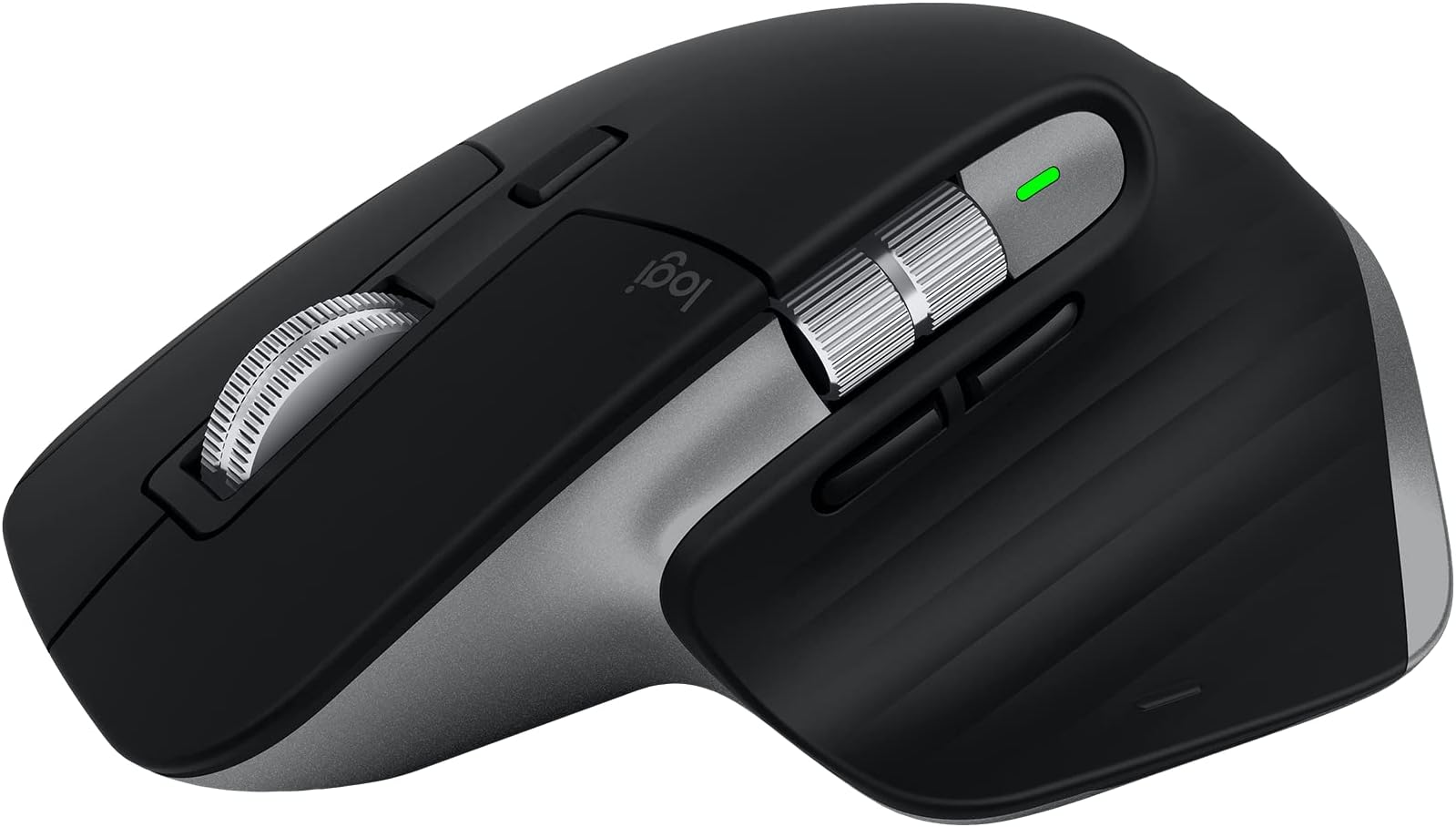
🖥️ Master your Mac workflow with the MX Master 3S — precision, power, and peace in one sleek package.
The Logitech MX Master 3S for Mac is a premium wireless Bluetooth mouse optimized for macOS and iPadOS, featuring an ultra-precise 8,000 DPI sensor that tracks on glass, 90% quieter clicks for distraction-free work, and MagSpeed scrolling that’s faster and more precise. Its ergonomic design supports natural wrist posture, while multi-device pairing allows seamless control across three Macs or iPads. With up to 70 days of battery life and USB-C quick charging, it’s built for sustained productivity. Customizable app-specific profiles and recycled materials in its construction make it a smart, sustainable choice for creative professionals and multitaskers alike.


| ASIN | B09HMV6K1W |
| Additional Features | Lightweight, Portable, Rechargeable, Wireless |
| Antenna Location | Office |
| Are Batteries Included | Yes |
| Are Batteries Required | Yes |
| Battery Average Life | 1 months |
| Best Sellers Rank | #374 in Computer Mice |
| Brand | Logitech |
| Built-In Media | Free Adobe Creative Cloud Subscription |
| Button Quantity | 7 |
| Color | Space Grey |
| Compatible Devices | Personal Computer |
| Connectivity Technology | Bluetooth, Radio Frequency , USB |
| Customer Reviews | 4.4 out of 5 stars 2,362 Reviews |
| Enclosure Material | Plastic |
| Hand Orientation | Right |
| Hardware Platform | Mac, PC |
| Item Dimensions L x W | 6.83"L x 5.45"W |
| Item Weight | 200 Grams |
| Manufacturer | Logitech |
| Mfr Part Number | 910-006569 |
| Minimum Required Operating System Version | Mac OS 14 Sonoma |
| Model Name | MX Master 3S |
| Model Number | 910-006569 |
| Mouse Maximum Sensitivity | 8000 Dots per Inch |
| Movement Detection | Optical |
| Movement Detection Technology | Optical |
| Number of Batteries | 1 Lithium Polymer batteries required. (included) |
| Number of Buttons | 7 |
| Operating System | Windows, macOS |
| Power Source | Battery Powered |
| Range | 30.0 feet |
| Special Feature | Lightweight, Portable, Rechargeable, Wireless |
| Style Name | MX Master 3S Mac (NEW) |
| Theme | Computer Accessories |
| UPC | 097855174826 |
| Unit Count | 1.0 Count |
| Warranty Description | Manufacturer’s warranty can be requested from customer service. |
5**E
MX Master 3S mouse is working great
I've been using this Mac Version of the Logitech MX Master 3S for about a month now, every day, all day, and with lots of activity. I bet I click this thing 1000x a day or more. My experience has been flawless, a very nice mouse that does what it's supposed to do, and is the right size and shape for my large hands to reduce operator fatigue. I'm using the mouse on both a Windows 11 laptop and a 2017 Mac Book Pro both via bluetooth, and selecting with computer with the button on the bottom which allows you to switch from one device to the next. Both PCs pick up the mouse immediately. No lag, no skips, no stops, and most importantly no random disconnects. Although this is a "Mac" mouse, it works perfectly on Windows, no downsides, no lost features. If you have only have a Windows computer, I'd recommend buying this version just incase you ever decide to use a Mac with it. I've also tried the software based feature that allows you move your mouse cursor off the edge of the display on one computer, then have it continue onto the other computer, and allow cut and paste between the two. This does require both PCs to be on the network, and the feature does work, although the cursor may not always show up in the place you expect it. Should be noted that I'm using this feature between a Microsoft Windows PC and an Apple Mac PC, and it actually works well. The features work well, the scroll wheels are in the best places, both work very smooth, and are a pleasure to use. I really enjoy the top scroll wheel feature that if you spin the wheel quickly, to detent mechanism releases, and the wheel free spins. (of course you can also push the button on top to keep the mouse wheel in free spin) I also like how this mouse only has 2 extra buttons which can be used as back and forward. Mice that have more buttons are just too confusing to hit the right button. There's also a palm button which can be useful too. All the buttons can be assigned to different tasks using Logitech's driver software. Battery life seems to be great so far. I charged the mouse once when I bought it, and have used it for a month, so far, haven't recharged a second time. Also, nice how you can use the mouse while it's recharging and that it's USB C. My only complaint is that the white rubberized coating is difficult to clean or keep clean. Would be nice if they could make this a smooth material that can be cleaned, or offer skins that can be removed and replaced. Overall, I highly recommend this mouse. Yes, it's expensive, but it's so much better than many of the cheap mice on the market.
J**Y
Logitech MX Master 3S: A Video Editor's Dream Mouse
As a video editor who's constantly toggling between my 16" M1 MacBook Pro, iPad Pro, and occasionally other devices, I've found a trusty sidekick in the Logitech MX Master 3S for Mac. This mouse isn't just a tool; it's my editing and productivity wand. The ease of switching between devices is akin to magic. Just like its cousin, the MX Keys keyboard, the transition is seamless. I can be trimming a clip on my MacBook and then switch to my iPad for some quick graphic work with just a click. It's like having multiple assistants at my beck and call. Now, let's talk about the programmability - a video editor's dream. The Logi app transforms this mouse into a Swiss Army knife of shortcuts and functions. Every button, scroll wheel, and gesture can be customized to my workflow. It's like having a bespoke suit; everything is tailored exactly to my needs, making editing a breeze and saving me precious time. Need to make custom program-specific hotkeys? Consider it done! The ergonomics are top-notch, too. After hours of editing, my wrist and hand still feel as fresh as a daisy. The mouse fits my hand like it was custom-made for it, and the strategically placed thumb controls are a godsend. And the battery life? I get a solid 2-3 weeks of all-day use on a single charge. It's like the Energizer Bunny of mice - it just keeps going and going. Plus, with USB-C charging, I'm back in action quickly when it does need a boost. Some people have mentioned connectivity hiccups, but I've never experienced one. In short, the Logitech MX Master 3S for Mac is a powerhouse mouse that's transformed my editing workflow. It's comfortable, customizable, and keeps up with my demanding schedule. If you're a video editor or a multi-device power user, this mouse is a no-brainer.
D**N
Better than the Magic Mouse
A few years ago, I had to (VERY regrettably) switch from a MacBook to a PC for work. At the time I absolutely LOVED the Apple Bluetooth keyboard except that at the time it did not have a num pad. I also had a wired version that did have the numpad, but obviously now that MB doesn't have USB anymore that's not practical anymore. So back then I looked for a PC keyboard to replace my Apple one, and I settled on the MX Keys and the Master mouse since that came the closest I could find to the Apple keyboard. I also really liked the Magic Mouse, except for a few things. It always felt a little sluggish (like it would not slide lightly over my desk, and I've tried a number of different things like mousepads and blotters), I was always accidentally touching it and triggering gestures, and the biggest was that I could not get used to the whole thing being a button, you had to push down the whole mouse to click. As I've used the MX mouse over the years, I have become very attached to it, it fits in my hand like a glove and it is such a pleasure using it. Fast forward to 2024 and I have to say that I love this MX Keys/Mouse a lot better than my Magic key/mouse. So much so even that when the opportunity came to switch back to MacBook, I was very happy to find out that Logi has Mac versions. Took me about 2 seconds to order them for my new Mac. Luckily the Apple BT connectivity is super stable (unlike Windows, BT is so crap that you have to use the universal wireless dongle) so there are no wires or dongles necessary. It's pricey for sure, but I spend my whole day typing and using the mouse that it's totally worth it to me. I haven't really played with the gestures but so far all the buttons work the same as I've become used to on the PC version. When I first started working on a Mac back in 2013, I really liked having the Magic mouse and loved how intuitive it was and how the touch surface had the gestures. The MX just fits so much better, there is zero tension in my hand, and the Logi software lets you customize the buttons down to the app level. Maybe it doesn't look as cool as the Magic Mouse, but it runs circles around it in every day use. For me this is the perfect mouse.
M**E
Smooth, Quiet, and Mac-Optimized - A Great Everyday Productivity Mouse
The Logitech MX Master 3S for Mac is a fantastic mouse for both casual and productivity-focused users. The ergonomic design is comfortable enough for long sessions, and while the clicks aren’t completely silent, they’re quiet and satisfyingly tactile, so you know you’ve made a selection without the loud “clack.” The ultra-fast scroll wheel is smooth and responsive, though it helps if your computer can keep up when flying through long pages. 8K DPI tracking is precise, even on slick or glass surfaces - great for anyone working on high-resolution monitors or unusual surfaces. Battery life is solid - I get a couple of weeks on a charge, and the USB-C charging is fast and convenient. The three-device switching button on the bottom makes it easy to move between my MacBook and other Apple devices without any hassle. Customization is a strong point. The gesture button and thumb wheel add real value once you dial in your preferred shortcuts. I mostly use this mouse for browsing and light design work, and it’s made those tasks noticeably more efficient and enjoyable. I give it a full 5 stars. It’s a premium mouse that just works, and the thoughtful Mac integration makes it a great choice for anyone in the Apple ecosystem.
M**W
Great, feature rich mouse for both Mac & PC
I've had many mice over the years and this is one of the best. It works well and connects great with multiple devices; if that's as far as you need, then this mouse has got it. The scroll wheel has two modes and one of them is a super satisfying free scroll where the wheel acts like a ball bearing. By itself, it's an amazing fidget tool but will help you get to the bottom or top of your page super quickly. The other buttons are great for shortcuts and commands and is all customizable. This mouse can also be used on almost any surface and is advertised to work on glass. The form is ergonomic and great on the hand. Other mice may have higher DPI but will not have the same connectivity, nor software/customizability, nor features/buttons, etc. The people who whinge about DPI are "gamers" but I game too and this mouse does a great job. For the reviews you see about "the white/gray colorway is easily stained!" are likely the same people complaining about the sheen on the previous models. The feeling of the mouse in this iteration is pleasant and softer than hard plastic. If you eat Cheetos and DON'T WASH YOUR HANDS yes it will stain. I mean, just look at their review photos; it's gross and so obvious! I'm surprised that people here haven't learned how to wash their damn hands before using the mouse (or many other things for that matter). Even still, wipe the mouse down after you eat Cheetos if you can't help yourself. Their problems are larger than the choice in material for the mouse. TL;DR it's a very well designed mouse with great features, software, and connectivity all while feeling great.
J**Z
Best Mouse for Mac Users - Customization and Comfort at its Best
1-Remastered for Mac: - Claim: Optimized for macOS and compatible with iPadOS. - Reality: The MX Master 3S seamlessly integrates with macOS, providing smooth and reliable performance. It pairs effortlessly with my Mac and iPad, making it versatile for all my Apple devices. 2-Feel the Performance: - Claim: 8K DPI track-on-glass sensor and Quiet Clicks with 90% less click noise. -Reality: The tracking is incredibly precise, even on glass surfaces. The quiet clicks are a significant improvement, reducing noise without sacrificing responsiveness. This is perfect for quiet environments and late-night work sessions. 3-MagSpeed Scrolling: - Claim: 90% faster, 87% more precise, and ultra-quiet scrolling. - Reality: MagSpeed scrolling is a game-changer. It offers smooth, fast, and precise scrolling, making it easy to navigate through long documents and web pages. The near-silent operation is a bonus. 4-Ergonomic Design: - Claim: Crafted for a natural wrist posture with optimally placed thumb controls. - Reality: The ergonomic design is one of the best I’ve experienced. It fits perfectly in my hand, providing comfort during long hours of use. The thumb controls are conveniently placed and enhance the overall usability. 5-App-specific Customizations: - Claim: Speed up and customize your workflow with predefined macOS and app-specific profiles. - Reality: The customization options are unparalleled. The predefined profiles for macOS and various apps make my workflow more efficient. The Logi Options+ software is intuitive and offers extensive customization. 6- Multi Mac Workflow: - Claim: Pair with up to 3 Mac computers and transfer text, images, and files between them. - Reality: This feature is incredibly useful. Switching between devices is seamless, and the ability to transfer files and text between them is a huge productivity boost. 7- USB-C to USB-C Rechargeable: - Claim: Stay powered for up to 70 days on a full charge and get 3 hours of use from a 1-minute quick charge. - Reality: The battery life is outstanding. I’ve been using the mouse for weeks without needing to recharge. The quick charge feature is handy for those moments when you need a quick boost. 8- Sustainable Design: - Claim: Plastic parts include certified post-consumer recycled plastic. - Reality: It’s great to see Logitech's commitment to sustainability. The use of recycled materials is a step in the right direction. Final Thoughts The Logitech MX Master 3S for Mac is the best mouse I’ve ever used. It offers unmatched customization, comfort, and performance. The ergonomic design, exceptional battery life, and advanced features make it a must-have for any Mac user. I’m nothing but pleased with all the features it offers, and it has become an indispensable part of my workflow. Highly recommended!
N**N
Best Mouse I Own
This is the best mouse I own. The battery last a LONG time! The quality and feel of the buttons is great. The mouse wheel is metal, and will keep spinning if you roll it, which is great for usability. The mouse is very ergonomic and comfortable. Happy with this purchase.
B**D
Broke Apple iMac OS Keyboard driver
Logitech "Logi Otions+" software for this mouse broke my Mac's keyboard drivers/software. Connected the mouse and installed the LogiTech software noted, and it worked fine until I discovered one problem using Apple's Numbers app. When selecting a cell it turned green and would not accept the "space key". Eventually after a number of keys used, hit would finally work, but not as before installing the software. Checked the following: 1. Worked fine in Pages and all other apps needing a keyboard, just not Numbers. 2. Unistalled the software COMPLETLY, removed from Bluetooth., and turned off the mouse to find that it was still broke after going back to my old Apple Magic mouse. 3. Called Logitech support and he said they had not heard of this and spoke to a Senior tech who had not heard of this either. 4. Support then said I would need to talk to Apple as Nubers was their software. I told them it was their problem, but they said they understood; however since Numbers was from Apple they could not help. 5. They did say if I made a video of before and after, they for send it to their Senior Engineers. I told them no and asked if they could screen share. Again they said they could not. 6. At this point I decided I was FOREVER done with Logitech and would never buy there products again. Their service is about as bad as it gets. 7. I submitted a return request to Amazon and as usual they accepted the return. Amazon gets 5 Stars here for their service as always. I then called Apple who did a screen share with me and were very professional and willing to help as much as possible. I have another call scheduled with Apple tomorrow with second level support - That is how it is supposed to work. My final recommendation is that this mouse is great as long as you do not install their software and give "Input" permissions under "Privacy/Security. Now just working with Apple to get my iMac M1 working correctly with Apple's keyboard and Magic mouse as it WAS before installing the Logitech software. Beware of doing business with them and their software. Updated 1/21/23: Apple was able to fix this problem and thanks for their usual excellent service. LogiTech should take a page from Apple's support experience. The Fix from Apple that works: Go to System Settings, Accessibility, then Keyboard. Turn off "Full Keyboard Access" at the top. Fixes problem immediately without a restart. Called LogiTech again and their response was more friendly and responsive. They are now aware of my problem as they have gotten more calls on this recently. The tech said it only appears to affect the iMac M1. He said they are working on a fix but no ETA. Now waiting on the fix before I buy again. I will not be a test for the fix, but rather wait an see.
M**A
Very good
Very good
C**E
Excelente
Tenía mis dudas al comprarlo pero, después de empezarlo a utilizar, me di cuenta que vale lo que cuesta.
M**I
بطارية ممتازة واستجابة سريعة
الماوس ممتاز، الاستجابة سريعة جدًا، بطارية فوق الخيال جايبه ليا أسبوع كان 60% وحاليا 50%
R**A
Flawless performance, truly built for Mac users
The Logitech MX Master 3S for Mac is easily the best wireless mouse I’ve ever used. It connected to my Mac instantly via Bluetooth, and the ergonomic design feels amazing—I can use it for hours without any discomfort. I love how smooth and precise the scroll wheel is, and the customizable buttons really help streamline my workflow. The clicks are quiet but responsive, which makes it perfect for both focused work and long creative sessions. As a Mac user, I really appreciate how well-integrated and reliable this mouse is. It’s fast, comfortable, and clearly built with quality in mind. I’d absolutely recommend it to anyone serious about productivity.
H**H
Flawless ergonomics, tracking, and build quality
Having owned an MX Master for over 10 years, it was such a great mouse that I wasn't sure what the MX Master 3S could bring to the table that was new. But the upgrade was well worth it: the laser tracking is even more accurate, the wireless connection stickier, the battery longevity even better, USB-C charging, and those are just the incremental improvements! The build quality was what surprised me most: same great ergonomic shape, but the knurled machined wheels are way better than the rubber/metal hybrids from the MX Master, and the buttons are now quiet! I used to switch to a touchpad when I was on audio and video calls to avoid having the mic pick up clicking sounds, but with this mouse that's no longer an issue. I didn't even realize this was something that could be solved, so I was pleasantly surprised! I'm expecting this mouse to last me another 10 years or longer while maintaining the reliability and performance I've come to expect from Logitech!
Trustpilot
1 month ago
2 days ago