Buy anything from 5,000+ international stores. One checkout price. No surprise fees. Join 2M+ shoppers on Desertcart.
Desertcart purchases this item on your behalf and handles shipping, customs, and support to KSA.
🚀 Elevate your Raspberry Pi vision — See what others can’t!
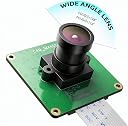
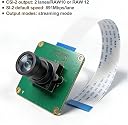
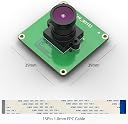
The InnoMaker Raspberry Pi Industrial Camera Module CAM-MIPI462RAW features a 2MP STARVIS IMX462 color CMOS sensor delivering 1920x1080 resolution at up to 60fps. Designed for all Raspberry Pi models, it connects via CSI with built-in drivers supporting Bullseye libcamera and Raspbian. Its ultra-wide 148° field of view and exceptional low-light sensitivity make it ideal for industrial, surveillance, and night vision applications. Adjustable focal length and custom design services add flexibility for professional projects.


| ASIN | B0B5G84PQ8 |
| Best Sellers Rank | #559 in Single Board Computers (Computers & Accessories) |
| Brand | innomaker |
| Built-In Media | no |
| CPU Manufacturer | ARM |
| Compatible Devices | Raspberry Pi 5, Raspberry Pi 4, Raspberry Pi 3B+, Raspberry Pi 3A+, Raspberry Pi 3, Raspberry Pi CM4, Raspberry Pi CM3, Raspberry Pi CM3+, Raspberry Pi Zero |
| Connectivity Technology | CSI |
| Customer Reviews | 3.7 out of 5 stars 21 Reviews |
| External Testing Certification | Não aplicável |
| Included Components | no |
| Manufacturer | innomaker |
| Mfr Part Number | IMX462 |
| Model Name | CAM-MIPI462RAW |
| Model Number | IMX462 |
| Operating System | Debian (Raspbian) |
| Processor Brand | ARM |
| Processor Count | 1 |
| RAM Memory Technology | LPDDR2 |
| Smart Home Compatibility | Not Smart Home Compatible |
| Total Usb Ports | 4 |
| UPC | 781520760468 |
| Unit Count | 1.0 Count |
| Warranty Description | 1 |
| Wireless Compability | Infrared |
O**L
Great for astronomical plate-solving
This is the best affordable Raspberry Pi camera module for astronomical use. The plate-solving performance in a PiFinder or Cedar finder build is unmatched. Even in light polluted skies I can typically get accurate solving at a crisp 16.7 ms exposure rate. Note that the raw camera frame rate at full resolution maxes out at around 40 fps on a Raspberry Pi Zero 2W. Using ISP processing I'm able to achieve 60 fps.
F**S
IMX462 is great for low light -- but you should know what you are getting
I am writing regarding the Sony IMX462 sensor board. The IMX462 is part of the line with the IMX290/327/462 and is meant for use in industrial or commercial applications. It has great sensitivity to long wavelength light (700nm+) so it is great for night vision with IR illumination. I replaced the stock lens with a "uxcell 8mm Focal Length 1080P F2.0 1/2.7 Inch Wide Angle" available on Amazon. It has no IR cut filter so IR light will pass through it. It is connected to a Raspi Zero W. It needs a converter cable to connect to the Zero due to a different pin size. The Pi OS comes with a driver for the IMX290 which works with the 327 and the 462, but it also has a driver for a 462 which works. The seller says to use the 290 driver but I tried both and they both work so I am using the 462 (it still appears as a 290 though, so who knows what is going on). It uses the Pi's hardware ISP to process the sensor image, so if you aren't using a Pi I don't think it will work. There is no way to get this to display on another computer unless you connect it to the CSI lane and have a specific driver for it and the ISP tuning file. It also relies on the Pi's hardware video encoder to encode the video -- if you don't do this you will get a raw SRGB stream. It will not fit in normal Pi camera enclosures. You should really know that you want this specific sensor and board for a specific purpose. It is specifically good for surveillance, night vision, industrial, or astronomical applications. I am using it with a cold mirror (visible light cut filter) and an IR light to grab images of otherwise un-imageable surfaces. It works great for that. This is my /boot/config.txt entry: #Camera dtoverlay=imx462,clock-frequency=74250000 #camera_auto_detect=0 Here is the output I get from some Pi commands which may be useful for you: $ libcamera-vid --list-cameras Available cameras ----------------- 0 : imx290 [1920x1080] (/base/soc/i2c0mux/i2c@1/imx290@1a) Modes: 'SRGGB10_CSI2P' : 1280x720 [60.00 fps - (320, 180)/1280x720 crop] 1920x1080 [60.00 fps - (0, 0)/1920x1080 crop] 'SRGGB12_CSI2P' : 1280x720 [60.00 fps - (320, 180)/1280x720 crop] 1920x1080 [60.00 fps - (0, 0)/1920x1080 crop] --- $ libcamera-vid -n -t 0 --inline --listen --height 1080 --width 1920 --framerate 60 --denoise off -o tcp://0.0.0.0:5000 Overriding H.264 level 4.2 [0:11:13.274240440] [658] INFO Camera camera_manager.cpp:299 libcamera v0.0.4+22-923f5d70 [0:11:13.556635700] [659] INFO RPI raspberrypi.cpp:1476 Registered camera /base/soc/i2c0mux/i2c@1/imx290@1a to Unicam device /dev/media2 and ISP device /dev/media0 Mode selection: SRGGB10_CSI2P 1280x720 - Score: 5000 SRGGB10_CSI2P 1920x1080 - Score: 3000 SRGGB12_CSI2P 1280x720 - Score: 4000 SRGGB12_CSI2P 1920x1080 - Score: 2000 Stream configuration adjusted [0:11:13.608129200] [658] INFO Camera camera.cpp:1028 configuring streams: (0) 1920x1080-YUV420 (1) 1920x1080-SRGGB12_CSI2P [0:11:13.611289169] [659] INFO RPI raspberrypi.cpp:851 Sensor: /base/soc/i2c0mux/i2c@1/imx290@1a - Selected sensor format: 1920x1080-SRGGB12_1X12 - Selected unicam format: 1920x1080-pRCC
M**H
I have yet to see ANYONE GET THIS Camera working on a Raspberry!
Pivariety drivers are a total joke. Will not operate on any version Pi or Pi OS. WASTE OF TIME! No support from Innomaker! You ask Innomaker for a way of installing a WORKING set of drivers and all you get is a link to a spec sheet that shows you the dimensions of the camera! ha, ha! I think the business plan is to continuously send these junk cameras out OVER and OVER again until they find enough Amazon customers who won't bother to check if they actually work!
C**R
Some open questions, but what I can see seems good.
Full disclosure: The project I was going to use this for has been put off for at least three months as I shift my project from Raspberry Pi 4 to Raspberry Pi 5 and complete other work. However, I've gone over the hardware, looked at the Github files, and reviewed the manual (such that it is). This review is based on that effort and I will update it after implementation. Also, I am an amateur, but not a complete newbie, so take this as you will. All in all, the hardware seems fine, the pin-out information in the manual is clear, the included ribbon connector seems fine. Importantly, there is only one open issue for this on Github, and that is a general question about use for non-Raspberry Pi boards. From the board layout, hardware installation will be easy, and the board and camera itself seems to have a good build quality. Obviously, functionality will be basic, but for the price and likely use cases (like mine), that is fine. I do wonder about overall support for this camera (separate from the customer support email address which is clearly listed in the documentation), given the manual appears to have only been updated one time since introduction in 2021, and that one open ticket I previously mentioned was never responded to, nor just assigned and closed if handled through a separate channel. Net, I get this review has serious limits, but since this was a "free" product I felt I needed to provide what I did know, and I also saw some other reviews that seemed to be negative in ways that seemed...unlikely to be representative. Unless there is some obscure issue, this seems worth at least four stars.
B**N
Driver support? Support period?
I am unable to load these drivers in ubuntu/rpios lite. I've tried compiling some drivers based on some search work but its still coming up empty handed. The github is a pdf spec sheet.
R**.
Be sure to check the InnoMaker Github for instructions when using with Raspberry Pi!
On the Rpi, you will need to edit /boot/firmware/config.txt as the auto camera detect didn't work for me. InnoMaker does have a GitHub with instructions. The URL is a QR code inside the box. camera_auto_detect=0 dtoverlay=imx290,clock-frequency=74250000 Note that ChatGPT gave incorrect frequency. Also, if you change the lens to a 16mm version (available on Amazon), focus can be tricky as the barrel can end up insufficiently long to focus close and come out or be loose. I used "PiFinder" Github project to assist with ideas.
D**.
Powerful little camera
I hesitated because of some bad reviews but I think those who wrote them may not understand the Pi camera interface or innomaker didn't have updated instructions. If this is your first time integrating a camera to a Pi there is a learning curve. I have gathered such great time-lapses of the night sky I have lots of people asking what my setup is and they are absolutely amazed that its this little camera. I got this to work on allsky(using imx219 identity) and indi-allsky (as native identity). Id suggest a pi with more ram and proc than the 3b to run this but it does still work. Im rating this 5 because this is a perfectly capable product that does exceptionally well especially for night sky. With some adjustments to the videos it will even begin to pick up milky way. Pic is a partial screen cap of 15 seconds of ISS transit
D**C
An excellent camera for imaging of the night sky
The imx462 is an excellent project camera for night sky images. I was able to connect it directly to a raspberry pi 3b and used the libcamera drivers to take images using an indi server. The camera picks up even faint stars with ease. I was impressed with the quality of the images and look forward to more projects using this camera. I only wish that the lens had a wider fov, but that is application specific. The lens is replaceable using a m12 mount. The lens the camera comes with is pretty much at infinity focus, and is easily adjusted if needed. The fov is about 150 degrees side to side and close to 120 degrees top to bottom. The camera also takes excellent daytime images. The camera is fully adjustable with auto white balance if needed or manual functions. I found a gain setting of 7 to be pretty optimal for stars without generating too much noise. The exposure settings are also adjustable. I did not really test the video frame rate or quality since I only use this for time lapse. I am curious to see how well this might work as a planetary camera - a project for another day.
V**D
Good
Great product
星**妃
十分な機能
暗所性能が高く、夜間や低照度環境でも映像がはっきりと映るのが魅力です。色の再現性も自然で、細部までくっきりと捉えられます。Raspberry Piとの接続もスムーズで、ドライバの認識に手間取ることもありませんでした。libcamera環境でも安定して動作し、遅延やフレーム落ちが少ないのも好印象。筐体はコンパクトで扱いやすく、自作プロジェクトや監視カメラ用途にぴったりです。
5**ん
libcameraがrpicamに代わったよ
2025/10/24現在の最新OS 、ラズパイ4 MODEL B で使用 他の方のレビューを参考にしてもどうしても起動してくれなかった。 よくよく調べたらコマンドが変更されていた、、、 以下に方法を記す ・sudo nano /boot/firmware/config.txtを実行 ・エディタが起動する ・最下段 [all]セクションの下に以下追記 dtoverlay=imx290,clock-frequency=74250000 ・記入後上書き保存し、sudo rebootで再起動 ・rpicam-hello -t 0 で動作確認 libcameraコマンドがrpicamに変更されていた。ずっとlibcameraでやって半日潰したw
し**ー
当初動作せず→動きましたが注記あり
前回動作しないと記載しましたが、 箱のフタ裏にQRコードが貼っていて、そこの英語説明書から ヒントを得られ、かろうじて映像を映すことができました。 参考まで、Raspberry Pi 4B bookworm 64bitで試した流れを記します ・ターミナルを開く ・sudo nano /boot/firmware/config.txtを実行 ・エディタが起動する ・最下段 [all]セクションの下に以下追記 dtoverlay=imx290,clock-frequency=74250000 ・記入後上書き保存し、sudo rebootで再起動 ・説明書 P10のgitを取得する ・libcamera-hello -t 0 で動作確認 これで映像は映りました。 ただしファイル指定をするlibcameraコマンド記載もありましたが そちらはエラーでした。 この辺り説明書P9、P10あたりに記載あり。 ただ視野角(FOV)はスペックと記載が違う気がして スペックほど広角でない気がします。フツーの画角です。 レンズをひねることで、ピント調整は手動で可能でした。 とりあえず動いたので星を1つ上げておきます。 なおラズパイ5対応のケーブルも入っていて、ドキュメントを 見たところ対応してると思いますが、検証はできていません。 個人的には写ったものの視野角が公称値ほどないので、この評価とします。 水平FOV 148度はどう見ても盛り過ぎだと思います。 --------以下は当初のレビューです タイトルの通りです。 英語でもよかったから説明書が欲しかった。 ケーブルの向きも複数回確認した上で試したけど、 あったまらず通電している感じがしないです。 /boot/firmware/config.txtもいじって再起動を繰り返したが 通電してる感じがしない。 「ERROR: *** no cameras available ***」の文字は散々みた。 商品説明本文のパラメーターも入れてみたが 正確な綴りも書かれておらず、不親切だと思う。 本体はラズパイ4ですが、他のカメラでの 動作実績はあるので本体起因ではないと思う。 あとラズパイのCSIカメラは、純正品と互換品、 Legacyタイプと現行OSで設定が結構異なる様子。 検索サジェッションで出てくるのは見当違いのものが 出ることもあり、苦労ばかりした。 ラズパイは2Bの頃から使ってきましたが、 初めてCSIカメラで挫折しました。 ちょっとこれはないなと思っています。 説明書きとも全く違うので、この評価はやむを得ません。 国内業者でも取扱いのある製品らしいので そちらを選ぶのが吉かもしれない。
Trustpilot
1 month ago
3 weeks ago