
Desertcart purchases this item on your behalf and handles shipping, customs, and support to KSA.
🖱️ Elevate your workflow with silent precision and unstoppable comfort!
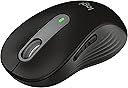
The Logitech Signature M650 Wireless Mouse is a sleek, ergonomic device designed for small to medium hands, featuring an adaptive SmartWheel for precise and fast scrolling, ultra-quiet clicks with SilentTouch technology, and a remarkable 24-month battery life. Compatible across multiple platforms and built with recycled materials, it offers customizable buttons and dual wireless connectivity options, making it the ultimate productivity companion for professionals seeking comfort, efficiency, and sustainability.
| ASIN | B09KX66ZCD |
| Additional Features | Lightweight, Portable, Soundless, Wireless |
| Antenna Location | Gaming, Office |
| Battery Average Life | 24 months |
| Best Sellers Rank | #24 in Computer Mice |
| Brand | Logitech |
| Button Quantity | 4 |
| Color | Black |
| Compatible Devices | Personal Computer |
| Connectivity Technology | Bluetooth, Radio Frequency |
| Customer Reviews | 4.5 out of 5 stars 2,693 Reviews |
| Enclosure Material | Rubber |
| Hand Orientation | Right |
| Hardware Platform | Linux, Mac, PC |
| Included Components | Batteries |
| Item Dimensions L x W | 4.22"L x 2.43"W |
| Item Weight | 23 g |
| Manufacturer | Logitech |
| Mfr Part Number | 910-006268 |
| Minimum Required Operating System Version | ChromeOS 137, ChromeOs 134 |
| Model Name | M650 |
| Model Number | 910-006268 |
| Movement Detection | Optical |
| Movement Detection Technology | Optical |
| Number of Batteries | 1 AA batteries required. (included) |
| Number of Buttons | 4 |
| Operating System | Chrome OS, Linux |
| Pattern | Small-Medium Size | Right Handed |
| Power Source | Battery Powered |
| Range | 30.0 feet |
| Special Feature | Lightweight, Portable, Soundless, Wireless |
| Style Name | Small-Medium Size | Right Handed |
| UPC | 097855167958 |
| Unit Count | 1 Count |
| Warranty Description | 1 Year Limited Hardware Warranty |
R**N
Awesome silent click mouse with near instant Bluetooth connection feature
Love this mouse so much I bought 3 more after getting the first one. I work in IT and around a lot of machines, and these come in handy nonstop. Best feature is when you put them into pairing mode, they (usually I'd say 90% of the time) automatically launch a window on any PC within Bluetooth range that says Connect. I love this feature because you can quickly connect this mouse to any computer within seconds without having to dig through menus or really do anything on the PC you're trying to connect this mouse to. I also love the design of the mouse, how if feels in my hand, and the best part of all for me personally, the silent clicks! Highly recommend this mouse to anyone.
P**S
Quiet clicks make this an excellent everyday mouse
The M650 is comfortable for everyday work, tracks reliably, and has pleasantly quiet clicks. The graphite design is understated, and the wireless connection has been simple and dependable.
J**A
Bluetooth and USB Dongle and AA Battery
It is not easy to find a wireless mouse that has Bluetooth and USB dongle options and operates with a standard battery. This one has one AA battery, and it was included! USB dongle tucked neatly away in the battery compartment. While the USB is a nice to have, especially if you need your mouse for when in the BIOS, pre-boot and Bluetooth availability. I generally, don't need that, and don't like having to rely upon a dongle hanging from my laptops USB port. Also, takes up a port. So glad this mouse has Bluetooth. I don't want another device to charge and when you need your mouse, you need it! No time to recharge if you did not do so already. I can grab an AA battery though and the show goes on. My work has me on the computer for a good 8-10 hours, so I need a mouse that is comfortable and performs well. This mouse checks all the boxes! Plus it has a great software interface to customize all the buttons, even with certain applications. Scrolling is silky smooth and love the very light haptic feedback to be able to scroll one line at a time or quickly down a page. The left and right buttons are indeed silent. I have to get used to how responsive they are! Overall, Logitech hit it out of the park with this highly customizable mouse. Also love the matt finish, so the dirt and wear overtime won't cake on like with other glossy mouses. Yes, I am an office worker, my hands are clean, but somehow the glossy mouses get grimy over time. This mouse is a keeper!
A**R
sooo easy to click!
I don't often write a review, but I wanted everyone out there to know how happy I am with this mouse. After using the Logitech m325 mouse for years, I noticed that after long hours of work sometimes my index finger's tendon would hurt from repetitive clicking. So I went in search of an easy to click mouse. I first tried the new logitech m240, which has the SilentTouch technology, and I was super pleased with how easy to click the left and right mouse buttons were (and totally silent!). However, the scroll wheel for the m240 took a good amount of effort to scroll, which I did not like. I next tried the new logitech mx anywhere 3s, which has a great scroll wheel, but the left and right buttons require about the same pressure to click as did the buttons on the m325 (and although logitech touts this mouse as quiet or silent, it is certainly audible, though much less so than the m325). After a bit more research, I saw that this m650 has the SilentTouch technology, so I got it. The left and right moues buttons are silent and suuuper easy to click. the scroll wheel is also silent, and also nearly effortless to scroll. while not as nice as the scroll wheel on the mx anywhere series, it does allow hyper scrolling, and is perfectly fine for my needs. Additionally, the mouse is quite lightweight. the USB Bolt adapter works well, although I don't quite understand why it's a USB-A instead of a USB-C type, as I have noticed that laptops have been doing away with USB-A ports for some time now (like Apple Macbooks). In summary, I didn't see any review that specifically commented on how EASY TO CLICK this mouse is, and in case you are searching for a mouse for a person with hand tendonitis or other overuse injury, I would definitely recommend the m650.
T**A
Very quiet
This mouse is a great all-around choice for both work and personal use. It’s impressively quiet with every click, which is perfect for shared office spaces or working late without disturbing others. One of the standout features is how smoothly it connects via Bluetooth—it paired effortlessly with both my Apple laptop and Microsoft PC, which is a big plus for anyone using multiple devices. The size feels just right in the hand, offering a comfortable grip for long periods of use, and the scroll wheel glides easily with good precision. The overall comfort makes it ideal for extended sessions, whether you’re working or browsing. The buttons are responsive, although they can feel slightly awkward depending on how you hold the mouse. It’s a minor issue, but worth noting. Build quality is generally decent—it doesn’t feel cheap, but it’s not the most rugged mouse out there either. For casual or office use, though, it should hold up just fine. All things considered, this mouse delivers great functionality and convenience at a fair price.
K**.
Great, silent, customizable mouse!
THIS is the mouse I've been wanting!!! The soft silent clicking is wonderful, the size options ensures that you have a good fit to your hand, and the extra buttons are highly customizable with the Logitech Options software. You can customize with multiple keystrokes, or highly specific keys. I originally went with the cheaper "silent" Logitech mouse but it did not offer any key customization - this was well worth the extra money.
G**L
Good & comfortable for use
Adding to my previous review below, I want to bring up a technical point on some of the negative reviews about clicks not working or having to do multiple clicks. I was thinking of replacing this mouse because I was having issues with multiple clicks necessary either Bluetooth or dongle. I was thinking maybe because I dropped the mouse many times lately and that I broke it. With the dongle sometimes it's an issue with where the dongle is located and the USB port that you're using. With me it was that I had the dongle plugged into a USB extension port 3.1 and the dongle is 3.0 so I found a cable I had that was 3.0 and then found that the location of the dongle made a difference. But the real issue with having to click multiple times is not necessarily the mouse itself, the dongle or Bluetooth. If you're on a Windows 11 computer it's likely the operating system and how long it's been since you've rebooted the computer. You should probably reboot on a daily basis. My background is in computers since 1968 so this is more than just an educated guess. ----- Slightly smaller than the M525 I replaced. Silent click not important but I'm finding the clicks are a little too sensitive and often produce double effect. Hence the four stars instead of five. But overall still like the mouse and prefer the button control on the side rather than tilting the wheel. Works well with the dongle. I just wonder which connection method uses less computer resources Bluetooth or dongle?
R**E
Works Great
Bought a few of them. Like them and they just work. Highly recommended. I never considered another brand as these replaced other Logitech Mice.
H**A
Superb Mouse
It's a genuine Logitech mouse. Great for daily office use. Can be stored in your laptop bag with ease. Two connectivity modes (Bluetooth and Logi Bolt USB). It came with DokkanTech warranty.
M**S
Would recommend
Bought this to replace a wired usb mouse so I could free up a port. After purchasing wished I'd bought the larger version but when received it it's about the same size as my current one. Feels very comfortable in the hand. Instruction leaflet is only in Chinese. I have a slightly complicated setup running kubuntu on my laptop and streaming games from my gaming windows laptop over wireless (sunshine/moonlight (Nvidia shield)). The mouse has a button on the bottom to connect to Bluetooth and connected to kubuntu without problems and works faultlessly over moonlight. I run virtual machines on kubuntu using KVM/vmm and this also works without any further setup or issues. I use a plain hardback book as a mouse mat and the the optics are smooth and precise. Tested by playing a round of golf streamed from the gaming laptop. The mouse clicks are soft, virtually silent and precise and I never accidentally clicked. Ended 3 under in windy conditions which is about normal :) I haven't tried the wireless nano usb dongle yet but love the way it's stored in the mouse so won't be misslaid should I ever need it. Recommended.
G**S
Amazing bit of kit
Changed from Microsoft mouse to this one. Should’ve done it ages ago. Mouse is smooth with easy no noise click. Bluetooth is also good meaning you don’t need to use the little stick thing.
A**H
Good Battery Life
So far I am happy with this item. It pairs easily with my laptop and has a very long battery life. I got this in December and I only replaced the battery for the first time today, the 21st of March.
G**E
Set up description required
Everything was up to the required standard - although it would have been most helpful if "Guide to Setting up" leaflet had been included in the box
Trustpilot
3 weeks ago
5 days ago