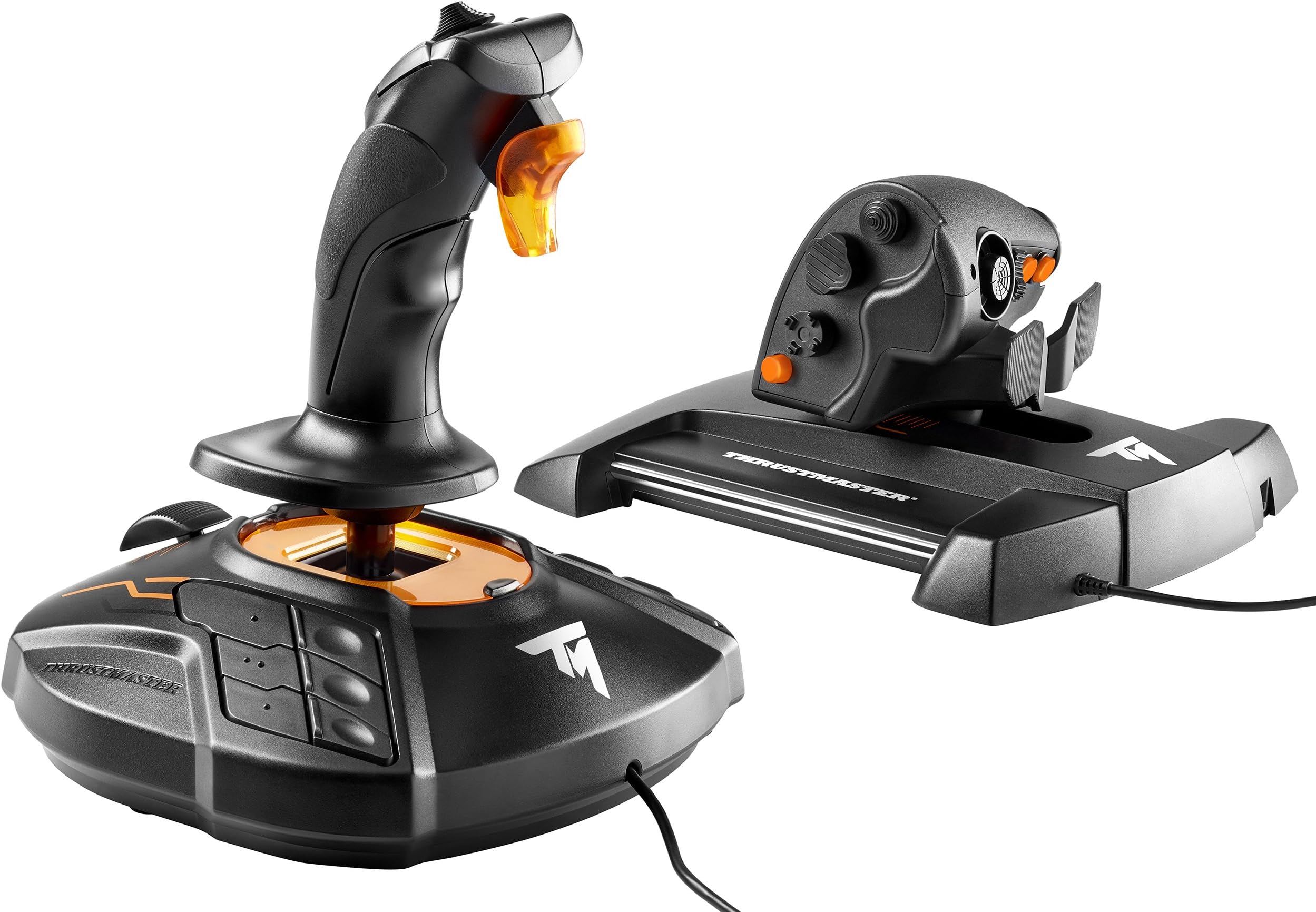
Thrustmaster T16000M FCS HOTAS (Compatible with PC)
Product ID: 32883610
🌀4 independent axes incl. twist rudder
🎮30 programmable buttons
🧲Hall effect magnetic precision sensors
Buy anything from 5,000+ international stores. One checkout price. No surprise fees. Join 2M+ shoppers on Desertcart.
Desertcart purchases this item on your behalf and handles shipping, customs, and support to KSA.
🛫 Elevate your flight game with precision, power, and pro-level control!
The Thrustmaster T16000M FCS HOTAS is a PC-compatible flight control system featuring 30 programmable buttons, 4 independent axes including a twist rudder, and patented Hall effect magnetic sensors for unparalleled precision. Designed ergonomically with textured, braille-style buttons for intuitive use in VR and intense gameplay, it offers plug-and-play USB connectivity and deep customization via T.A.R.G.E.T software. Ideal for both beginners and seasoned sim pilots seeking a high-performance, affordable HOTAS setup.


| Additional Features | Ergonomic |
| Asin | B01KCHPRXA |
| Best Sellers Rank | #558 in Video Games (See Top 100 in Video Games) #2 in PC Game Flight Controls |
| Brand Name | Thrustmaster |
| Button Quantity | 30 |
| Color | Black |
| Compatible Devices | PC |
| Connectivity Technology | USB |
| Controller Type | Flight Stick |
| Customer Reviews | 4.2 4.2 out of 5 stars (3,450) 4.2 out of 5 stars |
| External Testing Certification | Não Aplicavel |
| Global Trade Identification Number | 00663296420732 |
| Hardware Platform | PC (Windows 10, 8, 7, Vista) |
| Included Components | Instructions manual & flightstick |
| Item Dimensions | 9.01 x 10.39 x 10.7 inches |
| Item Type Name | Thrustmaster VG T.16000M Fcs HOTAS Controller (2960778) |
| Item Weight | 3 Pounds |
| Manufacturer | Thrustmaster VG |
| Manufacturer Part Number | 2960778 |
| Model Name | Thrustmaster T.16000M FCS HOTAS Controller |
| Model Number | 2960778 |
| Package Quantity | 1 |
| Power Source | Corded Electric |
| Warranty Description | One year |
User
Great quality Hotas...was very impressed!!
UPDATE: I am keeping the Hotas as I bought 2 Vesa clamps and added to my chair. Bumble from Youtube has a fantastic tutorial on how to mount. Made an additional step by fabricating some PlexiGlas mounting panels, screwed into platform and adhered each unit by Velcro to panels. You know what's better than having these at 13...having them at 46! Remapped gamepad and Hotas to a Custom Binding and was able to input ALL buttons / funcitons in. Mainly using gamepad for map / SRV as it feels more natural. Definatelty an awesome product...will update if unit degrades over normal use.I absolutely love this controller for Elite Dangerous! Not sure what other flight sims are out, but would like to try on X3 and Microsoft Flight X. All the buttons, toggles, and switches were used and had a pre-programmed setting. Elite is great / intuitave with a controller...it was better with this Hotas (not sure about the SRV...read one person's review that stated he used Hotas for flying and controller for SRV - I could see myself mirroring this). It did take some getting used to, and I am still not at the same proficiency as a controller. Remember boosting into a station was when you first played Elite...yeah that will happen again.The flight stick was good with a large number of buttons, but felt like other flight sticks I used in the past. I loved the throttle, slap paddles, and analog on the throttle portion - this unit added the most immersion to the game as it allowed for multiple articulating inputs to happening simutensiously. Same can be done with the controller, but when inputting the same actions using the Hotas it felt more alive (left hand was controlling throttle, left pinky / middle finger was the rudder, left index looking around with analog, right hand on flight stick, with right thumb on power allocation).Unfortunately I will need to return the unit for now as I found out I still have a few old shoulder / neck injuries and using this for too long causes aggrevation if placed on the desk. I will prepare a chair with Hotas mounts in preperation of re-purchasing this sometime in 2019 and let the good times roll. Hats off to a good product, wish your company the best! Trust me, I'm an engineer. Writing this review with the unit boxed up behind me feels like I'm saying good bye to an old friend : (
User
Good for arcade gaming, so-so for plane simulator, unacceptable for helicopter simulator.
I've been using this kit for 4 months now.Good:- Very good quality.- The joystick and throttle are both quite friendly for left-handed (yep, I am).- Nice set of features - a lot of buttons, switches, sliders and so.- Allows conveniently assign all critical controls on buttons - roll/pitch/yawn/throttle/prop/flaps/breaks/reverse/gears + 8-way look-around and return to default view.Ok:- Throttle requires to be adjusted and lubricated to provide really smooth movement.- Yawn control at throttle is ok. The pedal set is better but definitely better than nothing. I would say it is enough to regular operations with no-wind/low wind, but not precise enough to work through shifting winds or to fly helicopter.Bad:- Twist control on joystick is useless at best.- Worse, to provide twist abilities they have use quite a complex suspension and therefore it is almost impossible to manipulate one axis without significantly disturbing the others.- The spring is really heavy making precise manipulation almost impossible.All together make the joystick not the best one for flying in aviasim, especially in heavy weather, or to fly a helo.After 4 months I am still using the throttle and quite satisfied with it, but finally replaced the joystick with CH Flightstick pro and CH Pedals.
User
Excellent.
I've only owned this for a day or so, but whew! Set up was quite easy and coming from a Logitech Extreme 3D pro and keyboard setup all I can say is wow - what a difference! I wanted to get this mostly to try out the HOTAS experience after logging some ~200-300 hours in Elite: Dangerous with stick and keyboard, and let me just say I'm not going back! What surprised me quite a bit honestly is just how good the stick feels. The movement is super smooth and the accuracy is there down to the tiniest little movement. I personally set up a very small deadzone so I can rest my hand on the stick without accidentally moving about in game, but that's more a testament to the accuracy of the stick than anything. The tension is very good, if a little bit firm, but all the same it feels quite good. One other tiny thing to note is that when you move the joystick, the orange bit underneath the stick lights up - pretty cool! The throttle moves very smoothly as well and it is a joy to finally have analog control over my speed. I mapped horizontal thrusters to the paddle in the front of the throttle and vertical movement to the analog nub, and it seems to work pretty well. Overall I'd say the build quality of both items is excellent.Okay, so now some cons. These may be limited to me as I have small hands, but I find the stick just a bit too thick to grasp comfortably. My thumb ends up feeling stretched and in a bit of pain after extended use. The hat switch on top and the top three buttons are more or less off limits. I bound them to things I use very rarely, so it's not the end of the world or anything. However, use of them again just leaves my thumb in pain. Oh well. The cons of having smaller hands, I guess. I will learn to live with it being that the stick is of high quality in basically every other regard.Highly recommended if you're coming from a Logitech Extreme 3D pro or just looking to try out HOTAS for the first time!
User
A great joystick that punches above it's weight class.
EDIT: Subtracting 1 additional star because there is currently a problem with the joystick/throttle that prevents my monitor from going to sleep. I've checked around, and found a reddit thread where there are others who are reporting same thing: https://www.reddit.com/r/hotas/comments/7yja9l/t16000m_fcs_throttle_preventing_screen_off/So apparently, according to that thread, Thrustmeter's response is to unplug the peripherals when you are done. Hey Thrustmaster, how about you NOT HIJACK my computer's settings when I'm not using it, like any other stupid peripheral that DOESN'T.There are not too many HOTAS in the $100 - $150 price range.I originally bought the Logitech X52 (non-pro), because I thought it would be the better of the two devices, given that it is from Logitech, and it goes for only $10-$20 more on average. I was dead wrong. Of the two, the T.16000m is better by miles.First, starting with the look / feel: while Thrustmaster did make some sacrifices to get the product in this price range, I don't feel that it had a negative impact on the overall experience. The throttle and joystick are mostly plastic, but the molding is thick enough that it doesn't feel hollow or 'cheap'. Also, and it comes to the pivot and rail for the throttle and joystick, it does not feel like they're going to break in a few months. Thurstmaster didn't sacrifice in this area, thankfully.Ergonomically, the joystick feels very comfortable to grip. The resistance I get when I use the pivot/yaw in the joystick feels smooth, and it's a little on the high side (which I prefer). as for button placement, the hat switch at the top is suitably clicky and easy the reach. The main firing trigger also feels good to press, although it is made of plastic. Lastly, the 12 buttons located in the base gives me ample hotkeys. It is nnoying that I have to take my hands off the stick to reach them,but I was used to that overtime.Moving on to the Throttle unit, it's a little bit big for me, but I am happy to see a lot of buttons to map, and they are all mostly in reach of your hands, and don't require you to take them off to reach it. Some of the buttons, like the paddles located on the front, are genius and are something that I don't see included on more expensive HOTAS.I'm using this controller mostly for Elite Dangerous, and probably for Flight Sim 2020 when it comes out. It's obvious that this control has more then enough functions for both type of games. The inclusion of the paddle, the small joystick in the handle of the throttle also makes it great for when I want to use linear thrusting or lateral thrusts in Elite dangerous, and the amount of buttons means that I can map 90% of Elite Dangerous' functions to the Joystick or Throttle.Lastly, the two units are separate and have their own USB connections, which is something that the X52 does not (the x52 only has one going to the computer, and a janky PS/2 connection to wire both together).Overall, I would say that for the price rpange, if you're looking for a decent HOTAS, there is simply no other option but this one. It's pretty much this or stepping up to the warhog.
User
WOW Finally a HOTAS that actually works! Better than more expensive models!
Yikes I went through 4 of the X-52, 3 of the X-52 Pro, and 2 of the X-56 Pro - - - THEY ALL FAILED!!! Dead switches, dead logic boards - they all died within a few days of my gentle, mild use!!! I even tried a brand new Warthog and it failed programming brand spanking new out of the box - that too returned the next day... I was getting mad / sad, as my trusty X-45 was getting a bit old and stiff. I refurbed it a bit and now it's much better, still a great backup, but...Ok, so I thought, maybe I don't need higher-end, so I tried this offering from Thrustmaster. IT WORKS!! No programming needed, even for Elite Dangerous, my fave game. You can simply assign button combinations to do every, and I mean EVERY FUNCTION in Elite Dangerous - I never have to use the keyboard at all.Ok, there are no lit buttons but they have braille-like nibs on the buttons and I have learned to use them without looking. There are enough hats on the Throttle to do all the Interface Mode interactions, up down left right tab left tab right back next page prev page you can set them all!!!! I still use a gaming mouse for the non-ship stuff like FSS and manipulating the galaxy maps and free cameras but in theory all that could be done on the analog hat too.The feel and the buttons are quite nice and after two weeks I am tickled pink that this system works great. I even You-toobed a video on how to take them down for improvements, such as the Throttle now is re-lubed and smooth as glass - its really great as while I am playing E:D I often make very subtle and smooth throttle changes. If you are careful, you will not void the warranty doing this - the things are made well and are durable enough to handle this.The feel of all the buttons is just fine and all the hats work nice and precise. I have come to love the Twist Yaw and use it to get good hit ratios in E:D.I have zero complaints about this product and if you think you need a higher end model - good luck because they will let you down HARD.If these other models had worked, I would have kept one and not been making this review. But if I had to review it in that circumstance, this model would maybe only get 4 stars, has it does come across as a bit "toy-ish" - but I have to give it a full 5 stars because it made me happy because IT WORKS!!!
User
Acutally Very Good HOTAS!
It works great, but I dock a star on Range of motion because sometimes the throttle movement on the TWCS is a bit stiicky. A little Graphite basically took care of that, but it should not have been necessary. I dock it on Ergonomic because the head of the stick could be designed better. A little lacking, but it works well enough for Elite Dangerous with a MASSIVE keybind requirement! A second HAT or two more buttons would have been better, but I am comparing it to the Warthog stick and strangely enough, the Logitech Extreme 3D.Let's face it, we rarely use the buttons on the base of the joystick when the room is dark, the monitors are bright, and it;s hard to differentiate the base keys! Lighting would be good. Multiple color buttons would be good too. (The throttle slider on the Stick base does work great for changing the radar range level!)The TWCS throttle could use a couple more buttons, but overall it works great for my use with E.D. The stick works well for Descent/Overload/Descent: Underground also. Starting to use the HOTAS for my old Flight Sim 10, but there are some compatibility issues there, working around it, but only cuz it;s an old program.For the price it's excellent. And unlike the very expensive Warthog HOTAS, this stick has the twist that works very nicely. It they made the Warthog available with a stick twist for rudder/Yaw, I might have considered it.
User
Excellent Combo for Elite Dangerous - Long wait for joystick to be ship via Warranty Service
Update 16 Jan 19: Received replacement joystick on 14 Jan 19. 15 days after Thrustmaster approved my warranty replacement. The item came in a beat up product box but the joystick seem to be in new condition. Doesn't mean it is new just that it looked new. The new joystick has no issues of the jitters. I can leave the calibration setting on auto vice manual. Also, I made a mistake on the warranty period. The warranty is actually 2 years so I still have 1 year left on my replacement so it makes me feel a little better the issue shows up on the new joystick.Update 12 Jan 19: Just before the 1 year warranty period the joystick started to jitter. Even after calibrating the joystick, there would be a jitter. (Jitter = moving erratically with no user input). Thrustmaster had me take a video of me calibrating and showing that it still had the jitter before they would warranty the joystick. Once they approve the warranty, they ask me to cut the usb cord at the base and take a photo of the cut cord and base. This the bad part. They originally said that the item would ship on 10 January. Now they are saying that it is still being processed for shipping with an unknown date for shipment. This is why I have drop my rating down to 3 star "OK". I have a feeling that I will be waiting a long time for my replacement joystick.Update 17 Feb 18: So, after Googling, found out that the throttle has an adjustment screw for tension. You need to slide the throttle all the way up and the flip it over so the you can see the bottom. A screw should be showing through the base. Less tension, counter clockwise and more tension clockwise. Also, I took some suggestion from the online community and put some White Lithium Grease on the guide rails inside the throttle. The grease dose a good job keeping the glide up and down smooth with little tension.I only had the HOTAS for 1 week and I am loving it. I purchased the HOTAS for Elite Dangerous. I didn't really read the manual or online stuff so my first experience was very bad. I tried programming the buttons using the in game binding of keys. Do not do this! The key to using the HOTAS is the TARGET app that you download from Thrustmaster. TARGET is the app that will bind game keys to the HOTAS. Once I figured that out, the HOTAS worked as it was suppose to. The default key binding for Elite was not to my liking so I had to change it. Once again a little reading to understand how to program the binding and it was very easy to make modification. There is a way to do it using scripts but I like the GUI.Game Play. Although I was doing fine with the mouse and keyboard, there is something more natural using a joystick and a throttle. Landing and fighting became much easier. I think it is because all the key buttons are within a thumb reach away vice pressing the wrong key on the keyboard. BTW mouse and keyboard still works. I use the mouse for the galaxy and system maps. The keyboard for typing in names of systems or stations.Weight. The joystick and throttle are both weighted down. The bottom feet are pretty sticky, preventing it from moving. Only during very intense fighting dos the throttle, and more likely the joystick move.Build. Both the joystick and throttle are plastic. However, the plastic feels very sturdy under hand. It does seem like it can take a good beating without breaking.The joystick is spring loaded meaning that it goes back to center. I don't see a way to adjust the tension but the tension doesn't seem to stiff. The throttle is somewhat smooth. As I move the throttle up and down, you can feel it clicking in small increments. It is not hard to move it up and down but there is a noticeable click.
User
Magnum Opus of Joysticks and amazing throttle
I upgraded from a Thrustmaster HOTAS X because I wanted something a little more serious. The throttle is excellent, though as is to be expected with small joysticks, the stick on the throttle doesn't center perfectly, setting the deadzones to 20% resolves this however. Being such a small joystick, a bit of deadzone is preferred regardless of its ability to center itself adequately (for contrast, a standard xbox 360 controller has roughly 20% deadzone for both its sticks by default.) It's also worth noting that the throttle does not have a tactile center point but this is personally a preference of mine, though I know the HOTAS X had it. While mostly inconsequential from a keybinding standpoint, its worth noting that of the 3 hat switches on the throttle, only the top most switch registers as an actual POV hat in windows settings. The middle and lower two register all their directions as individual buttons.The joystick is arguably the most interesting thing to note. Compared to the "normal" T.16000M, it's better in a number of ways. The POV hat and face buttons have grooves for better grip, the joystick throttle is now a proper rubber grip instead of some weird thumb catch as in the original. The base buttons have divots and nubs for distinction, the originals were all flat and it was hard to tell which button you were pressing without looking at it. While this joystick still lacks a switch to turn off the annoying lights, orange is a much less offensive color than green. The original green could not be ignored, but the orange in this version can be easily ignored, even in dark conditions.Honestly, considering the technology and features behind the T.16000M Joystick and the improvements in this revision, I would personally be willing to pay $130 for the joystick alone. The throttle, while amazing in its own right, was merely the icing on the cake. Thrustmaster, if you guys are reading this, consider selling the revised joystick on its own as you have with the throttle. It's a flawless version of an already great joystick. I want to buy a second joystick like this one for a dual stick setup but I don't need, nor can I use a second throttle.
User
Very Good.
Works well. Feels solid and durable.
User
Good quality, precious control
I am very happy with the purchase. Only downside that noticed is the 'stickiness' in the trust slider, which makes it difficult to do finer adjustments. I mostly fly airliners so it doesn't matter much.
User
Sensor excelente y la mejor calidad-precio. No hay nada mejor por este precio
Es claramente lo mejor en calidad-precio. Al principio me pensaba comprar el TCA (que es el mismo que este joystick, pero con la apariencia de Airbus) pero estaba agotadisimo, y al final decidí gastarme un poco más y comprarme este con el HOTAS. Juego al Flight Simulator con este set y es UNA DELICIA. Es de plástico pero no se nota para nada "plasticoso". Es un plástico de buena calidad.Lo bueno que tiene el joystick es que tiene exactamente el mismo sensor que el Warthog de ThrustMaster de 500€. La sensibilidad es excelente y se siente muy cómoda la mano. Además tiene muchas setas y joysticks que son muy útiles para mover la cámara, etc. Al igual que el HOTAS.Hablando del Hotas, además de ser comodísimo, dispone de una ruede cita de trim (compensador) que es muy muy útil y cómoda de utilizar. Compra totalmente recomendada. Estoy contentísimo.Muy recomendado. Lo estoy disfrutando mucho.
User
Parfait pour ED
Produit de bonne qualité ! Parfait pour les sessions sur ED
User
De los mejores productos calidad precio
Es un producto de muy buena calidad y funcionalidad, en Windows se reconoce de inmediato y la comunicación es muy buena. Yo lo utilicé para aplicaciones de realidad virtual y la compatibilidad es muy buena con Unreal y con Uniti.
Trustpilot
2 weeks ago
1 week ago