

Desertcart purchases this item on your behalf and handles shipping, customs, and support to KSA.
⌨️ Elevate your workspace with Mac-perfect precision and style!
The Satechi Slim W3 Wired Keyboard is a premium Mac-optimized keyboard featuring a full 104-key QWERTY layout with numeric keypad, seamless USB-C wired connection, and adjustable backlit keys with three brightness levels. Crafted with a sleek aluminum finish, it offers ergonomic low-profile keys designed for comfort and precision, compatible with a wide range of Apple devices and backed by a 2-year warranty.
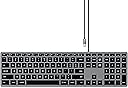


| ASIN | B08Q67XPFT |
| Additional Features | Backlit |
| Antenna Location | Office work, graphic design, low-light environments |
| Best Sellers Rank | #8,546 in Computers ( See Top 100 in Computers ) #197 in Computer Keyboards |
| Brand | SATECHI |
| Built-In Media | USB Cable |
| Button Quantity | 104 |
| Color | Space Grey |
| Compatible Amazon Tablet Models | Amazon Fire HD 10 11th Generation |
| Compatible Devices | MacBook Pro 14/16-inch (2026 M5/M3/M2/M1), MacBook Air 13/15-inch (2026 M5/M4/M3/M2/M1), MacBook Neo 13-inch (2026), iPad Pro 11/13-inch (2025 M5/M4/M3/M2/M1), iPad Air 11/13-inch (2026 M4/M3/M2/M1), iPad Mini (A17 Pro/6), iPad (A16/10th Gen), iPad Pro 12.9-inch (6th/5th/4th/3rd/2nd/1st gen), iPhone 17, iPhone Air, iPhone 17 Pro, iPhone 17 Pro Max, iPhone 16/15/14/13/12 Series, Mac Mini (2024 M4/M… |
| Compatible Operating System Family | iPadOS |
| Compatible Tablet Computer Models | Apple iPad mini 6 |
| Compatible devices | MacBook Pro 14/16-inch (2026 M5/M3/M2/M1), MacBook Air 13/15-inch (2026 M5/M4/M3/M2/M1), MacBook Neo 13-inch (2026), iPad Pro 11/13-inch (2025 M5/M4/M3/M2/M1), iPad Air 11/13-inch (2026 M4/M3/M2/M1), iPad Mini (A17 Pro/6), iPad (A16/10th Gen), iPad Pro 12.9-inch (6th/5th/4th/3rd/2nd/1st gen), iPhone 17, iPhone Air, iPhone 17 Pro, iPhone 17 Pro Max, iPhone 16/15/14/13/12 Series, Mac Mini (2024 M4/M2/M1), iMac (2024 M4/M3/M1), Mac Studio (2025 M4/M3/M2/M1), Lenovo ThinkPad, Microsoft Surface, Google Pixelbook, Google Pixel Pro 8/9, Samsung S24/Z Flip 5 Compatible devices MacBook Pro 14/16-inch (2026 M5/M3/M2/M1), MacBook Air 13/15-inch (2026 M5/M4/M3/M2/M1), MacBook Neo 13-inch (2026), iPad Pro 11/13-inch (2025 M5/M4/M3/M2/M1), iPad Air 11/13-inch (2026 M4/M3/M2/M1), iPad Mini (A17 Pro/6), iPad (A16/10th Gen), iPad Pro 12.9-inch (6th/5th/4th/3rd/2nd/1st gen), iPhone 17, iPhone Air, iPhone 17 Pro, iPhone 17 Pro Max, iPhone 16/15/14/13/12 Series, Mac Mini (2024 M4/M2/M1), iMac (2024 M4/M3/M1), Mac Studio (2025 M4/M3/M2/M1), Lenovo ThinkPad, Microsoft Surface, Google Pixelbook, Google Pixel Pro 8/9, Samsung S24/Z Flip 5 See more |
| Connectivity Technology | USB-C |
| Connectivity technology | USB-C |
| Country of Origin | China |
| Customer Reviews | 4.2 out of 5 stars 394 Reviews |
| EU Spare Part Availability Duration | 2 Years |
| Enclosure Material | Aluminum |
| External Testing Certification | 16364859011 |
| Generation | 1st Generation |
| Global Trade Identification Number | 00879961009083 |
| Hand Orientation | Ambidextrous |
| Item Dimensions L x W x H | 42.3L x 11.4W x 1.1H centimeters |
| Item Type Name | Keyboards |
| Item Weight | 429 Grams |
| Keyboard Backlighting Color Support | Single Color |
| Keyboard Description | Numeric |
| Keyboard Layout | QWERTY |
| Keyboard Plate Material | Aluminium |
| Keyboard description | Numeric |
| Manufacturer | Satechi |
| Manufacturer Contact Information | [email protected] |
| Mechanical Keyboard Switch Model | Linear |
| Mfr Part Number | ST-UCSW3M |
| Model Name | Slim W3 |
| Model Number | ST-UCSW3M |
| Number of Items | 1 |
| Number of Keys | 104 |
| Number of Packs | 1 |
| Number of Sections | 2 |
| Power Source | Battery Powered |
| Recommended uses for product | Office work, graphic design, low-light environments |
| Special features | Backlit |
| Style Name | Modern and Minimalist |
| Switch Type | Tactile |
| Theme | Modern |
| UPC | 879961009083 |
| Unit Count | 1.0 Count |
| Warranty Description | 2-Year Manufacturer Warranty |
| Water Resistance Level | Not Water Resistant |
&**;
Great keyboard
This was great. I had previously used a generic keyboard for my monitor, which I use with my macbook, but the windows keys end up causing confusion. This one is also much easier and more pleasant to type on
D**I
Excellent!!!!
Shame I lost one button. Works great. Sturdy!!!!
M**A
Function keys are not on by default
It's a decent keyboard but the main problem is that the function keys are not on by default. So every time you have to switch manually otherwise you end up changing brightness instead of hitting F2
G**G
Excelente
Excelente porém achei que era sem cabo kkkk
B**U
An excellent keyboard
This is a very high quality, great keyboard. Having tried both the X3 and the W3, I would say this (the W3) is just slightly worse than the X3 (the bluetooth version) in a couple of ways, but is definitely better in one way. In terms of ways in which the W3 is (slightly) worse, firstly the W3 has only 3 brightness levels where the X3 has 10. (However, they 3 levels are still well chosen, and the darkest is not too bright.) Secondly (and slightly weirdly), on the W3 then £ and # symbols are printed the wrong way round on the 3 key. (Since this is basically a US layout keyboard, the # symbol should be printed at the top of the key, not to the side, corresponding to the symbol accessed when pressing shift, as is done on all the other numeric keys on this keyboard, and indeed as is done on the 3 key on the X3, which has the same layout!) Related to this, I (again, only slightly) prefer the X3's key labelling, where they just haven't bothering to include the ALT (€ and £) symbols on the 2 and 3 keys at all, I prefer this as it makes the keyboard look slightly neater and less cluttered. Nevertheless, if you're only going to use the keyboard wired, I'd still get this one, even though the X3 can be used in wired mode. In particular, and one key reason why the W3 is better, if you're the kind of person who regularly uses Del/F2/F12 to break into the BIOS menu, then definitely get this wired model, the W3, as *even when used wired* the X3 cannot consistently do this, and (not always, but often, half the time or more) causes the BIOS to report that there is no keyboard attached. To point out another (very minor) imperfection shared by the X3 and the W3, the lighting on these keyboards is just not quite as beautiful as the lighting on a real Mac laptop keyboard - specifically, there are small overly bright spots here and there around the keys, where the light shows through too much, rather then the really uniform lighting around the keys on real Mac laptop keyboards. Nevertheless in build quality, in looks, and even in the above-mentioned quality of the lighting, this and the X3 are _way_ better than any of the (several) other illuminated external keyboards for the Mac which I have tried recently. Finally, the X3 booklet documents this, but the W3 booklet does not: fn+ESC is the way to swap the default behaviour of the function keys, between multimedia key or function key behaviour. The same key combo works on both keyboards.
L**L
Stille tikplank.
Prima toetsenbord, artikel is zoals beschreven. Goed verpakt geleverd.
M**L
Clavier de très bonne qualité
A**R
Great keyboard with a minor backlight issue
I put my laptops in vertical stands and was looking for a replacement keyboard. I have both a Mac and Windows PC. First I tried a mechanical keyboard, the the Keychron C2 with the blue switches and that was loud. It’s a really high-quality keyboard and I’d highly recommend it if you don’t mind the click-y noise of a mechanical keyboard. Then I tried the Cherry 6000 which was quieter but made a tinny noise when I typed. It was a good keyboard for typing and seemed to be well-made, but the noise was annoying. Maybe it was just defective, I don’t know. Finally I tried this one and I really like it. Its solid and has all a full keyset, but it’s a compact form factor, so it fits on my desk really well. It’s flat and heavy and I don’t mind the risers for a little angle. It’s very quiet and the key action is really good—it’s great for typing on. The only minor issue is the backlighting. The light is really bright under the top rows of keys and bleeds through under the key caps. It also flickers randomly when the computer is asleep, which is kind of weird. (This doesn’t happen if you keep the backlighting turned off, which I do, unless I really need it late at night.). The keys are very easy to see, even in low light. Bottom line: I’d definitely buy this keyboard again and would recommend unless the backlight is really important.
Trustpilot
5 days ago
1 month ago