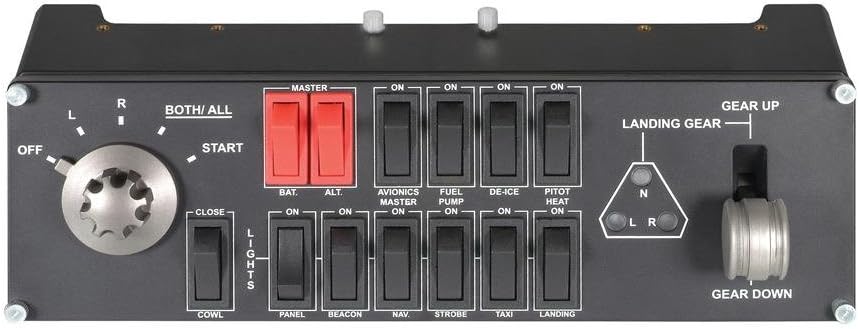
Saitek Pro Flight Switch Panel, Professional Simulation Switch Controller, LCD Display, Five-Position Magneto Dial, Realistic Gear Control, USB, PC - Black
Product ID: 284812419
💻PC Compatible
🔄Modular Design
✈️Realistic Controls
Buy anything from 5,000+ international stores. One checkout price. No surprise fees. Join 2M+ shoppers on Desertcart.
Desertcart purchases this item on your behalf and handles shipping, customs, and support to KSA.
🛩️ Take Flight with Precision Control!
The Logitech G Saitek Pro Flight Switch Panel is a professional-grade simulation switch controller designed to enhance your flight simulation experience. Featuring multiple in-cockpit controls, a realistic 5-position magneto dial for engine ignition, and a modular design for customizable setups, this device is perfect for serious flight enthusiasts. Compatible with PC gaming, it allows you to build the ultimate virtual cockpit.
I**K
Excellent addition to FS2020 for a more immersive experience
See the bottom of this review for a year later update.Lockdown giveth and lockdown taketh away. It giveth me loads of free time to mess around on a flight simulator, but, as a freelance corporate filmmaker, it taketh away the income to pay for it all! Having said that . . .I've casually used flight sims for many years, but with the release of FS2020 I decided to do things properly and actually learn what I was doing. There's only so many times you can fly under Tower Bridge . . .To take it seriously you absolutely need to learn about radio navigation. VFR flying is great fun, and FS2020's stunning scenery realism makes that so much easier, but VFR isn't always an option. When the weather closes in, or you're flying over water, you have to turn to the navigation instruments to get where you want to go, as well as getting help from ATC.One of the things I loathe doing is using a mouse to turn and press knobs and buttons on screen, so this radio stack was high on my list of add-ons to buy. I can already control flaps, pitch trim etc with buttons on the excellent Honeycomb Alpha yoke (and eventually I will be able to control those things plus autopilot and more with my pre-ordered Honeycomb Bravo throttle - I currently have the Saitek quadrant). I also have ignition, lights, avionics and master battery on the yoke and I've bought a second hand Thrustmaster rudder pedal assembly. As a first pass for a home 'cockpit' I think I now have covered every important base. Anything extra (eg a second or third radio stack, individual instruments, etc) will be very-nice-to-haves but with a finite budget they're out of reach just now. Oh, the other thing I have just discovered is the Simionic G1000 simuator for the iPad, which integrates beautifully with FS2020 and also responds to changes from the Logitech radio stack, which is great.So, the radio stack itself:Well, it certainly looks the part! At least it does if you are flying entry level aircraft such as the Cessna 152 (which is my learning airplane of choice). Of course it isn't identical to a genuine Bendix/King radio stack, but the general style is the same and you do feel as though you're using a real radio (so says someone who has never used a Cessna radio stack. Real pilots may have a different view!). The mainly plastic construction seems quite sturdy and overall build quality is good. The knobs and buttons have a firm feel to them (actually, the knobs to change between COM1, COM2, NAV1 etc might be a little TOO firm, but that could be my 57 year old fingers struggling.)The display is bright and clear, although I have read a couple of other complaints that the brightness on individual LCD bars varies across the display. Yes, that is true, but for me it didn't spoil my enjoyment and to be honest I hadn't noticed it until I was told!For now I have mounted the radio on top of my Honeycomb yoke, as you can see in the picture. Fitting was easy and only took a few minutes (there are seven screws to turn with a supplied hex key). It's great that there seems to be a standard for mounting between manufacturers. There are several mounting options and eventually, if I remain serious about all this, I might knock up an instrument panel out of plywood and install the radio to the right of the yoke. I'd also think seriously about having two additional radio stacks, so I could dedicate one to COM channels, one to NAV channels and one to the transponder. Again, finances are preventing that for now - as well as the fact that I am waiting to see what Microsoft/Asobo does about multi-monitor support (true multi-monitor support - not using NVidia Surround, which is horribly distorted).Software installation was easy - just follow the instructions on the Logitech drivers page. You also need to install and run a special plugin that allows the stack to talk to FS2020. This must be run before starting the sim. Occasionally I get a message saying that an instance of the plugin is already running. I haven't worked out exactly when this does and doesnt happen as it appears to be random, but it doesn't seem to affect anything.I have everything plugged into a cheap four port powered hub which is also on a USB extension cable - all works fine.In use, the stack is extremely responsive to changes in the SIM and vice versa. When given instructions to change frequency or transponder code, as soon as you make the change, the option to tune the radio in the on-screen ATC panel disappears, as it recognises you have made the change manually. In fact, the only time you now need to touch the radio stack is to acknowledge ATC calls and for other non comms related activity (eg choosing an airport, requesting vectors etc). I have bound the big red button on the yoke to Radios/Option 1 (which is always the option to acknowledge ATC calls) so I don't have to touch the keyboard so much.So, any niggles? Not really, other than the two things I have already mentioned:1. Now that I have been told about the LED issue I can't unsee it! It really doesn't have any effect on how I use the radio stack, nor my enjoyment of it, other than me noticing it every now and then.2. I don't know how stiff they are in the real world, but I found the channel knobs just a tad too stiff. Perhaps they really are like that in order to prevent accidentally changing channel, and if so then all good.At time of writing I only have one 'that would have been nice' observation: a volume control would have been great to be able to listen to the morse code signal from beacons, as well as to turn ATC up or down in different conditions.And that's it. Until I have fully mastered the use of the radio I don't really know if there are any other shortcomings or missing features. For me, as it stands, and given my current level of expertise (I'd say advanced beginner) this radio stack is almost perfect, and a fantastic addition to my growing cockpit. From the point of view of realism and immersion, it adds another layer of both. It means I am using the mouse less and not having to zoom in to the on screen instruments so much.I haven't tried this unit with X-Plane 11 yet, but I see no reason why it should not perform just as well.In summary, if you're serious about your flight simulator exerience then this is an essential purchase. I highly recommend it.EDIT: I bought mine at £89.99 in September 2020 - I now see the price has gone up rather a lot! Between £135 and £171 plus shipping. It seems lockdown demand has outstripped availability and a few gougers are taking advantage. That's a shame. Currys still have them at the MRP.UPDATE October 2021:Well, the price has settled down and they are still available at the price I bought mine for last year (£89.99). I got very angry when I saw all the inflated prices!Anyway, I was impressed enough with the radio that I bought two more (at RRP) so I now have a stack of three. One is dedicated to COM radios, one to NAV radios and the last is for ADF, DME, Transponder and a few other goodies. It really does add to the immersion and gives you a better sense of what's needed to manage an aircraft. I'm still flying the small Cessnas. The radios and AP are all mounted in a stack on top of my Honeycomb Bravo throttle (which I eventually received in April this year). I also have the Saitek Multipanel which handles autopilot duties. These are duplicated on the Bravo, but the Saitek has a display, which I prefer.An absolutely must-have add-on is Spad.Next - a software app that allows you to configure the Saitek devices any way you like. I have used all sorts of presets from Spad.Next to completely customise the way the radios (and other devices) work. I can display outside air temperature, QNH, distance to DME, all kinds of things you can't do by default. Highly recommended.My home cockpit isn't quite there yet, but it's slowly shaping up. I'm still happy to recommend the Logitech Saitek Radio Panel. Don't buy it for X-Box though, as it won't work!
W**S
Needs SimConnect.dll to work (with FSX)
I had a (small) issue with the setup. As indicated I downloaded and installed the drivers from the Saitek website. I ran FSX, nothing happened. I took a look into the folder in which the drivers had been installed (c:\program files (x86)\logitech\fsx plugin) and tried to start the plugin LogiFlightSimX.exe manually. It indicated that SimConnect.dll was missing. I wrote a copy of this dll to this folder and ... problem solved. Works like charm!
C**Y
Serves its purpose, but questionable quality.
The unit functions as expected. But the main dial has more than acceptable play up and down. I have the radio panel and the aluminium dials are good and snug, with no play. This isn't up to the sane quality.
H**.
Precies wat ik zocht.
Werkt niet met alle toestellen binnen MSFS2020. Wellicht na toekomstige update van de jet toestellen dat het wel naar behoren gaat. Maar een ideale uitbreiding, zeker bij de verschillende propeller toestellen.
J**S
Plug and play for msfs
Awesome but if kit for my flight simulator and works seamlessly with MSFS
Trustpilot
1 month ago
1 month ago