Desertcart purchases this item on your behalf and handles shipping, customs, and support to KSA.
📚 Scan smarter, work faster, impress always.
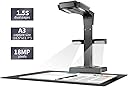
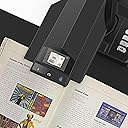
The CZUR ET18 Pro is a professional-grade book and document scanner featuring patented laser auto-flatten and deskew technology, an 18MP HD camera with 275 DPI resolution, and ultra-fast scanning speeds under 1.5 seconds per page. Compatible with Mac and Windows, it supports A3-sized documents and converts scans into editable PDFs, Word, Excel, and TIFF files using ABBYY OCR technology with support for over 180 languages.


| ASIN | B07JMTPJ8S |
| Best Sellers Rank | #83,024 in Computers ( See Top 100 in Computers ) #115 in Document Scanners |
| Brand | CZUR |
| Color Depth | 24 bits |
| Connection Type | USB |
| Connectivity technology | USB |
| Customer Reviews | 4.3 out of 5 stars 206 Reviews |
| Item Dimensions D x W x H | 35.1D x 36.2W x 14.9H centimeters |
| Item Weight | 2 Kilograms |
| Light Source Type | LED |
| Manufacturer | CZUR |
| Media Type | USB |
| Minimum System Requirements | Macintosh |
| Model Name | ET18 Pro |
| Model name | ET18 Pro |
| Optical Sensor Technology | CMOS |
| Product dimensions | 35.1D x 36.2W x 14.9H centimeters |
| Resolution | 275 |
| Scanner Type | Document |
| Scanner type | Document |
| UPC | 782938041231 |
K**Y
Quality product and easy to use
We purchased this scanner to digitize high school yearbooks for placement on our website. The yearbooks are in a variety of formats, sizes and print quality and we needed a scanner that was of good quality. We are very pleased with the ET18 Pro. It has proven to be perfect for our application. We have found it easy to use and the support from CZUR has been very good and our questions quickly responded to. The equipment is easy to set up and arrived in good working order. We are pleased to have purchased this product.
M**G
this is a serious case of "shut up and take my money!"
I got this scanner for humanitarian reasons: We're all out of space at home. Our house is filled with thousands of books, most of whom can just as easily be read in PDF, and the books keep multiplying when we're not watching... I was looking for a means of eliminating most of the physical books and replacing them with PDF files that I can then read on my tablet. Some books will have to remain: Reference books, certain textbooks, dictionaries... But most other books can be replaced with PDF files. And this is where CZUR ET-18 Pro comes in. It's a life-safer, it's a must. If you have too many books at home, just get it. Cons: - The scanner is not cheap. But if you take into account that you're recovering square feets in your apartment or house, the cost of the scanner becomes negligible. If you plan on scanning books (e.g., from a library or books borrowed from friends) then the scanner will pay for itself rather quickly. - The software that comes with the scanner is not of great quality: It will crash after scanning a large number of pages (between 450-500 seems to be the magic number). The solution is simply to save every 300 pages, and then use other software to combine the documents into a single book. - The software lacks many options that come with software made for other scanners. It's ability to edit the document is poor. The user-interface is not very friendly. - The documentation that comes with the scanner is rubbish. - There is a certain learning curve to operating the scanner and the software properly: You will need to learn how to switch between different options, e.g., for the cover of the book vs the inside. You will need to learn how to hold the book open using the plastic finger thingies that are provided. You will need to learn at what speed you can scan. This takes time, and you're going to mess up the first N scans. But then your hands and foot (yes, it's operated with a foot pedal) will get the hang of it, and your copies will come out perfectly. Pros: - Less than 1.5 seconds for scanning two pages. I don't know of any other scanner with this speed! - The foot pedal is pure genius. That said, the pedal is too light, and the cable is a bit on the short side. I'd rather they made the foot pedal much heavier so that it would be stabler... - The software, as clunky as it is, actually does a fantastic job when one needs to replace sheets, and this can be done in much less time and with no hassle. - The scanner lives up to its promise: You can scan a 350+ page book in under 10-15 minutes, and get a perfectly usable PDF file. - Even though the software lacks OCR for right-to-left languages (Hebrew, Arabic, Farsi, etc), it does handle right-to-left documents well in terms of splitting and ordering pages in right-to-left books. - The scanner is very forgiving when it comes to page size: It handles page sizes from very small to A3! If you check youtube, you'll find ways of using this scanner for even larger documents, simply by elevating it a bit above the scanning surface, using, e.g., a small stack of books. The scanner lends itself to a crazy workflow & reading schedule: - I scan books at full speed - While I scan books, I'm listening to ebooks from my tablet - When I'm done scanning a book, I add it to my tablet. ☺ I've increased my rate of reading dramatically since I started using this scanner. My advice is to get yourself tiny rubber thingies you can place on your finger, to help you turn pages. They're dirt-cheap, available online on aliexpress and ebay, and will really speed-up page-turning. If you don't want to get these or can't find them, make your own by cutting a finger off of an ordinary latex glove, and using it to turn pages… In two days of casual scanning, I've managed to scan well over 20 books, and read 4. This is becoming my weekend hobby! If you love reading books, but are running out of physical space for all the books you've collected, you really owe it to yourself to have them scanned! You can fit thousands of books on a micro-sd card in your tablet, and carry your library with you!
R**B
Super Fasts Scanning of scrapbooks and old books
Works great for scanning old photo albums and books. Whst would take me a month to do this machine does in a few hours. Easy setup and customer support is great. I had a small issue and they immedialtly helped me and couldn't of been nicer. Looking forward to using it for years to come. The best thing about it is when it scans a page of photos from a scrapbook it auto crops the images for you. So great.
B**I
Good product
Fast and easy to use
A**S
The ease of this machine is amazing, but you do need patience
I am in love with this machine. I can scan a 650 page book in under an hour without taking apart the book. I had to scan some old dime store books for my mom, books from the 1960s, and the images came out so crisp. Today, we played with making the files into Word OCR, because all I've been doing is PDF. The file sizes were not unmanageable and my mom had no problems cleaning them up in Word. I'm really thankful I bought this scanner. It was worth every penny. It isn't 100% however. hence my 4 star rating. If a speck of paper or dust is on the black mat (that comes with the scanner) it kind of freaks out the scanner and you will get weird half pages or quarter pages. Sometimes it will scan both pages and not separate them like it should. That being said, I combat the black mat issues with a roll on lint roller and make sure its clean. The set up was so easy. I was really glad. I'm bummed that the power cord isn't longer, so I have a weird set up. You do have to play with the lights to get it just right. But there are side lights and overhead and different brightness settings. I find that if you play with it, it goes so smooth. I also save the files into smaller bites if you will. I'll scan one chapter at a time. I will go through the scan and make sure it took. It will also let you rescan of just one page at a time. It'll also let you insert a page but only a before page and not an after. I would have liked to have either option. I do have to sometimes correct the scan because every once in a while the letters will enlarge. I think that is from moving too fast. So I don't fly thru the books, but I can tell you, I haven't damaged any. The books I have had to damage to scan, were already in poor condition. But I was able to save about 10 of the 12 dime store novels that I scanned. I have even scanned photos. You do have to play with the light settings, but it came out really nice with no glare. I wish it would not freak out every once in a while and I'll get crazy scans. So I turn off the Czur and let it rest. So for me its more of a 4.5 star but only for that weird glitch every once in a while. Again, DON'T have any fuzzies or anything weird on the mat, it will screw up the scans.
Trustpilot
1 month ago
1 week ago