Buy anything from 5,000+ international stores. One checkout price. No surprise fees. Join 2M+ shoppers on Desertcart.
Desertcart purchases this item on your behalf and handles shipping, customs, and support to KSA.
❄️ Chill out with the ultimate cooling solution!
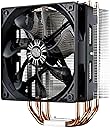
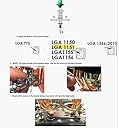
The Cooler Master Hyper 212 Evo CPU Cooler is engineered for exceptional cooling performance, featuring a 120mm PWM fan, aluminum fins, and four copper direct contact heat pipes. Compatible with a wide range of CPU sockets, it balances high airflow and low noise levels, making it the perfect choice for gamers and professionals alike.


| ASIN | B005O65JXI |
| Air Flow Capacity | 82.9 Cubic Feet Per Minute |
| Best Sellers Rank | #228 in Computer CPU Cooling Fans |
| Brand | Cooler Master |
| Brand Name | Cooler Master |
| Compatible Devices | Desktop |
| Cooling Method | Fan |
| Customer Reviews | 4.6 out of 5 stars 18,660 Reviews |
| Global Trade Identification Number | 00884102012921 |
| Item Dimensions L x W x H | 6.26"L x 4.72"W x 3.15"H |
| Item Weight | 1.3 Pounds |
| Manufacturer | Cooler Master USA, Inc. |
| Material Type | Aluminum |
| Maximum Rotational Speed | 2000 RPM |
| Model | RR-212E-20PK-R2 |
| Noise Level | 36 Decibels |
| Number of Items | 1 |
| Part Number | RR-212E-20PK-R2 |
| Power Connector Type | 4-Pin |
| Product Dimensions | 6.26"L x 4.72"W x 3.15"H |
| UPC | 001910693924 884102012921 |
| Unit Count | 1.0 Count |
| Voltage | 12 Volts |
| Warranty Description | 12 months |
| Wattage | 2.64 watts |
D**R
Cooler Master master's cooling
I have purchased three different type installations of this same cooler and review does not allow for reviewing them each on it's own. These are remarkably great coolers with the last keeping my cpu at 20+ degree temps. However the installation of the latest one purchased was not ideal. It would take too long and too much space to go into the details, so I'll leave it at that. While most of the confusion involved was mostly on me, the design of the hardware installation was the worst of the three coolers I've purchased. Back plates should fit flush with the MB in my opinion, not ride atop the back of the cpu slot. Nuff said. Still, Cooler Master coolers do the job in spades, at a great price. {AM2+ install pictured} Purchased two of these about 3 years apart. Did not realize it until after much searching and the second purchase that I had bought the same cooler for an AMD processor that I had bought several years previous for an Intel processor. The second sits atop a mid level AMD Athlon X2 2.8 (soon to be a Phenom II X4 3.0) while the first sits atop an I7 6700 4.0 processor. Installation for the M2+ socket was simple with a rocker arm clipping on either side to my existing base. Hovers over the first RAM slot but workable. Installation for the LGA socket was a tad more complicated needing the included hardware for a different base installation. Both do an incredible job of quietly keeping my cpu's running at very low temp's. The Athon temps are consistently equal to or less than 20 C and the Intel are equal to or less than 28 C. Temps did not exceed 56 C on the I7 when running an elongated (FurMark) stress test. Did I say these are very quiet heat sink coolers. In my experience nobody does it better than Cooler Master. If you are not a gamer or an overclocker (as I am not) who just wants to ensure things are cool, quiet and stable, I would highly recommend this heat sink cooler.
F**U
Great!
I was unlucky enough to recieve a defective version of this product. The screws on the bracket that hold the cooler on top of the processor had been reversed. After spending several hours of being very confused, I realized the product was actually just defective. I notified amazon who sent me a replacement with 1 day shipping. In the meanwhile, since I still wanted to use the product, I removed the permanent washers over the screws and reverse them and was able to apply the cooler properly (albeit with very damaged washers). It still worked perfectly. When I got the replacement, I just took off the "altered" bracket and put on the new one. Anyways, besides that here is the review: Pros: Overall: HUGE IMPROVEMENT in temps. Great! I loved it. - Processor cores used to run at 80 degrees C when gaming when overclocked, 70 C overclocked, and 50~60 C idle. After the I installation, cores dropped down to 20 C idle to 35 C MAX. GREAT cooling. I had the original heatsink that came with my processor and the improvement was fantastic (Intel i7 950) -Overall CPU temp dropped from 50 C to 10-15 C. Super awesome. -Runs quietly - Installation is fairly straightforward. I had never installed a heatsink like this before but figured it out quickly. Cons: Overall: No cons for me really, but here are some that may exist for others: - I received a defective bracket the first time around so that was a bit confusing; the screws were reverse and I had to use pliers to remove and reverse the screws so it would work until Amazon sent me a replacement. - it DOES wiggle a little bit when you move it around on the CPU but it isn't too bad and it does not affect it's performance at all, although I can see how that can be a bit disconcerting to some; it does not really sit that firmly on the bracket. - Improper installation can cause drastic differences in results so you have to make sure you follow the instructions properly. For example, at first I had the fan facing the wrong direction and by reversing the direction my temps dropped significantly. Also read other stories about people using the wrong pin hole on the bracket causing a loose fit and resulting in no temp drops. So read the manual carefully. - Installing the bracket by pushing in the screws can scare some who feel like they may damage their CPU. You won't. But again, I can see why it may be disconcerting. - It is a bit large. It fit fine in my medium-sized case but if you have a very small case and/or motherboard with not much space around the CPU it may not fit right. It fit just fine in mine (MSI x58 Pro-E) but some motherboards with ram sticks that are very close to the cpu might have difficulties fitting
J**N
Great cooler...if you have the right chip
Building a new computer comes down to picking the right parts to get the best bang for your buck, and price wise, this is a very attractive option. Cooler Master makes a whole bunch of coolers, and there must be at least 40 other possible choices. As I was looking to get the most cost effective cooler (not necessarily the "best" cooler), this seemed a good choice. Sadly, after buying, I continued to do more reading (huge mistake, most of the time)and it seems by accident, I made an excellent choice. It turns out that every cooler using heat pipes has an ideal thermal load. You can add or change fans and effect this a bit, but the number and size defines how much energy it can handle. This cooler is very light weight (as these things go) and does not have the biggest tubes. Note: These guys are countercurrent exchange systems, so be very careful to blow air from the correct side. If you reverse the air flow, the cooler will not effectively work. This means when you take the fan off it install it, make sure it goes back on the same side (not obvious once it is off) it came from. Light weight means it heats up faster (moving the heat quicker)and will show quicker variation in temperature. While they don't tell you this, it seems to almost perfectly match the heat load from the slightly overclocked AMD F6100 I used for this system. Or something a bit over 100 watts at maximum power. (I am running it at 3.9). I replaced the stock fan with a Noctua P12 (more directed, slightly higher flow). More for the known durability than anything else. I am getting 25C in idle and a maximum of around 43C (but it varies very fast). If I had a hotter processor, at some point I would overload the tubes and cooling efficiency would drop off. If I had a lower heat generating system, the efficiency would be lower, and the processor temps would not vary much from what I am getting. Turns out I accidentally got lucky on the size (would much rather have planned it. Had I bought the biggest, baddest cooler, I would not be getting results any different. Had I bought an I7, and over clocked it, this cooler would have sucked. I don't think even a F8--- amd 125 watt processor would have worked that well. In the old days of lots of metal and nothing else, bigger was better. Now, matching the cooler to the heat load would seem to be the better way to go. The mounting bracket is a pain, and knowing to tighten down the center screw is not obvious from the direction, but the finished system does work. Oh, if you mount this unit pointed up, and you have tall heat sinks on your ram.....you cannot install in the closest slot. If you mount it pointed to the back, you have to raise the fan up a bit, when you put it back on after the install. Note2: you could cut off the top of the heat sink for that slot...but sort of defeats the reason for having it. Final word: Gosh it works really well in this system.
W**3
Big and Bulky, But Does the Job Beautifully.
Very impressed with this heatsink/fan combo. I'm running an AMD FX 8350 with this thing, and many of you are aware of AMD's ability to throw serious heat. With the stock fan, I was regularly putting the CPU under 60-70 degrees Celsius while encoding video to H264. With the Cooler Master 212, I haven't yet broken 50 degrees Celsius while under full load. No, it's not as good as a good liquid cooling solution. But for those of us who have fixed enough computers because of coolant leaks, it's hard to argue with a good air cooling system such as this. To be fair, today's closed-loop water coolers have gotten a lot better (not to mention easier to install)--but if you'd like to completely eliminate all possibility of leaks, you'll be hard-pressed to find a better air solution for the money. But by purchasing this, you'll need to be aware of the shortcomings of air cooling. The first is that you'll never cool a CPU by pushing warm air around in your case, so make good and sure your case has good airflow before installing this. If you've got any fans that are wearing out, replace them. Also, you'll profit from making sure that the ambient room temperature doesn't resemble an oven: Pushing warm air into your case won't help your cause. This doesn't mean that the room your computer's in has to be meat-locker cold, either, but the cooler the air entering your case is, the better of a job this CPU cooler will do. The second downfall is that this thing is huge. Really huge. That's not a fault of the design--heat dissipation is all about surface area. But this necessity also means that you'll have to plan ahead. Small cases likely won't accommodate the height. Having said this, my case is a ATX mid-tower, and it's as snug as a bug in a rug. If in doubt, check out your case manufacture's forum and support. Google your case along with "Cooler Master 212" or similar keywords, and see if there's been any complaints. The third strike is related to the one above--you'll want to make sure the bulk of this cooler won't block off RAM slots or expansion ports you're going to need. High-profile heat spreaders on your RAM modules might pose a problem. And it's also a good idea to have your memory already installed into your motherboard before installing your Cooler Master so that you don't have to do any fancy footwork later. My motherboard is an ASROCK Extreme 9 990FX, and the Cooler Master is installed horizontally with the fan blowing upward, toward the exhaust fans on the top of my case; despite this, all of my DIMM sockets are populated and there's room to spare. Had I chosen memory with tall heat spreaders (such as the Crucial Elite product line), I would have had trouble. As above, google your motherboard to see if anyone's had headaches before plunking down hard-earned coin on this. There's some pretty good YouTube videos that will show you step-by-step how to install this cooler, so check them out if this is your first time installing an aftermarket solution such as this. If all the above considerations pan out for you... enjoy your cooler. It does its job very well, and if you're not into insane overclocking, this might be all you'll ever need to keep your CPU running its best.
N**T
Huge difference from stock heat sink / fan
It was time to build myself a new PC and switch back to PC gaming from consoles, especially with the launching of next gen consoles. The machine will also be used for graphic design, rendering and encoding. Purchased the AMD FX-8350 with the intent of not overclocking it for now and stick with its stock heat sink and fan. For the first few weeks, the stock cooling ramped up on the RPM for fan speed when I played most games (ie. Bioshock: Infinite, Crysis 3, etc.), and this included when encoding video. It was unbelievably loud to where I began to fear something was not right. Built an identical system for the girlfriend but with a different case which included more case fans. Hers was not as loud (though at times I could hear the fan speed up but not as often). I purchased a few 120mm case fans and installed them. It was not much help. Since the initial build I was looking at this Cooler Master Hyper 212 Plus based on the reviews. After the first few weeks of dealing with the noise I purchased the EVO version per the PLUS being discontinued or out of stock. This was my first time switching cooling systems per always using stock for every build I put together. The instructions were easy to read and it was separated depending on what type of processor you had. Still not 100% confident I YouTubed a video tutorial based on the type of processor I had and followed it step by step. It did take me about 1 - 2 hours to switch it completely over (again, due to not wanting to make any mistakes). This cooler only comes with one fan but includes the additional clips to attach another 120mm fan. Also, this heat sink is huge! I've seen pictures online and knew it was bigger than stock but didn't realize it was a lot bigger. I had to take out the top two 120mm case fans due to the case not having enough room but did place one of them as the second fan on this cooler and set it up to where the airflow goes through the heat sink for better cooling. I turned on my system for the first time after installing this. It was whisper quiet. Loaded some games, rendered, encoded. Quiet. The fans did not even need to ramp up. I placed my hand a few inches from the back of the case where there's a fan pulling air out and could feel warm air coming out (which is what it's suppose to be). Read the temperatures within the BIOS and within Windows. It was extremely cool. This thing is beautiful and definitely worth the low price to keep things quiet.
R**Z
Way Cool! Best bang for the buck.
This bad boy dropped my full load temp by 37 degrees C, compared to a stock Intel D60188 (as measured with RealTemp and Prime 95). No matter what I do now, max temp = 48 C with an overclocked E5450. This model is much better than the older and/or cheaper Cooler Masters because it puts more copper in contact with the CPU. I considered liquid cooling, but I'm glad I took this route. Simpler and cheaper. Because of the superior heat transfer of the heatplate and pipes, I'm able to let my motherboard control the fan speed, but even at full throttle this fan is absolutely silent. FYI: The 4 pin PWM fan connector IS compatible with the older style 3 pin headers. I used Arctic Silver 5 instead of the thermal paste that came with the unit because I know it's the best. I assume this contributed a few degrees to my results. Now for some technical details: This cooler is tall. How tall? Exactly 6.5" from the motherboard to the top of the cooler for my socket 775 installation. Since the mounting hardware is the same for all supported sockets except 2011, I expect the other heights will be about the same. The 2011 standoffs are a little bit shorter. It's amazing that this cooler can fit so many different CPU sockets. I'm looking forward to keeping this for a while as I upgrade processors and motherboards in the future. Installation tip: Because of the ingenious mount system, the bracket that holds the heat plate to the CPU is a bit tricky to seat. I suggest you practice fit it once or twice and tighten the mounting screws half way to check your work before disassembling, applying the thermal paste and doing the final assembly. When I removed the protective sticker from the heat plate, there was plenty of adhesive stuck to it so I made an executive decision (unaided by Google) to remove it with rubbing alcohol before applying the thermal paste. Note to my friends at Cooler Master: I love the product and the fact that it fits so many different sockets, BUT the way the bracket connects to the heatplate, could be simpler to install and better. Here's what I would do: Eliminate the locating pin and replace the spring thing in the middle with a screw connected to a large thumbwheel that you could screw into the hole (that will need to be threaded) in the heatplate. Alternatively, you could use a small hex head bolt and include an open end wrench to install it (a la Ikea). You could also sell a bunch more of these if you could make them just a bit shorter - I understand there is a trade-off between being high enough to clear RAM and low enough to fit into the case, and having a 120mm fan.....but 1/4 to 3/8" would be a big help. How about clipping the tops of the heat tubes to be almost flush with the top fin? Thanks to all the other reviewers who helped me choose this product.
F**N
Can't imagine a reason for purchasing any other cooler
Getting idle temps of 28-29C on a 4770K OC'd to 4.2GHz, in a cool room (~70F). Granted, it helps that the humidity is at 90% right now--curious to see what it'll be when the humidity drops down to the norm, which is pretty low here in Denver. I used the included thermal compound just for the hell of it, and was honestly surprised: it spreads, by far, better than any other compound I've ever used (AS5, Antec 7, the generic goop, etc.), making it possible to get an even, microscopically thin layer on the contact surface before it's even mated with the CPU heat spreader (I used the plastic spreader that came with some old Antec 7 I had laying around--really handy to have one of those, because you need that flexibility to spread the compound right). The contact surface was certainly not polished to a mirror shine, but it's quite flat and even, and considering my idle temps, I don't think there's any compelling reason to go through the trouble of lapping it. Installation was remarkably straightforward: there's only one way the bracket can fit on the board, there's a nice little tool included to tighten the nuts that secure the standoffs that go on the CPU side, and the X bracket that secures the heatsink itself to the standoffs has a little nub so that everything remains centered once tightened. The fan is whisper-quiet, even when it spins up under load. I was considering putting a pair of Corsair AF120s in a push-pull configuration on this thing, but that's proven to be unnecessary. The good: - 29C idle, 48C load (Prime95, large FFTs) even on one of the notoriously toasty Haswells. What more could you ask of an air setup at any price point? - The price. That such a high-quality, high-performance product can be sold at this price is itself an advancement. I paid about three times as much for my Ultra 120 Extreme six years ago, and that thing didn't even have copper heat pipes. - Whisper-quiet. At idle, silent like the dead. I'm truly impressed by the fan. - Even the thermal compound it comes with is awesome. When was the last time you had a good experience with included thermal compound? The bad: -There are the teeniest, tiniest grooves in the contact surface between the heat pipes. I'm really grasping at straws here, because evidently that has very little appreciable effect on performance, which is pretty damned close to being as good as you can possibly get on air. -They could stand to raise the overall height of the fins a bit. I've got mine installed horizontally (all evidence seems to agree that horizontal is best for typical tower configurations), and the DDR modules, which of course run vertically, are directly to the right of my CPU socket. The fins of the cooler are perfectly, perfectly flush with the top of those modules (G.Skill Sniper series), and if I had some of those modules with the gaudy heat spreaders, I wouldn't be able to fit the cooler horizontally at all. Fortunately, it only extends as far as the very first slot. In conclusion, unless money is no object and you're going to spend hundreds on some sort of elaborate liquid cooling setup, I see absolutely no reason to purchase any other air cooler besides this one. If you were to spend twice as much, how much more performance could you possibly get? *Maybe* 2-3C less under load? This thing is already idling a mere 5 degrees above the motherboard temp. What's that difference going to do for you, give your CPU a few more months of life over the course of five years or more, when there might not even be such a thing as desktop computers? As far as I'm concerned, Cooler Master has cornered the market with this product.
R**R
You Cannot Go Wrong With This Cooling System! Fantastic!
This cooling system is extreme! I installed this cooling system on my Asus M5A97 R2.0 mother board with a AMD 8350 FX Black Edition CPU this afternoon. I had to remove the motherboard from the case since my case does not provide access to the back of the motherboard. OK...first of all if you try to install this without watching a video on how to install it you may find yourself stumped and make mistakes. I watched two videos online on how to install this on an AMD system to be sure I did it right the first time. When I opened the box I was surprised to see so many different parts for it. You see, this system will work on Intel and AMD CPU systems and has all the parts to make it happen. So first things first you should separate the Intel kit pieces from the AMD pieces and keep them segregated. Seems the AMD setup uses less parts and was very simple to install (once I watched a video). This isn't for the non computer builder so if you don't have computer building experience you may want to get some help installing this. I won't go into all the steps to install it since you can see plenty of videos on installing this cooling system online. Apparently this cooling system was rated number 30 out of over 300 cooling systems for overclocking hot CPU's. When you install this system you will see it takes up a LOT of room! It is quite large and has a 120 mm fan to keep it cool. You can mount the fan on either side of the cooling fins to "push" or "pull" the air through or into the cooling fins. I suggest moving the air in the direction of your other system or power supply fan(s) so the air will be taken out of the case and not fight other cooling fans. The kit also comes with another set of clips to add yet another 120 mm cooling fan to the other side of the cooling fins for even more air flow. Make sure you have the room in your case before ordering the second fan. Did I mention how BIG this thing is? Yes, it is huge and my side cover on the case just barely slides by it with maybe 1/10th inch clearance. Onto more interesting points: The fan is a 120 mm fan and runs VERY SLOW compared to the stock CPU fan. Since it runs so slow and has a much larger surface area for heat dissipation it is very, very quiet. Right now as I type this the CPU fan is running at 950 rpm (original CPU fan ran around 2900 RPM most of the time) and the 8350 FX CPU is at 30C with 15% CPU loading. With the original fan at this load level the CPU temperature was 35C and fan speed was 2900 RPM. So....this means the cooling ability is much improved over the original cooler and it is WHISPER quiet. If you want a quiet and very effective non water cooling system this is the one for you. UPDATE: Still running strong! I moved this CPU Cooler to another system about four years ago that is on 24/7 365 days a year. The system it is on records 6 channels of video/audio input from home security cameras. I am very happy with this CPU Cooler and how well it has done. It has been running this way continuously for just over 4 years. Pretty darn amazing. I bought another one just a few weeks ago for another FX 8350 build. What a great cooler. Extremely reliable fan and rather quiet for it's massive cooling.
G**S
Mientras más grande, menos caliente.
Excelente discipador, cumple con las 3 B Bueno: enfría de maravilla, y mantiene constante la temperatura. De 50-60°C pase a 40-50°C Bonito: hace ver a tu PC súper poderosa con semejante tamaño y diseño que tiene Barato: el precio es súper accesible. Lo malo fue que: -Al instalarlo cuesta trabajo pues quedó muy justo y en cierto punto me dió miedo que por atornillarlo de un lado se fuera a romper la MB o dañar el procesador. Está en X, por lo que debes atornillar por puntas contratias ; arriba a la izquierda, luego abajo a la derecha, arriba a la derecha, luego abajo a la izquierda. Y debes atornillar poco cada punto, justo para que no se safe y ya que las 4 puntas quedaron en su lugar, sean atornilladas por completo. De no hacerlo así, se sufre mucho. (En pocas palabras, no atornilles por completo una punta y luego atornilles por completo otra, porque las demás se alzan y te constará mucho poder atornillarlas). - Hay que tener cuidado con las medidas. En mi caso, el discipador se quedó sólo con un ventilador pues si le ponía otro, chocaba con las memorias RAM.
S**B
brrr che freddo
La valutazione riguarda sia le modalità ed i tempi della delivery (velocissima dagli states) sia la qualità del prodotto che corrisponde al 100% delle caratteristiche vantate. debbo dire grazie anche ad alcune recensioni che mi hanno indirizzato all'acquisto in questione.
A**2
مبرد للمعالج جميل لاكن سعر عالي
جميل جدا لاكن هناك منافسين افضل
J**D
Amazing cooler and great value. Reviews don't do this cooler justice... watch videos to make installing this easy.
I've bought 3 of these so far. At first I bought one and was so impressed with it and its performance I bought 2 more to replace default coolers on other cpus I had. First one I got, I put on my 2600k i7 CPU. This cpu overclocks extremely easily, so i was able to hit 4.5 ghz, and running prime95 (maximum heat test small FFT) for 30+ minutes, the highest core temp spike was 69 celcius, but on average the temps were barely over 60c. I even clocked it at 4.6ghz, and the temps were still below 70 on average. I couldn't believe it to be honest, because I have an Corsair h60 water cooler on another 2600k cpu, and its heat is over 10 degrees celcius hotter and runs into the mid to high 70s on that water cooler... just an amazing cooler. Alright, the second cooler I replaced my AMD 8120 8 core cpu cooler, with this one running at 3.7 ghz. With this cooler, it had to be put in a bit different and rotated 90 degrees because thats how the motherboard socket was made on this motherboard, but there was no problem at all with memory running it this way... but some large heatsink memory could have a problem, since it does overlap a bit into 2 memory slots when forced into this 90 degree turned placement. Anyways, temps on my old cpu cooler that came with my cpu were on average 68c. After replacing it with the Evo, the load temps went down to 49c. Both tests done 30 minutes under full load in prime95. I replaced the fan that came with the Evo with a Noctua 1200rpm fan, and its temps only went up slightly to 52c. I really like the high tension the bracket has on the cooler. Once you have this installed, it doesn't move or budge at all, its got super tight contact with the CPU... but with that, make sure you try to tighten the mounting bracket as evenly as possible so it doesn't put too much pressure on one side of the CPU, watch the youtube videos on how to screw this on properly, don't be a know it all and do it brainless. Some people said its hard to mount this, but its not hard, i found this easy to do since I watched some youtube videos to verify i did it right. This also comes with an extra fan bracket incase you wanted to put another fan on the cooler. The tests i ran, this didn't help that much in temps... but in a tight case with limited airflow, it probably would help push air out better... its worth testing if you have an extra fan to see if having another fan hooked up is worth it or not. You can mount the fan in either push or pull, and if your rams preventing from using a push setup, pull setup works fine. I didn't notice any big difference in pull, but personally i do prefer push. Ok. Only negative thing I can mention about this cooler, is the fan is a bit loud at full rpm (1500rpm). However, its very hard to get the cpu hot enough to even have this run at full rpm since it cools so well, and also you can adjust the fan speed in your motherboard if you really wanted to. Or buy a fan controller and force it whatever speed you want. Or buy a high quality Noctua fan and have it really quiet... which depends if the noise is enough to warrant that... which probably won't for most since its not loud at all until it goes full blast. Also, the manual that comes with this cooler is very basic and doesn't help much with instalation. I recommend you watch a couple youtube videos to make sure you install this properly. You have to make sure the bracket is properly set ontop of the heatskink for it to lock in perfectly. It was a bit confusing since this includes the 2011 mounting screws, and they aren't marked at all, you just have to carefully look at them to tell which is which, youtube videos will make it clear which are the 2011 screws... once you identify them, keep them somewhere else so you don't use them... unless you are using a 2011 board. The price is great here, and I did read reviews on this cooler and i doubt their results since all the temps I was getting were far below what I saw on some reviews of this. I'm saving the last one i have and will probably eventually replace my h60 water cooler with it since its over 5 years old and maybe losing some of its performance from liquid evaporation or pump weakening. On another note, my main PC currently is a 4770k, but its a poorly made cpu compared to the second gen intels, so I actually would more likely go for an overkill air cooler like the Noctua D14 or D15s if you were to cool a poorly manufactored cpu like the 4th gen intels since they heat up so quickly... currently i use a Corsair H110 on my 4770k, and even that can barely keep it cool at only 4.4ghz. Although, the H110 doesn't have the heavy tension this Evo cooler had when installing it, which makes me wonder if the tighter contact of a cooler like this would outperform the H110 even? Hard to know. Lastly, I used MX4 thermal compound, and not the stuff they provided, which im sure works fine also.
C**T
Good Cooler
Sturdy mounting, was able to achieve ~15 above room temperature based on sensors for an older pc, prior i was hitting to ~20-25 above, i used artic instead of the paste that came along with it. Only thing the instructions to mount were terrible, luckily someone uploaded into you tube bunch of videos on how to mount this on different chips, just search for Hyper 212 EVO and your cpu Overall still happy with it
Trustpilot
2 days ago
1 month ago