


Desertcart purchases this item on your behalf and handles shipping, customs, and support to KSA.
❄️ Stay cool, stay ahead — because your CPU deserves the best chill.
The Cooler Master Hyper T2 is a compact, high-performance CPU cooler featuring patented dual loop heat pipes with continuous direct contact technology for superior heat transfer. It delivers up to 54.8 CFM airflow at a quiet 35 dB noise level, compatible with all common Intel and AMD sockets. Its universal mounting system and snap-on fan design ensure easy installation, making it an ideal upgrade for professionals seeking efficient, silent cooling in space-constrained builds.
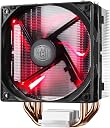


| ASIN | B00K7809O2 |
| Air Flow Capacity | 54.8 cfm |
| Best Sellers Rank | #7,481 in Computer CPU Cooling Fans |
| Brand | Cooler Master |
| Brand Name | Cooler Master |
| Compatible Devices | Desktop |
| Cooling Method | Fan |
| Customer Reviews | 4.4 out of 5 stars 1,209 Reviews |
| Global Trade Identification Number | 00884102026317 |
| Included Components | Processor cooler |
| Item Dimensions L x W x H | 3.7"L x 2.36"W |
| Item Weight | 12 ounces |
| Manufacturer | Cooler Master USA, Inc. |
| Material Type | Aluminum |
| Maximum Rotational Speed | 2800 rpm |
| Model | RR-HT2-28PK-R1 |
| Noise Level | 35 db |
| Number of Items | 1 |
| Part Number | RR-HT2-28PK-R1 |
| Power Connector Type | 4-Pin |
| Product Dimensions | 3.7"L x 2.36"W |
| UPC | 884102026317 |
| Unit Count | 1 Count |
| Voltage | 12 volts |
| Wattage | 3.12 watts |
J**.
Hyper T2 Specs and Review -- great value for the price!
I just got this and installed it today, but I wanted to write this review to answer all of the questions I had in mind before I purchased a fan, just in case there are other people wondering the same things but struggling to get a good answer. I'll update this review if, after some time and use, I feel it deserves less stars. First, I will list the specifications of the Hyper T2 fan that came on the box. Fits the following CPU sockets: -Intel Socket LGA 1156/1155/1150/775 -AMD Socket FM2+/FM2/FM1/AM3+/AM3/AM2+/AM2 Dimensions: 93 x 80 x 140mm (3.7 x 3.1 x 5.5 inch) Heat Sink Dimensions 90 x 51 x 140mm (3.5 x 2.0 x 5.5 inch) -- From the bottom flat pipes that adhere to to the CPU to the top 2 pipes of the fan, this is 140mm tall. (Something I wish I had known beforehand. Luckily this fit in my case just fine, but it's likely that some of the 4 pipe fans would not have). Heat Sink Material: 2 Direct Contact Heatpipes/ Aluminum Fins Heat Sink Weight: 248g/ 0.55lb Heat Pipe Dimensions: Ø6mm Fan Dimensions: 92 x 92 x 25mm (3.6 x 3.6 x 1 inch) Fan Speed: 800 - 2800 RPM (PWM) Fan Air Flow 15.7 - 54.8 CFM Fan Air Pressure: 0.35 - 4.27 mm H2O Fan Life Expectancy: 40,000 hours Noise level: 17-35 dBA (I find it to be silent when I'm not gaming, but still pretty quiet when I am) Bearing Type: Long Life Sleeve Connector: 4 Pin Rated Voltage: 12 VDC Safety Current: 0.6 A Rated Current: 0.26 A Power Consumption: 3.12 W Max. Fan Weight: 91 g / 0.20 lbs Weight: 340 g / 0.75 lb So far the only con to this fan is that installation was a bit tricky. It has 4 push pins just like the stock coolers you will get from Intel (thought it also comes with some sort of clip for AMD mobos... wouldn't know about that since I'm using Intel products), so it seems like things should be relatively simple. They are, but only after you figure out which way to rotate all the pins before pushing them into the holes. The directions are just pictures with no explanation, which is why I struggled at first. I did eventually figure things out, but it would be nice if they updated the directions to have some written instruction. As for the the fan, it's perceptibly better than a stock cooler. When doing very simple things (like writing this review) you shouldn't be experiencing high temperatures anyway, but the cooler has dropped things a few degrees C. However, there seems to be a relatively decent difference while playing games. The highest I've noticed the stock cooler at was 55 C, which is kind of pushing it since apparently you don't want to get any hotter than 60. Doing a quick test run of a solo dungeon in the game, Tera, at max graphics, most of my cores are staying near 40-43 C. Again, I'll come back and update this review once I've used the fan for longer or tried it with different games. I bought this fan for essentially $5.50. The list price was 9.99 (10.50 with tax) and there was a 5$ mail in rebate. I highly doubt I could find a better fan for 5$. Stock coolers on Amazon are listed for around 8. For the price, this is a pretty damn good value.
M**H
Works as should, no problems and a perfect replacement for my setup.
Just to start off, I have a ASRock H97M PRO4 Micro ATX LGA1150 Motherboard. The previous fan, a Cooler Master Hyper TX3 54.8 CFM Sleeve Bearing CPU Cooler, started dying on year 4. I needed a replacement therefore I checked my options on PCPartPicker and found this fan here on Amazon. I bought it, unboxed it once delivered and took my old fan out to replace it with this. First of all, I hate replacing fans. It's always annoying and bad luck for me. I used the setup for my last fan because it was easier that way; Basically took off the part holding the old fan and put in on the new one, disregarding whatever the new fan came with. Would have worked fine but I would've had to move some wires and I just wanted to get this over with. The prongs never seem to sit in right and then you worry about the thermal paste not getting smeared and blah blah. After some colorful language and locking the fan in place, I fired up my computer to hear a silent fan and watched my temps on Coretemp to make sure it was working well and nothing was overheating and everything seemed fine! Safe to say it's all still working groovy after several weeks of constant use. <3 .... also, sorry for the crap photo.
K**D
Replace the fan and it's great (but *BEWARE* of the fan!)
I set out to make a "nearly" silent PC, in that I didn't want to go fanless, but I wanted it to have the fans running so slowly (or off) during normal operation that it was silent, and it was only during intensive activities that the fans would ramp up. I bought this Hypter T2 CPU cooler as it is the biggest Cooler Master that fits in a standard case and then replaced the fan with a Noctua NF-A9, and am very happy with the resulting solution. I give it 4 stars instead of 5 because I needed to swap out the fan, but I'd still recommend doing that instead of buying a much more expensive Noctua CPU cooler. It saves about $30 even when taking into account the extra fan purchase. Why did I have to replace the fan? Because the Cooler Master fan sucks and doesn't allow you to reduce the fan speed below ~32%. I was very frustrated as I didn't know why it wouldn't go that low. Was it the fan controller on the motherboard? Or the fan software (either BIOS or at the OS)? But after doing a lot of debugging I finally determined that it was the Cooler Master fan's internal controller that was at fault. It would stay at about 850 RPM for any PWM setting below 32%, including zero, but once it got over that, it would ramp up to the correct speed all the way up to a max of 2500 RPM. I do have one slight workaround to provide you with a little more control if you want to stick with the stock fan: Switch to DC fan mode on your fan controller. With DC mode I could get the fan down to about 500 RPM at 32% (3.84V) and I could also get it to shut off entirely when desired, something in PWM mode the fan won't allow *EVER*. It's really frustrating that the stock fan won't allow that control and I wonder how many people have blamed their fan controller not realizing it's the stupid fan's fault. So, what I'd suggest is buy the Hyper T2 and then swap out the fan for a Noctua NF-B9 (yes, the B9 instead of the A9 I am using, as it is cheaper and works just as well). The good news is that with this CPU cooler and the right fans both on this CPU cooler and the rest of the system, as well as an EVGA gold power supply in "eco mode" I have a truly silent PC, where a pretty sensitive dB meter can not detect it being on. I have to do the test in the middle of the night, because even cars going by outside are detectable. But at 3 AM, it reads 21.1 dB with the PC off and 21.1 dB with it on. My stomach gurgles and the stupid thing goes up to 24 dB or I click the mouse and it goes up to over 30 dB so trust me when I say the dB meter is sensitive enough to detect pretty small readings. To be fair and give a caveat, to keep it silent, the fans are running at 13% on the rear of the case, 10% on the CPU and 5% on the GPU and the front of case fan is off. But that's just enough air flow with the good heatsinks that in normal operation the system temp stays around 40 and both the CPU temp and GPU temps stay in the mid 50's. Build details: -Intel Core i3-8100 CPU -MSI Z370M Mortar motherboard -Gigabyte GTX 1050 Ti "Windforce OC" GPU (Note: Gigabyte is the only vendor with a good fan controller on their 1050 GPU. The other companies have junk 2-pin fans. Also note I replaced the fans it comes with, with Noctua NF-B9's as their fans were noisy on ramp up.) -2 of 4 GB DDR4 2400 Kingston Fury DIMMs -Samsung 960 EVO M.2 SSD -EVGA 650 GQ PSU in eco mode
T**N
Hyper T2. Very Impressive Performance.
I'm not a Gamer, but I do take and edit lots of photographs. Who would have thought that when I ran a function to reduce shake on a photograph that my CPU temp would shoot from 120f (48c) to 171f (77.2c)? I sure as hell didn't. I installed this unit today and then ran the same editing function on the same photograph. The CPU temp never rose above 89f (31.6c) - which is pretty close to my previous temps at idle. My new idle temps are down by 30 degrees fahrenheit. My previous cooler was the one boxed by AMD along with my CPU (AMD Phenom II X4 840). It requires a lot of space - it was intimidating just seeing it in the box - but it the installation was no more difficult than that of a standard CPU fan. I purchased this on Amazon over Black Friday for less than $10.00. Sweet. Cooler Master Hyper T2 - Compact CPU Cooler with Dual Looped Direct Contact Heatpipes, INTEL/AMD with AM4 Support
S**N
Cools Great. Simple. Compact. Quiet. A+
This T2 is one of the newest versions from Cooler Master. Everyone raves about the Hyper 212 EVO but seeing that this was a compact size cooler I decided to give the T2 a go. Bottom Line: It works very well. Definitely better than the stock intel CPU cooler and I could fit it facing up toward the top fan of my case (Above my graphics card on a ASUS 87-Plus motherboard) or I could fit it as it is now with the CPU fan blowing out toward the rear case fan (And this includes having 2 sticks of high profile RAM in the first two RAM slots; If you have 4 sticks of high profile RAM it's not going to fit but it might be possible with low profile RAM I have no way of testing it out). Anyway, my CPU runs about 3 degrees Celsius cooler in idle and doesn't make the loud fan noise on initial startup of my computer as my stock fan did. Airflow is a definite improvement since I now have air flowing from front to back continuously. I have not run stress tests on my CPU such as Prime95 but don't think it's necessary given that I only occasionally game on my computer for short periods of time. I'm sure it will hold up just fine in stress tests; I mean really all you need to make sure of with any type of CPU cooler is that you apply just the right amount of thermal paste and have a good connection between the copper and CPU so heat can conduct. I just didn't like my stock intel because it was louder and the airflow was less than optimal. This is a great fan. Simple. But it works. The pins that insert into the motherboard are also very durable. I accidentally bent a few of the white plastic pins on the CPU clip when trying to insert them into the motherboard. You would definitely think they would break how much I pressure I put on the thing not realizing it wasn't going in, but they didn't break! It was just severely bent but I could bend them back to shape to insert into the board for a secure fit! Just be aware of this when inserting this push-in and click type CPU attachment and make sure the holes line up! I was impressed with how durable the clip was and the way it attaches to the board is a big selling point for a lot of aftermarket CPU buyers. Worked fine for me just be patient when installing!
S**0
Great cooler for a great price
I recently upgraded to a Ryzen 3, using a ASUS ROG Strix motherboard. Doing 12 hours of Prime95 torture testing on all 4 cores, and my CPU temps never got above 50C. I don't overclock because stock speeds get everything done the way I want them, without random BSOD or black screens. The video games I play aren't overly demanding, so I haven't tabbed out to monitor temps. The lack of crashing is proof enough for me. During regular surfing, multi-tasking, video ripping and such, the CPU temps never really get above 35C. All of that is based on 50% fan speed for a more or less quiet rig. With the ASUS mobo, I did not have to purchase an AM4 clamp adapter, the stock clamp included with the tower cooler worked just fine. As a side note, I did thoroughly prep my CPU and the cooler seating plate by wet polishing them both on 600 grit diamond plate until they were both shiny. I prepped both surfaces with Arctic Silver cleaning compounds and then used Arctic Silver 5 thermal paste.
D**A
No install problems on AMD FM2+ CPU
Bought this for my A8-7600 AMD Gigabyte GA-F2A88XM-D3H HTPC. Runs 20 degrees cooler than stock fan and is nearly silent. Was going to get the mighty 212 EVO for this, but was a bit too tall for my application. I have read people having problems installing on AMD board. I did not experience any problems installing this. In fact, took maybe 20 minutes total time. Just make sure the locking arm is down BEFORE you try to push it onto locking pin then swing it opposite direction. Also, make sure the fan is on opposite side of cooler when you lock it down, or have it off completely. It WILL BE in the way if you don't. I didn't use the paste that came with it, I used Antec formula 7 nano diamond on sale at the "BB" store and works nice on the couple builds I have used it on. Only problem is on FM2 boards, the cooler does not face the rear case fan, it only will face the top or bottom. So when you purchase, be aware of this. It may cause an interference issue with your top mounted power supply or fans in smaller cases. Will definitely buy another for next build.
S**N
Decent-ish for the price, but needs a more robust mounting system like the 212 EVO.
I was struggling to find an after-market cooler specifically labeled as supporting LGA 1151 (I'm not 100% sure if 1150 and 1151 are mount/height compatible so I wanted to be sure to get something labeled 1151). This is one of the few I found. I had picked up a 212 EVO before the T2, which had nicer build quality and a better mounting system (metal backplate, metal spring loaded mount, metal bolts), but that ended up being too tall for my case. I had tried modding the 212 EVO, but found out the copper pipes are actually hollow on the inside and didn't want to risk any odd issues, so I picked up the T2 after checking height measurements. I like the fan mounting system. It's easy and seems solidly attached when connected. The included fan in PWM and in silent mode it's great. Great job on the fan mounting and fan included. The heatsink itself is alright and a nice overall size that should fit most cases, though the bottom has those big pipe gaps and isn't exactly flat. I also don't like the mount brackets you have to screw on to the heatsink for Intel CPUs. It adds another layer of variability, so I expect even less of full and proper contact to the CPU. I don't like the heatsink mounting system on the T2. It seems weak and prone to accidentally coming loose with those plastic twist knobs. I think I might have made one of the pins/knobs a bit looser than it should be after messing around with it for a while because it had some vertical play. The mounting hardware doesn't give me any confidence. I'll be looking around for something with a better mounting system that will fit in my case. For now, it seems good enough. I can't compare it to the stock Intel cooler because I never tried it. I'd like it if Cooler Master made a "T2 EX" or something that would have higher quality mounting components and CPU contact surface improvements. Their 120mm fan based CPU coolers are just too big, but then this smaller one is too value orientated. I'd gladly pay for a smaller yet higher quality heatsink setup for 1151.
C**E
Decently Good CPU cooler for less power hungry CPU's
I upgraded from the stock CPU cooler I was using from a pre built. When I took the stock cooler out it didn't seem that good plus it was dust heaven. So it felt good just getting it out of there. Then I began to install the Hyper T2. It was kinda hard to get it on there but I figured it out and once I had securely locked it on with some Arctic MX-4 I was ready to go. When I booted and checked temps they were MUCH better than they used to be. Now I am a power hungry user. I like to game I like to watch and stream HD content. So I need the CPU power and cooling to keep up. But I noticed with this little Hyper T2 it was just barely keeping my AMD FX-8150 at bay. Sometimes reaching temps in the high 70s when I would blast it with tests. So I mean you could say it was stable. But it wasn't comfortable. I was only able to get a small over clock WITH AMD Turbo Core Control turned on with 4.20GHz. My setup now wrecks that. I have the Cooler Master Geminii S524 VER.2 with an AMD FX-8350. Over clocked WITHOUT AMD Turbo Core Control on I can get a steady 4.70Ghz. Now I know they are different processors but just the shear difference between the two coolers goes to show that this Hyper T2 is meant for slower clocked and less Wattage required CPU's. Im sure there is someone out there that would have a perfect use for the Hyper T2 I am not calling it down Im saying it did quite well for what I needed it to do. Be better than my old OEM CPU cooler. My honest opinion anyone with a machine that doesn't need MONSTER cooling. Could be perfectly fine with the Hyper T2. But anyone else that needs like almost liquid style cooling I would look at the higher tier Cooler Master coolers. I have heard the Hyper 212 EVO is suppose to be one of their best. I couldn't go with it because it wouldn't fit my case and I don't want to rock a case with no siding on it lol Also in the picture I didn't have my SSD yet. It was on order. Plus I showed this picture instead of the modification I made to the cooler making it a push/pull cooler to help with getting the hot air out the back faster. Oh ya and I have a new exhaust fan from Arctic its a F9 PWM PST CO. So basically it works with the CPU fan and ramps up when the CPU fan ramps up they work together. I wanted to give it a try. I still have the Arctic F9 in the picture I could somehow install it in my case but I don't have a lot of PWM or 3 pins at all on my motherboard. Also I am going to post a picture of my computer CURRENTLY. Just so you can see how far I have come from when I first started.
F**S
Just what I needed
This is perfect for cooling my cpu, when using the stick cooler l, my cpu was running a little too hot, when I put this in to cooled it down and keeps it cool all day with no problems. Comes with its own thermal paste so you don’t need to buy your own.
E**N
Great product
I'm very happy with this purchase.
S**L
Good temperature control
I'm using it for more than a year and it's a good investment. After installing it I never have a heating problem.
B**H
Great would buy again
Very good cheap and works great I would recommend buying to any one but you will need at least 6inch in your case for it to fit and setting up is a little tricky as you have to line it up centre on your cpu there is no centre guide you have to do that yourself but over all worth buying had no issues 10 min to install yelds great temp drop under heavy loads solid 5 stars
Trustpilot
2 weeks ago
1 month ago