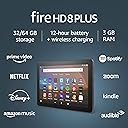






Fire HD 8 Plus tablet, HD display, 64 GB, (2020 release), our best 8" tablet for portable entertainment, Slate
Product ID: 202672832
⚡12-hour battery life
💾64 GB storage
📱8" HD display
🔥 Elevate Your Entertainment Game!
The Fire HD 8 Plus tablet (2020 release) features an 8" HD display, 64 GB of internal storage (expandable to 1 TB), 3 GB RAM, and a powerful 2.0 GHz quad-core processor. With up to 12 hours of battery life, USB-C charging, and hands-free Alexa, it's designed for seamless entertainment and productivity on the go.
W**2
So much better than the previous generation
I've had Fire tablets ever since the old 6" model from 6 or 8 years ago. They're great as media consumption devices, so long as you understand what you're getting. They're not as responsive as Apple products, or as pretty, but you can also buy 8 of them for the price of one iPad Mini. That said, the performance gap has closed significantly with this new model. I buy a new one every other year give or take, and this one (2020 release) is so much more responsive than the 2018 model I had. The interface actually moves when you swipe, menus come up quickly, etc. It's still not a replacement for a "real" tablet, but it's far more pleasant to use. Media consumption continues to be the main/only use for it, and it excels at that. The screen is bright and colorful, the only issue with it being a pretty narrow field of view (it starts to dim pretty rapidly as you get past a couple degrees of viewing angle). Not too much of a problem since it's not really for sharing the screen, but I did notice some parallax while watching stuff in bed at night (where one eye would see it fine, and the screen was dimmer for the other eye). I have a Kindle Paperwhite for reading, and I don't think this screen would be great for ebook readers in comparison to a real e-paper reader. I don't think I've ever actually taken a picture with the built-in camera, so I couldn't tell you if it's any good. My guess is that regardless of what phone you have, it's probably better. Battery life has really improved in my experience. I don't have an hour estimate, but after watching a movie it's usually still at least at 80% or more. The browser is better than before, but still not great. Silk tries to cache pages to give the impression of speed, but it still feels slow, and pages still render weird a lot of the time. I don't use it for much unless I really need to look something up, even then I'll usually pull out my phone because it's more responsive. As far as apps are concerned, it's a mixed bag. It has most of the streaming services that are important to me: Disney+, HBO, MLB.tv, and (obviously) Prime Video. It also has apps for Netflix, Hulu, etc. I'm not sure about AppleTV+, but I don't actually know anyone that cares about that one anyway. As for other apps, they're there. That's about all I could really say. As I said, I use this pretty much exclusively as a media-consumption device, so I'm not downloading a ton of games or productivity apps. Overall I recommend this for a very narrow use case. If you want an iPad and think you can get away with spending a whole lot less by buying this, you're going to be disappointed. This is not that. That said, if all you want to be able to do is watch movies or TV shows in bed on a bigger screen than your phone, this does that job very well.
C**I
A great update to the Fire tablet line
This Amazon Fire HD 8 Plus is a great complementary device for those who already have a real computer. This is true whether that real computer is a desktop or a laptop. Windows 10 or Mac Os, it doesn't matter. As long as you have a "real" computer, this Fire HD 8 Plus table is a great companion device. Perhaps the best companion device for most people. I work in the IT field. In my opinion, most people overbuy and overspend on technology devices. Which is fine, buying that new toy can be fun. For a while. But know this. A lot of you what buy, you can do without. Let me explain. A computing device like a desktop or a laptop gives you the most versatility. Add a smart phone and those are all the tech needed by the majority of people. Most do not need a writing tablet to draw on or take notes on. Most just need a secondary device for portability and quick access. A Fire tablet will do that. I own a Windows 10 and a Macbook laptops. I also own an iPad. Occasionally, I would use my Kindle reader and my old Fire HDX 7. I only need three to meet all of my needs. One laptop, my smart phone, and a tablet. I only use the ipad to pick fights on Twitter, make quick purchases on Amazon, and check my email. I may go on Facebook once in a while. Guess what. Any Windows 10 or Macbook would do those and with more versatility. My smart phone would do all of those, although with a lot less versatility and more aggravation. An Amazon Fire tablet will do all of those things, with more finesse and ease than a smart phone. And just as well as an iPad. I bought this new Fire to replace a 2015 Fire HDX 7. The HDX 7 is still in perfect shape. The battery holds as much charge as when it was new. But it no longer runs the Amazon shopping app. That's the only thing wrong with it. My Kindle is also of 2015 vintage. That Kindle is also still in perfect condition. But this newer model has updates that I wanted. Like front and rear facing cameras. The HDX 7 only has a front facing camera. I wanted to run the Amazon shopping app, for ease of use. I also wanted to start a relationship with the charming Alexa. It doesn't mean I'm dumping Sirri though. I can readily recommend this Amazon Fire HD 8 Plus for most people who already have a true computer, whether it's Windows or Mac. This is a great companion device for those who already have a computer. It is a lot less expensive than an iPad and does almost as much. It is also a lot more durable. Most tablets are used for media consumption and social interactions. You can do those on this Fire. The only thing you might miss is a browser like Safari or Edge. Silk works fine and it has gotten better over the years, but I still prefer a traditional browser. I did not order the wireless dock. This Fire will be carried with me to work. Charging with the USB is fine for now. I bought the Amazon protective sleeve that was made for this device. You want to keep your Fire in some kind of a protective sleeve so the screen does not get scratched. When you buy tech toys, find the sweet spot. Always buy something that can be upgraded. I have added more RAM as well as upgraded the hard drive to solid state on my 5-year-old Windows 10 laptop. It still runs great after five years. It is a high-end Lenovo model. Likewise, I bought the Fire HD 8 Plus because you can add additional storage easily. You cannot really upgrade an iPad. I am not saying buy high end, but pay more up front and keep the device for a lot longer. This Fire HD 8 Plus is a fine device. No, it will not meet the needs of the artists who wants to use a pen/stylus to draw. It will not meet the requirements of the busy college student who wants to take precise notes by hand on a tablet. But it will capably do email, twitter, facebook, Amazon purchases, take pictures, make videos, ebooks, audiobooks, just fine. The Silk browser has gotten better and works well.
T**C
Great tablet, wild operating system
I do not mean "Wild" kindly, but I'll get to that shortly. Sorry for the long read, but I have a lot of thoughts about this particular product to inform you, the end-user of your purchasing decision before you commit a purchase, and as a responsible citizen of the Internet, I've heavily tested the tablet hands-on to see what I can make it do, how I can make it work and where Amazon's hires could improve the overall experience for a multi-adult household. The tablet itself is functional. What else is there to say about it? Inside a home or building, so long the sun isn't shining directly on it the display is bright, with a clear, crisp display and along with a decent battery much bigger than your current handheld mobile device, you also get anywhere between a mediocre and acceptable tablet use experience, depending on how much money you hand to Amazon. I painfully regret not going with the Fire HD 10, but I am a bit of a cheapskate and after having seen what comes with the Fire HD Kids' Pro 8 through an encounter with a daughter of my mother's friend, I figured the Fire HD 8 Plus would be the same exact experience — and I can happily say, it is. The inclusion of a three-pole phone socket for headphones and TF / micro SD slot for extra storage practically makes it the ideal tablet computer… until you try to use it as a multi-user tablet computer. But we'll get to those gripes later. First impressions of the hardware makes it seem like the absolute perfect device for personal and work use, domestic and abroad. A simple tablet with great features. Except for a GSM / SIM slot but if you already have a mobile handheld, the Fire can use wireless tethering whenever the tablet needs access to the Internet where WiFi isn't available, and it can do calls via WiFi so that's something if your friends aren't using any of the supported social network platforms available through Amazon's app market. Fire OS on the other hand, that's uhm — fun. Yes, fun. If you receive nothing else from this, should you be the sole adult of the tablet, then you have nothing to worry about. Everything just works — for you. For anyone else? Yeah, nah. Show mode is honestly a great inclusion, as well Alexa Hands-Free — it's like if you have a general-purpose tablet, Amazon Show desktop unit and phone (which can only do calls via WiFi) for what was at the time of Prime Day anywhere between sixty and eighty dollars depending on device capabilities. What a bargain! …For the primary user. Second adult? Nah, can't do Show Mode, Alexa Hands-Free or WiFi calling. But children can do calls with approved contacts and permission from their parents! That hardly makes any sense — if you're not a child you don't get to make calls beyond the primary profile? Why? Speaking of kids, if you think that kids' launcher or adult settings will let you move off all of the kids' apps to an SD card, ha ha nope. So your child will very likely make using the tablet almost impossible after they stuff the internal storage with nothing but pointless games. For a couple, it makes even less sense to buy this for the intent of using voice recognition features. Sure, auto guy and shop girl can keep their profiles separate, but only one of them get the privilege of using all of the tablet's features. A second adult profile is like a grown-up kid, and feels almost demeaning, which likely means whoever wears the pants between two people will be the one with the primary account which does everything. And what if they want to share applications? There's no easy way to do this beyond reinstalling them on the other profile. I've looked, and there seems to be no way of easily sharing apps between adult profiles which especially makes installation of such things as Google Play a major drag without third-party guidance and tools. It's an Amazon device, so of course it will advertise Amazon everything — even Washington Post. If you don't use that service, too bad can't disable. If you don't care about Amazon's other services, too bad shove it in a folder on the Fire Launcher. Without tinkering beyond what Amazon allows you to do, it kind of makes using the tablet a terrible experience being inundated with all of these Amazon-owned things at once, and for some people the constant upselling is enough to warrant a return. If you can get over all of that — and again, if you are the sole adult of the tablet, none of the above save for the upsells are really an issue — then you have yourself a capable and handy little Android-based tablet which will do almost everything you want. A solid product with a mediocre and terribly flawed OS, but one if you've committed your entire life to Amazon may be welcome. As I exhibit no such brand loyalty I'm exceedingly annoyed, but all of the thorns and papercuts are nothing a little bit of tinkering cannot cleave and become rid of. EDIT 07/06/21.1: Minor correction, seems like while four-pole may fit, I can't use external mic with the tablet or Fire OS doesn't disclose how to do this. EDIT 07/06/21.2: Grammar and error corrections
H**K
A great entertainment device for the money.
What can I add to the thousands of mostly positive reviews here? Let me try to just add a different perspective without all of the tech talking points that seem to be well covered here. Our last Fire was the HDX model a few years back. We still have it and it is working fine. My son uses it. The hard drive is too small so we are always running out of space. I have owned various tablets from Apple and Samsung as well. I just wanted a device I could watch some shows on, read a little (I have a Kindle Oasis that I keep on my night stand) when I am out of the house, listen to occasional music, and can surf the web in lieu of my phone. The Fire 8 Plus checks those boxes. Frankly, as a long time Prime member, it is actually ideal. This device is highly integrated into the Amazon ecosystem. I read so many reviews that made this out to be a bad thing. I get that on some level but thats kind of missing the point to me. Thats actually exactly what I want. I still have access to my Netflix and Spotify accounts but I can also just hit the Video menu button and immediately be placed into my Prime video menu. Its really great. Another common complaint is the lack of the Google Android Play Store. It is a valid complaint. I have never really understood this decision by Amazon. It seems like a lot of work for no reason on Amazon's part but it does keep you in Amazon's playground. Regardless, for me its fine. The app store offers all the big name apps I want or need. This just isn't a negative for me and what I want out of the device. The screen is good. I could nitpick it for sure. Its a bit dull and really not bright enough if you are under bright lights. Outdoor viewing would be nearly impossible in the sun. Its not the fastest tablet either. You will notice it if your phone is a relatively current flagship model but it works fine. For what its worth, I am pretty picky about my tech. This newest Kindle just gets it done. It has a solid battery life, good screen, its well made, and its built to do exactly what I needed it to do. If you spend a lot of time in the Amazon ecosystem, at approximately $120, this borders on being a must buy. Just know what you want. If you are looking for a fast vivid tablet that is diverse, this probably isn't it. If you need something that is productive as a work tool, this definitely isn't it. If you want an inexpensive little entertainment machine though, I don't think you will find a better addition to your arsenal of tech at a better price than this.
T**.
Replaced my HD 10s
I won't go into all of the technical aspects since those have been done to death (but perfectly) in many of the other reviews. I ordered this as a package with the wireless charger stand that converts it into an Alexa device when mated. The package arrived within the two day Prime shipping time, so I guess the CV19 is having less of an effect on Amazon shipping as time passes. I actually had 2 Fire HD 10 tablets for complicated reasons that probably don't really fit the story. I loved almost every aspect of the 10-inch tablet except the size when I was trying to read in bed. It is just too big and awkward to comfortably hold. I quickly opened everything and powered up the tablet and started what I thought would be the normal configuration procedure. Almost everything was the same as with the other two tablets I had with the exception of the annoying animated video you have to sit through that explains the different functions and benefits of the Fire tablets. There really should be an option that allows the animation to be skipped, especially for repeat owners. During the configuration process, the tablet does download the latest updates to the operating system. Since I previously had a Fire tablet that I had deregistered, the configuration process gave me the option to download all of the apps, settings, etc. from that tablet. The odd thing was that since I had two tablets it only gave me the option to sync the information from the tablet I had deregistered and performed a factory reset on over a week ago and not the tablet I had just deregistered yesterday. Other than that, everything went very smoothly. After that process was complete, I went into YouTube and watched a video that I would recommend everyone with any of the Fire tablets should watch on Tips & Tricks for the Fire HD 8. It is a short video and gives instructions on several settings changes that are very beneficial and do not affect the warranty or stability of the tablet. After getting everything configured to suit me I went to the Amazon APP store and downloaded a few more things that didn't transfer over from syncing the to the settings on one of my previous tablets. Amazon may censor this comment, but I also sideloaded the Google Playstore so I could download several other apps that were critical to me. After all that was completed, I was pleasantly surprised that several minor changes had been made to the user interface and other functions that are great improvements. They are so subtle that most casual users may not even notice but I appreciate the upgrades. The tablet is very snappy and the apps all execute very quickly. The screen resolution is lower than the 10-inch tablets but since the screen is smaller I cannot discern any difference in viewing quality of icons, photos, or video. The placement of the stereo speakers is better than the 10-inch tablet but since the device is so small there probably isn't much benefit. I did connect to my Bluetooth earbuds and watch part of a movie and the sound quality and stereo sound stage are excellent. The other improvements aside, the bottom line is that the form factor of the 8-inch table suits my needs much better. This thing is very comfortable to hold and is still large enough to provide extremely good viewing quality at a fraction of the cost of Samsung and Apple tablets. I have owned a couple of Samsung tablets and a Sony Xperia tablet in the past and for the most part, they are great tablets but are really overkill for the typical user. When you decide you need a tablet make sure you make an accurate assessment of your actual needs and don't buy something that is bigger or more than what you really need. Now...go read the in-depth technical writeups from other reviewers and more importantly watch several of the YouTube videos that demonstrate both the Fire HD 8 and HD 8 Plus to make sure they are right for you.
D**D
Great tablet...if you expect to get what you pay for.
So I've had my Fire HD 8 Plus for a few days now and thought I'd share my impressions. Let me say that so far, I'm really enjoying this little tablet. I went into this expecting a device that would stream content - not much more than that - and to date, I'm very pleased. Netflix, Amazon Prime (and a few channels I subscribe to), Plex, Disney+, and others work just fine, and the quality is fantastic for an 8" screen. I haven't run into any problems so far. I was a subscriber to HBO and Shudder, but I simply canceled those memberships and joined again through Amazon Prime Video channels. The pricing is exactly the same, so why not, and they work flawlessly. Yes, there are ads that display on the lock screen, but that doesn't bother me at all. In fact, sometimes I find the suggestions useful. I've installed a few social media apps (Facebook, Instagram, etc.), and again, no problems there. I had to get used to the interface as it differs from my iOS devices, but on the whole, it was painless. The Kindle app is very important to me (I own an Amazon Oasis) and for viewing content that is graphically heavy, it's great. It's also very cool that I can order Kindle content, and have it sent to my Oasis, AND my Fire HD 8. WiFi is speedy and by taking advantage of Amazon's pre-configuration, it was the very definition of simple to connect to my router. Battery life can be an issue for some, but I am VERY happy with how the HD 8 performs. It actually beats the battery life of my Oasis, which I find surprising. The one thing that I would point out as a *slight* negative: the screen attracts fingerprints like crazy. I find myself continually cleaning my screen ('cause that's how I roll). It would be awesome if Amazon would offer a screen protector, but on searching for one, I came up empty. I ordered the HD 8 Plus (10th Generation, watch for that) case, and it fits like a glove. Some have written reviews to the effect that the case feels "cardboardy" - for want of a better term - but for me, it provides a nice level of comfort that my device is protected. So those are my first impressions. If you're looking for an iPad replacement, look elsewhere, or bite the bullet and order an iPad. For what I want, the HD 8 Plus performs. ADDENDUM: 8.14.2020 Wireless charging is a big plus and works with any of the 3 wireless chargers I have. It even charges in the case, which surprised me; my iPhone has to be removed from the case to charge wirelessly. Very cool! ADDENDUM: 11.18.2020 Still no major complaints. Sometimes the Wi-fi seems a bit sluggish (I have at least 300mbps through wifi) but nothing that is too annoying. Time to time streaming video apps have to buffer, but it's not awful. But having said that, the utilities offered for the Fire HD 8 are really POOR. I have tried several optimizations, and general-purpose utility apps and they are mostly useless. I confess it would be nice if the FireOs would open the Google Play Store.
J**F
Great
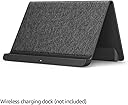
I received the new Fire HD 8 Plus with dock for Christmas. Comparing it to my older Fire 8 (I think I got it in 2014 or a bit later, but I don't really remember), it has a brighter screen, an entirely different software package, and a usb c plug instead of micro usb (the biggest thing for me). My gift giver was generous enough to get me a version that wasn't ad supported, so to unlock the screen is similar to my phone. Hit the power button, swipe up, then enter your unlock code. I never had an unlock code on my previous kindle which was ad supported, so I'm not sure if it's something that comes with it not being ad supported or if it's just a new feature. After you unlock it, the kindle has a widget like thing for the most recently added stuff, be it apps, books, etc. Below that is a fairly standard grid of apps you have downloaded. Swiping to the right, you'll get the "Library" screen, which has section you can reorder dedicated to kindle, audible, amazon video, apps, and games. Each section when expanded shows the most recent, suggested, and some other categories depending on the type. I mostly use my Kindle Fire to read. My family sharing account has over 3000 kindle books available to me, so the organization of kindle books is of great importance to me, so I can actually find what I'm looking for. The software on this device does have the "collection" of books not in a collection, which I find very helpful. Other than that, the kindle software is mostly the same. I downloaded some stuff from audible and amazon video, but haven't used those apps enough to detail any new features. I haven't used the app store/games at all. If you swipe left from the home screen, you get the "For You" page. This is a combination of things you've used most recently and suggestions from Amazon of things you might want, including news stories, apps, books, things free with Prime, etc. It seems mostly like they wanted to create something enticing for people to spend time on, but also try to drag you deeper into the Amazon ecosystem at the same time. As for the hardware, the screen seems good, I got a slightly matte screen protector for it, and that seemed to help with some of the eye strain from staring at a screen for a long period of time. I haven't tried the speakers, and typically when I would use the audio, I'd be using headphones, so I can't really speak to that. The power and volume buttons are on the top instead of the side. There are 2 cameras, one on the top back corner, one in the middle of a long side on front. They work as expected. I like the dock. There are certainly a lot of improvements to it that I can see (using the usb-C cable to plug in the dock, having the dock be foldable for travel, etc) but I don't see anything else out there in a brief search that has those features, so I'll stick with what I've got. It can charge my phone, but only if I take my phone out of it's case. It can charge the fire HD 8 Plus, even in the case (I got this one: https://smile.amazon.com/gp/product/B088RHLZFY/ref=ppx_yo_dt_b_asin_title_o05_s00?ie=UTF8&psc=1). Overall, I'm happy with the product, though I wish Amazon would improve the organization available to kindle books. Audible now will organize by Genre, at least on the phone, and Google books will organize by series (I REALLY want Amazon to implement this). Oh well, one can always hope for next time.
A**M
Fire HD 8 Plus vs Ech Show 8
So much has already been said about the Fire HD 8 Plus, but I was really trying to decide between the Fire HD 8 Plus and the Echo Show 8, and I couldn't find a very comprehensive overview of the difference, so I decided to try out both to see the difference. First, the screens are virtually identical in size and shape. Side-by-side, when the screens are off, it's somewhat hard to tell which one is the Fire and which one is the show. The most telling difference is the placement of the camera, which is top and center of the Fire and top and right on the Show (more on the cameras later). The screen specs are the same (8” high-definition touchscreen; 1280 x 800 resolution), but the Echo screen is considerably brighter. I wouldn't notice if they weren't side-by-side, but it's a marked difference (see photo). The Show also has more customizable wallpaper options. On the show, you can select from a number of different wallpaper options, but on the Fire, you an only customize by selecting your own photos. This may not be an issue for many, but it's one more small perk of the Show. The camera on the Fire is considerably better (2 MP vs 1 MP on the Show), but for the purposes of dropping in on another Echo device, that is pretty minor. Certainly for the purpose of using it as a tablet, this is better, but I suspect most people will have a cell phone with a better camera than that, so I don't see the 2 MP camera being a deal-breaker for most people. The placement of the camera on the Echo is a bit awkward as it is to the right of the screen, so when you're looking at the screen, it always looks a little like you're looking to the left. If you are getting this device for the purpose of having regular phone conferences, that could be a deal-maker for the Fire. However, for me, one major win that the Show has over the Fire is the physical privacy shutter. You can close it and even if someone could hack into the Show, they could still not see you because there is a physical piece of plastic in the way. This is especially comforting if you are going to have this in a bedroom or somewhere else where privacy is especially important. By far, the biggest difference for me in these two is the sound quality. As some have said, the sound on the Fire is worse than most cell phones, and much worse than any speaker on the Echo line. And, in the opposite direction, the Echo Show speaker is spectacular. The volume is extraordinarily loud (to the point where, if it is on full volume, it actually hurts my ears to listen to). The attached video shows the difference in volume. The first few seconds are of the Fire at full volume, and then it switches over to the Show, and then back. On a different song, the max dB reading for the Fire was 67.1 dB, whereas the max for the show was 89.5 dB. The bass on the Show is substantial, and the overall quality, though not the best speaker you will ever hear, far outstrips the quality and volume of the Fire. There are a few other differences that are possibly somewhat minor to some. For example, Spotify is not native to the Fire Show screen, so if you want to play music on Spotify, it will switch you to the Fire OS, where you will have to install Spotify and play from there. Not a big deal, but it's somewhat nice that Spotify comes out of the box for the Show. There are other similar things, and I haven't explored them all, but it is to say that the Fire version of an Echo Show is not 1:1 of the actual Echo Show. As far as the tablet itself, again, this has been reviewed somewhat exhaustively, but I'll say (as many others have) that it pales in comparison to a higher-end tablet such as an iPad. I got my iPad 7 for $250 new at Best Buy, so for a little over double the price, I was able to get 10x the performance over the Fire HD 8 Plus and double the screen size. There are definitely things to like about the Fire, and for a budget e-reader/video streamer/audiobook player, then this could be a great deal for you. But, then again, you could get all of that from the Fire 7 for half the price. It's all about your priorities and your budget, but the wireless charging and more RAM didn't win me over enough to justify this tablet in my arsenal of screens. It might for you, though. Bottom line, if you are looking for a Fire tablet that also works as an Echo, this may be what you're looking for. It is a nice enough tablet (if you know what you're getting into), and it definitely functions as an Echo to do things like turn on smart home devices and tell you the weather. However, if you are looking for an Echo that is also a tablet (as I was), I highly recommend going with the Echo Show 8 instead. There are a lot of other good tablet options out there, and the speaker difference alone gives the Show much more value in my opinion.
P**O
Una muy buena tablet para su precio
El paquete se recibió a tiempo, y la recomiendo totalmente a gente que la quiera utilizar para leer, ver videos y jugar ocasionalmente. Recomiendo comprar el modelo plus sobre la normal dado que existe mucha diferencia en tiempo de carga en las aplicaciones, incluye carga inalámbrica y se puede transformar en un echo show con una base especial de carga inalámbrica. Recomiendo comprar la funda original.
Trustpilot
3 weeks ago
2 months ago